Vulnx is a query client for vulnerability data, and its quick start runs the same search twice
Modern CLI for exploring vulnerability data with powerful search, filtering, and analysis capabilities.
At a glance
- What is it?
- A Go CLI from ProjectDiscovery that searches, fetches and aggregates CVE records through their cloud API. The interesting parts are the query language that sits alongside fourteen filter flags, the example field count printed in the docs, and a container image that copies a binary it never builds.
- Who is it for?
- Vulnx is a thin, readable client over a hosted vulnerability index, and it is the right tool when your question is which records match a filter rather than whether a host is exposed. It is the wrong tool for scanning anything, since nothing here touches a target.
- Can I use it commercially?
- Yes. MIT is a permissive licence: you can use, modify and sell software built on it, as long as you keep its copyright and licence notices.
- Is it still maintained?
- Yes. The repository last received commits 5 days ago.
- What is it written in?
- Mainly Go, according to GitHub's language statistics.
Answers come from the project's GitHub data, last synced on November 14, 2026, and from our analysis. They are not legal advice.
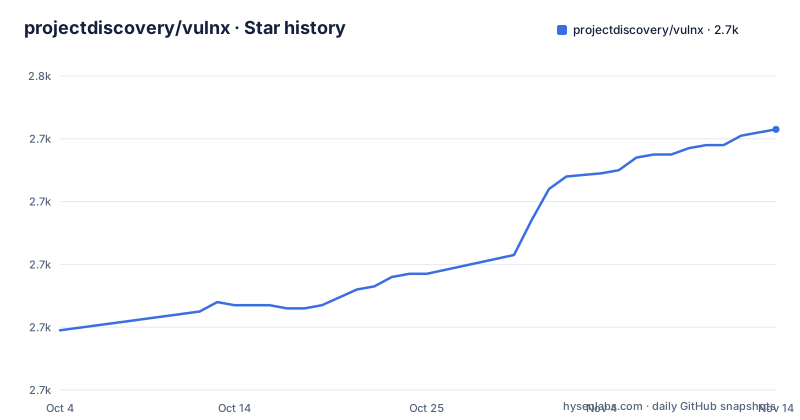
Star history
- projectdiscovery/vulnx2,743 ★ · +64
| Repository | 2026-10-04 | 2026-11-14 |
|---|---|---|
| projectdiscovery/vulnx | 2.7k | 2.7k |
64 Stars in the last 41 days, measured from the daily GitHub snapshot. Compare with other projects
Editorial analysis
The quick start runs the same search twice and calls the second one enhanced
The five-step quick start installs the binary, points at two help commands, runs a search, then sets up a key:
# 1. Get vulnx
go install github.com/projectdiscovery/vulnx/v2/cmd/vulnx@latest

# 2. Explore commands
vulnx --help
vulnx search --help

# 3. Start exploring vulnerabilities (no API key required)
vulnx filters                          # See all available search fields
vulnx search apache                    # Basic search (subject to rate limits)

# 4. Set up your API key (recommended to avoid rate limits)
vulnx auth                              # Get free API key at https://cloud.projectdiscovery.io

# 5. Enhanced exploration with higher limits
vulnx search apache                    #
Step 5 is a character for character repeat of the search in step 3, and its trailing comment is empty. Nothing about the command changes when the key exists, so the entire difference between basic and enhanced exploration is a credential held somewhere on the machine. The stated limits are the same ones people hit first: basic search is subject to rate limits, and `vulnx auth` points at a free key issued through the ProjectDiscovery cloud site. `vulnx healthcheck` exists for testing connectivity, which is the fastest way to find out whether a key is being picked up at all.
Two ways to express the same filter, and the docs never rank them
A severity filter can be written two ways. Inside a query string it is `severity:high`, and the same string can combine terms with `&&` and `||`, as in `vulnx search "severity:critical && is_remote:true"` or `vulnx search "apache || nginx" --limit 20`. As a flag it is `--severity high`, short form `-s`, with a comma separated list such as `--severity critical,high`.
The flag table goes considerably further than the examples do. Alongside `--product` and `--vendor` there are `--tags`, `--cvss-score`, `--epss-score`, `--vuln-age`, `--vuln-type`, `--kev`, `--template`, `--poc`, `--hackerone`, `--remote-exploit` and `--vuln-status`, with short forms on only four of them. Nothing states whether these flags are translated into the query syntax or sent as separate parameters, and nothing tells you which one to prefer in a script. The same duplication shows up in output shaping, where `--limit 50`, `--sort-desc cvss_score` and `--fields cve_id,severity` do the same work as `--term-facets`, `--range-facets` and `--facet-size` in more granular form.
The field list is the schema, and its own example says 69 fields
Since the query language depends on field names that come from a remote index, `vulnx filters` is the command that matters most, and its output is more than a list of names. For each field it reports the data type, a description with examples, whether the field can be sorted or used as a facet, the available enum values where there are any, and the search analyzer behind it:
Field: severity
Data Type: string
Description: Vulnerability severity level (e.g., critical, high, medium, low, info)
Can Sort: Yes
Facet Possible: Yes
Search Analyzer: keyword-lower
Examples: severity:critical, severity:high
Enum Values: critical, high, medium, low, info, unknown

Total: 69 filters available
That block is the only place a field count appears anywhere, and it is an example rather than a guarantee, so a query built against 69 fields may be written against a different number later. The analyzer field is the more durable signal: `keyword-lower` means the term is lowercased before matching, which is why `Apache` and `apache` behave the same and why exact vendor strings are safer than partial ones. The same output can be taken as JSON or written to a file with `--output fields.json` or `--output fields.csv`.
analyze is documented with two different flag names
Aggregation is the one analytical command, and it groups records by a field:
vulnx analyze --fields severity
vulnx analyze --fields affected_products.vendor
The command table at the top of the file writes the same thing with a short flag instead:
vulnx analyze -f severityBoth forms appear without a note saying which is canonical, and neither the long nor the short spelling appears in the essential options list. The dotted path `affected_products.vendor` is the more useful of the two examples, since it reaches into a nested object rather than grouping by a flat enum, and it is the one place the documentation shows how to address a field inside a structured record.
Fetching a single record is the other half of the read side:
vulnx id CVE-2021-44228
vulnx id CVE-2024-1234 --json
The first identifier is a real catalogue entry and the second has the shape of a placeholder, so the pair reads as one worked example and one template. `--detailed` on a search produces output in the same style as the `id` command, which is how you get that shape for a whole result set.
The container image copies a binary it never builds
There are two Dockerfiles at the root, and the plain one is four instructions:
FROM alpine:3.18.2
RUN apk -U upgrade --no-cache \
    && apk add --no-cache bind-tools ca-certificates
COPY vulnx /usr/local/bin/

ENTRYPOINT ["vulnx"]
Nothing in it compiles Go. The image expects a file named `vulnx` to be sitting in the build context, which is exactly the name the Makefile's build target produces with `go build -o "vulnx" cmd/vulnx/main.go`. So the image cannot be built from a clean checkout on its own; the binary has to be produced first and shipped alongside the Dockerfile. The base is pinned to a specific Alpine release while the package install upgrades everything on top of it, and `ca-certificates` is there for TLS while `bind-tools` covers the name resolution the client needs to reach the API.
The version string is parsed out of a Go source line with awk
The Makefile does not keep a version file. It reads one out of the source:
# Version from source; override with: make build VERSION=v2.0.3
VERSION ?= $(shell awk -F'"' '/Version = /{print $$2; exit}' cmd/vulnx/clis/version.go)
ifeq ($(VERSION),)
VERSION := dev
endif
VERSION_LDFLAG := -X github.com/projectdiscovery/vulnx/v2/cmd/vulnx/clis.Version=$(VERSION)
The pattern match is on the text `Version = ` with double quotes around the value, the first match wins, and anything empty falls back to the literal `dev`. That means the version is a property of how one line of Go is punctuated, not a declared constant, and an override is available on the command line when you need one. Build flags strip symbols with `-s -w`, with a comment in the file warning that this should be turned off if the binary ever uses pprof, and `-extldflags "-static"` is appended whenever the target is not darwin.
The remaining targets are the usual chain: `fmt`, `vet`, `test`, `lint`, `tidy`, an `integration` target that drops into `cmd/integration-test` and runs `bash run.sh`, and a `pre-push` that runs the whole sequence. `lint` skips itself with a message when golangci-lint is absent, so a green pre-push does not prove linting happened.
A v2 module with three 2026 releases, and an MCP dependency the visible docs never mention
The module path already carries the major version, `github.com/projectdiscovery/vulnx/v2`, and so does the install line. The release line restarted recently: v2.0.0 on 2026-03-25, v2.0.1 on 2026-03-27, v2.0.2 on 2026-07-09, with the default branch last pushed on 2026-09-21. The build target declares Go 1.26.0 as its floor, so the toolchain requirement is current rather than conservative.
Direct dependencies describe a small, conventional client: cobra for the command tree, gologger for output, retryablehttp-go for the transport, projectdiscovery/utils for shared helpers, go-pretty and aurora for tables and colour, x/term for terminal handling, and mark3labs/mcp-go, an SDK for the Model Context Protocol. The documentation that comes with the repository covers the command line surface and stops partway through a flag table, and nothing in it mentions MCP, so that dependency is unexplained by the material a reader has to hand. It is not a minor entry either: it is a direct requirement, not one of the indirect lines further down the file.
The tree explains itself otherwise. `client.go` and `types.go` sit at the root as the API layer, `pkg/` and `cmd/` hold the rest, `USAGE.md` carries detail beyond the readme, `DEVELOPMENT.md` covers working on it, `.goreleaser.yml` drives the tagged binaries, and `_typos.toml` plus `.cursorrules` sit alongside a `.pre-commit-config.yaml`.
Editorial conclusion
Vulnx is a thin, readable client over a hosted vulnerability index, and it is the right tool when your question is which records match a filter rather than whether a host is exposed. It is the wrong tool for scanning anything, since nothing here touches a target. Before building a script on top of it, check three things: whether the query syntax or the filter flags are the interface you want to depend on, because both express the same filters and the docs do not rank them; what your rate limit looks like with and without the API key, since the quick start claims both paths run the identical command; and whether you need the current field list, since the documented count of 69 lives in an example block. For anything that must keep working across versions, pin a release, because the module path already carries a major version and the tags are the only stable names.
Frequently asked questions
How do I use vulnx to search vulnerability data?
Install it with go install github.com/projectdiscovery/vulnx/v2/cmd/vulnx@latest, run vulnx filters to see the searchable fields, then vulnx search apache for a first query. Basic search needs no API key but is subject to rate limits, and vulnx auth stores a free key from cloud.projectdiscovery.io for higher limits.
How many search fields does vulnx expose?
The sample output of vulnx filters ends with a line reading Total: 69 filters available. That number appears only inside the example, so vulnx filters --json is the way to get the current list instead of trusting the documented count.
What does the vulnx analyze command do?
It aggregates vulnerability data by field, for example by severity or by affected_products.vendor. It appears in the docs both as vulnx analyze --fields severity and as vulnx analyze -f severity, and neither spelling is marked as the canonical one.
Does vulnx ship a container image?
There are two Dockerfiles at the root. The plain one starts from alpine:3.18.2, installs bind-tools and ca-certificates, copies an existing vulnx binary into /usr/local/bin and sets it as the entrypoint, without building anything in the image.
Can vulnx scan a target for vulnerabilities?
Nothing in the documented command set touches a host. search, id, filters, analyze, auth, version, update and healthcheck all work against the hosted index, and the project describes itself as a CLI for exploring vulnerability data.
Official sources
Add this badge to your README
If you maintain this project, the badge below links readers to this analysis and shows its maintenance status from the daily GitHub snapshot. Paste the markdown into your README; add ?metric=license or ?metric=stars to the image URL for a different field.

[](https://hysenlabs.com/projects/projectdiscovery-vulnx)Star history chart for your README
[](https://hysenlabs.com/projects/projectdiscovery-vulnx)Was this useful?