ProseKit: a headless rich text editor built on ProseMirror
Framework agnostic and headless rich text editor
At a glance
- What is it?
- ProseKit is a headless, type-safe and composable toolkit for building rich text editors on the web, sitting on ProseMirror and shipping first-class bindings for React, Vue, Preact, Svelte, Solid and vanilla JavaScript. It is a monorepo at version 0.22 with changesets, turbo builds and a registry of web components.
- Who is it for?
- Adopt ProseKit if you are building a rich text editor in the browser and want ProseMirror's document model without writing the editor UI yourself, particularly if your application already uses React, Vue or Svelte and you would rather not commit to a monolithic editor component. Do not adopt it if you need a ready-made editor with a toolbar, or if your project cannot take on a ProseMirror-shaped document model.
- Can I use it commercially?
- Yes. MIT is a permissive licence: you can use, modify and sell software built on it, as long as you keep its copyright and licence notices.
- Is it still maintained?
- Yes. The repository last received commits 1 day ago.
- What is it written in?
- Mainly TypeScript, according to GitHub's language statistics.
Answers come from the project's GitHub data, last synced on November 7, 2026, and from our analysis. They are not legal advice.
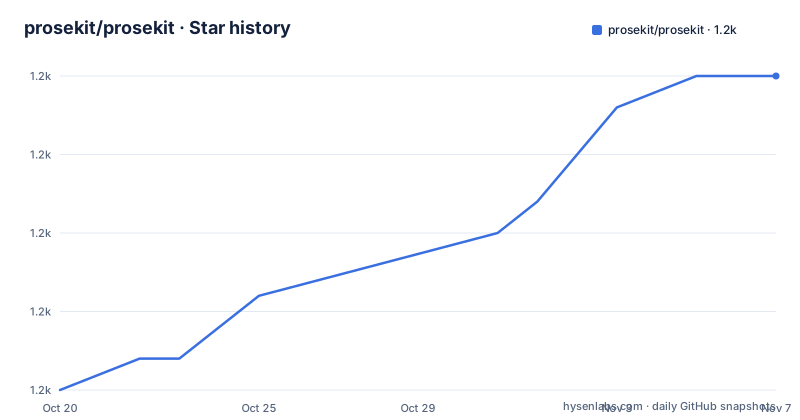
Star history
- prosekit/prosekit1,225 ★ · +10
| Repository | 2026-10-20 | 2026-11-07 |
|---|---|---|
| prosekit/prosekit | 1.2k | 1.2k |
10 Stars in the last 18 days, measured from the daily GitHub snapshot. Compare with other projects
Editorial analysis
Headless means the editor is a document, not a component
The description is the whole pitch: a framework agnostic and headless rich text editor. Headless here means the editing core is separated from any user interface you render. The ProseMirror document model, the schema, the transactions and the selection are the substance, and the markup on screen is one possible view of it. That is a different contract from a component that ships a box with a toolbar, a bubble menu and a set of buttons, and the difference matters for anything beyond a simple form field. A headless editor lets you decide what the interface looks like, where it lives in your own layout, and which commands appear in which context, and it lets the same editor logic be reused in a comment box and in a full page editor with a different chrome. The README describes the project as the ultimate toolkit for building rich text editors on the web, headless, type-safe and composable, and it is that type safety, with the editor state and the commands typed end to end, that is the part a team will notice when they upgrade TypeScript and everything still compiles.
One core, six ways to render it
ProseKit is built on ProseMirror, and the project provides first-class support for React, Vue, Preact, Svelte, Solid, and vanilla JavaScript. That list is the design statement. Most editor libraries pick a framework and make you adopt it, and the cost of that choice is paid every time you need to put an editor somewhere unusual, or in a project where the framework is not the one you already have. ProseKit's answer is to keep the core framework free and ship a thin binding per framework, so the document model, the plugins and the command surface are shared and only the rendering layer changes. The repository layout supports that reading, with a packages/ directory holding the core and the framework packages, a separate registry/ directory for the web component distribution, and the README pointing at a per-framework example package for each binding. The vanilla JavaScript case is the one that makes the claim testable, because a headless editor with no framework at all is only useful if the core really is decoupled from the view.
Getting started: one package, or a scaffolded example
The install is a single package:
npm install prosekitand the README then sends you to the Quick Start guide at prosekit.dev/getting-started/quick-start to build the first editor, which is the right division of labour since the interesting part is the API, not the install. There is a second route for teams that already use shadcn/ui, and it is the one worth knowing about. Instead of assembling an editor by hand, you can scaffold a full-featured example with a single command, one per framework:
# React
npx shadcn@latest add @prosekit/react-example-full
# Vue
npx shadcn@latest add @prosekit/vue-example-full
The same pattern exists for Preact, Svelte and Solid, with the package names following the @prosekit/framework-example-full shape. What this gives you is a working editor, with its toolbar and its styling, that you can read and then strip back, and for a project that has already committed to shadcn/ui that is a much faster route to a working prototype than writing the commands yourself.
A monorepo with turbo, changesets and a web component registry
The root package.json describes itself as the monorepo for ProseKit, private, with the type set to module and pnpm as the package manager at version 11.28.2. The build is orchestrated with turbo, so a plain `turbo build` fans out across the workspace, and there are narrower targets such as building only the packages and the registry with a concurrency of one, building the website, and building the typedoc output. A registry/ directory is where the web component distribution is assembled, and the fix scripts reach into it specifically, with oxfmt formatting the registry's lit/ sources, which tells you the registry is built on web components. The release process uses changesets, with a change command, a version command that runs changeset version followed by a pnpm install without the frozen lockfile, and three publish paths: a latest tag, a beta tag, and a snapshot publish to pkg-pr-new for every package under packages/. A .changeset/ directory at the root holds the pending change entries, and a .release-please style workflow is not used here since changesets is doing that job. There is a patches/ directory, a scripts/ directory and a website/ directory that hosts the documentation.
The quality gates, which are strict and visible
The scripts show what the project considers non-negotiable, and the settings are opinionated in a useful way. Linting runs three separate checks: eslint with --max-warnings 0 and a cache, a sequential per-package lint, and knip, which finds unused files, dependencies and exports. The zero warning threshold on eslint is the detail that matters, since a project that tolerates warnings is a project where the warnings accumulate. Formatting is handled by dprint for most of the tree and oxfmt for the lit sources in the registry. Type checking is a tsc build across the project references, and the fix script repairs those references with a dedicated tool, monorepo-typescript-references, which is the kind of thing that only exists in a monorepo where the reference graph is generated. The test story is worth noting because of one line: the pretest step is `playwright install chromium`, and the test runner is vitest. A rich text editor is a DOM-heavy component, and testing it against a real browser rather than a simulated DOM is a deliberate choice that costs a Chromium download in continuous integration but buys a meaningful class of coverage.
Version 0.22, and what a pre-1.0 number means for you
The releases listed for the project are v0.22.4 from 2026-10-09, v0.22.3 from 2026-09-20 and v0.22.2 from 2026-08-30, and the last push to the repository was on 2026-10-15. Two things follow from that. The first is that the project is moving quickly, with three releases in six weeks, which is what you want from a young toolkit and what you have to plan for in a codebase that cannot absorb churn. The second is that the version is still below 1.0, and in the npm and semver convention that is a signal that the API is not settled. Nothing in the documentation promises otherwise, and the changelog is maintained per package in packages/prosekit/CHANGELOG.md, which is where you should look before upgrading rather than discovering the change in a pull request. The dependency footprint is also worth noting, since a headless editor layered on ProseMirror inherits ProseMirror's own API surface, and the ProseMirror plugin ecosystem is large enough that the practical version questions extend beyond ProseKit's own numbering.
Where ProseKit is the wrong tool
Four limits are clear. The first is that headless means work. There is no toolbar shipped, no bubble menu and no user interface of any kind, so if you need a working rich text field this afternoon, you are writing the interface or running the shadcn example and adapting it. A component that arrives with its own chrome is a different product with a different price, and for many teams that is the right price. The second is that the headless model only pays off when the editor is genuinely part of a larger interface. If you need one rich text field in a settings page, the abstraction buys you nothing and costs you a ProseMirror-shaped document to reason about. The third is the version churn at 0.22, and it is worth being concrete about the risk: a minor version bump in a pre-1.0 project can carry breaking changes, and your editor is the most visible surface in your product. The fourth is the ecosystem size. ProseKit is a young project with a single maintainer listed as its sponsor, and while the ProseMirror foundation underneath it is stable, the layer above it is young, so a team that would rather build on the settled layer is better served by writing directly against ProseMirror.
Editorial conclusion
Adopt ProseKit if you are building a rich text editor in the browser and want ProseMirror's document model without writing the editor UI yourself, particularly if your application already uses React, Vue or Svelte and you would rather not commit to a monolithic editor component. Do not adopt it if you need a ready-made editor with a toolbar, or if your project cannot take on a ProseMirror-shaped document model. Before you start, read the quick start guide at prosekit.dev, and note that the project is still at version 0.22.4, so the API can change between minor versions, with the last release on 2026-10-09.
Frequently asked questions
What is ProseKit?
It is a headless, type-safe and composable toolkit for building rich text editors on the web, built on ProseMirror with first-class support for React, Vue, Preact, Svelte, Solid and vanilla JavaScript. It is MIT licensed and published as the prosekit package on npm.
How do I install ProseKit and build a first editor?
Run `npm install prosekit` and then follow the Quick Start guide at prosekit.dev/getting-started/quick-start. If you use shadcn/ui, you can instead scaffold a full-featured example with `npx shadcn@latest add @prosekit/react-example-full`, or the equivalent package for Vue, Preact, Svelte or Solid.
What does headless mean for a rich text editor?
The editing core, which is the ProseMirror document model, schema, transactions and selection, is separated from any rendered interface. The project ships a thin binding per framework so the document model and commands are shared while the view is yours to build.
How is the ProseKit monorepo built and released?
The root package.json uses pnpm with turbo for the build and changesets for releases. There are publish scripts for a latest tag, a beta tag, and a pkg-pr-new snapshot publish across every package under packages, with the web component distribution assembled in the registry/ directory.
How are ProseKit's tests and lints run?
The test command is vitest, and a pretest step installs Chromium through Playwright, so the suite runs against a real browser. Linting combines eslint with --max-warnings 0, a sequential per-package lint and knip for unused code, and type checking is a tsc build over the project references.
Official sources
Add this badge to your README
If you maintain this project, the badge below links readers to this analysis and shows its maintenance status from the daily GitHub snapshot. Paste the markdown into your README; add ?metric=license or ?metric=stars to the image URL for a different field.

[](https://hysenlabs.com/projects/prosekit-prosekit)Star history chart for your README
[](https://hysenlabs.com/projects/prosekit-prosekit)Was this useful?