Expo ships the native code, the CLI does not, and one Android gradient is broken
SVG library for React Native, React Native Web, and plain React web projects.
At a glance
- What is it?
- react-native-svg is Software Mansion's SVG implementation for React Native across iOS, Android, macOS and Windows, with a compatibility layer for the web. Install cost differs sharply by toolchain, the React Native version table pairs each release line with a floor and stops at 15.16.0, Fabric has a separate and higher floor, and the known issues list has exactly one entry: the RadialGradient focus point on Android.
- Who is it for?
- Take react-native-svg when your React Native app needs real vector content rather than raster images, and when you can live with one platform-specific gap on Android gradients. If you want Fabric, note that it is supported only on React Native 0.69.0 and above, from react-native-svg 13.0.0, and the project states that earlier versions are not possible due to breaking changes in configuration.
- Can I use it commercially?
- Yes. MIT is a permissive licence: you can use, modify and sell software built on it, as long as you keep its copyright and licence notices.
- Is it still maintained?
- Yes. The repository last received commits 1 day ago.
- What is it written in?
- Mainly TypeScript, according to GitHub's language statistics.
Answers come from the project's GitHub data, last synced on November 14, 2026, and from our analysis. They are not legal advice.
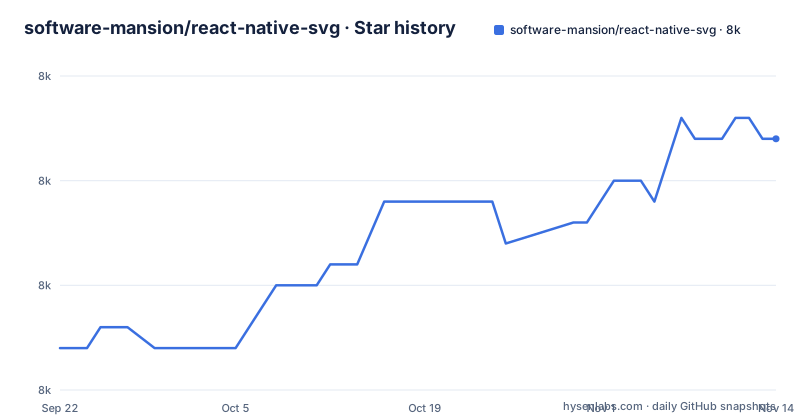
Star history
- software-mansion/react-native-svg8,012 ★ · +10
| Repository | 2026-09-22 | 2026-11-14 |
|---|---|---|
| software-mansion/react-native-svg | 8k | 8k |
10 Stars in the last 53 days, measured from the daily GitHub snapshot. Compare with other projects
Editorial analysis
Two install paths with very different costs
With Expo the whole install is one command, and the reason is stated above it:
npx expo install react-native-svgThe Expo client app comes with the native code installed, which is the entire difference. Nothing else is required.
With react-native-cli it becomes two steps. Install the package:
npm install react-native-svgthen link the native code:
cd ios && pod installSo the same dependency costs one command on Expo and a CocoaPods run on the CLI, and the second command is iOS only. Android needs nothing printed here, and Windows has its own separate step:
npx react-native-windows-init --overwriteThat asymmetry is worth planning for. The README leads with the Expo path and treats the CLI as the alternative, so a team on bare React Native reads a shorter and vaguer installation than the one the project would prefer you to use.
The version table pairs each release line with a React Native floor
The longest table in the README is a compatibility matrix, and it is more informative than any single version claim. It runs from react-native-svg 3.2.0 against react-native 0.29 all the way to 15.16.0 against 0.80.0.
The shape of the early rows is per-release, because each was pinned to one React Native version: 4.2.0 to 0.32, 4.5.0 to 0.40, 5.2.0 to 0.45, 5.4.1 to 0.47. Then it changes character. From 5.5.1 and every major after it, the row is an open lower bound, written as >=0.50, then >=0.57.4 three times, then >=0.64.0, >=0.70.0, >=0.73.0 then >=0.78.0 for 15.13.0, and finally >=0.80.0 for 15.16.0 and above.
That transition is the answer to which line to use. Recent majors are not tied to a React Native release, they declare a floor. The last row covers the current release, 15.16.0, which needs React Native 0.80.0 or newer.
Fabric has its own floor, higher than the rest of the library
Fabric is React Native's new rendering system, and the library treats it as a separate compatibility problem rather than folding it into the main table.
The rule: as of version 13.0.0 of react-native-svg, Fabric is supported only for react-native 0.69.0 and above. Support for earlier versions is stated as not possible, because of breaking changes in configuration. That is a stronger statement than any other in the README. Everywhere else the answer is a lower bound you can work around; here it is a wall.
The sub table refines it: 13.0.0 for 0.69.0+, 13.6.0 for 0.70.0+, 13.10.0 for 0.72.0+.
So there are two tables in play: the Fabric table covers the 13.x lines, and the main matrix gives the floor for current lines, which for 15.16.0 and above is 0.80.0.
One known issue, and it is a gradient focus point on Android
The known issues section has a single entry: it is not possible to apply the focus point of a RadialGradient on Android.
A single listed issue is a good sign about a library this old, and this specific one is worth understanding rather than just noting. A radial gradient can be positioned away from its default centre, and on Android that positioning is not applied.
The features list is also narrower than the marketing around SVG libraries usually is. It claims support for most SVG elements and properties, naming Rect, Circle, Line, Polyline, Polygon and G among them. Most, not all, with an ellipsis, and no enumeration of what is missing.
For a team shipping a design system, the practical consequence is to test radial gradients on Android early rather than at the end. The known issues page is the short list to check before you promise a design.
Opening an issue requires the whole App.js and the react-native info output
The project states its issue bar plainly. Verify that it is still an issue with the latest version, as specified in the troubleshooting step. If so, open a new issue, include the entire App.js file, specify which platforms you have tested, and include the results of running one command:
react-native infoThat is a lot of friction on purpose. The preceding troubleshooting step tells you to create a clean project with the latest versions, reproduce the problem in App.js, and run it on both platforms before concluding anything. A maintainer reading an issue should not have to ask any of those questions.
There is also a path for spec conformance. If you suspect the library renders something differently from the specification, you can test your component in a react-native-web project by forking a provided codesandbox, to see how different browsers render the same content. The project asks for an issue if any evergreen browser with a significant user base renders the SVG content better, or supports more of the SVG and related specifications.
That invitation is the clearest statement of what this library is for: matching the browsers, not exceeding them.
Converting existing SVG markup is delegated to an external converter
The features section has two items and the second is the one people arrive with. Supporting most SVG elements and properties is the first. The second is that it is easy to convert SVG code to react-native-svg, and that claim points at an external tool rather than at anything in this repository.
So the workflow for an existing icon set is: run the artwork through a converter, review the output, then maintain it as React components. Nothing in the README describes a native conversion command, an SVG inliner or a build step for assets.
The package itself is a component library, and its manifest describes a normal modern build. Three entry points are declared, a CommonJS build at lib/commonjs/index.js, an ES module build at lib/module/index.js, and the TypeScript declarations at lib/typescript/index.d.ts, with react-native itself resolving straight to src/index.ts:
  "main": "lib/commonjs/index.js",
  "module": "lib/module/index.js",
  "react-native": "src/index.ts",
Those three builds are produced by react-native-builder-bob from src into lib, with the TypeScript target using a separate tsconfig.build.json. So a consumer on a bundler gets compiled JavaScript, while React Native's own resolver gets the TypeScript source.
A PEG grammar generates the attribute transform, and native source ships in the package
Two details in the repository explain how a cross platform SVG library stays manageable.
The first is the peg script. It generates three JavaScript files from grammar files, two of which are visible in the package script:
pegjs -o src/lib/extract/transform.js ./src/lib/extract/transform.pegpeggy -o src/filter-image/extract/extractFiltersString.js src/filter-image/extract/extractFiltersString.pegjsSo the parsers for transform and filter strings are generated from grammars rather than written by hand, which tells you where to look when one of those attributes behaves unexpectedly.
The second is what the published files list contains: android, apple, windows, common, plus lib, src, css and filter-image, and the RNSVG.podspec. Native source for three platforms ships inside the npm package, which is why installing the JavaScript is not enough on a bare React Native project and why pod install appears in the instructions.
Around them sit e2e/, __tests__/, screenshots/, scripts/ and an apps/ directory holding the example app, plus a format script that runs prettier over the JavaScript and clang-format over the Objective-C and C++ under apple/ and common/.
Editorial conclusion
Take react-native-svg when your React Native app needs real vector content rather than raster images, and when you can live with one platform-specific gap on Android gradients. If you want Fabric, note that it is supported only on React Native 0.69.0 and above, from react-native-svg 13.0.0, and the project states that earlier versions are not possible due to breaking changes in configuration. Verify three things. On Expo, run npx expo install react-native-svg and stop, because the native code already ships inside the client app; on react-native-cli, expect to run cd ios && pod install yourself, and on Windows npx react-native-windows-init --overwrite. Then find your row in the version table and check it against your React Native version, because the newest pairing listed is 15.16.0 with 0.80.0. And read the known issues list before relying on a radial gradient on Android, because the focus point cannot be applied there.
Frequently asked questions
how to install react native svg
With Expo it is one command, npx expo install react-native-svg, because the Expo client app comes with the native code installed. With react-native-cli you install the package from npm or yarn and then link the native code with cd ios && pod install. Windows additionally needs npx react-native-windows-init --overwrite.
what is react native svg
An SVG library for React Native on iOS, Android, macOS and Windows, with a compatibility layer for the web and for plain React web projects. It supports most SVG elements and properties, naming Rect, Circle, Line, Polyline, Polygon and G among them. The current release recorded for the package is 15.16.0.
how to use react native svg
Usage lives in USAGE.md in the repository rather than in the README. For existing artwork the documented shortcut is conversion: the features section links an SVGR converter for turning SVG markup into react-native-svg components. An example app is at apps/common/example.
react native svg vs expo image
The README does not mention Expo Image and makes no comparison. What it does say is that the Expo client app ships react-native-svg's native code already installed, so on Expo the install is a single command with no pod step, while react-native-cli needs the package plus cd ios && pod install.
react native svg vs skia
Skia is not named in the README and no comparison is made. What the project describes is element and property coverage for most of SVG, with the package keywords listing ART, VML and gradient alongside SVG, and native source for android, apple and windows shipping inside the npm package.
react native svg alternative
The README names no alternative. It points at its own USAGE.md for usage and at an external SVGR converter for turning SVG markup into react-native-svg components, and it documents which React Native version each react-native-svg line targets, with a separate table for Fabric support starting at 13.0.0.
Official sources
Add this badge to your README
If you maintain this project, the badge below links readers to this analysis and shows its maintenance status from the daily GitHub snapshot. Paste the markdown into your README; add ?metric=license or ?metric=stars to the image URL for a different field.

[](https://hysenlabs.com/projects/software-mansion-react-native-svg)Star history chart for your README
[](https://hysenlabs.com/projects/software-mansion-react-native-svg)Was this useful?