Prospector wraps pylint, pycodestyle and McCabe behind one profile layer
Inspects Python source files and provides information about type and location of classes, methods etc
At a glance
- What is it?
- Prospector aggregates pylint, pycodestyle and McCabe complexity into a single Python report shaped by profiles, strictness levels and dependency autodetection. The value is filtering rather than new checks, and the shipped pre-commit example pins a revision three versions behind what the package declares.
- Who is it for?
- Prospector earns a place on teams drowning in separate pylint, pycodestyle and McCabe runs, where profile YAML and `--strictness high` buy back more signal than they cost. Skip it if you already standardised on ruff or mypy alone and do not want a second config layer over one.
- Can I use it commercially?
- Yes, with conditions. GPL-2.0 is a copyleft licence: if you distribute software that includes it, you must release that software's source code under the same licence. Running it internally without distributing it does not trigger that obligation.
- Is it still maintained?
- Yes. The repository last received commits 4 days ago.
- What is it written in?
- Mainly Python, according to GitHub's language statistics.
Answers come from the project's GitHub data, last synced on October 22, 2026, and from our analysis. They are not legal advice.
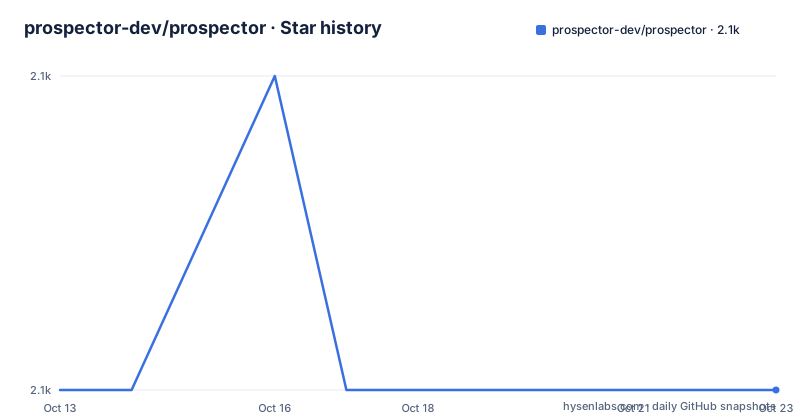
Star history
- prospector-dev/prospector2,083 ★ · +0
| Repository | 2026-10-13 | 2026-10-22 |
|---|---|---|
| prospector-dev/prospector | 2.1k | 2.1k |
0 Stars in the last 9 days, measured from the daily GitHub snapshot. Compare with other projects
Editorial analysis
One report merges pylint, pycodestyle and McCabe findings
Prospector does not analyse Python on its own. It runs other analysers and merges their output: pylint for errors and convention problems, pycodestyle for style, and McCabe for complexity. What you read is a flat list of messages, each carrying the name of the tool that produced it, so one run gives you one file instead of three separate reports.
Run it from the root of your project and every message names the file, the position and its origin:
prospector
prospector.tools.base (prospector/tools/base.py):
    L5:0 ToolBase: pylint - R0922
    Abstract class is only referenced 1 times
That sample line decodes cleanly. The module is `prospector.tools.base`, the path repeats as `prospector/tools/base.py`, `L5:0` is line 5 and column 0, `ToolBase` is the enclosing class, `pylint` names the producing tool and `R0922` is the pylint message code. The full option list sits behind `prospector --help`.
The practical consequence is that silencing one analyser is a configuration decision rather than a change of tool, because the message codes you already know stay the codes you keep reading. Nothing in this output format belongs to Prospector alone.
Install from PyPI, with Python 3.10 as the declared floor
The install line is one command:
pip install prospectorOptional analysers arrive as extras, and the shell you use decides how you spell them:
pip install prospector[with_pyroma]
pip install prospector\[with_pyroma\]
The escaped form is for shells that swallow square brackets, which the documentation calls out for Zsh on macOS Catalina. Zsh reads an unescaped square bracket as the start of a glob pattern, so pip never sees the argument you meant to hand it.
Contributors do not use pip. `poetry-core>=2` is the declared build backend requirement and `requires-python` is set to `>=3.10`:
poetry install
poetry install -E with_everything
Classifiers cover 3.10, 3.11, 3.12, 3.13 and 3.14, so five interpreter versions are declared, and `Operating System :: Unix` is the only operating system classifier in the file. Anything below 3.10 sits outside the declared range, and no route for such interpreters is documented.
One packaging detail deserves attention: `dynamic = [ "dependencies" ]`. The static dependency list is not written in pyproject.toml at all, so what pulls in pylint, pycodestyle and McCabe at install time is not visible from the file a reviewer would normally read first.
Dependency autodetection exists to kill framework false positives
The failure mode Prospector is built around is pylint reporting errors that are not errors. A Django model has no `objects` attribute in its class definition, so plain pylint flags it even though a framework adds it at run time. Every project using an ORM hits this, and every team ends up writing suppression comments.
Prospector answers with detection rather than suppression. It reads your dependency list through `requirements-detector`, decides which frameworks are in play, and switches on the matching adaptor before the tools run. Adaptors are written as plugins for the underlying tools, so the Django support works as a pylint plugin with or without Prospector in the loop, and the metadata section of the report names which adaptors actually ran.
When detection guesses wrong there are two flags, pulling in opposite directions:
prospector --uses django celery
prospector --no-autodetect
The first forces libraries on when detection misses them. The second switches autodetection off entirely, which is what you want when it confidently enables a library you never import and the noise comes from that. Choosing between them is a per-project decision the tool leaves to you; nothing in the output tells you the detector was wrong.
Profiles filter by message code, strictness sets how hard it looks
Configuration comes from profiles, which are composable YAML files holding directives to enable or disable tools and individual messages. `prospector.yml` at the project root is where they live, and the same file passes options through to each tool:
# https://bandit.readthedocs.io/en/latest/config.html
bandit:
options:
    skips:
    - B201
    - B601
    - B610
    - B611
    - B703

# https://mypy.readthedocs.io/en/stable/command_line.html
mypy:
options:
    ignore-missing-imports: true
Two mechanisms run side by side. The skips list removes five bandit codes by identifier, and each suppressed code disappears from later runs without trace. `ignore-missing-imports: true` does the same job for mypy across untyped third-party packages.
What profiles do not cover is display. Options affecting only how results appear are passed as command line arguments instead, which is why display flags and profile keys live in different places and you will end up looking in both.
Volume is controlled separately by one value:
prospector --strictness highAccepted values run from verylow through veryhigh in five steps. Prospector ships tuned to be useful with no configuration at all, and its built-in profiles exist because filtering thousands of third-party findings is the work most teams do not want. Documentation checks are the notable omission: they stay off unless `--doc-warnings` is passed, so a clean default run says nothing about missing docstrings.
For anything other than a human reader, the human-readable default is the wrong shape, and JSON output is a flag away. Note what that flag is: the option name appears on its own rather than as a full `prospector` invocation, so a CI job wanting machine-readable findings must assemble the command itself.
The pre-commit hook pins v1.16.1 while the package declares 1.19.1
Copying the documented hook configuration gets you an older Prospector than the project ships:
repos:
- repo: https://github.com/PyCQA/prospector
  rev: v1.16.1 # The version of Prospector to use, if not 'master' for latest
  hooks:
    - id: prospector
Three things in that block deserve a second look. The rev is v1.16.1 while pyproject.toml declares version 1.19.1, so the example sits three versions behind, past both 1.18.0 dated 2026-02-03 and 1.19.0 dated 2026-06-22, and behind v1.19.1 dated 2026-07-16. The comment says the value is the version to use if not master for latest, so the pin is deliberate in form and merely left behind in practice. And the repo URL is the PyCQA organisation, not the prospector-dev organisation the issue tracker points at.
Anyone who copies this block gets v1.16.1 rather than the current build, with no warning printed and no failure, because a pre-commit pin is a pin. Update the rev value yourself, or point it at master and accept a moving target on every CI run.
The last push to this repository was on 2026-10-06.
Six optional extras exist, and the documentation names only three
The extras in pyproject.toml are individual entries rather than one bundle:
poetry install -E with_everything`optional-dependencies.with-everything` collects six tools: bandit, mypy, pyright, pyroma, ruff and vulture. The optional-dependency examples only ever mention pyroma, bandit and mypy. pyright, ruff and vulture appear in the packaging metadata and nowhere in the prose, so a reader working from the documentation alone cannot tell what they contribute or how they are configured.
The spelling is inconsistent across the two sources too. pyproject.toml declares `optional-dependencies.with-mypy`, while the pre-commit example passes `.[with_mypy,with_bandit]` with underscores, and pairs that with `--with-tool=mypy` and `--with-tool=bandit` arguments. Extras being installed and tools being enabled are two separate switches, and the documented block shows both.
That separation has a practical effect. Installing an extra makes a tool available without guaranteeing it runs. A team adding bandit to CI needs the extra and the with-tool argument, and a config review that checks only one of the two will not find the missing piece.
Running the underlying tools directly is the real alternative
Prospector's differentiation is not analysis quality. pylint, pycodestyle and McCabe do the analysis, and the Django adaptor is written as a pylint plugin so it works without Prospector in the loop at all. The whole delta is aggregation plus a filter layer: profiles, strictness and autodetection.
That makes plain pylint the honest comparison. Direct invocation returns pylint's own message list under pylint's own configuration, with no Prospector process, no profile merge and no detection step. You take on the false-positive triage yourself, which is exactly the work Prospector exists to absorb.
The trade runs the other way for anyone already standardised on a single linter. If ruff is your linter, Prospector adds a second configuration layer over an analysis you have already unified, and `dynamic = [ "dependencies" ]` means the overlap is documented nowhere. Its case is strongest on a legacy codebase running three tools separately, and weakest where consolidation already happened.
One asymmetry is worth naming here. Prospector's value sits in what it removes, not in what it finds. Teams adopt it to delete suppressions, so a project with few framework false positives gains little from it.
The repository description describes a job the README never assigns
The one-line description for this repository reads: Inspects Python source files and provides information about type and location of classes, methods etc. Prospector's own account is different in kind: analysis for errors, potential problems, convention violations and complexity, delivered as lint messages carrying tool codes such as R0922 rather than as an inventory of class and method locations.
The documented sample output is the clearest evidence. `ToolBase` appears once, as the enclosing context of a pylint message about a class being referenced only once. That is a lint finding incidentally carrying a class name, not a catalogue entry reporting where classes live.
The topic list carries similar drift: hactoberfest sits beside linter, linters-config and statistical-analysis, and none of the three technical topics match an introspection utility. Read together with the one-line description, the repository metadata points at something closer to a code browser than to the aggregator its documentation sets out. For anyone evaluating from a search listing rather than the README, that gap matters, because the description is what an index shows first.
Distribution is under GPL-2.0, declared as GPL-2.0-or-later in pyproject.toml.
Editorial conclusion
Prospector earns a place on teams drowning in separate pylint, pycodestyle and McCabe runs, where profile YAML and `--strictness high` buy back more signal than they cost. Skip it if you already standardised on ruff or mypy alone and do not want a second config layer over one. Before adopting, compare the pre-commit rev value against the version in pyproject.toml, then check whether `requirements-detector` finds your dependencies on a clean CI checkout; if it does not, `--uses` must be set or the framework false positives return.
Frequently asked questions
What does Prospector actually check in my Python code?
It implements no checks of its own. It runs pylint, pycodestyle and McCabe complexity and merges their messages into one report, with each message carrying the name of the tool that produced it.
How do I install Prospector with optional tools such as bandit?
Extras are named inside the install command, as `pip install prospector[with_pyroma]`, and Zsh users need the brackets escaped. The full set comes through `poetry install -E with_everything`.
Why does Prospector report fewer errors than pylint on my Django project?
It detects your dependencies and enables framework adaptors before running the tools, so attributes added at run time are not reported as missing. If detection misses a library, name it with `prospector --uses django celery`.
Which Prospector version does the documented pre-commit configuration install?
The example pins v1.16.1, while pyproject.toml declares version 1.19.1. Copying the block as written gives you the older build unless you change the rev value yourself.
Can I silence a specific bandit or mypy finding in Prospector?
Yes, through per-tool options in your prospector.yml profile file. The documented example lists five bandit codes under skips and sets `ignore-missing-imports: true` for mypy.
Official sources
Add this badge to your README
If you maintain this project, the badge below links readers to this analysis and shows its maintenance status from the daily GitHub snapshot. Paste the markdown into your README; add ?metric=license or ?metric=stars to the image URL for a different field.

[](https://hysenlabs.com/projects/prospector-dev-prospector)Star history chart for your README
[](https://hysenlabs.com/projects/prospector-dev-prospector)Was this useful?