Provenance routes 50+ console systems to separate cores, and the install channel decides what you can run
iOS & tvOS multi-emulator frontend, supporting various Atari, Bandai, NEC, Nintendo, Sega, SNK and Sony console systems… Get Started: https://wiki.provenance-emu.com |
At a glance
- What is it?
- Provenance is a C frontend for iPhone, iPad, Mac and Apple TV that hands each console system to one or more named emulator cores. Two rows in its support tables are conditional on how you installed it, and iCloud sync sits in the paid Provenance Plus tier.
- Who is it for?
- Provenance suits someone who wants several eras of console in one Apple frontend and is willing to read the per-system core table before buying a ROM. Read it with two gaps in mind: the PlayStation 2 core needs JIT the App Store install may not grant, and the Apple II core is hidden from that build entirely.
- Can I use it commercially?
- Check first. The repository uses a licence we do not classify automatically, so read its LICENSE file before any commercial use.
- Is it still maintained?
- Yes. The repository received new commits within the last day.
- What is it written in?
- Mainly C, according to GitHub's language statistics.
Answers come from the project's GitHub data, last synced on November 15, 2026, and from our analysis. They are not legal advice.
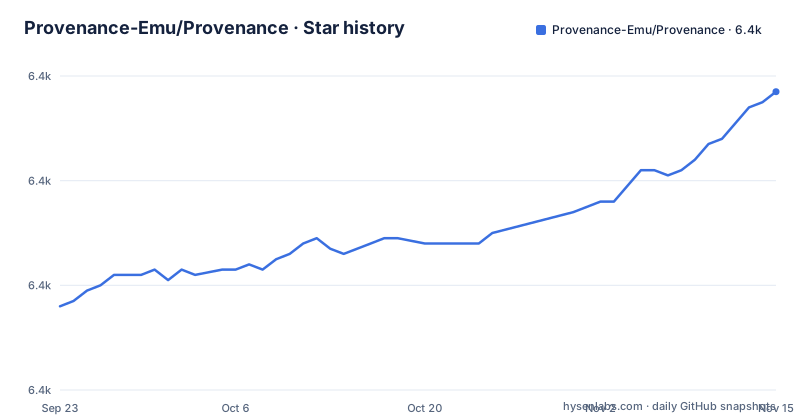
Star history
- Provenance-Emu/Provenance6,417 ★ · +41
| Repository | 2026-09-23 | 2026-11-15 |
|---|---|---|
| Provenance-Emu/Provenance | 6.4k | 6.4k |
41 Stars in the last 53 days, measured from the daily GitHub snapshot. Compare with other projects
Editorial analysis
A core routing table instead of one emulator
Provenance is a frontend, so the substance is the routing table underneath it. Every console system maps to one or more named cores, and many systems let you pick. NES and Famicom go to FCEUX, Nestopia, or Mednafen. Super Famicom goes to SNES9x or bsnes. Nintendo 64 goes to Mupen64Plus-NX or ParaLLEl. Genesis and Mega Drive can run on Genesis Plus GX or PicoDrive, and PlayStation can run on DuckStation, PCSX-ReARMed, or Mednafen. Mednafen is the widest single entry, appearing against twelve rows: NES, Game Boy and Game Boy Color, Virtual Boy, Saturn, PlayStation, Atari Lynx, PC Engine, TurboGrafx-CD, PC Engine SuperGrafx, PC-FX, Neo Geo Pocket and Color, and WonderSwan and Color. The repository keeps two core trees, Cores/ for native builds and CoresRetro/ for the RetroArch side, with PVCoreLoader, PVCoreBridge, PVCoreBridgeRetro, and PVEmulatorCore sitting between them. Reading that table tells you more about actual behaviour than any feature list.
PlayStation 2 needs JIT that the store build will not grant
The PlayStation 2 row is the one carrying a warning. Its core, Play!, ships inside the App Store build, but it is playable only when just-in-time compilation is available. The row names two conditions that still allow it: jailbroken devices, and older OS versions that permit JIT for App Store installs. Sideloaded and AltStore builds obtain JIT another way. So the same system behaves differently depending on where the app came from. Everything else in the Sony group carries no such condition: PS1 runs on DuckStation, PCSX-ReARMed, or Mednafen, and PSP runs on PPSSPP. The practical difference between a store install and a side-loaded install is therefore not the core list, it is whether one core can compile code at runtime.
Apple II sits behind MAME and stays out of the App Store build
The Apple II entry is marked experimental and hidden from the App Store build, with MAME named as its core, and reaching it means sideloading through AltStore or SideStore. That is the second channel restriction in the same support table as the PlayStation 2 JIT condition, and both are written as conditions rather than as things a fresh store install gives you. The rest of the NEC, SNK, Bandai and more group has no such conditions. 3DO runs on Opera, ColecoVision on Gearcoleco, Vectrex on VecX, Intellivision on FreeIntv, Magnavox Odyssey2 on O2EM, ZX Spectrum on Fuse, MSX and MSX2 on blueMSX or fMSX, IBM PC-DOS on DOSBox, Watara Supervision on Potator, and Mega Duck on SameDuck. One of seventeen rows in that group is conditional, which means the core list on a store install is shorter than the core list in the repository.
Cheats and shaders travel two different routes through the core trees
Cheat support is split by core type: Game Genie, Action Replay, and GameShark are listed on twelve or more native cores and on all RetroArch cores. Video filters are described along the same split, as Metal shaders that apply across native and RetroArch cores, with Simple CRT, Complex CRT, Mega Tron, ulTron, LCD, Game Boy, and VHS named as presets plus a path for RetroArch shaders. The v3.3.0 release calls these unified filters. The core independent controls sit next to them: save and restore anywhere with thumbnail previews and a screenshot browser inside the pause menu, fast forward from the pause menu or a controller shortcut, and on tvOS a RetroWave side menu with TopShelf v2 and a save state browser. Those behave the same whether your game runs on Genesis Plus GX or on a RetroArch core, which is the clearest dividing line between what is core dependent and what is not.
The release pipeline lives in the Makefile and its keys live in .env
Building or shipping this app means wiring secrets before anything compiles. .env.sample documents every key: ASC_API_KEY_ID, ASC_API_ISSUER_ID, ASC_API_KEY_PATH, CERT_P12, P12_PASS, SIGNING_IDENTITY, and DYLIBS_TOKEN, a token scoped to repo access for the dylibs repository. The file states that GitHub secrets are write-only so nothing can read them back, which makes the local .env the source of truth and 1Password the durable backup, synchronised through Scripts/release/secrets-1p.sh. The Makefile loads that file with a soft include and exports it to recipes, so make testflight, release.sh, and fastlane all read the same values, and a missing .env does not break a continuous integration run. Starting from the sample file:
cp .env.sample .env
make help
make ios
Two commands from the sample file do the certificate work. The identity line prints your signing certificates, and the base64 line feeds a key into the clipboard:
security find-identity -v -p codesigning
base64 -i ~/.appstoreconnect/private_keys/AuthKey_<KEY_ID>.p8 | pbcopy
iCloud sync is the paid feature, and Apple TV is the exception
The free tier promises no ads, no tracking, and no required account, and stays free when sideloaded or built from source. Sync is the exception. Provenance Plus at $3.99 a month adds iCloud sync across all devices, TestFlight beta access, and priority support, and the feature table marks iCloud sync as a Plus item, while the Apple TV entry says sync is free on Apple TV. The release history shows that split arriving in 3.3.0 on 2026-03-14, titled iCloud Sync, New tvOS UI and Video Filters, followed by 3.3.1 Alpha on 2026-03-30 and an alpha tag named Provenance Alpha on 2026-11-03. TestFlight builds are part of the paid tier and the Makefile treats them as first class targets:
make testflight
make testflight-tvos
make testflight-all
The last push was on 2026-11-02, one day before that alpha tag.
BIOS files, ROM formats, and the compatibility list live on the wiki
What the app does not carry is as important as what it does. It ships no games, so every ROM and BIOS file is yours to supply, and the tables in the README name systems and cores without naming accepted ROM formats or BIOS requirements. Those, plus the full compatibility notes and the sideloading and build instructions, are deferred to wiki.provenance-emu.com. Import paths are all system level: WebDAV, AirDrop, the Files app, and Safari downloads. Two features also depend on services outside the repository. Box art, descriptions, and genre data come from OpenVGDB, and RetroAchievements pulls from retroachievements.org. Controller skins are community made and collected at provenance-emu.com/skins.
Build configs cover three targets and the feature list names two
The repository layout says more about the project's shape than the screenshots. Four xcconfig files split the targets: Build.xcconfig, Build-iOS.xcconfig, Build-tvOS.xcconfig, and Build-watchOS.xcconfig, plus CodeSigning.xcconfig.sample so you bring your own team. Signing is a sample by design. Alongside them sit MoltenVK/, External/, Dependencies/, Cores/, and CoresRetro/, which is where two core lineages meet. The Swift tooling is configured too, with .swiftlint.yml, .swiftformat, and .xcode-version, and the release side runs on a Gemfile and Gemfile.lock with fastlane ExportOptions.plist and an ExportOptions/ directory. Editor and agent configuration files sit alongside DEVELOPER.md, AGENTS.md, CLAUDE.md, and Dangerfile.swift. A watchOS config is present in the tree, and PVFeatureFlags/ is part of the tree, but the feature list and the release notes talk about iPhone, iPad, Mac, and Apple TV only. Maintenance targets also cover code generation:
make generate-all
make update-core-versions
make generate-cheatdb
make generate-licenses
Editorial conclusion
Provenance suits someone who wants several eras of console in one Apple frontend and is willing to read the per-system core table before buying a ROM. Read it with two gaps in mind: the PlayStation 2 core needs JIT the App Store install may not grant, and the Apple II core is hidden from that build entirely. BIOS requirements, accepted ROM formats, and the real compatibility notes sit on wiki.provenance-emu.com rather than in the app, so check that page, confirm your install channel, and decide about the $3.99 a month sync tier before you commit.
Frequently asked questions
How do you use the Provenance emulator on iOS?
Install it from the App Store, sideload it with AltStore or SideStore, or build it from source. Pick a core per system from the support tables, import your own ROMs through WebDAV, AirDrop, the Files app, or Safari downloads, and use the pause menu for save states, screenshots, and fast forward.
How do you install Provenance on an iPhone?
The App Store build is the easiest route, and it is the build that hides the experimental Apple II core and that can lack the JIT the PlayStation 2 core needs. For sideloading or building from source, the project points to the installation guide at wiki.provenance-emu.com.
What does setting up the Provenance emulator involve on Apple TV?
Provenance has a native tvOS app with a RetroWave side menu, TopShelf v2, a save state browser, and iCloud sync free on Apple TV.
Can Provenance play Nintendo 3DS games?
Yes, Nintendo 3DS is in the support tables under the core emuThreeDS, named in parentheses as Citra and Azahar. It sits alongside DeSmuME and melonDS for Nintendo DS, and VBA-M and mGBA for Game Boy Advance.
Official sources
Add this badge to your README
If you maintain this project, the badge below links readers to this analysis and shows its maintenance status from the daily GitHub snapshot. Paste the markdown into your README; add ?metric=license or ?metric=stars to the image URL for a different field.

[](https://hysenlabs.com/projects/provenance-emu-provenance)Star history chart for your README
[](https://hysenlabs.com/projects/provenance-emu-provenance)Was this useful?