Prowlarr Indexer Sync, Cardigann Definitions, and What the README Omits
Prowlarr is an indexer manager/proxy built on the popular *arr .net/reactjs base stack to integrate with your various PVR apps, supporting management of both Torrent Trackers and Usenet Indexers.
At a glance
- What is it?
- Prowlarr holds your torrent trackers and Usenet indexers in one place, then pushes that list into Sonarr, Radarr, Lidarr, Readarr and Mylar3 so you stop configuring indexers app by app. It is a manager and proxy only, and the details a self hoster needs most sit in the wiki rather than the repository.
- Who is it for?
- Prowlarr earns its place if you already run two or more arr apps and are tired of copying the same indexers between them. It is the wrong tool if you want one program that searches, downloads and manages a library.
- Can I use it commercially?
- Yes, with conditions. GPL-3.0 is a copyleft licence: if you distribute software that includes it, you must release that software's source code under the same licence. Running it internally without distributing it does not trigger that obligation.
- Is it still maintained?
- Yes. The repository received new commits within the last day.
- What is it written in?
- Mainly C#, according to GitHub's language statistics.
Answers come from the project's GitHub data, last synced on November 14, 2026, and from our analysis. They are not legal advice.
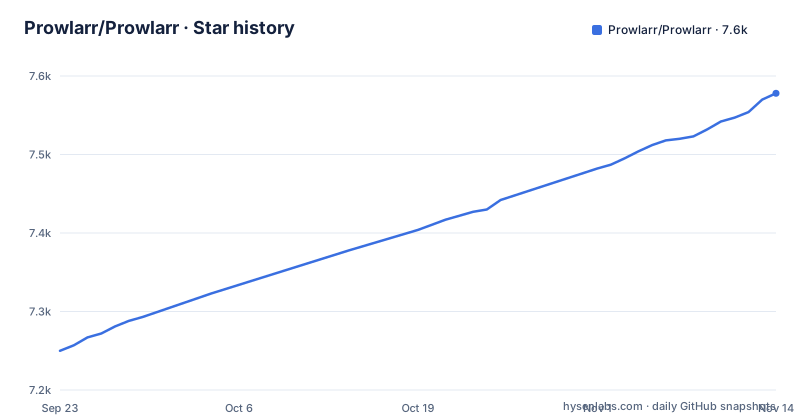
Star history
- Prowlarr/Prowlarr7,578 ★ · +328
| Repository | 2026-09-23 | 2026-11-14 |
|---|---|---|
| Prowlarr/Prowlarr | 7.3k | 7.6k |
328 Stars in the last 52 days, measured from the daily GitHub snapshot. Compare with other projects
Editorial analysis
Indexer Sync replaces the indexer form in every app
Prowlarr holds the indexer definitions itself and pushes that list into Lidarr, Mylar3, Radarr, Readarr and Sonarr through a feature the README calls Indexer Sync. The stated payoff is that no per app indexer setup is required, which is the alternative of re-entering the same site details in each program and then repairing each copy whenever a tracker changes its login or its category list. The dependency runs the other way as well. Treat Prowlarr as a component of the stack with its own uptime rather than a convenience page.
Cardigann YML is the route for trackers with no native definition
Custom YML definitions via Cardigann, with JSON and XML parsing, is listed as a first class feature rather than a workaround. That is the path for a tracker with no built in entry: you describe which URL to hit and which fields come back. The contributor list links a wiki article on the YML indexer definition. A separate request site at requests.prowlarr.com collects trackers people want but do not have. One gap matters for planning: the README does not break down its claim of over 500 torrent trackers into native entries versus Cardigann files, so you cannot tell from the repository which kind any given tracker is before you add it.
Generic Newznab and Generic Torznab are the two escape hatches
For Usenet, 24 indexers are supported natively, Headphones VIP among them, and any Newznab compatible indexer is reachable through an entry called Generic Newznab. For torrents, the count runs to over 500 trackers, and any Torznab compatible tracker goes through Generic Torznab. The README does not document which fields you must fill in for a generic entry; the wiki at wiki.servarr.com/prowlarr is the place to check.
Proxies are configured per indexer, and Flaresolverr is only a label here
Proxy support is per indexer rather than global, and the README names four types: SOCKS4, SOCKS5, HTTP and Flaresolverr. Per indexer matters when one tracker needs a different route than the rest, which is the usual reason to want this at all. It also means there is no single switch to flip: each indexer that needs a proxy carries its own setting, and a missed one is a missed route. Flaresolverr is named in the list without any description of what it does inside Prowlarr, how it is addressed, or how it differs from the three plain proxy types. Read that entry as something to confirm in the wiki at wiki.servarr.com/prowlarr, not as documented behavior.
Manual search stops at the category level and hands off the release
Alongside the automatic path, Prowlarr lets you search trackers and indexers by hand at the category level, and it supports parameter based manual searching, which is the piece that lets you narrow a query instead of pulling a whole category listing. It can also push multiple releases at once directly to your download clients from Prowlarr. Two things are missing for anyone planning a workflow around this. The README does not name which download clients are supported, and it does not explain how a result from an indexer is mapped onto a category in the client. It also does not say what happens to a release you decline. Prowlarr delivers the release; what is stored, moved, or removed afterward belongs to the app that takes it.
Your first run is a yarn and webpack toolchain, not an installer
The frontend build is defined in package.json, where every script is webpack driven and yarn wrapped; the C# backend sits in src/ alongside build.sh. A frontend run means yarn, then build or start. Prebuild runs yarn clean first, and clean removes the ./_output/UI directory plus every .js.map file, so a rebuild starts from a known empty state. The platform split shows up in the tooling: stylelint has a separate script for Linux and one for Windows because the file globs differ. The top level also holds .devcontainer/, .vscode/, azure-pipelines.yml, build.sh, test.sh and docs.sh, which is what CI and contributors work from.
"build": "webpack --config ./frontend/build/webpack.config.js",
"prebuild": "yarn clean",
"clean": "rimraf ./_output/UI && rimraf --glob \"**/*.js.map\"",
"start": "webpack --watch --config ./frontend/build/webpack.config.js",
"watch": "webpack --watch --config ./frontend/build/webpack.config.js",
"lint": "eslint --config frontend/.eslintrc.js --ignore-path frontend/.eslintignore frontend/",
"lint-fix": "yarn lint --fix",
"stylelint-linux": "stylelint $(find frontend -name '*.css') --config frontend/.stylelintrc",
"stylelint-windows": "stylelint \"frontend/**/*.css\" --config frontend/.stylelintrc",
"check-modules": "are-you-es5 check . -r"
Install instructions are a wiki link, so the repo answers nothing about setup
There is no Compose file, no setup script and no binary payload at the repository root. The only install destination the README points to is the Docker page in the wiki, at wiki.servarr.com/prowlarr/installation/docker, and the project homepage is prowlarr.com. That means a reader who arrives expecting a clone plus a running service will not find one, and a reader who wants the port, the first run wizard, or the backup and upgrade path has to leave the repository to get it. The API is documented separately at prowlarr.com/docs/api/ rather than in the tree, and while a SECURITY.md sits at the root, the README says nothing about reporting a vulnerability. Verify the install path for your own platform before planning a migration.
Issues take bugs and feature requests, everything else goes elsewhere
The README is explicit that GitHub Issues are for bugs and feature requests only. Configuration questions, connection help, and requests for a tracker that does not exist yet all route elsewhere: support wiki at wiki.servarr.com/prowlarr, Discord at prowlarr.com/discord, and the request site for new indexers. The practical consequence is that a tracker that fails silently will not get an issue thread, and a question like how to pair Prowlarr with a specific download client has no bug to file, so it lands in Discord where the answer lives in someone's scrollback. Contribution follows the same split, with CONTRIBUTING.md in the repository plus wiki articles for contributing and for writing a YML indexer definition.
Editorial conclusion
Prowlarr earns its place if you already run two or more arr apps and are tired of copying the same indexers between them. It is the wrong tool if you want one program that searches, downloads and manages a library. Before you commit, check the three things this repository does not answer: the install path for your platform, where the port and API key live, and whether the trackers you rely on are native definitions or need a Generic Torznab entry or a Cardigann file you write yourself.
Frequently asked questions
What exactly does Prowlarr do?
It is an indexer manager and proxy built on the .net and reactjs base stack, holding both torrent trackers and Usenet indexers, then syncing them into Lidarr, Mylar3, Radarr, Readarr and Sonarr so no per app indexer setup is needed.
What is the difference between Prowlarr and sonarr?
The README never describes Sonarr itself. It lists Sonarr as one of the five apps Prowlarr syncs indexers into, which means Sonarr gets its indexers from Prowlarr with no manual indexer configuration in Sonarr.
how to install prowlarr
The README carries no install command. It links the Docker instructions in the wiki at wiki.servarr.com/prowlarr/installation/docker, and the frontend build runs the yarn scripts in package.json. The project homepage is prowlarr.com.
how to use prowlarr with sonarr
Sonarr is one of the five apps reached by Indexer Sync. Configure indexers inside Prowlarr and that feature pushes them across, which is why the README says no manual configuration of the other applications is required.
how to use prowlarr with flaresolverr
Flaresolverr is named as one of the per indexer proxy types, alongside SOCKS4, SOCKS5 and HTTP. The README does not describe how it is addressed or what it changes, so the wiki at wiki.servarr.com/prowlarr is where to confirm it.
Is Prowlarr safe to use?
The README makes no security claims. The project is GPL v3 with copyright 2010 to 2025, keeps a SECURITY.md at the repository root, and its develop branch was last pushed on November 2, 2026, with release v3.0.0.5737 on November 2, 2026.
Official sources
Add this badge to your README
If you maintain this project, the badge below links readers to this analysis and shows its maintenance status from the daily GitHub snapshot. Paste the markdown into your README; add ?metric=license or ?metric=stars to the image URL for a different field.

[](https://hysenlabs.com/projects/prowlarr-prowlarr)Star history chart for your README
[](https://hysenlabs.com/projects/prowlarr-prowlarr)Was this useful?