psmux: installing it puts a binary called tmux on your PATH
Tmux on Windows Powershell - tmux for PowerShell, Windows Terminal, cmd.exe. Includes psmux, pmux, and tmux commands. This is native High-Performance Tmux designed for Windows in Rust 🦀
At a glance
- What is it?
- A native Windows terminal multiplexer written in Rust that drives the Windows console host interface directly, speaks the tmux command language and reads a .tmux.conf without needing WSL, Cygwin or MSYS2. It ships under three names that behave identically, vendors its own PTY and terminal parser forks, names its regression tests after issue numbers, and offers a container build that publishes SSH and takes an admin password on the command line.
- Who is it for?
- psmux is the answer for someone who lives in tmux on a Unix box and has been missing it on Windows, since the compatibility claims are specific enough to test, with a command matrix, a per-command flag reference and a live list command to check against your own config. Four things to know before you install it.
- Can I use it commercially?
- Yes. MIT is a permissive licence: you can use, modify and sell software built on it, as long as you keep its copyright and licence notices.
- Is it still maintained?
- Yes. The repository received new commits within the last day.
- What is it written in?
- Mainly PowerShell, according to GitHub's language statistics.
Answers come from the project's GitHub data, last synced on November 22, 2026, and from our analysis. They are not legal advice.
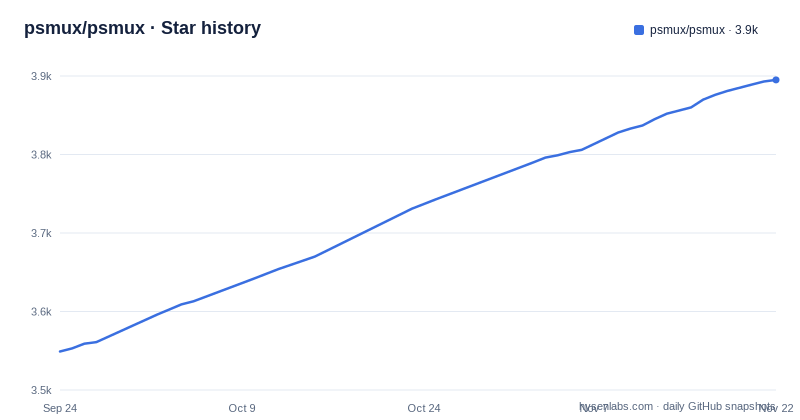
Star history
- psmux/psmux3,895 ★ · +346
| Repository | 2026-09-24 | 2026-11-22 |
|---|---|---|
| psmux/psmux | 3.5k | 3.9k |
346 Stars in the last 59 days, measured from the daily GitHub snapshot. Compare with other projects
Editorial analysis
It installs a binary called tmux
The most consequential line in the readme is a tip: psmux ships with tmux and pmux aliases, and it tells you that you can just type tmux and it works.
So this is not one binary with one name. Three names are installed, and the usage section is explicit that they are identical.
The install methods make the same point. The Cargo route is described as installing the psmux, pmux and tmux binaries into your Cargo bin directory. Building from source produces three executables in the release directory:
target\release\psmux.exe
target\release\pmux.exe
target\release\tmux.exe
On a Windows machine that also has real tmux, whichever ends up first on the path wins. Nothing in the readme warns about the collision, and a user arriving from a dual-boot setup or a Windows package manager could spend a confusing afternoon wondering why their key bindings behave like someone else's.
The naming is otherwise a good idea. It means an existing .tmux.conf keeps working and a muscle-memory habit keeps paying off, at the cost of a name that is not yours to take.
The container build publishes SSH and takes the password on the command line
One of the install methods is not installing psmux at all. It is a build environment: a ready-made Windows container with the Rust toolchain, the Microsoft C++ toolchain and an SSH server, so you can compile the project without setting up a Windows build host.
The commands are given in full:
cd docker
docker build -t psmux-dev .
docker run -d --name psmux-dev -p 127.0.0.1:2222:22 -e ADMIN_PASSWORD=YourPass123! psmux-dev
ssh ContainerAdministrator@localhost -p 2222
Two things to notice. The SSH port is published to the loopback address only, which is the right default and means the container is reachable from the host and nowhere else. And the administrator password is passed as an environment variable on the command line, which means it lands in your shell history, and in the output of any process listing on the machine for as long as the container runs.
It also tells you the account to connect as, an administrator account, over a forwarded port. For a throwaway build container that is a reasonable trade; it is still a password, in plaintext, in history.
Two forks live in the workspace
The workspace declaration lists the root package and two directories under crates, and both names end with the project name rather than being the upstream names.
One is a portable PTY library and one is a terminal emulator parser, each carrying the project name as a suffix. Both are the layer where a Windows terminal multiplexer actually lives: allocating a pseudoterminal per pane, and decoding the escape sequences the pane's program writes.
Vendoring both is a deliberate choice rather than an accident, and the consequences run through the whole project. Behaviour that upstream libraries treat as settled, cursor movement, colour updates, alternate screens, clipboard sequences, is now this project's to fix. Which is visible in the repository layout rather than in any prose.
It also explains the shape of the example directory, which is covered separately. Most of what is there is diagnostic code for those two layers rather than sample sessions.
The workspace excludes a list of directories from the build, including the release directory, the tests directory and the packaging directories, which means the packaging tooling is kept out of the compiler's view rather than being feature-flagged.
The regression tests are named after issue numbers
The manifest does something unusual: it declares integration tests one at a time, and the names are issue and pull request numbers.
There is one for a mouse handling bug in the terminal parser, two for one issue covering escape attribute handling and rendering, one for a rename dialog, one for dropped escape sequences, two for clipboard capture including an end-to-end case, two for a command-state issue including a shell snippet integration case, one for a command safety pull request, one for a copy-mode freeze, and one more for a wide-character issue that the visible list cuts off partway through.
So the test suite doubles as an index of fixed bugs, and you can look up a number from a report and find the test that holds the line.
There is a comment above the first one explaining why they are declared at all: auto-discovery of integration tests from the tests directory is disabled. That directory is in the workspace exclude list, so without explicit declarations Cargo would still find the files and try to compile them as tests.
The naming convention also means the tests double as a rough history of what goes wrong in a terminal multiplexer, which is a category of bug with a long tail.
The examples directory is a diagnostic harness, not sample sessions
There are eleven example programs, and reading the names tells you they are not demonstrations.
Eight are diagnostics for input and escape-sequence handling: colour and graphics rendition attributes, the cursor-position sequence for alternate key encoding, the enter key, key handling generally, escape sequences through the parser, and escape sequences through the pseudoterminal layer. Two more are rendering and cursor diagnostics.
The remaining two are the interesting ones. One is a latency harness, which is a measurement tool rather than a demo. The other is a pipeline diagnostic, which suggests tracing data through the input path.
So the examples directory exists to answer questions about the terminal, not to show you how to use the multiplexer. If you are looking for a worked session, the tutorials in the documentation are where those live, and the four listed are a getting-started walkthrough, writing one script that runs across all three platforms, running terminal agents and text user interfaces in scripted layouts, and multi-window project session layouts with presets and bootstrap scripts.
None of the eleven examples is a multiplexer demo, and the readme does not point at them as such.
Five packaging directories, one per install channel
The top level of the repository carries five directories whose only purpose is packaging.
There is one for the Scoop bucket, one for the Chocolatey package, one for an installer, one for the release packages and one for the container image. Each corresponds to a route in the installation section, which offers a Windows package manager, Cargo, a Scoop bucket that has to be added before use, Chocolatey, a zip from the releases page, and a clone plus a release build.
That is an unusual amount of surface for one small tool, and it is the honest consequence of targeting Windows, where there is no single package manager and no single convention. Each channel also has its own maintainer expectation: the Scoop bucket lives in a separate repository that has to be added by hand, and the Chocolatey and installer directories carry whatever metadata those channels require.
So contributing packaging is not one thing. A change to the binary may need mirroring into several of these directories, and nothing in the manifest coordinates them.
Two other files at the root are worth knowing about: a build script, and a metadata file for the tool's own manifest format.
The floor is PowerShell 7 on Windows 10 or 11
The requirements section is short and one line in it is bold.
You need Windows 10 or Windows 11, and PowerShell 7 or later, recommended, or cmd.exe. A separate line gives the package-manager command that installs the recommended shell.
That is a real constraint on the pitch, which is that this is tmux on Windows with no Unix environment required. The absence of WSL, Cygwin or MSYS2 is stated as a feature, and the multi-shell documentation lists what can run side by side inside panes, naming PowerShell, cmd, Git Bash, WSL and nushell. So the environments are available as pane payloads, just not as the thing hosting the multiplexer.
Two documentation entries show what that costs in practice. One is about pane titles and border labels, and its description includes the question of why PowerShell shows a path where a name would be expected. Another is about the chooser preview, a live preview pane for the tree and session pickers, which exists because a terminal picker with no preview is hard to use without a mouse.
And the performance documentation is pointed at a warm pool of pre-spawned servers, which is a design choice made to hide process startup rather than to reduce it.
Editorial conclusion
psmux is the answer for someone who lives in tmux on a Unix box and has been missing it on Windows, since the compatibility claims are specific enough to test, with a command matrix, a per-command flag reference and a live list command to check against your own config. Four things to know before you install it. It writes a binary named tmux onto your path, so on a machine that already has tmux the two will collide. It vendors its own PTY layer and terminal parser as workspace forks, which means escape-sequence behaviour is the project's to own and the source of most of its issue-numbered tests. Windows 10 or 11 with PowerShell 7 is the floor, not the Unix-style shell you may assume. And if you use the container build, read it first: it publishes SSH and takes an administrator password as an environment variable on the command line.
Frequently asked questions
what is psmux
It is a native Windows terminal multiplexer written in Rust. It uses the Windows console host interface directly, speaks the tmux command language, reads your .tmux.conf, supports tmux themes, and needs no WSL, Cygwin or MSYS2. It ships under three names, psmux, pmux and tmux, which behave identically.
How to install psmux?
Five routes: the Windows package manager, cargo install psmux which installs all three binaries, a Scoop bucket that has to be added before installing, Chocolatey, or a zip from the releases page added to your path. Building from source is a clone plus cargo build --release. The requirements are Windows 10 or 11 with PowerShell 7 or later.
What are the differences between psmux and tmux?
tmux is the Unix tool psmux imitates. psmux is a native Windows multiplexer built on the Windows console host interface rather than ported or wrapped, so it needs no WSL, Cygwin or MSYS2, while still speaking the tmux command language and reading a .tmux.conf. It claims more than 90 tmux-compatible commands, over 140 format variables and 53 vim copy-mode keys.
Official sources
Add this badge to your README
If you maintain this project, the badge below links readers to this analysis and shows its maintenance status from the daily GitHub snapshot. Paste the markdown into your README; add ?metric=license or ?metric=stars to the image URL for a different field.

[](https://hysenlabs.com/projects/psmux-psmux)Star history chart for your README
[](https://hysenlabs.com/projects/psmux-psmux)Was this useful?