OpenResearch hands Claude Code, Codex and Cursor a research loop and keeps the evidence on your disk
Turn your coding agents into research agents
At a glance
- What is it?
- alphaXiv's OpenResearch is a Rust harness and desktop workspace that points existing coding agents at literature review, hypotheses and experiments. It is local-first and moving fast at version 0.2.23, but the CLI is unsigned, Windows is a beta, and analytics are on until you turn them off.
- Who is it for?
- OpenResearch suits researchers and ML engineers who already trust a coding agent such as Claude Code, Codex, OpenCode, Cursor or Google Antigravity and want its experiments recorded, grounded in alphaXiv, bioRxiv or PubMed, and dispatched to SSH, Slurm, Kubernetes, Modal, Ray or Hugging Face Jobs from one local workspace. It is a poor fit for anyone who needs a signed command-line install on a managed Mac, a stable Windows build, or a Linux desktop older than glibc 2.35.
- Can I use it commercially?
- Yes. MIT is a permissive licence: you can use, modify and sell software built on it, as long as you keep its copyright and licence notices.
- Is it still maintained?
- Yes. The repository received new commits within the last day.
- What is it written in?
- Mainly Rust, according to GitHub's language statistics.
Answers come from the project's GitHub data, last synced on November 14, 2026, and from our analysis. They are not legal advice.
Star history
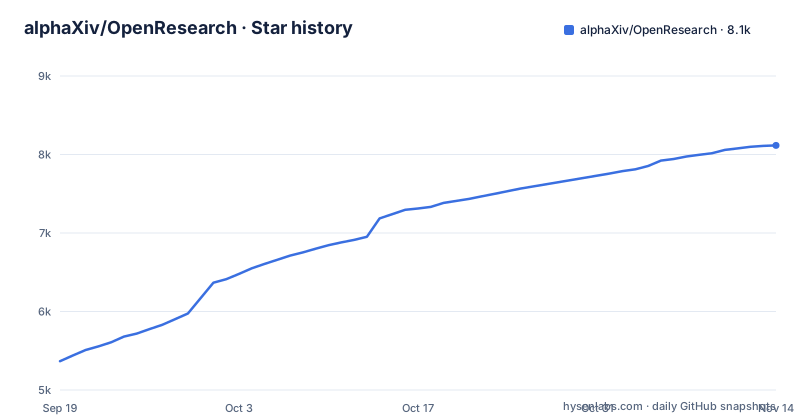
- alphaXiv/OpenResearch8,116 ★ · +2,749
| Repository | 2026-09-19 | 2026-11-14 |
|---|---|---|
| alphaXiv/OpenResearch | 5.4k | 8.1k |
2,749 Stars in the last 56 days, measured from the daily GitHub snapshot. Compare with other projects
Editorial analysis
A harness that sits underneath the coding agent you already run
OpenResearch, an alphaXiv project, calls itself the local-first harness and workspace for research agents. It does not ask you to adopt a new agent. It works natively with Claude Code, Codex, OpenCode, Cursor and Google Antigravity, and the idea is that the same agent you use to edit a codebase can be launched against a research question and asked to review literature, develop hypotheses, run experiments and produce research artifacts. The Rust crate, published as openresearch-cli with a binary named orx, depends on agent-client-protocol 2.2 for talking to those agents.
The practical consequence is that OpenResearch does not raise the ceiling of the agent you plug in. If your agent writes poor training scripts or misreads a paper, the harness organizes, records and grounds that work, but it cannot make the underlying model smarter. For local models, the route the project points to goes through OpenCode, backed by LM Studio, oMLX, Ollama or a custom endpoint, with details in docs/local-models.md. If you were hoping to run a local model behind Claude Code or Cursor specifically, OpenCode is the combination to start from.
The desktop app is the recommended path and orx is the secondary one
The project recommends the desktop app first. Builds are published as release assets: OpenResearch.dmg for macOS, OpenResearch-Setup.exe for Windows (marked Beta), and AppImages for Linux on both x86_64 and ARM64 (aarch64). The app is also where you inspect what your agents have done and the evidence behind each result.
The standalone CLI is offered for macOS and Linux only, through a shell script piped from the project site:
curl -LsSf https://openresearch.sh/install.sh | sh
orx up
Running orx up opens the local dashboard at http://127.0.0.1:4791, so the CLI path still gives you a browser interface rather than a terminal-only workflow. There is a third option that sidesteps the script entirely: inside the desktop app, Settings → Updates → Install the orx command puts orx on your terminal path. An account at openresearch.sh is optional for local use; it is what gets you email updates and access to managed OpenResearch compute. Windows users do not get the curl route, so on that platform the beta app is the entry point.
The install.sh binary is unsigned, and managed Macs can block it
The one-line installer has a stated weakness. The orx binary it drops is not yet signed, and on a managed Mac the device-management policy may refuse to run it. The project's own answer is to use the signed and notarized desktop app instead, and then install orx from the app's Settings if you still want it in your shell.
This matters more than it first appears. A team that standardizes setup with a script across company laptops will find the curl line works on personal machines and fails on managed ones, with the failure coming from the MDM policy rather than from OpenResearch itself. Piping a remote script into sh is also a trust decision every reader has to make for themselves; the signed app removes that step. If you administer Macs under device management, treat the app as the supported install and the script as a convenience for unmanaged machines. Until the CLI is signed, there is no way around this from the OpenResearch side: the choice is between the app route and an exception in your own policy.
Platform floors: macOS 11, Git for Windows, and glibc 2.35 on Linux
Each platform has a hard requirement. The app needs macOS 11 or later. The Windows build is a beta and requires Git for Windows, covered in docs/windows.md. The Linux app needs glibc 2.35 or newer, covered in docs/linux.md. On an older distribution, the AppImage is not an option.
Cargo.toml explains why the Linux story splits in two. The desktop feature, which pulls in tao, wry, gtk and png, is a glibc build linking WebKitGTK and is off by default, so that the static musl CLI builds stay free of GTK. macOS and Windows always build the app. The same file shows a deliberate effort to avoid system libraries: reqwest uses rustls rather than native-tls because OpenSSL will not build for musl, and rusqlite is compiled with SQLite bundled from source. TLS roots come from both webpki-roots, so a container with no OS trust store still works, and native-roots, which is where a TLS-inspecting corporate proxy's CA lives. If your network intercepts TLS, that second set is what lets orx reach the internet; if your container lacks certificates, the bundled Mozilla list covers it.
Every experiment lands in a local SQL database the agent reads back
The feature that separates OpenResearch from simply running an agent in a terminal is experiment memory. Every experiment is recorded in a local SQL database, and its logs, code and artifacts are kept on your machine. Agents use that record to learn from past results and decide what to try next, and the desktop app shows you what they did along with the evidence behind each result. Under the hood the CLI links rusqlite 0.32 with the bundled and backup features enabled.
The flip side of keeping everything local is that the record lives where you put it. Projects, conversations, experiments, logs and artifacts stay on your machine under your control, which is the point for anyone handling unpublished work, but it also means a lost disk takes the experiment history with it. Treat that data directory the way you would treat any lab notebook: back it up. Agents deciding what to try next from past results is only as good as those results; a buggy early run sits in the same database as a clean one, and you will want to inspect the evidence in the app before trusting a conclusion built on it.
Literature from alphaXiv, bioRxiv and PubMed, compute from a laptop to Slurm
OpenResearch grounds hypotheses in recent literature through integrations with alphaXiv, bioRxiv and PubMed, so agents can find relevant papers and connect their experiments to existing research. That set leans toward preprints and biomedical literature. If your field publishes mainly elsewhere, check what these three sources actually cover for your topic before relying on the literature step to catch prior work.
Compute is the broader part of the integration list. Experiments can run locally, over SSH, on Slurm, Kubernetes, Modal, Tinker, Ray or Hugging Face Jobs, or on managed OpenResearch compute, which requires an account at openresearch.sh. That range means a lab with an existing Slurm cluster or a team already paying for Modal can keep its infrastructure. It also means OpenResearch inherits the failure modes of each backend: queue limits, credentials and quotas are yours to manage. The repository ships an example under demo/nanochat/, which is the place to look for a worked project layout before pointing the harness at your own code.
Analytics and agent feedback are on until you run orx telemetry off
Official release builds send usage analytics on an opt-out basis. Two streams leave the machine in the background, tied to a random installation ID: coarse product analytics events, and detailed agent feedback. The project states that your code, prompts, file contents or paths, repository names, tokens, emails, and project and experiment identifiers are not collected. Anonymized token and message counts are used to see which models people run, and those numbers are public at https://openresearch.sh/rankings.
The agent feedback stream deserves the closer look. Agents send reports for bug reports, feature requests and general frustrations, and they are instructed to sanitize those reports to exclude sensitive information about your research or code. That is an instruction to a language model, not a deterministic filter, so a careless agent can still describe more than you would like. If you work under an NDA or with embargoed data, switch everything off before the first session, either in the desktop app's Settings or from the terminal:
orx telemetry offThe claim that OpenResearch can run entirely locally holds only after that switch.
Version 0.2.23 and releases days apart
The Rust package is at version 0.2.23, edition 2021, under the MIT license. Releases arrive quickly: a canary build on 2026-10-27, v0.2.22 on 2026-10-28 and v0.2.23 on 2026-10-31, with the most recent push to the repository on 2026-11-02. The project is plainly under heavy development, and the README is maintained in English, Spanish, Korean, Simplified Chinese, Japanese and Russian.
A 0.2.x number paired with that cadence means you should expect change. For a one-off exploration that is fine. For a research pipeline where you need to reproduce a result months later, record the exact OpenResearch version alongside the experiment, keep the installer for it, and upgrade deliberately rather than whenever the app offers. The canary channel exists for people who want the newest build; the tagged releases are the ones to pin. The repository also carries AGENTS.md, CLAUDE.md, SKILL.md and SYSTEM_PROMPT.md at the top level, alongside an agent-skills directory, so the instructions given to agents are part of the versioned code and can change between releases too.
Editorial conclusion
OpenResearch suits researchers and ML engineers who already trust a coding agent such as Claude Code, Codex, OpenCode, Cursor or Google Antigravity and want its experiments recorded, grounded in alphaXiv, bioRxiv or PubMed, and dispatched to SSH, Slurm, Kubernetes, Modal, Ray or Hugging Face Jobs from one local workspace. It is a poor fit for anyone who needs a signed command-line install on a managed Mac, a stable Windows build, or a Linux desktop older than glibc 2.35. Before adopting it, check that your agent of choice handles experiment code well, decide whether to run orx telemetry off, and pin the 0.2.x release you validated, because releases are landing days apart.
Frequently asked questions
What is OpenResearch from alphaXiv?
OpenResearch is alphaXiv's local-first harness and workspace for research agents. It lets coding agents such as Claude Code, Codex, OpenCode, Cursor and Google Antigravity review literature, develop hypotheses, run experiments and produce research artifacts.
How do I use OpenResearch?
Download the desktop app for macOS, Windows (beta) or Linux, or on macOS and Linux install the CLI with curl -LsSf https://openresearch.sh/install.sh | sh and run orx up. That opens the local dashboard at http://127.0.0.1:4791.
Does OpenResearch send any data off my machine?
Official release builds send opt-out coarse analytics and agent feedback tied to a random installation ID, but not your code, prompts, file paths or experiment identifiers. You can turn all of it off in the desktop app's Settings or with orx telemetry off.
What are the OpenResearch system requirements?
The app needs macOS 11 or later, the Windows beta requires Git for Windows, and the Linux app needs glibc 2.35 or newer. The standalone CLI install script covers macOS and Linux.
Official sources
Where developers are discussing it
Posts on Hacker News, dev.to and Lobsters that link to this repository, found by our scan of those communities. 0 in the last 30 days; newest first.
- OpenResearch: A local-first workspace for research agentsHacker News · Sep 30, 2026 · 1 points · 0 comments
Add this badge to your README
If you maintain this project, the badge below links readers to this analysis and shows its maintenance status from the daily GitHub snapshot. Paste the markdown into your README; add ?metric=license or ?metric=stars to the image URL for a different field.

[](https://hysenlabs.com/projects/alphaxiv-openresearch)Star history chart for your README
[](https://hysenlabs.com/projects/alphaxiv-openresearch)Was this useful?