pterodactyl-installer: one bash command that assembles a Pterodactyl Panel host
:bird: Unofficial installation scripts for Pterodactyl Panel
At a glance
- What is it?
- An unofficial bash script that installs Pterodactyl Panel, its Wings daemon, nginx, a database and Docker on a bare Linux server. It is fast, opinionated and pinned to PHP 8.3, and it documents uninstall without documenting upgrade.
- Who is it for?
- This suits someone with a clean VPS and an hour to spare who would rather not assemble nginx, PHP, a database and a systemd unit by hand. It does not suit a shared host, a container-first setup, or anyone who needs a reversible change, because uninstall is offered and upgrade is not.
- Can I use it commercially?
- Yes, with conditions. GPL-3.0 is a copyleft licence: if you distribute software that includes it, you must release that software's source code under the same licence. Running it internally without distributing it does not trigger that obligation.
- Is it still maintained?
- Yes. The repository last received commits 28 days ago.
- What is it written in?
- Mainly Shell, according to GitHub's language statistics.
Answers come from the project's GitHub data, last synced on November 7, 2026, and from our analysis. They are not legal advice.
Star history
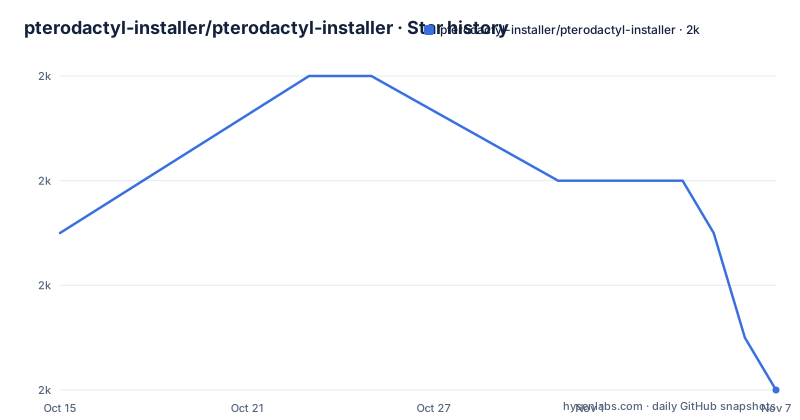
- pterodactyl-installer/pterodactyl-installer1,998 ★ · -3
| Repository | 2026-10-15 | 2026-11-07 |
|---|---|---|
| pterodactyl-installer/pterodactyl-installer | 2k | 2k |
-3 Stars in the last 23 days, measured from the daily GitHub snapshot. Compare with other projects
Editorial analysis
A shell script that mutates a bare server into a game panel host
Pterodactyl is split into two halves. The panel is a PHP web application served through nginx, and Wings is the daemon that actually starts, stops and watches the game server processes. Assembling that by hand means choosing a database, adding a PHP runtime, writing a cron entry, adding a web server block and registering a systemd service, in an order where a mistake in one step leaves a half-configured machine. This repository is a bash script that fixes that order for you. It contains no panel code. The top level is one script plus helper directories:
.github/
.gitignore
CODE_OF_CONDUCT.md
CONTRIBUTING.md
LICENSE
README.md
Vagrantfile
configs/
install.sh
installers/
lib/
scripts/
ui/
The `installers/` and `lib/` trees hold the per-component work, `configs/` holds the config files written onto the host, and `ui/` holds the menu layer the operator interacts with. The script says outright that it is not associated with the official Pterodactyl Project, and support for the script itself runs through its own Discord channel rather than upstream channels.
Panel and Wings are two separate decisions, not one install
At launch the script asks whether you want the panel only, Wings only, or both, and the two paths are not welded together. The panel path is the heavy one: dependencies, a database, a cron job and nginx, in that order. The Wings path is lighter, since it needs Docker and a systemd service and no web server block. Two optional steps sit on the panel side and can be declined at the prompt: Let's Encrypt certificate configuration and firewall configuration. Of the two, the firewall is the step the project pushes hardest, describing automatic firewall setup as highly recommended during the install. Uninstallation is offered for both panel and Wings. That last point carries more weight than a feature list gives it, because a script that installs and cannot remove leaves an operator repairing a broken nginx block by hand at an hour when nothing else is working.
Every supported row of the matrix says PHP 8.3
The support table is the most informative and most restrictive file in the repository. Supported systems are Ubuntu 22.04, 24.04 and 26.04, Debian 10, 11, 12 and 13, Rocky Linux 8 and 9, and AlmaLinux 8 and 9. Everything else carries a red mark: Ubuntu 14.04 through 20.04, Debian 8 and 9, and CentOS 6, 7 and 8, with a footnote explaining that those releases were previously supported. CentOS 6 and 7 being listed as unsupported, while its two replacements are listed as supported, is a clean record of how the script moved forward. The tighter constraint sits in the last column: each supported row names PHP 8.3, and no row names any other PHP version. On a distribution whose packaged PHP differs, the documentation gives no path, and the script does not describe a way to select a different runtime. Treat that single column as the real compatibility test, not the distribution name.
The documented install pipes a domain into bash, not a tagged file
Installation is one command, run as root:
bash <(curl -s https://pterodactyl-installer.se)What you get back is a prompt for panel, Wings or both, then the optional Let's Encrypt and firewall questions, then the install itself. One operational note matters more than it first reads: on some systems you must already be logged in as root before running it, because putting `sudo` in front of the command does not work. The script then continues unattended.
The closer point is where the bytes come from. That URL is the project homepage domain, not a path inside the repository and not a pinned revision, so nothing in the command names v1.3.0. The repository does contain `install.sh`, and the documented command does not use it. Whatever the domain serves at the moment you run the line is what executes with root privileges, which means the sensible habit is to fetch it first and read it.
The Vagrant list promises every supported distro and names one
Development and testing run through Vagrant, which gives the maintainers a throwaway machine per distribution. To cover every supported target at once:
vagrant upOr one distribution by name:
vagrant up <name>The list that follows the second command is where the documentation thins out. It says to replace name with one of the supported installations, then names `ubuntu_jammy`, and the bullet after it is empty. Ubuntu Jammy is 22.04, the oldest Ubuntu version the matrix still supports, so the single named target tests the oldest supported row and leaves Debian, Rocky Linux and AlmaLinux with no named Vagrant machine at all. That gap matters more than the shell linting badge, which is wired through GitHub Actions and catches shell defects but not a package that resolves differently on AlmaLinux 9.
Uninstall is a feature, upgrade is silence
Uninstallation is a claimed capability for both panel and Wings. Beyond a fresh install and that removal path, the documentation covers no lifecycle operation. There is no documented upgrade procedure, no documented way to move an existing installation from one version of the script to a newer one, and no statement either way about what happens if you run the command a second time on a host that already has a panel. The repository also keeps a file of dated notes at its top level, and the README never points a reader at it for migration guidance. The result is a gap that moves the work to you: once the script has rewritten nginx, PHP and a systemd unit on a machine, reversing or upgrading it is no longer the script's stated job. On a server that hosts anything else, that is the reason to read before running rather than after.
Where this sits against a container-based panel
The real alternative is the upstream Pterodactyl documentation and its own Docker based deployment, where the panel and Wings run as containers alongside a database container rather than as host packages. The difference in approach is not packaging, it is blast radius. This script installs into the host's own package set, its own nginx and its own systemd, so there is no container boundary between the panel and the rest of the machine, and no compose file to edit later. On a dedicated VPS that is fewer moving parts and one less layer between you and a crash. On a host with other services, the reverse. The script is GPL-3.0, so anyone modifying and redistributing it carries the same obligation, which is a licensing fact rather than advice.
Editorial conclusion
This suits someone with a clean VPS and an hour to spare who would rather not assemble nginx, PHP, a database and a systemd unit by hand. It does not suit a shared host, a container-first setup, or anyone who needs a reversible change, because uninstall is offered and upgrade is not. Before running it, confirm your distribution appears in the supported table with PHP 8.3, and fetch the script to a file and read it rather than piping a domain straight into bash, and remember that `sudo` in front of the command does not work on some systems.
Frequently asked questions
What operating systems does pterodactyl-installer support?
Ubuntu 22.04, 24.04 and 26.04, Debian 10 through 13, Rocky Linux 8 and 9, and AlmaLinux 8 and 9 are marked supported, each pinned to PHP 8.3. Ubuntu 14.04 through 20.04, Debian 8 and 9, and CentOS 6, 7 and 8 are marked unsupported and are noted as previously supported.
How do you install Pterodactyl Panel with pterodactyl-installer?
Run `bash <(curl -s https://pterodactyl-installer.se)` as root, and the script asks whether to install the panel, Wings or both. On some systems you must already be logged in as root, because `sudo` in front of the command does not work.
Can pterodactyl-installer upgrade an existing Pterodactyl installation?
No upgrade path is documented. The script covers a fresh install, an optional Let's Encrypt setup, an optional firewall setup and uninstallation for both panel and Wings, and the README says nothing about migrating an existing installation to a newer version of the script.
Does pterodactyl-installer configure a firewall and TLS?
Both are optional panel steps the script asks about during the run. Automatic Let's Encrypt configuration and automatic firewall configuration can each be declined, and the project calls opting in for the firewall highly recommended.
How does the maintainer test pterodactyl-installer locally?
With Vagrant. `vagrant up` builds every supported target and `vagrant up <name>` builds one, and the README names `ubuntu_jammy` as a target while the list of further names is empty.
Official sources
Add this badge to your README
If you maintain this project, the badge below links readers to this analysis and shows its maintenance status from the daily GitHub snapshot. Paste the markdown into your README; add ?metric=license or ?metric=stars to the image URL for a different field.

[](https://hysenlabs.com/projects/pterodactyl-installer-pterodactyl-installer)Star history chart for your README
[](https://hysenlabs.com/projects/pterodactyl-installer-pterodactyl-installer)Was this useful?