Pterodactyl Panel puts every game server in its own Docker container and each one behind an egg
Pterodactyl® is a free, open-source game server management panel built with PHP, React, and Go. Designed with security in mind, Pterodactyl runs all game servers in isolated Docker containers while exposing a beautiful and intuitive UI to end users.
At a glance
- What is it?
- Pterodactyl Panel is the PHP, React, and Go control plane for game server hosting, paired with the Wings node agent. Its Docker image builds frontend assets in a discarded Node stage, its .env.example ships an empty APP_KEY, and coverage beyond the core game list depends on community eggs.
- Who is it for?
- Pterodactyl Panel fits a host who wants per-server container isolation, per-game configuration through eggs, and a browser UI for end users, and who is prepared to run two components, the panel and Wings. Skip it if you need one-process hosting or if your game has no egg, because coverage past the core list comes from the community.
- Can I use it commercially?
- Check first. The repository uses a licence we do not classify automatically, so read its LICENSE file before any commercial use.
- Is it still maintained?
- Yes. The repository last received commits 3 days ago.
- What is it written in?
- Mainly PHP, according to GitHub's language statistics.
Answers come from the project's GitHub data, last synced on November 13, 2026, and from our analysis. They are not legal advice.
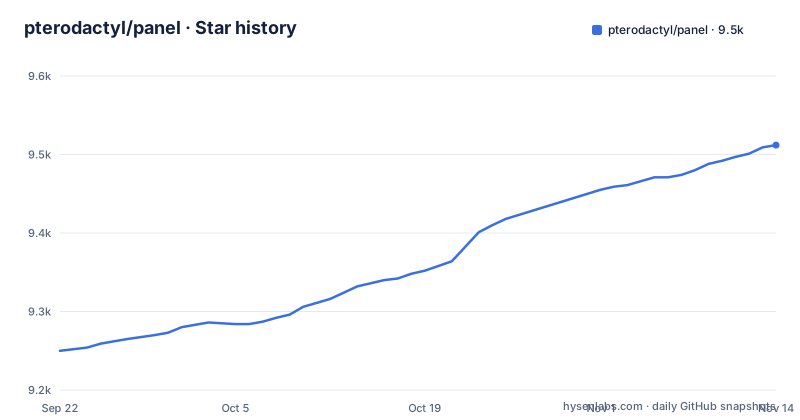
Star history
- pterodactyl/panel9,509 ★ · +259
| Repository | 2026-09-22 | 2026-11-13 |
|---|---|---|
| pterodactyl/panel | 9.3k | 9.5k |
259 Stars in the last 52 days, measured from the daily GitHub snapshot. Compare with other projects
Editorial analysis
`.env.example` ships an empty APP_KEY, an empty HASHIDS_SALT, and debug logging
The example environment file is the fastest way to see what the panel expects. Some values are safe defaults and two are deliberately blank. `APP_KEY=` and `HASHIDS_SALT=` have no default value at all, and `HASHIDS_LENGTH=8` sits next to the salt, so server identifiers are short hashid strings whose salt you must supply. The file does not contain the command that generates either value.
The logging defaults are worth noticing because they contradict what a careful operator would pick. `APP_ENV=production` and `APP_DEBUG=false` are set, yet `LOG_LEVEL=debug` is also set, with `LOG_CHANNEL=daily` and `LOG_DEPRECATIONS_CHANNEL=null`. So the application is told not to debug while the log file records debug output. Other identity fields set the defaults you will want to change: `APP_URL=http://panel.example.com`, `APP_TIMEZONE=UTC`, `APP_LOCALE=en`, and `APP_THEME=pterodactyl`.
The state layer is split, which is the detail most likely to surprise on a first install:
DB_CONNECTION=mysql
REDIS_PORT=6379
CACHE_DRIVER=file
QUEUE_CONNECTION=redis
SESSION_DRIVER=file
A MySQL database named panel with a pterodactyl user, Redis on port 6379 for the queue, and cache and sessions on the local filesystem.
Mail needs an EHLO domain or Gmail will reject the panel's mail
The mail block in the example environment carries the clearest comment in the repository, and it is a real operational trap rather than a style note. The configuration sets `MAIL_MAILER=smtp`, `MAIL_PORT=25`, `MAIL_ENCRYPTION=tls`, a placeholder host of smtp.example.com, and a from address of [email protected] with the name Pterodactyl Panel.
The comment explains that MAIL_EHLO_DOMAIN should be set to your own domain to stop it defaulting to localhost, because mail servers such as Gmail will reject your mail otherwise, and it points at pull request 3110 as the change that added it. The line itself is present but commented out.
The consequence is concrete and easy to misdiagnose. Without MAIL_EHLO_DOMAIN, a panel that otherwise works can have its outgoing mail rejected, and the failure looks like a broken SMTP configuration rather than a rejected EHLO hostname. There is also no queue-specific mail fallback documented in the file even though the queue itself is Redis backed, so anything that expects mail to be retried out of band has to be verified rather than assumed.
For anyone hosting at scale, that makes the mail block the one section of .env.example to fill in completely before the first user is created.
The Dockerfile throws away the Node 22 stage and ships php:8.3-fpm-alpine
The production image is a two stage build and the first stage exists only to compile assets. Stage 0 starts from `node:22-alpine`, copies the whole tree, and runs `yarn install --frozen-lockfile` followed by `yarn run build:production`. Its output is not kept as a runtime: the comment says the stage is discarded since NodeJS will not be needed in the future. That matches the frontend toolchain, where `yarn.lock` is committed so the frozen install resolves the same versions in CI and in the image.
Stage 1 starts from `php:8.3-fpm-alpine`, copies the source again, and copies only `/app/public/assets` from stage 0. Packages added with apk include nginx, certbot, certbot-nginx, supervisor, dcron, curl, git, tar, unzip, and a mysql client, while the PHP extensions installed are bcmath, gd, pdo_mysql, and zip, with zip configured first. Composer is fetched from getcomposer.org and then run as `composer install --no-dev --optimize-autoloader`.
Two lines in that stage are the operational contract. The example environment file is copied to `.env` during build and then removed along with `bootstrap/cache/*.php`, so a production image carries no credentials and no stale cached config, and `chmod 777 -R bootstrap storage` followed by `chown -R nginx:nginx .` hands the writable paths to the nginx user the process actually runs as.
Cron drives the scheduler every minute, and certbot renews at 23:00
The container schedules work with root's crontab. Two lines are written into `/var/spool/cron/crontabs/root`: `* * * * * /usr/local/bin/php /app/artisan schedule:run >> /dev/null 2>&1`, which runs the Laravel scheduler every minute with output discarded, and `0 23 * * * certbot renew --nginx --quiet`, which renews certificates at 23:00 daily and quietly.
The nginx adjustment is the other manual step. The image removes `/usr/local/etc/php-fpm.conf` and creates `/var/run/php` and `/var/run/nginx`, then disables the ssl_session_cache line in nginx.conf with a substitution that comments it out, and copies `.github/docker/default.conf` into `/etc/nginx/http.d/default.conf`.
Two consequences follow from writing the scheduler as cron. The panel's periodic work only runs if cron inside the container is alive, so a container started without the crontab silently stops doing scheduled tasks with no error in the panel. And with certificate renewal tied to that same crontab at one fixed hour, a container that is down at 23:00 postpones renewal.
The frontend is React 16 with the hot loader standing in for react-dom
The dependency list in package.json shows a frontend that is not a current React stack, and the reason is visible in the entries. `react` is pinned at `^16.14.0`, and `react-dom` is not resolved from npm at all: the value is `npm:@hot-loader/react-dom`. Alongside it sit `react-hot-loader` at `^4.12.21` and `@floating-ui/react-dom-interactions` at `^0.6.6`. So the DOM renderer is deliberately replaced by a hot loading build, which is what makes module replacement work in development.
Other dependencies set the shape of the interface. Styling is split between `tailwindcss` at `^3.0.24` with `styled-components` at `^5.3.0` and `styled-components-breakpoint`, and forms come from `@tailwindcss/forms`. State uses `easy-peasy` at `^4.0.1` with `formik` for form handling, and data fetching sits on `swr` at `^0.2.3`. Console access is `xterm` at `^4.19.0`, the editor is `codemirror` at `^5.57.0`, usage graphs use `chart.js` with `react-chartjs-2`, and `qrcode.react` renders QR codes. Localization is full stack through `i18next`, `react-i18next`, and the HTTP and multiload backends.
The build side matches: webpack with babel, tailwind.config.js, a jest.config.js, and `engines` requiring node 22 or newer. The practical consequence for anyone extending the UI is that patches land against React 16 idioms, not current ones, and component libraries expecting React 18 will not drop in.
Coverage past the core game list depends on community eggs
The panel's support for a game is not built in. It comes from eggs, and the standard set is a starting point rather than the whole list. The core supported games named are Minecraft, including Paper, Sponge, Bungeecord, Waterfall, and more, plus Rust, Terraria, Teamspeak, Mumble, Team Fortress 2, Counter Strike: Global Offensive, Garry's Mod, and ARK: Survival Evolved.
Beyond that the community supplies the rest, at eggs.pterodactyl.io, and the list includes Factorio, San Andreas: MP, Pocketmine MP, Squad, Xonotic, Starmade, Discord ATLBot, and most other Node.js or Python Discord bots. The stated reason Docker containers are used at all is that isolation keeps a host from filling up with dependencies for every game, and each egg describes how to build and run one of them.
The consequence for planning is that host capability and host coverage are different questions. The container runtime gives you isolation for anything with an egg, while the actual list of games you can offer is set by eggs someone else wrote and maintains. If a game is missing, you are writing and maintaining an egg yourself, and the egg, not the panel, is what decides the image, the ports, the config file format, and the start command a user sees.
The panel and Wings are two installs, and the README links both manuals
The README does not contain an install command, and that is not an omission in the documentation so much as a statement about the shape of the system. Two manuals are linked separately: Panel Documentation at https://pterodactyl.io/panel/1.0/getting_started.html and Wings Documentation at https://pterodactyl.io/wings/1.0/installing.html, plus a Community Guides section and a Discord for additional help.
Wings is the node side that actually runs the containers, and the panel is the web application that talks to it and renders the interface. Since the panel's own description is that it runs all game servers in isolated Docker containers while exposing the interface to end users, both halves have to exist on your infrastructure before a single server can start.
The repository also tells you where the in-repo engineering information lives rather than in external docs. BUILDING.md sits beside CONTRIBUTING.md, CHANGELOG.md, and SECURITY.md. Static analysis is configured through phpstan.neon, PHP tests through phpunit.xml, JavaScript tests through jest.config.js, and formatting through .php-cs-fixer.dist.php, .prettierrc.json, and .eslintrc.js. Dependency locks are committed as composer.lock and yarn.lock, there is a .env.ci for continuous integration, and a flake.nix with shell.nix and flake.lock describe a Nix development environment. docker-compose.example.yml is present for local work, while the production image comes from the Dockerfile.
The README's copyright line ends at 2022 while tagged releases land in 2026
The licensing paragraph is short and it does not match the project's own cadence. It reads Pterodactyl Copyright 2015 - 2022 Dane Everitt and contributors, followed by code released under the MIT License at LICENSE.md. Meanwhile the default branch is 1.0-develop and tagged releases continue well past that range: v2.0.0-beta.1 and v2.0.0-beta.2 on 2026-10-14, and v1.15.2 on 2026-10-21. The copyright range is a holder statement that was never extended, not a boundary on the code, so anyone doing license diligence should read LICENSE.md itself rather than the years in the README.
The same README spends most of its length on sponsors, which has a second implication for how you read it. Seven companies are listed, mostly hardware, hosting, and game hosting providers: Buildurly for hardware procurement, Hosturly for VPS, web, dedicated, and colocation, indifferent broccoli as a game server hosting and rental company, Infraly as an infrastructure company, MineStrator as a game server hosting provider, Physgun as a game server hosting provider, and WISP.
WISP is described as a SaaS platform for game server management aimed at hosting companies and gaming organizations, and Physgun's blurb claims that most providers rent rack space and rebrand a panel. Both statements come from the sponsors themselves, which is the point worth keeping in mind: the panel is funded by companies in the hosting business, including one that sells a hosted panel, so feature discussions and sponsorship do not sit in separate rooms.
Editorial conclusion
Pterodactyl Panel fits a host who wants per-server container isolation, per-game configuration through eggs, and a browser UI for end users, and who is prepared to run two components, the panel and Wings. Skip it if you need one-process hosting or if your game has no egg, because coverage past the core list comes from the community. Before deploying, note that the copyright line in the README ends at 2022 while tagged releases continued into 2026, that APP_KEY and HASHIDS_SALT ship empty, and that the sponsors list includes a company selling a hosted panel of its own.
Frequently asked questions
Is it pannel or panel?
For this project it is one l, spelled Pterodactyl Panel. The repository is pterodactyl/panel and the npm package name in package.json is pterodactyl-panel, both with a single l.
What does panel mean?
Here it means the control surface for game servers: Pterodactyl Panel is a free, open-source game server management panel built with PHP, React, and Go that runs all game servers in isolated Docker containers and exposes a UI to end users.
Is a panel a group of people?
Not in this repository. Pterodactyl Panel is software, split into the PHP panel application and the Wings node agent that runs the containers, with separate documentation pages for each at pterodactyl.io.
how to install panel board
The README carries no install command. Installation is documented in two places, the Panel Documentation at https://pterodactyl.io/panel/1.0/getting_started.html for the panel application and the Wings Documentation at https://pterodactyl.io/wings/1.0/installing.html for the node agent, since both are needed before any server starts.
Official sources
Add this badge to your README
If you maintain this project, the badge below links readers to this analysis and shows its maintenance status from the daily GitHub snapshot. Paste the markdown into your README; add ?metric=license or ?metric=stars to the image URL for a different field.

[](https://hysenlabs.com/projects/pterodactyl-panel)Star history chart for your README
[](https://hysenlabs.com/projects/pterodactyl-panel)Was this useful?