One Chromium ZIP for four browsers, a store listing for two, and none for Chrome
Web Extension for sniffing and downloading HTTP Live streams (HLS)
At a glance
- What is it?
- HLS Downloader is a WebExtension that detects HLS playlists on the page you are already watching and muxes the fragments into MP4 or MKV inside the browser with a WebAssembly FFmpeg. It is worth understanding what it captures and on whose terms before anything else, because the interesting engineering is in the storage and build story rather than in the sniffing.
- Who is it for?
- The honest read is that this is a tool for people who already have the right to watch what they are watching and want a file at the end of it. That framing decides everything else.
- Can I use it commercially?
- Yes. MIT is a permissive licence: you can use, modify and sell software built on it, as long as you keep its copyright and licence notices.
- Is it still maintained?
- Yes. The repository last received commits 5 days ago.
- What is it written in?
- Mainly TypeScript, according to GitHub's language statistics.
Answers come from the project's GitHub data, last synced on November 15, 2026, and from our analysis. They are not legal advice.
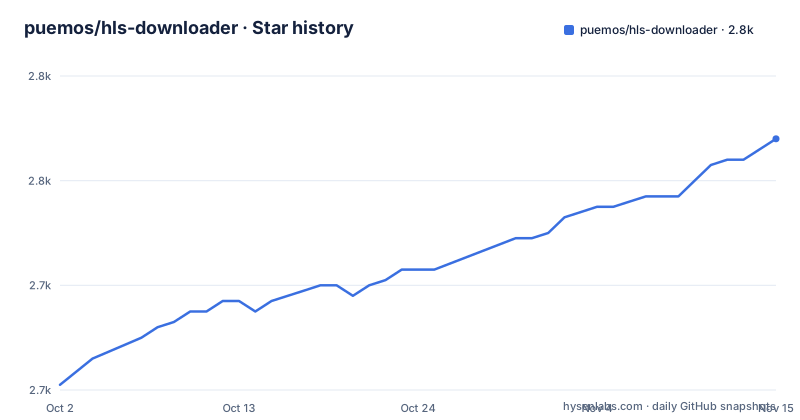
Star history
- puemos/hls-downloader2,768 ★ · +47
| Repository | 2026-10-02 | 2026-11-15 |
|---|---|---|
| puemos/hls-downloader | 2.7k | 2.8k |
47 Stars in the last 44 days, measured from the daily GitHub snapshot. Compare with other projects
Editorial analysis
What it captures is whatever the page already requests
Start with the part that is not a technical question. The extension does not reach out and find content. It detects HTTP Live Streaming playlists on the page you have open, which means it acts on requests the page has already made to a server that chose to serve that stream to you. That distinction is what separates this from a circumvention tool, and it is also why the answer to whether you may keep the result depends entirely on the terms of the specific service, not on the extension. Some services grant a personal offline copy, some grant nothing beyond streaming, and the difference is not something a browser extension can decide for you. The project's own position on data is narrow and checkable: it claims nothing is uploaded, it names a privacy document in the repository root, and the merge step runs as a WebAssembly build of FFmpeg inside the browser with fragments and final output both in browser-managed storage. Take the no upload claim at face value only after reading that document, since the extension has to see every media request on every page you visit. Two design choices follow from that framing rather than from any bypass. Discovery is automatic, in the sense that the extension looks for playlists on the page as soon as it opens, with no developer tools and no manual copy of a manifest URL involved. And quality is chosen before the transfer rather than after, with resolution and audio language settled up front, so a wrong track is not something you discover after the bandwidth is already gone.
Six browsers are named and two have a store listing
The availability table names six browsers and routes four of them to manual installation. Firefox has a listing on the add-ons site and a manual path. Microsoft Edge has a listing on its own add-ons site. Google Chrome, Brave, Arc and Opera are all pointed at manual installation, and Chrome's row is worded as an experimental Manifest V3 build available from source rather than as a download. So the browser with the largest Chromium share has no store listing at all, and the row that describes it as experimental sits directly above four sets of manual instructions that treat the same archive as the ordinary route. The stated runtime floor is given once for everything: Firefox 128 or newer, or Chromium 111 or newer. Everything below that floor, and every browser not in the table, is simply outside the project. That is a narrow distribution surface for an extension whose main selling point is that it needs no developer tools, and it is worth knowing before you plan to hand it to anyone else.
The documented archive name is not the name the build writes
The install sections tell you to download a file called extension-mv3-chrome.zip from the latest release, and they say so identically for Chrome, Brave, Arc and Opera. The build script does not write that name. It takes a basename that defaults to extension and appends a browser suffix, so the default output is extension-chrome.zip, and it writes a second archive, extension-firefox.xpi, from the same directory. There is a third dimension the instructions never mention: the default build targets Manifest V2, described as the Firefox and legacy Chromium workflow, while every Chromium manual path asks for an MV3 artifact. So the file named in the documentation is produced by a non-default variant script rather than by the plain build. Look at how the archive step is written and the reason becomes clear. One shell command reads two environment variables with defaults, a directory that defaults to dist and a basename that defaults to extension, then changes into that directory and zips its contents into a chrome suffixed archive, and then, if a third variable that also defaults to true is left alone, zips the same directory contents a second time into a firefox suffixed archive. One directory, two archives, and the second one is not a different build but the same bytes under another extension. Three naming layers, two manifest versions and one shared Chromium archive, and the document that tells you what to download points at the least obvious combination of them.
A blocklist ships in the extension and can be built out
There is a file called blocklist.json in the repository root, and the build scripts exist in pairs. There is a Manifest V2 build and a Manifest V3 build, and then there is a Manifest V2 build with a no-blocklist flag and a Manifest V3 build with the same flag, and then an aggregate command that runs all four in sequence. The existence of those two extra variants is the notable part. A blocklist inside a stream sniffer is a list of things the extension declines to act on, and shipping a build with the list removed is a supported, scripted operation rather than a patch someone has to hand write. What is not stated anywhere in the visible text is what is on that list, who curates it, or how a site gets added. The privacy document and the functionalities document sit beside it in the root, so those answers may exist somewhere in the project, but the store listing and the readme both describe the shipped build without describing its exclusions. Treat the default build as the one with the project's own judgement baked in. The four builds are not four scripts. They are one variant script invoked with a manifest argument, with the no-blocklist builds adding a second flag, and an aggregate command that cleans, builds the Manifest V2 and Manifest V3 variants, then builds the two no-blocklist variants on top of that. So the pairing is systematic and the list file is the only difference between the members of each pair, which makes the removal of it a deliberate, one-flag operation rather than a fork.
Storage is browser quota and the estimate is treated as informational
Everything stays in the browser, which means everything competes for browser storage quota, and the project is upfront that this is the weak point. It needs room for the downloaded fragments and for the finalized file at the same time, since the merge reads one and writes the other. The readme says browser storage estimates can be conservative and are treated as informational when the unlimited storage permission is active, which is a way of saying the extension does not trust its own headroom calculation. Downloads started by an older version stay readable through a legacy IndexedDB path, and they are explicitly not migrated. The stated failure case is blunt: if a legacy finalization runs out of memory, delete the download and do it again. That is a real answer rather than a hedge, and it is also the only migration story in the document. The merge itself is the expensive step, and it happens on the same machine that is running the browser playing the video.
Firefox release builds pin three tools to exact versions
The build is reproducible to a degree that is unusual for an extension, and that reproducibility is also a constraint. Release builds for Firefox use Node.js 22.12.0, npm 10.9.0 and pnpm 10.34.4 exactly, the manifest declares a package manager field pinned to that pnpm version, and the engine floor is Node 22.12.0. Contributors are told to install the pinned pnpm through npm first and to install from a frozen lockfile:
git clone https://github.com/puemos/hls-downloader.git
cd hls-downloader

# install the pinned pnpm version through npm
npm install --global [email protected]

pnpm install --frozen-lockfile
pnpm run build    # outputs → ./dist/, extension-chrome.zip, extension-firefox.xpi

# verify build artifacts then clean up
pnpm run clean
The cleanup step is where the care shows and also where it bites. It removes the dist directories, every extension archive and every file matching a source-code zip pattern, then recreates the dist directory. So the same command that tidies a working tree also deletes the prepared source archives a store review expects. The repository keeps those artifacts alongside the code in a store-assets directory, plus a Mozilla metadata file and a document written for store reviewers, so the submission material is versioned in the project rather than produced at release time.
The Firefox manual step reads Opem
The Firefox instructions are two steps, and the first of them contains a typo: it says Opem where it means Open, in front of the about:debugging runtime page, followed by a temporary add-on load that picks the XPI. Small as it is, it is the kind of error that survives in a document nobody has rewritten since the CRX era. The same document still carries a collapsible block of instructions for versions before 4.1.2, which install by dragging a CRX file onto the extensions page with developer mode enabled. That block is explicitly labelled legacy, and a note above it says newer versions ship only a ZIP archive. So the delivery format changed once, the old path stayed in the file, and it is still reachable. Four more rows of the same table then repeat nearly identical manual steps for Chrome, Brave, Arc and Opera, differing only in the internal URL you open or, in Arc's case, a menu path with a keyboard shortcut offered alongside it.
Four build units and an audit that checks patches landed
The extension is not one bundle. The build filters into four units: a core, a design system, a background worker and a popup. The first two are built in sequence, and the two browser-facing ones are then built in parallel, which tells you the split is shared logic and styling on one side, and the two extension contexts on the other. The security story is scripted too. One command runs an audit at the moderate level and then runs a second script whose job is to verify that security patches were applied, so the dependency check has a companion that inspects the result rather than trusting the exit code alone. The repository also carries a coverage badge in its root, a changelog, a contributors guide, a code of conduct, a document for reviewers, and a document for people who want to translate or extend it. The workspace is a pnpm workspace with a patches directory, so dependencies are vendored and amended in the repository rather than resolved fresh. Release history is recent but uneven: v5.5.0 on 2026-07-27, then v5.4.4 and v5.4.3 published seven minutes apart on the same afternoon in May, and the default branch moved again on 2026-09-29, about two months after the newest tag. The one number that appears anywhere is not a performance figure: it is the quality range, offered from 240p up to 4K, with audio language and bit rate chosen before the download starts rather than after, and the output written as either MP4 or MKV.
Editorial conclusion
The honest read is that this is a tool for people who already have the right to watch what they are watching and want a file at the end of it. That framing decides everything else. If your use is legitimate, the two things to verify first are the terms of the specific service you point it at, and where you get the build from: two of six listed browsers have a store listing, Chrome has only a source build described as experimental, and four browsers share one archive whose documented filename does not match the one the build script writes. Also check what the shipped blocklist contains before you strip it, since removing it is a supported build variant and nobody outside the project publishes that list. For day to day use in a browser you depend on, prefer the store build and read PRIVACY.md first; this one is explicitly a source and archive workflow.
Frequently asked questions
Is the HLS Downloader extension available in the Chrome Web Store?
Not according to its own availability table. Chrome is listed as an experimental Manifest V3 build available from source, and the instructions point at a ZIP from the latest release rather than a store listing.
Which browsers have a store listing for HLS Downloader?
Firefox, on the add-ons site, and Microsoft Edge, on its own add-ons site. Brave, Arc and Opera are all routed to manual installation.
Does the HLS Downloader extension upload anything?
It states that nothing is uploaded, and that a WebAssembly build of FFmpeg muxes the chosen audio and video locally while media fragments and the final output both stay in browser-managed storage. A privacy document sits in the repository root.
What happens to downloads started by an older version of the HLS Downloader?
They stay readable through the legacy IndexedDB path but are not migrated, and if a legacy finalization runs out of memory the stated advice is to delete it and download it again.
What tool versions does HLS Downloader pin for Firefox release builds?
Node.js 22.12.0, npm 10.9.0 and pnpm 10.34.4 exactly, with the package manager field pinned to that pnpm version and an engine floor of Node 22.12.0.
What is the blocklist.json file in the HLS Downloader repository?
The build scripts offer Manifest V2 and V3 builds both with and without it, including a no-blocklist variant of each. The visible documentation does not describe what the list contains or who curates it.
Official sources
Add this badge to your README
If you maintain this project, the badge below links readers to this analysis and shows its maintenance status from the daily GitHub snapshot. Paste the markdown into your README; add ?metric=license or ?metric=stars to the image URL for a different field.

[](https://hysenlabs.com/projects/puemos-hls-downloader)Star history chart for your README
[](https://hysenlabs.com/projects/puemos-hls-downloader)Was this useful?