Haehnchen/crypto-trading-bot: a self-hosted Node.js bot for CCXT exchanges
Cryptocurrency trading bot in javascript for Bitfinex, Bitmex, Binance, Bybit ... (public edition)
At a glance
- What is it?
- The public edition of a TypeScript trading bot that runs its own webserver, stores candles in sqlite3, and executes strategies you write into var/strategies. It is explicitly labelled not production ready, and that label should drive the decision.
- Who is it for?
- Adopt it if you are a developer who wants to read the strategy code before it trades and you are comfortable running Node 22 or newer on your own host. Do not adopt it if you need a supported product, a managed platform, or anything the author is willing to call production ready.
- Can I use it commercially?
- Yes. MIT is a permissive licence: you can use, modify and sell software built on it, as long as you keep its copyright and licence notices.
- Is it still maintained?
- Yes. The repository last received commits 112 days ago.
- What is it written in?
- Mainly TypeScript, according to GitHub's language statistics.
Answers come from the project's GitHub data, last synced on November 21, 2026, and from our analysis. They are not legal advice.
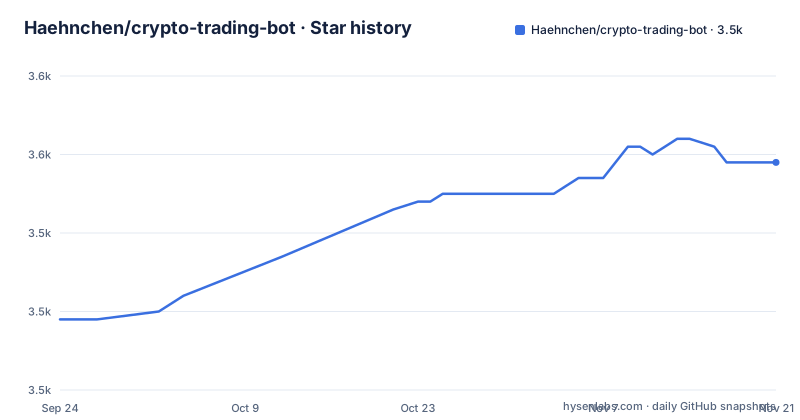
Star history
- Haehnchen/crypto-trading-bot3,549 ★ · +20
| Repository | 2026-09-24 | 2026-11-21 |
|---|---|---|
| Haehnchen/crypto-trading-bot | 3.5k | 3.5k |
20 Stars in the last 58 days, measured from the daily GitHub snapshot. Compare with other projects
Editorial analysis
What Haehnchen/crypto-trading-bot actually is, and who it is for
This is a Node.js trading bot that talks to exchanges through CCXT, the library that normalises order and market endpoints across venues. The README lists Bitfinex, Bitmex, Binance and Bybit in the project description and claims CCXT-based support for 100+ exchanges. It stores candles and tickers in sqlite3, serves a dashboard over HTTP, and runs strategies against those candles. The author's own framing is blunt: "Not production ready only basic functionality." That sentence is the most important line in the repository, and it should be read as a description of the intended audience. This is a bot for someone who wants to write the strategy themselves, run it on a machine they control, and watch the trades land in a local UI. It is not a hosted service, it has no homepage, and there is no release artefact to download. You get it by cloning the repository and building it. The feature list is aimed at that person: multi-pair support in one instance, long and short positions, a signal browser, and Slack, Telegram and email notifications so you do not have to keep the dashboard open.
How the bot is wired: webserver, sqlite3 and CCXT in one process
The architecture is a single long-running Node process that does three jobs at once. It polls or subscribes to exchange data through CCXT and writes candles and tickers into a better-sqlite3 database. It evaluates strategy code on a schedule against that stored data. It serves an Express webserver, rendered with EJS templates and express-ejs-layouts, on port 8080 by default, with basic-auth in front of it. The package.json shows the rest of the shape: winston for logging, telegraf for the Telegram bot, nodemailer and sendmail for email, queue-promise for serialising work, and flat-cache for short-lived caching. Indicator maths comes from two places, the pure JavaScript technicalindicators package and talib, which is a native binding to TA-Lib. That native dependency is the source of most installation friction, and it is worth understanding before you start: talib is pinned at 2.0.3 in package.json, and the README's preinstall step exists precisely because building sqlite and the indicator libraries needs a compiler toolchain. The bot is not a set of microservices and it does not scale horizontally. One instance, one sqlite file, one process. For a personal bot that is a reasonable trade, because state stays in one place and there is no message broker to operate.
Installing it and getting the dashboard up
The engines field in package.json requires Node 22 or newer, so check that first. On a Debian or Ubuntu host the README suggests installing build tools before anything else, because better-sqlite3 and talib compile native code during install. The README gives this exact command:
sudo apt-get install build-essentialThen install dependencies and start the bot. The README uses the production install flag, and npm start is defined in package.json as a production build followed by node dist/index.js trade, so the first run also compiles the TypeScript and bundles it with esbuild:
npm install --production
npm start
If port 8080 is already taken, the README documents passing a port through npm. Note the double dash, which forwards the flag to the script:
npm start -- --port=55555When the process is up, the README says to open the dashboard at http://127.0.0.1:8080. You should see the webserver UI with a dashboard, and separate views for trades, positions and orders, which the README documents with screenshots under documentation/. If you prefer to run from source without the production build, package.json defines start:dev as tsx index.ts trade, and start:watch adds file watching. For development that is faster than rebuilding on every change. Tests run through mocha with tsx as the loader, via npm test.
Writing a custom strategy into var/strategies
Strategy code lives in two places. The repository ships built-in strategies under src/strategy/strategies, and the README is honest about them: the common indicator strategies are "most of the time not profitable." It points to two that are documented in their own README files, dip_catcher and dca_dipper, the latter described as a long term Dollar-Cost Averaging dip investor strategy. For your own work the README directs you to var/strategies, and the file layout is a plain JavaScript file or a folder containing one:
# simple file structure
var/strategies/your_strategy.js

# or wrap strategy into any sub folder depth
var/strategies/my_strategy/my_strategy.js
The README does not spell out the strategy interface, so the practical route is to read an existing strategy under src/strategy/strategies and mirror its shape. That is a real gap: the custom strategy folder is documented by path only, with no API reference, no lifecycle description, and no statement of which callbacks the runner invokes. Treat the shipped strategies as the specification. The var/ directory is also separate from src/, which means your strategy survives a rebuild of the TypeScript sources, and that separation is the main reason the folder exists.
The webserver is the weakest link, and the README says so
The README states plainly that the webserver provides just basic auth, and recommends combining it with HTTPS for a public server. It then gives an nginx server block with proxy_pass to http://127.0.0.1:8080, an ssl_certificate and ssl_certificate_key managed by Certbot, plus the options-ssl-nginx.conf and ssl-dhparams.pem includes. That is a workable pattern, but notice what it implies: the bot itself has no session handling, no rate limiting on login, and no account model beyond basic auth. If you expose port 8080 directly to the internet you are one credential leak away from someone placing manual orders through your UI. Keep it bound to localhost and let nginx terminate TLS. The same caution applies to exchange API keys. The README does not describe key storage, scoping or rotation, and the repository layout gives no secrets-management directory. The safe assumption is that keys live in local configuration files on the host, which means file permissions and host access are your only controls. That is normal for a self-hosted bot, but it is a control you have to build, not one the project hands you.
When this bot is the wrong tool
The author's own warning is the first reason to walk away. If you need something you can put in front of real capital without reading the source, this is not it. The second reason is the dependency chain. talib pinned at 2.0.3 and better-sqlite3 both need a native toolchain, so installs fail on minimal containers and on machines without build-essential, and the README's preinstall step exists because of that. If you cannot run a compiler on your host, this bot is the wrong choice before you even reach the strategy question. The third reason is the strategy surface. The README documents var/strategies by path, not by interface, so anyone who cannot read TypeScript well enough to reverse-engineer the callback contract from src/strategy/strategies will be stuck at the first custom strategy. The fourth is the built-in strategies themselves. The README says they are most of the time not profitable, which is an unusual and welcome admission, but it also means the default experience is not a working trading system. You are getting a framework, a dashboard and an execution loop, not an edge. Finally, there is no hosted version and no homepage, so there is no vendor to call when the bot stops placing orders.
How it differs from freqtrade and the other bots it lists
The README's Related Links section names freqtrade, zenbot, magic8bot, gekko, WolfBot, bitprophet, PHPTradingBot and Superalgos as inspiration. The most useful comparison is freqtrade, because the difference is structural rather than cosmetic. freqtrade is a Python project and its strategy interface is a documented class with named entry and exit callbacks; this bot is TypeScript and JavaScript, and its strategy interface is demonstrated by example rather than specified. If you already write Python and want a documented strategy contract, freqtrade is the closer fit. If your stack is Node and you want the strategy to live next to the rest of your JavaScript, this repository is the more natural home. The second difference is the UI. This bot ships its own Express webserver with EJS views, a dashboard, a signal browser and TradingView widgets, so the browser is part of the product. Several of the listed projects expect you to bring your own monitoring or run headless. The third difference is exchange reach: because execution goes through CCXT, the README's claim of 100+ exchanges is a property of that library, not of this bot's own integrations, which means venue-specific quirks are CCXT's problem to solve. That is a reasonable bet, but it is a dependency, not a feature the project maintains itself.
Maintenance, licence and what an upgrade actually costs
The repository is not archived, and the last push was on 2026-08-02, which is recent enough that the project is still being touched. The repository has no published GitHub releases, so there is no versioned artefact to pin and no changelog to read before upgrading; package.json still carries version 0.1.0, which tells you the project does not use its version field as a release signal. Upgrading therefore means pulling master and rebuilding, and the rebuild is where the cost sits: npm start runs npm run build:prod, which invokes esbuild, and any change to the native dependencies triggers another compile of better-sqlite3 and talib. Your custom strategies in var/strategies are outside src/, so they are not overwritten by a rebuild, but they can break if the strategy contract shifts, and nothing in the README promises it will not. The licence is MIT, which permits commercial use, modification and redistribution provided the copyright notice and permission notice are kept. That is a permissive licence, and it places no obligation on the author to support you. Nothing here is legal advice; if you plan to trade other people's money, the regulatory question is separate from the licence question.
Editorial conclusion
Adopt it if you are a developer who wants to read the strategy code before it trades and you are comfortable running Node 22 or newer on your own host. Do not adopt it if you need a supported product, a managed platform, or anything the author is willing to call production ready. Before wiring an API key, confirm three things: that npm install --production compiles better-sqlite3 and talib on your machine, that the strategy you intend to run exists in src/strategy/strategies rather than only in your head, and that you have put the webserver behind the nginx proxy_pass the README shows, because basic auth alone is what ships.
Frequently asked questions
How do I set up Haehnchen/crypto-trading-bot?
Install build-essential on the host, run npm install --production, then npm start, which builds the TypeScript and runs node dist/index.js trade. The dashboard is served at http://127.0.0.1:8080 by default, and you can pass --port through npm start to change it.
Is Haehnchen/crypto-trading-bot profitable?
The README states that the built-in common indicator strategies are most of the time not profitable, and the project is labelled not production ready. Profitability depends on the strategy you write into var/strategies, which the repository does not evaluate for you.
Does Haehnchen/crypto-trading-bot send Telegram notifications?
Yes. Telegram is listed as a notification channel alongside Slack and email, and the README walks through creating a bot with BotFather, adding it to a group as administrator, and reading the group chat id (including the negative sign) from @RawDataBot.
Which exchanges does Haehnchen/crypto-trading-bot support?
Exchange access goes through CCXT, and the README lists Bitfinex, Bitmex, Binance and Bybit in the project description while claiming CCXT-based support for 100+ exchanges. Venue behaviour therefore follows what CCXT implements.
Can I run my own strategy with Haehnchen/crypto-trading-bot?
The README directs custom strategies to the var/strategies folder, either as a single .js file or inside a subfolder of any depth. It does not document the strategy interface, so the shipped strategies under src/strategy/strategies are the practical reference.
Is the Haehnchen/crypto-trading-bot webserver safe to expose publicly?
The README states the webserver provides just basic auth and recommends combining it with HTTPS for a public server, giving an nginx proxy_pass example on port 8080. There is no account model or login rate limiting described in the repository.
Official sources
Add this badge to your README
If you maintain this project, the badge below links readers to this analysis and shows its maintenance status from the daily GitHub snapshot. Paste the markdown into your README; add ?metric=license or ?metric=stars to the image URL for a different field.

[](https://hysenlabs.com/projects/haehnchen-crypto-trading-bot)Star history chart for your README
[](https://hysenlabs.com/projects/haehnchen-crypto-trading-bot)Was this useful?