PythonKit loads libpython at runtime, so the Python version is decided on the machine, not at build time
Swift framework to interact with Python.
At a glance
- What is it?
- PythonKit is a Swift package that calls into Python through a dynamic Python.import. Because the interpreter library is found when the program starts, the environment variables and code signing rules matter more than the API.
- Who is it for?
- PythonKit suits Swift developers who want to call a Python module from Swift code, on a machine where a Python library is installed and findable. It is a poor choice if you need to ship an app to a machine you do not control, since the interpreter is not bundled and the README only explains how to point at one.
- Can I use it commercially?
- Yes. Apache-2.0 is a permissive licence: you can use, modify and sell software built on it, as long as you keep its copyright and licence notices.
- Is it still maintained?
- Yes. The repository last received commits 34 days ago.
- What is it written in?
- Mainly Swift, according to GitHub's language statistics.
Answers come from the project's GitHub data, last synced on November 25, 2026, and from our analysis. They are not legal advice.
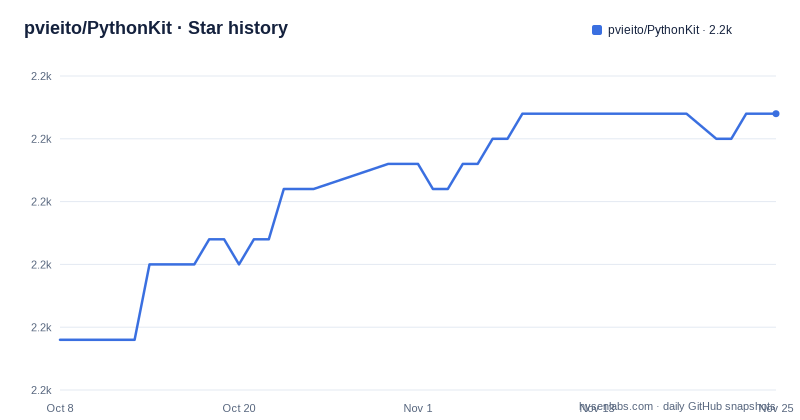
Star history
- pvieito/PythonKit2,231 ★ · +9
| Repository | 2026-10-08 | 2026-11-25 |
|---|---|---|
| pvieito/PythonKit | 2.2k | 2.2k |
9 Stars in the last 48 days, measured from the daily GitHub snapshot. Compare with other projects
Editorial analysis
Python.import turns a Python module into a Swift value
PythonKit is a Swift framework to interact with Python. Its README demonstrates the idea by translating a three-line Python script into Swift. The Python version imports `sys` and prints the version numbers, the default encoding and the full version string. The Swift version starts with `import PythonKit`, then calls `Python.import("sys")` and reads the same attributes off the result.
import PythonKit

let sys = Python.import("sys")

print("Python \(sys.version_info.major).\(sys.version_info.minor)")
print("Python Version: \(sys.version)")
print("Python Encoding: \(sys.getdefaultencoding().upper())")
The attribute names are the Python ones: `version_info.major`, `getdefaultencoding()` and `upper()`. The README's point is that the Swift code reads like the Python code it replaces. It gives no listing of which Python types convert to Swift types, so that is a question for the source in `PythonKit/`.
A single Swift Package Manager line brings it in
Installation is a Swift Package Manager dependency. You add this line to the dependencies of your `Package.swift` manifest:
.package(url: "https://github.com/pvieito/PythonKit.git", from: "1.0.0"),The `from: "1.0.0"` clause asks for version 1.0.0 or any later compatible version. The repository has no GitHub releases, so check the tags yourself before you rely on that floor resolving to what you expect.
The README mentions no other install route. There is no CocoaPods or Carthage section, and the two badges at the top both link to the Swift Package Index page for the project. Building and running your own target is done with `swift run`, which is the command all the README examples use.
The newest Python found on the machine wins unless you say otherwise
Python libraries are loaded at runtime by PythonKit. It tries to find the most modern Python version available in the system. That is a convenience on your own laptop and a hazard on a server where several Pythons are installed, because the one chosen is the one the lookup finds, not the one your code was written against.
Two environment variables override the search. `PYTHON_VERSION` forces a given version, and `PYTHON_LIBRARY` forces a specific Python library path or name. The README gives four examples: `PYTHON_VERSION=3 swift run` printed Python 3.5, `PYTHON_VERSION=2.7 swift run` printed Python 2.7, `PYTHON_LIBRARY=libpython3.5.so swift run` printed Python 3.5, and `PYTHON_LIBRARY=/usr/lib/x86_64-linux-gnu/libpython2.7.so swift run` printed Python 2.7.
Those version numbers are examples from the README, not a statement of what is supported today. The README does not publish a list of supported Python versions.
PYTHON_LOADER_LOGGING prints every path it tries before it gives up
When PythonKit cannot find and load the Python library, the program stops with a fatal error. To see where it looked, set `PYTHON_LOADER_LOGGING`. The README shows this run:
$ PYTHON_LOADER_LOGGING=TRUE PYTHON_VERSION=3.8 swift run
Loading symbol 'Py_Initialize' from the Python library...
Trying to load library at 'Python.framework/Versions/3.8/Python'...
Trying to load library at '/usr/local/Frameworks/Python.framework/Versions/3.8/Python'...
Fatal error: Python library not found. Set the PYTHON_LIBRARY environment variable with the path to a Python library.
The log shows the first symbol it needs, `Py_Initialize`, and then the candidate locations under `Python.framework`. The error message itself tells you the fix: set `PYTHON_LIBRARY` to the path of a Python library.
Because the failure happens when the program runs, a build that succeeds on a CI machine says nothing about whether the same binary will start on another host.
Hardened Runtime on macOS blocks libraries signed by someone else
The Troubleshooting section has a single entry, and it concerns macOS. If you target the Mac platform with the Hardened Runtime enabled, you must properly sign and embed the Python framework you want PythonKit to load.
The reason is the Hardened Runtime Library Validation mechanism. It prevents a process from loading libraries that are not signed by Apple or by the same developer as the main process. A Python framework installed from elsewhere meets neither condition, so loading fails until you sign and embed it, or change the entitlement the README links to.
This matters for distribution. An app that works under `swift run` on your machine can refuse to start once it is signed with the Hardened Runtime, because the Python framework it loads at runtime is not signed by you. The README documents no iOS or Linux equivalent.
No bundled interpreter, and the README is silent on exceptions and threads
PythonKit does not bundle an interpreter. Everything in the README assumes a Python library already exists on the machine, found by version or by path. If your target has none, the loader prints its fatal error.
The README is short and silent on several points a Swift developer would ask about. It does not list supported platforms beyond the macOS signing note and the Linux library path in the `PYTHON_LIBRARY` example. It does not say how Python exceptions surface in Swift, how threads and the interpreter lock behave, or how to pass Swift closures into Python. Treat each of these as unknown until you read the source or test it yourself.
The examples also show Python 3.5, 2.7 and 3.8 as the versions picked. Verify the Python you plan to use with your own program first.
Lineage from Swift for TensorFlow and where questions go
Originally PythonKit was based on the `Python` module from the Swift for TensorFlow experimental project. The README gives no further history, and it does not say how far the code has moved from that module.
For questions, the README sends you to the Swift Forums, in the related projects category. There is no mention of a separate issue template or chat room in the README text.
The repository is under the Apache-2.0 licence, with the licence text in `LICENSE.txt`. Its last push was on 23 October 2026, and it is not archived. Alongside `Package.swift`, `PythonKit/` and `Tests/`, the top level holds `AGENTS.md` and `CLAUDE.md` files, which the README does not mention.
Editorial conclusion
PythonKit suits Swift developers who want to call a Python module from Swift code, on a machine where a Python library is installed and findable. It is a poor choice if you need to ship an app to a machine you do not control, since the interpreter is not bundled and the README only explains how to point at one. Before adopting it, run a small program with PYTHON_LOADER_LOGGING set on the target platform and confirm it finds the library you expect.
Frequently asked questions
What is PythonKit?
PythonKit is a Swift framework to interact with Python. It lets Swift code call Python modules, for example through Python.import("sys").
How do I add PythonKit to a Swift project?
Add .package(url: "https://github.com/pvieito/PythonKit.git", from: "1.0.0") to the dependencies in your Package.swift manifest.
How do I make PythonKit use a specific Python version?
Set PYTHON_VERSION to force a version, or PYTHON_LIBRARY to force a library path or name. Set PYTHON_LOADER_LOGGING if the library cannot be found.
Why does PythonKit fail to load Python on macOS?
With the Hardened Runtime enabled, Library Validation blocks libraries not signed by Apple or the same developer. Sign and embed the Python framework you want to load.
Official sources
Add this badge to your README
If you maintain this project, the badge below links readers to this analysis and shows its maintenance status from the daily GitHub snapshot. Paste the markdown into your README; add ?metric=license or ?metric=stars to the image URL for a different field.

[](https://hysenlabs.com/projects/pvieito-pythonkit)Star history chart for your README
[](https://hysenlabs.com/projects/pvieito-pythonkit)Was this useful?