Two PyAV installs, two different products: the wheel bundles FFmpeg, the source build hands you pkg-config
Pythonic bindings for FFmpeg's libraries.
At a glance
- What is it?
- PyAV-Org/PyAV is a BSD-3-Clause set of Python bindings for FFmpeg, pushed to main on 2026-10-03. The install section is the interesting part, because the binary wheel and the source build ship different things, and the README states one FFmpeg version while its own build script assumes another.
- Who is it for?
- PyAV is the right choice when a Python program has to sit inside the decode path rather than beside it, and the wheel install makes that cheap because FFmpeg travels with it. It is the wrong choice for scripted one-off conversion, which the README says plainly.
- Can I use it commercially?
- Yes. BSD-3-Clause is a permissive licence: you can use, modify and sell software built on it, as long as you keep its copyright and licence notices.
- Is it still maintained?
- Yes. The repository last received commits 1 day ago.
- What is it written in?
- Mainly Python, according to GitHub's language statistics.
Answers come from the project's GitHub data, last synced on November 14, 2026, and from our analysis. They are not legal advice.
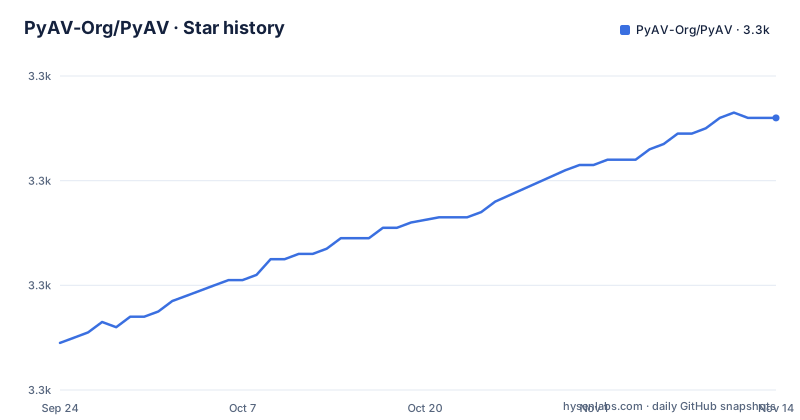
Star history
- PyAV-Org/PyAV3,332 ★ · +43
| Repository | 2026-09-24 | 2026-11-14 |
|---|---|---|
| PyAV-Org/PyAV | 3.3k | 3.3k |
43 Stars in the last 51 days, measured from the daily GitHub snapshot. Compare with other projects
Editorial analysis
The wheel and the source build ship different things
The first install is one line, and it hides a large amount of machinery:
pip install avWhat that command gets you is a binary wheel from PyPI for Linux, macOS and Windows with FFmpeg bundled, which means the codecs arrive inside the wheel rather than as a system dependency you have to satisfy. The package name on PyPI is `av`, one letter off the project name, and the conda-forge channel publishes the same package under the same name, so `conda install av -c conda-forge` is the second route to the same bundled artifact.
Every other path in the file behaves differently. Building from source puts the FFmpeg problem back in front of you: the dependency has to already exist on the machine, and satisfying it is the reason the alternative install section carries a warning box in the first place. So the choice is not really between pip and conda. It is between taking the bundled FFmpeg in a wheel, or taking responsibility for the FFmpeg on the box.
The release supports FFmpeg 9.x while the build script skips on 8.x
Two statements about the FFmpeg version sit close together and do not agree. The alternative install section says this release supports FFmpeg 9.x. The source build block, a few paragraphs down, tells you to build ffmpeg from source and then adds this comment: you can skip this step if ffmpeg 8.x is already installed.
So the prose names 9.x as the supported version while the shortcut is offered to anyone on 8.x. Read literally, a developer with 8.x already present is invited to skip `./scripts/build-deps` and link against what they have, in a release whose stated target is a different major. Nothing in the file resolves it: there is no note saying the skip also applies to 9.x, and no note saying 8.x is unsupported. The consequence is that the fastest path through the source build is the one whose precondition the document does not confirm.
A related naming choice sits on the Windows side. The vendored FFmpeg is fetched with a config file named `scripts\ffmpeg-latest.json`. A file called latest inside a release that states a supported major version is the pin expressed in the filename rather than in the contents, and the README never shows what that file pins.
Windows builds through setup.py and a fetched vendor directory, not through make
The Unix source path is Ant-free and Make-driven. You clone, activate a script, optionally build FFmpeg, then run make, make test, and finally pip install the tree after deactivating.
git clone https://github.com/PyAV-Org/PyAV.git
cd PyAV
source scripts/activate.sh

# Build ffmpeg from source. You can skip this step if ffmpeg 8.x is already installed.
./scripts/build-deps

# Build PyAV
make

# Testing
make test

# Install globally
deactivate
pip install .
Windows takes a different route through the same problem. There is no Makefile step. Instead a conda environment is created with a pinned toolchain, `python=3.12 cython setuptools numpy pillow pytest`, and FFmpeg is downloaded by the project's own script into a directory under CONDA_PREFIX:
python scripts\fetch-vendor.py --config-file scripts\ffmpeg-latest.json $ffmpegDir
python setup.py build_ext --inplace --ffmpeg-dir=$ffmpegDir
python -m pytest
That is a vendored FFmpeg delivered by the project, not one you supply, which is the reverse of what the Linux path asks for. The two platforms are not variations on one build; they are different strategies for the same dependency.
The project tells you when not to reach for it
The framing paragraph is unusually direct about the limits. PyAV exposes direct and precise access to media through containers, streams, packets, codecs and frames, and offers a few transformations plus interop with NumPy and Pillow. Then it says the power comes with responsibility, because working with media is horrendously complicated and PyAV cannot abstract that away or make the best decisions for you. The stated test is whether the ffmpeg command already does the job without you bending over backwards; if it does, PyAV is likely to be more hindrance than help.
That sentence is the acceptance criterion in the project's own words, and it rules out the most common reason to reach for a binding: shelling out once from a script. The value is on the other side of it, where you cannot avoid it because the frames have to become arrays in a running process.
It also sets the expectation for the API. The description claims the power and control of the underlying library while managing the gritty details as much as possible. The qualifier is doing real work: as much as possible is not all of it, so decisions the binding declines to make stay with you.
Documentation and homepage share one domain, and neither is the GitHub page
The homepage in the repository metadata is https://pyav.basswood.io, and the documentation badge in the README points at the same host, labelled docs on pyav.basswood.io. The docs link in the README body resolves there too. So the documentation for this project is not on a github.io page and not in the wiki; it is a single site that serves as both front door and manual.
What the README links out for everything else is deliberately short: the FFmpeg site, conda-forge, the conda install guide for Miniconda, PyPI, the GitHub tests workflow, and the GitHub discussions page for chat. The tutorial content itself is not in the README at all. After install and build, it closes with an invitation to read the docs and come chat, which is where the actual API guidance lives.
For an evaluation that means the file you can read without a browser answers one question well, which is how to get the package installed, and defers every other question to the site. The tradeoff is real: one place to look for everything, and nothing in the checkout to read when the site is unreachable.
--no-binary av moves the FFmpeg requirement onto the machine you already have
The documented escape from the wheel is a flag:
pip install av --no-binary avThat builds the source distribution against an existing FFmpeg installation, on Linux or macOS only, and it is introduced with the least cheerful sentence in the file: due to the complexity of the dependencies, PyAV is not always the easiest Python package to install from source. The warning attached to it names the two things that must already be on the system, FFmpeg development files and pkg-config, which is the concrete form that complexity takes.
The phrase most often the easiest Python package to install from source is a claim about the ecosystem rather than a step, and it is the only signal in the README that the supported route is the wheel. Everything else in the file is arranged around getting you off the source path: binary wheels on three platforms, a conda channel, a vendored download on Windows, and a build script that will compile FFmpeg for you if you do not skip it.
So the ordering in the file is also a recommendation. If you are reading the alternative install section at all, something has already gone wrong with the one line above it.
v19.0.0 shipped on 2026-09-29 and v19.0.1 four days later
Three tags are visible: v18.1.0 on 2026-08-12, v19.0.0 on 2026-09-29 and v19.0.1 on 2026-10-03. The major version landed in late September, and a patch followed four days later. The most recent push to the default branch main carries the same timestamp as v19.0.1, which means the branch tip and the newest tag are the same moment.
For a binding library that is the more comfortable position of the two. There is no installed artifact to lag behind, since consumers resolve a wheel from an index rather than a checkout, and the last commit being the patch release means the README's build instructions describe a tree close to what was tagged.
The FFmpeg 9.x line in the install section belongs to this generation, since it appears in the alternative install text that accompanies the 19 tags. That makes the 8.x comment in the build script the older assumption surviving into the current release, rather than a plan for a future one.
Editorial conclusion
PyAV is the right choice when a Python program has to sit inside the decode path rather than beside it, and the wheel install makes that cheap because FFmpeg travels with it. It is the wrong choice for scripted one-off conversion, which the README says plainly. Before building from source, check which FFmpeg your system already has, because the release notes one major version and the build script skips on another, and on Windows be ready for a different toolchain than the Unix path uses.
Frequently asked questions
How do I install PyAV using pip?
Run `pip install av`. PyAV requires Python 3.12 or later, and binary wheels are provided on PyPI for Linux, macOS and Windows with FFmpeg bundled. Conda users can run `conda install av -c conda-forge`.
Do the PyAV wheels include FFmpeg?
Yes. Binary wheels on PyPI for Linux, macOS and Windows are provided with FFmpeg bundled, so a normal `pip install av` does not need a system FFmpeg. Building from source reverses that arrangement.
Can I pip install FFmpeg?
The README does not offer that route. It documents `pip install av`, which pulls a wheel with FFmpeg bundled, and for source builds it asks for FFmpeg development files and pkg-config to be available on the system already.
Which Python version does PyAV require?
Python 3.12 or later. The Windows source instructions pin it in the conda environment with `python=3.12` alongside cython, setuptools, numpy, pillow and pytest.
When does the PyAV project say not to use PyAV?
When the ffmpeg command already does the job without you bending over backwards. The README says PyAV is likely to be more of a hindrance than a help in that case, and calls itself a critical tool where you cannot work without it.
Official sources
Add this badge to your README
If you maintain this project, the badge below links readers to this analysis and shows its maintenance status from the daily GitHub snapshot. Paste the markdown into your README; add ?metric=license or ?metric=stars to the image URL for a different field.

[](https://hysenlabs.com/projects/pyav-org-pyav)Star history chart for your README
[](https://hysenlabs.com/projects/pyav-org-pyav)Was this useful?