pygame-ce: installation, architecture, and first use
🐍🎮 pygame - Community Edition is a FOSS Python library for multimedia applications (like games). Built on top of the excellent SDL library.
At a glance
- What is it?
- pygame-ce is a community-maintained fork of pygame for Python developers building multimedia applications with SDL. It offers a documented package installation path, Python bindings backed by C and SDL components, and a separate development branch.
- Who is it for?
- pygame-ce suits Python developers who want direct access to SDL-backed graphics, audio, input, and multimedia support without writing platform bindings themselves. It is less suitable for developers who need no multimedia layer or who require stable native dependencies across every target system.
- Can I use it commercially?
- Not without permission. GitHub finds no licence file in the repository, and without a licence all rights are reserved by default: you may read the code but not reuse it. Check the README, or ask the authors, before using it.
- Is it still maintained?
- Yes. The repository last received commits 4 days ago.
- What is it written in?
- Mainly C, according to GitHub's language statistics.
Answers come from the project's GitHub data, last synced on November 6, 2026, and from our analysis. They are not legal advice.
Star history
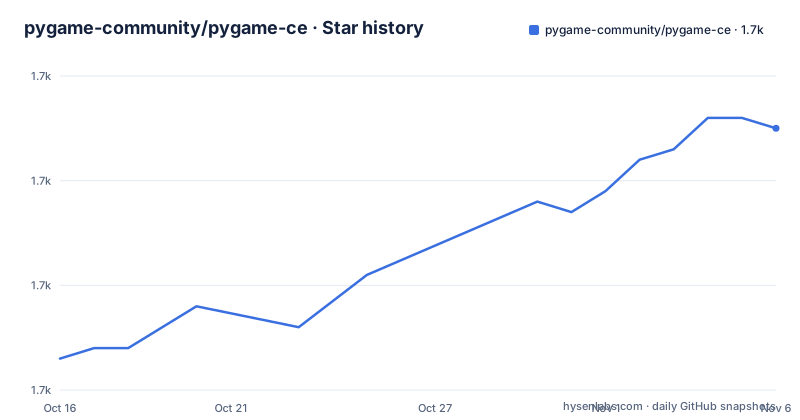
- pygame-community/pygame-ce1,715 ★ · +22
| Repository | 2026-10-16 | 2026-11-06 |
|---|---|---|
| pygame-community/pygame-ce | 1.7k | 1.7k |
22 Stars in the last 21 days, measured from the daily GitHub snapshot. Compare with other projects
Editorial analysis
Why pygame-ce exists alongside upstream pygame
pygame-ce addresses a concrete packaging and governance problem. The README describes it as a fork of the upstream pygame project created by former core developers after they concluded they could not continue development upstream. The fork uses the `pygame-ce` distribution name while retaining `pygame` as its Python import name.
Its intended users are Python developers creating video games or other multimedia applications. The project abstracts common functions associated with SDL, allowing application code to handle tasks such as display creation, graphics, sound, input, and related multimedia operations through a Python-facing library. That does not make every multimedia application a game, and the repository's topics and examples show a strong game-development orientation.
The alternative of writing directly against SDL offers lower-level control but requires the application team to manage that platform interface itself. pygame-ce instead combines SDL with Python and a collection of dependent libraries. The repository includes Python sources under `src_py/`, native code under `src_c/`, tests under `test/`, and build configuration files including `pyproject.toml` and `meson.build`. Based on that layout, development involves both Python code and native integration rather than a purely Python implementation.
The SDL and Python path through pygame-ce
The documented architecture starts with SDL, described as the Simple DirectMedia Layer library. pygame-ce sits above that layer and exposes common multimedia operations to Python applications. Its primary language is C, while `pyproject.toml` also classifies the distribution under Python, Cython, and Assembly. The repository structure supports that mixed implementation: Python package code is separated from C source, tests, build options, documentation, and examples.
The required runtime versions are explicit. CPython must be at least 3.10, or the README says to use PyPy3. SDL must be at least 2.0.20. Media support has separate dependencies: SDL_mixer at least 2.0.4, SDL_image at least 2.0.5, and SDL_ttf at least 2.0.18. Font handling through SDL_ttf also depends on FreeType. The `mixer` and `mixer.music` modules depend on SDL_mixer, while the image module depends on SDL_image.
This split affects deployment. Installing the Python package is only one part of making a multimedia application work on a target machine. SDL and the relevant media libraries must also be available. Pygame-ce also embeds smaller components in particular areas: `Transform.rotozoom` contains an embedded version of SDL_rotozoom, and `gfxdraw` contains an embedded version of SDL_gfx. The README directs readers to `docs/licenses` for dependency license details.
For an application architect, pygame-ce is therefore not merely an importable convenience package. It is a boundary between Python application code and several native multimedia libraries. That makes its dependency set central to platform support, binary packaging, and source builds.
Installing pygame-ce without disturbing system Python
The simplest documented installation requires Python and `pip` to be available on `PATH`. The package name is `pygame-ce`, while the import namespace remains `pygame`.
pip install pygame-ceThe README notes that some platforms require `pip3` instead of `pip`. On Linux distributions that protect their system Python, a global installation may produce an `externally-managed-environment` error. Its recommended solution is to create a virtual environment, activate it, and install pygame-ce inside that environment.
python3 -m venv venv
source venv/bin/activate
pip install pygame-ce
The first command creates a directory named `venv`, the second activates that environment on the documented Linux path, and the third installs the package into it. The README also identifies `pyenv` for user-level Python management and `uv` as an environment and package manager that can replace parts of the `venv` and `pyenv` workflow. It does not prescribe a pygame-ce-specific `uv` command, so none should be inferred from that mention.
If a project needs a feature currently in development, the README directs contributors to build pygame-ce locally instead of relying only on the package installation. Once dependencies are compiled and installed, the documented project-level command is shown below.
pip install .This invokes the local project build, but the README warns that dependency compilation remains the most involved part. It points to the Compilation wiki page for platform-specific details.
A safe first use through pygame-ce documentation
The README's lowest-risk first activity is opening the bundled reference documentation. It documents both online documentation and a local launcher. With pygame-ce installed, run:
python -m pygame.docsIf local documentation files are present, the command uses them. If they are absent, it opens the online website. This gives a new user access to the full library reference without requiring a display, audio device, controller, or sample asset. It also establishes the import namespace used by applications.
The online documentation follows the development version on GitHub, so it may describe a newer codebase than the installed package. For a deployment pinned to the latest full release, the README gives this upgrade command:
pip install pygame-ce --upgradeThat version distinction matters. The repository's `pyproject.toml` currently declares version `3.0.0.dev1`, while the recent release list identifies `2.5.8` as a full release. The online docs may therefore be useful for learning the API but can be ahead of the package installed by the initial `pip install pygame-ce` command.
For code examples, the repository includes playable programs in its `examples/` directory, including `aliens.py`, `camera.py`, `joystick.py`, `midi.py`, `liquid.py`, and `headless_no_windows_needed.py`. The README does not give an exact command for launching a particular example, so execution should follow the documentation or the example's own entry point rather than relying on an invented invocation.
Where pygame-ce becomes the wrong abstraction
The clearest wrong-tool case is an application that does not need multimedia or SDL-backed Python access. Pulling pygame-ce into a command-line utility would add native dependencies and installation complexity without providing the graphics, image, font, audio, input, or mixer facilities that motivate the library. Its `pyproject.toml` classifiers cover a broad library role, but that should not be read as a recommendation for every Python package.
Native dependency management is also a real constraint. A binary distribution may make initial installation straightforward, while source builds require SDL-family libraries and development dependencies. The README explicitly says that compiling and installing pygame-ce dependencies accounts for most source-build work. Teams distributing to several operating systems must therefore account for SDL 2.0.20 or newer, SDL_mixer 2.0.4 or newer, SDL_image 2.0.5 or newer, and SDL_ttf 2.0.18 or newer.
The feature-to-dependency relationship matters too. An application using fonts has a different dependency path from one using only display functions. The mixer and music modules require SDL_mixer, image operations require SDL_image, and SDL_ttf adds FreeType. A missing native library can therefore affect one media subsystem rather than making every pygame-ce feature unusable, but the README does not document graceful fallback behavior for each absent dependency.
Compared with direct SDL development, pygame-ce provides a more Python-oriented abstraction and bundled higher-level multimedia modules. Direct SDL work keeps the application closer to the native API and requires developers to assemble that integration themselves. Developers should choose pygame-ce when Python access and the standard pygame modules reduce that native integration work, not when minimizing the SDL dependency boundary is the primary objective.
Release cadence, native upgrades, and pygame-ce's LGPL terms
The repository is not archived, and its last push was on 2026-10-14. Recent releases include `2.5.8` on 2026-08-09, `2.5.7` on 2026-03-02, and `2.5.6` on 2025-10-19. These dates document recent release activity, but upgrading is not cost-free. A project must account for changes between Python releases, SDL dependencies, native extensions, and the gap between online development documentation and the installed full release.
The declared license is `LGPL-2.1-or-later`, and `pyproject.toml` contains the project metadata `LGPL v2.1`. The README says closed-source and commercial games may use pygame-ce, while modifications or additions to pygame-ce itself must be released under a compatible license. It also states that future versions may use a different license. That future-license reservation deserves attention when planning upgrades, especially for products that modify the library itself.
The examples directory is described as public domain. That statement concerns the example programs, not automatically every dependency. The README directs readers to `docs/licenses` for dependency licensing details. Any organization considering pygame-ce should therefore inspect the exact release and bundled dependency notices rather than treating the library's LGPL identifier as the only license information relevant to a distribution.
For maintenance planning, the concrete boundary is the split between full releases and the repository's `3.0.0.dev1` development version. Online docs track that development line, so version verification belongs at the start of an adoption review.
Editorial conclusion
pygame-ce suits Python developers who want direct access to SDL-backed graphics, audio, input, and multimedia support without writing platform bindings themselves. It is less suitable for developers who need no multimedia layer or who require stable native dependencies across every target system. Before adoption, verify the required Python and SDL versions, test packaging for each target platform, and review LGPL-2.1-or-later obligations if pygame-ce itself will be modified.
Frequently asked questions
How do I install pygame-ce on Linux without modifying system Python?
Create a virtual environment, activate it, and install `pygame-ce` there with `pip install pygame-ce`. The README presents this approach for Linux systems that report `externally-managed-environment`.
What are the minimum Python and SDL requirements for pygame-ce?
The README lists CPython 3.10 or newer, or PyPy3, together with SDL 2.0.20 or newer. It also requires SDL_mixer 2.0.4 or newer, SDL_image 2.0.5 or newer, and SDL_ttf 2.0.18 or newer.
How can I browse pygame-ce documentation locally?
Run `python -m pygame.docs`. The command uses local documentation when available and opens the online website when local files are absent.
Can pygame-ce be used in a commercial or closed-source game?
The README says commercial and closed-source games are fine. Modifications or additions to pygame-ce itself must be released under a compatible license, and dependency license details are in `docs/licenses`.
Official sources
Add this badge to your README
If you maintain this project, the badge below links readers to this analysis and shows its maintenance status from the daily GitHub snapshot. Paste the markdown into your README; add ?metric=license or ?metric=stars to the image URL for a different field.

[](https://hysenlabs.com/projects/pygame-community-pygame-ce)Star history chart for your README
[](https://hysenlabs.com/projects/pygame-community-pygame-ce)Was this useful?