Pyinfra: three of its six footer badges point at the author's old repository
🔧 pyinfra turns Python code into shell commands and runs them on your servers. Execute ad-hoc commands and write declarative operations. Target SSH servers, local machine and Docker containers. Fast and scales from one server to thousands.
At a glance
- What is it?
- A configuration tool that replaces declarative YAML with Python functions, installs as a single command through a modern Python tool manager, and targets SSH hosts, the local machine and containers with the same operations. The dependency manifest is where this project is most interesting, and its readme footer is where it is most neglected.
- Who is it for?
- Use it if you want infrastructure operations to be reviewable Python rather than a separate declarative language, and if being able to run an ad hoc command against one host without writing a playbook matters to you. Do not adopt it on the strength of the speed claim alone, which is a design intent in a marketing list rather than a measurement.
- Can I use it commercially?
- Yes. MIT is a permissive licence: you can use, modify and sell software built on it, as long as you keep its copyright and licence notices.
- Is it still maintained?
- Yes. The repository last received commits 2 days ago.
- What is it written in?
- Mainly Python, according to GitHub's language statistics.
Answers come from the project's GitHub data, last synced on November 15, 2026, and from our analysis. They are not legal advice.
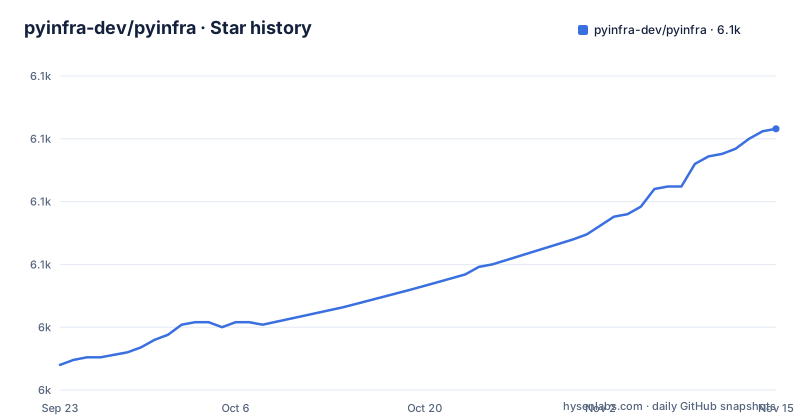
Star history
- pyinfra-dev/pyinfra6,104 ★ · +94
| Repository | 2026-09-23 | 2026-11-15 |
|---|---|---|
| pyinfra-dev/pyinfra | 6k | 6.1k |
94 Stars in the last 53 days, measured from the daily GitHub snapshot. Compare with other projects
Editorial analysis
Five of the six footer badges point somewhere else
The readme ends with a row of six badge links, and it is worth counting where they go. The package index badge, the download statistics badge and the documentation badge point at the current addresses. The other three point at a repository under a different organisation name entirely, owned by the author personally: the continuous integration badge, the coverage badge, and a licence link.
The licence link is the one that dates the file. It is not pointing at the current branch. It points at the licence file on a branch named for version two, which is one major version behind the branch this repository is on.
So a reader who clicks the licence link lands on a file from a previous generation of the project, and a reader who clicks the coverage badge lands on a repository that may no longer exist under that name. Meanwhile the project's own manifest lists the repository at the current pyinfra-dev/pyinfra address.
None of this affects the software. It does mean the readme's provenance information is unreliable, which is the first thing a security minded reader and a corporate scanner both look at.
Operation arguments are a function call parsed from your shell
The quickstart shows the same operation twice, once from a command line and once as a Python file, and the comparison is the clearest explanation of the design in the whole document.
On the command line:
pyinfra @docker/ubuntu apt.packages iftop update=true _sudo=trueIn a Python file, the same call:
from pyinfra.operations import apt

apt.packages(
    name="Ensure iftop is installed",
    packages=['iftop'],
    update=True,
    _sudo=True,
)
Two conventions are doing the work. Positional arguments become a list, and keyword arguments are written as name equals value pairs on the command line. The last argument is the odd one out: its name begins with a leading underscore character, and that is how a flag is marked, meaning an argument that controls how the operation runs rather than what it installs.
That means the command line is not a thin wrapper over the function. It is a parser for a call syntax that maps onto the same function the Python file calls.
The other convention worth noting is argument order. The final example runs the inventory file before the operations file.
One dependency explains the concurrency model and three explain the speed claim
The design feature list makes four claims worth checking against the dependency list, and the first two line up exactly.
The claim is super fast execution over thousands of hosts with predictable performance. The dependency that makes it plausible is a cooperative concurrency library pinned to a minimum version, which means the whole tool runs on greenlets rather than on one operating system thread per host. That is the right architecture for opening tens of thousands of connections and waiting on them, and it is also why the second claim works: instant debugging with realtime standard input, output and error output at maximum verbosity.
Streaming a remote process's output live while hundreds of others are in flight is trivial with greenlets and painful with threads. So the verbosity flag is not a cosmetic addition; it is the debugging affordance the concurrency model bought.
The other two claims are architectural rather than mechanical. Idempotent operations that enable diffs and dry runs before making changes is the property that separates this from running ad hoc commands, and agentless execution against anything with shell access is what removes the daemon requirement that other tools in the same category have.
The one claim to be careful about is extendability with the entire Python package ecosystem. It is true in the sense that any library you can import is reachable from an operations file. Whether that is a feature or a liability depends entirely on whether your deploy scripts are reviewed code, which they should be.
Two dependency floors are justified with an API name and an issue number
Three lines in the dependency list carry comments, and two of them explain a requirement by naming the exact thing the code uses. That is a level of care you do not get in most manifests.
The first pins a minimum and a maximum on the SSH library and explains that the minimum version, 3.2, adds PKey.from_type_string and pkey.UnknownKeyType, which connectors.sshuserclient uses. It then cites the issue number in this repository that required it. So a reader can go from the dependency line to the bug report to the API change, in three hops.
The second is a conditional dependency on a typing backport, applied only below a specific Python version, with a comment naming the construct it exists for and the version in which that construct became available in the standard library.
Both comments share a property worth copying: they say what breaks rather than what is preferred. A comment reading that a version is preferred for stability tells you nothing; a comment reading that a newer version removes a method this code calls tells you exactly why you cannot upgrade.
The rest of the manifest is unremarkable and well chosen. A command line framework, a terminal output library, a templating library, date parsing, runtime type checking, distribution detection, packaging utilities, and a validation library.
Type stubs in the runtime list, and two CLI frameworks at once
One entry in the runtime dependency list deserves comment because it is not a library the tool needs to function.
It is a stubs package for the SSH library. Stub packages contain type information only, no runtime code, and this one is in the dependencies rather than in a development group. That means installing this tool on a production machine installs type information for a library the tool already depends on, into the same environment, for no runtime benefit.
It is not harmful, but it is the kind of thing you discover when auditing an environment, because it changes what is installed for a reason nobody documented.
The supported interpreter range is declared carefully, from 3.10 to just under 4.0, with classifiers for 3.10 through 3.14, and the package is classified as production stable under the development status scheme.
The project ships a versioned schema for its own operation metadata
Two files at the repository root are unusual enough to name. One is a metadata definition for this project, and the other is a JSON schema for that metadata, with the version in its filename: a one point zero point zero schema.
That is a bigger commitment than it looks. It means the project has decided that the shape of that metadata is a published contract, and that the contract carries a version number so it can change without breaking whoever depends on it.
Publishing a schema means an editor, an IDE extension or a wrapper project can validate metadata without importing the tool. That is what makes the ecosystem claims in the design list plausible rather than rhetorical.
The rest of the repository root is equally deliberate. There is a spell checker configuration, .typos.toml. There is a blame ignore file for bulk mechanical changes, an editor configuration, a documentation site configuration, an overrides directory, a lock file in a modern format, and a coverage configuration.
The presence of a spell checker and a blame ignore file together is a good signal about how the project is maintained: the same care applied to prose and to line history.
An AI policy file, two agent directories, two agent instruction files
This project takes its automated contribution tooling seriously enough to document it, which is worth reporting as a fact rather than as a trend.
There is a policy file with a name that says exactly what it is, separate from the human contributing guide. There is a general agent instruction file at the root, a separate instruction file aimed at one specific assistant tool, and two directories, one general and one named for a specific tool.
That is four places where the project tells an assistant how to behave around its code, plus one that tells a human the same thing. Compare that with the many projects in this space that have none of them, and with the ones that have a single instruction file bolted on by a contributor.
Why it matters for an article like this one is specific rather than general: the presence of a written policy means the maintainers have already decided what they want from automated contributions, so a contributor can read the rules instead of guessing. It also means the policy is versioned in the repository and will change in the open, which is a better arrangement than a rule that lives in somebody's head.
The rest of the root follows the same pattern of small, purposeful files: a change log, a contributing guide, a licence file, documentation, examples, scripts, tests and the source itself.
Two patch releases on one evening, on a branch named for the version
The default branch is not main or master. It is named for the version line, 3.x, which makes it a release branch rather than a trunk. It means opening the repository lands you on the current line and not on a master copy of everything.
The release history has three entries and two of them are on the same evening. Two consecutive patch versions were published on the same day in June, thirty two minutes apart, and a minor version followed in July. The branch was pushed on 2026-11-01, more than three months after that newest tag.
Two patch releases half an hour apart looks like a fix that shipped, was found to be incomplete, and shipped again. That is normal and it is also worth knowing about if you pin versions: the second patch is the one to want, and nothing in the release names tells you which problem either patch addressed.
Taken with the stable development status classifier, the picture is a project that considers itself production ready, ships at a small version, moves quickly inside a version line, and does not cut a release for every change. For a tool that runs on production machines, that last point is the one to design around: pin a version, and read the change log at the root before upgrading rather than waiting for a release note to tell you.
Editorial conclusion
Use it if you want infrastructure operations to be reviewable Python rather than a separate declarative language, and if being able to run an ad hoc command against one host without writing a playbook matters to you. Do not adopt it on the strength of the speed claim alone, which is a design intent in a marketing list rather than a measurement. Three things to check first. The install path assumes a modern Python package tool and a Python floor of 3.10, so the machine you run it from needs Python 3.10 or newer. The manifest carries type stubs for one of its own dependencies as runtime requirements. And three of the README's footer badges still point at the earlier Fizzadar/pyinfra repository, the licence badge at its 2.x branch, one major version behind. Licence is MIT, the default branch is the version line rather than a main branch, and the branch was pushed on 2026-11-01.
Frequently asked questions
Can Python be used for infrastructure automation?
That is the premise of this project. It turns Python code into shell commands and runs them on your servers, so operations are ordinary function calls in files you can review with the rest of your code, rather than a separate declarative language. It targets SSH servers, the local machine and Docker containers with the same operations, needs no agent installed on the target, and its own framing is a comparison to a YAML based tool it claims to be considerably faster than.
pyinfra vs terraform
The README does not present them as alternatives. Terraform appears once, in a list of connectors alongside Docker and Vagrant, which means this tool can drive infrastructure that Terraform created rather than compete with it. Its own stated scope is narrower: making and changing state on hosts that already exist and that you can open a shell on.
How do you install pyinfra and run your first command?
Install it as a tool with a modern Python package manager, then run a command against a host over SSH, or against a container or the local machine using a connector name prefixed with an at sign. The quickstart gives the SSH form, the Docker form and the local form as three separate one line examples. Requires Python 3.10 or newer.
What does a pyinfra operation look like from the command line?
You name the target, then the operation, then its arguments. A positional argument becomes a list, keyword arguments are written as name equals value, and an argument whose name starts with a leading underscore character is a flag controlling how the operation runs rather than what it installs. The quickstart shows the same call in both forms, from a command line and from a Python file.
Does pyinfra support dry runs before changing anything?
Yes, and the design list attributes it to idempotent operations, which are described as enabling diffs and dry runs before making changes. The same list claims realtime standard input, output and error output at maximum verbosity for debugging, and agentless execution against anything with shell access, so no daemon has to be installed on the target machine.
Official sources
Add this badge to your README
If you maintain this project, the badge below links readers to this analysis and shows its maintenance status from the daily GitHub snapshot. Paste the markdown into your README; add ?metric=license or ?metric=stars to the image URL for a different field.

[](https://hysenlabs.com/projects/pyinfra-dev-pyinfra)Star history chart for your README
[](https://hysenlabs.com/projects/pyinfra-dev-pyinfra)Was this useful?