pyjanitor: readable data cleaning APIs for pandas DataFrames
Clean APIs for data cleaning. Python implementation of R package Janitor
At a glance
- What is it?
- pyjanitor extends pandas DataFrames with verb-based cleaning methods that fit into method chains. It is useful for analysts and Python developers who want readable preprocessing code, although its dependency requirements and experimental modules deserve scrutiny.
- Who is it for?
- Adopt pyjanitor when repeated pandas preprocessing is easier to understand as named, chained operations. Do not adopt it solely for basic filtering or column deletion, or if Python 3.11 and pandas 3.0 or later are unacceptable constraints.
- Can I use it commercially?
- Yes. MIT is a permissive licence: you can use, modify and sell software built on it, as long as you keep its copyright and licence notices.
- Is it still maintained?
- Yes. The repository last received commits 2 days ago.
- What is it written in?
- Mainly Python, according to GitHub's language statistics.
Answers come from the project's GitHub data, last synced on November 7, 2026, and from our analysis. They are not legal advice.
Star history
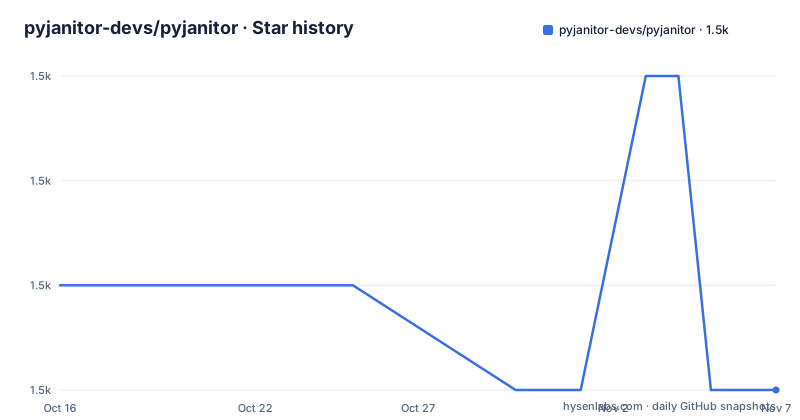
- pyjanitor-devs/pyjanitor1,498 ★ · -1
| Repository | 2026-10-16 | 2026-11-07 |
|---|---|---|
| pyjanitor-devs/pyjanitor | 1.5k | 1.5k |
-1 Stars in the last 22 days, measured from the daily GitHub snapshot. Compare with other projects
Editorial analysis
Why pyjanitor targets pandas preprocessing chains
pyjanitor solves a readability problem in pandas data cleaning. A typical preprocessing job is ordered: create a DataFrame, remove a column, discard incomplete rows, rename fields, and derive another column. Those operations often depend on one another, but ordinary pandas code can split the sequence across assignments and mutation statements.
The project began as a Python implementation of the R `janitor` package, according to the README. Its current direction adds a method-chaining API with explicit verb names such as `remove_columns`, `rename_column`, and `add_column`. This makes a chain read closer to the order in which the data is transformed. It does not replace pandas or create a separate dataframe engine. The documentation describes it as extending `pandas` with cleaning routines and supporting method chaining or pandas piping.
This makes the project most relevant to data analysts, data engineers, researchers, and developers who write repeated pandas preprocessing code. It is less compelling for a single `.dropna()` call or a one-off rename. In that case, the extra dependency and custom API do not replace much code. The value appears when a pipeline contains several transformations and its sequence matters.
The README frames those ordered transformations as a data-processing DAG. pyjanitor does not schedule that DAG or automatically resolve dependencies. It gives Python code a more explicit syntax for expressing a sequence. That distinction matters: the library improves how a chain is written, not whether its transformation logic is correct.
How pyjanitor extends the DataFrame API
Importing `janitor` registers its DataFrame methods with pandas. The README's example then calls pyjanitor methods directly on a DataFrame created by `pd.DataFrame.from_dict(company_sales)`. The chain drops `Company1`, removes rows where `Company2` or `Company3` is null, renames the remaining company columns, and adds a `Google` column.
The key mechanism is not a new data container. It is a collection of functions usable through the extended DataFrame API. The project also describes a functional API for users who prefer passing a DataFrame as an argument. Its naming follows the R package where practical, while retaining Python-oriented use with method chaining or piping.
The documented function set covers several preprocessing categories. It includes cleaning column names, including multi-index cases, and identifying duplicate entries. It can remove empty rows and columns, add or rename columns, and encode columns as categorical values. Other routines split data into features and targets, coalesce columns, convert dates from MATLAB, Excel, or Unix formats, expand delimited categorical values into dummy variables, and concatenate or deconcatenate strings by delimiter.
That breadth creates a useful syntax layer, but it should not be mistaken for validation. The README does not claim that every transformation checks business rules, schema stability, or data quality. Users still need to decide which rows are invalid, how missing values should be handled, and whether a derived column preserves the intended meaning.
Installing pyjanitor and running the first DataFrame chain
The README states that pyjanitor requires Python 3.11 or later. It supports PyPI, conda-forge, and pipenv. For a standard Python environment, the documented pip command is:
pip install pyjanitorAfter installation, create a small DataFrame and import `janitor`. Importing the package is required because pyjanitor extends pandas methods.
import pandas as pd
import janitor
The next chain demonstrates the verb-based API from the README. It removes one column, drops rows missing either selected column, renames two columns, and adds a third column.
df = (
    pd.DataFrame.from_dict(company_sales)
    .remove_columns(["Company1"])
    .dropna(subset=["Company2", "Company3"])
    .rename_column("Company2", "Amazon")
    .rename_column("Company3", "Facebook")
    .add_column("Google", [450.0, 550.0, 800.0])
)
The README shows the resulting columns as `SalesMonth`, `Amazon`, `Facebook`, and `Google`. The original index labels are retained where rows were dropped, so `March` disappears while later rows retain their original indices.
Conda users can install the package from the channel documented in the README:
conda install pyjanitor -c conda-forgeThe README also documents a pipenv route with prerelease dependencies:
pipenv install --pre pyjanitorUse that last command only if prerelease dependencies fit the project. The ordinary `pip install pyjanitor` command is the clearest documented starting point.
pyjanitor's dependency boundary under pandas 3.0
The current `pyproject.toml` identifies version `0.32.39`, requires Python `>=3.11`, and requires `pandas>=3.0.0`. It also pins `natsort>=8.4.0,<9`, `pandas-flavor>=0.8.1,<9`, `multipledispatch`, `scipy`, and `janitor-rs==0.6.4`. That is a larger dependency surface than a small collection of pure pandas helpers would suggest.
This is the most concrete adoption constraint. An existing pandas 2.x environment cannot satisfy the current project metadata without changing its pandas version. Changing pandas can affect unrelated code because pandas is a central dependency rather than an isolated utility. The README's Python requirement also conflicts with some classifier entries in `pyproject.toml`, which still list Python 3.8, 3.9, and 3.10. The installable metadata is the stronger source for the current minimum, while the stale classifiers are a packaging detail to verify before publishing or supporting environments.
The optional dependencies are narrower. Biology uses `biopython`, chemistry adds `tqdm`, engineering uses `unyt`, and Spark support uses `pyspark`. Documentation dependencies also include `polars`, but the project describes finance, biology, chemistry, engineering, and PySpark as experimental submodules. Those modules should not be treated as equivalent in stability to core cleaning functions without checking their documentation and tests.
The repository includes `tests/`, `docs/`, `examples/`, `CHANGELOG.md`, and contribution configuration, which is consistent with a substantial Python library. Still, the repository does not make migration notes for every pandas upgrade part of the README. Production users should inspect the changelog for the exact release they plan to install.
Method chaining versus ordinary pandas assignment
pyjanitor is an alternative interface to pandas primitives, not an alternative to pandas itself. The README compares an imperative sequence that deletes and renames columns with a fluent pandas example that uses `.drop()`, `.dropna()`, `.rename()`, and `.assign()`. That comparison is important because modern pandas already supports readable chaining for many tasks.
Where pyjanitor differs is its vocabulary and intended breadth. `.remove_columns()` states the operation as a cleaning verb. `.rename_column()` and `.add_column()` expose project-specific operations within the same chain. Ordinary pandas remains more familiar, and its native methods can apply to more cases without relying on pyjanitor's registered extensions.
A second difference is consistency with the R package. The API documentation says pyjanitor copies R package function names where possible. That helps users familiar with `janitor` translate some routines, but Python users cannot assume every R behavior or column-selection convention is identical. The README does not provide a complete compatibility matrix.
For a compact pipeline, the custom syntax may improve readability. For a library of broad production transformations, it can also hide pandas behavior behind another abstraction. Code reviewers must understand both the pyjanitor function and the pandas operation it ultimately performs. The example's use of explicit verbs is a presentation improvement, not evidence that the data transformation is more correct.
Maintenance signals, MIT terms, and upgrade work
The repository is not archived. Its last push was on 2026-10-16, and releases `v0.32.37`, `v0.32.38`, and `v0.32.39` were published between 2026-10-13 and 2026-10-15. Those facts indicate recent release activity, but they do not establish compatibility for every pandas version or production workload.
The project is licensed under MIT. That permits use, modification, distribution, and sublicensing under the license conditions, including preservation of the copyright and license notice. It also includes an implied warranty disclaimer and limits the licensor's liability. This is a factual reading of the license identifier, not legal advice.
Upgrade cost depends on whether pandas can move to version 3.0 or later. The current metadata may require dependency resolution, environment changes, and regression checks outside pyjanitor itself. Reviewers should use the release notes and `CHANGELOG.md` rather than assuming that frequent releases mean an existing chain will behave identically.
The Makefile defines `test`, `lint`, `docs`, `check`, and formatting targets, although it warns that it has not been fully tested and contains a release target that invokes `setup.py`. The project metadata instead uses setuptools configuration in `pyproject.toml`. This mismatch makes the Makefile a less reliable guide than the package metadata for installation and release procedures.
Editorial conclusion
Adopt pyjanitor when repeated pandas preprocessing is easier to understand as named, chained operations. Do not adopt it solely for basic filtering or column deletion, or if Python 3.11 and pandas 3.0 or later are unacceptable constraints. Check `pyproject.toml`, the selected cleaning functions, and any optional dependencies needed by finance, biology, chemistry, engineering, or PySpark workflows before upgrading production code.
Frequently asked questions
How do I install pyjanitor?
The README documents `pip install pyjanitor` and `conda install pyjanitor -c conda-forge`. It states that Python 3.11 or later is required.
What does pyjanitor add to pandas?
pyjanitor adds verb-based DataFrame methods for cleaning and preprocessing, including removing or renaming columns, identifying duplicates, coalescing values, date conversion, and encoding columns. It also provides functional or chained usage according to the project documentation.
Is pyjanitor suitable for production pandas projects?
The project is not archived, and its documented release activity is recent. Before adopting version `0.32.39`, verify that the environment can use Python `>=3.11` and `pandas>=3.0.0`, then review the release's changelog and relevant tests.
Official sources
Add this badge to your README
If you maintain this project, the badge below links readers to this analysis and shows its maintenance status from the daily GitHub snapshot. Paste the markdown into your README; add ?metric=license or ?metric=stars to the image URL for a different field.

[](https://hysenlabs.com/projects/pyjanitor-devs-pyjanitor)Star history chart for your README
[](https://hysenlabs.com/projects/pyjanitor-devs-pyjanitor)Was this useful?