PyScaffold: a putup command that writes a setuptools project and tags its own version
🛠 Python project template generator with batteries included
At a glance
- What is it?
- PyScaffold generates a Python package skeleton from one command, putup, and wires it to setup.cfg, setuptools_scm, tox and Git. This piece covers what ends up in the folder, where the generated defaults bite, and who should skip it.
- Who is it for?
- Pick PyScaffold when you want a PyPI-ready setuptools package with Git-tag versioning, tox tasks and Sphinx docs from a single putup call, and you are happy to keep configuration in setup.cfg. Skip it if your team has settled on another build backend or you need a template that does not assume Git.
- Can I use it commercially?
- Check first. The repository uses a licence we do not classify automatically, so read its LICENSE file before any commercial use.
- Is it still maintained?
- Yes. The repository last received commits 5 days ago.
- What is it written in?
- Mainly Python, according to GitHub's language statistics.
Answers come from the project's GitHub data, last synced on November 7, 2026, and from our analysis. They are not legal advice.
Star history
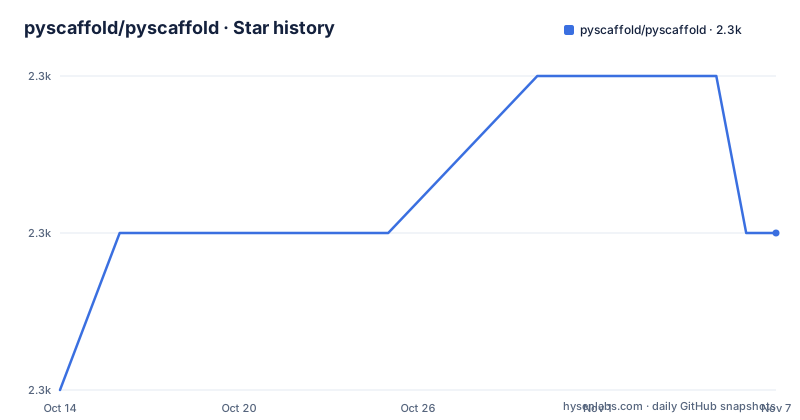
- pyscaffold/pyscaffold2,260 ★ · +1
| Repository | 2026-10-14 | 2026-11-07 |
|---|---|---|
| pyscaffold/pyscaffold | 2.3k | 2.3k |
1 Stars in the last 24 days, measured from the daily GitHub snapshot. Compare with other projects
Editorial analysis
One putup call produces the whole package folder
PyScaffold installs a command called putup. Running putup my_project creates a folder named my_project and fills it with a project template meant for a package that can be shared on PyPI and installed with pip. Inside the repository you can see the shape of the output: .cirrus.yml, .coveragerc, .gitignore, .isort.cfg, .pre-commit-config.yaml, .readthedocs.yml, AUTHORS.rst, CHANGELOG.rst, CONTRIBUTING.rst, LICENSE.txt, README.rst, docs/, environment.yml, pyproject.toml, setup.cfg, setup.py, src/, tests/ and tox.ini. The project dogfoods this layout, since those are its own top-level entries.
The generator is built for people who start Python packages often. Typing putup -h lists the other configuration options. The demo in the project documentation shows the --cirrus flag, which adds CI support through Cirrus CI, followed by tox to build a distribution file.
There is also an interactive mode for setting up a simple project. The project calls it experimental, so a team script that depends on its prompts can break between releases.
Three install routes, and an extras bundle you have to ask for
Any of these installs the putup command:
## Good old pip
# (make sure it is up-to-date: pip install -U pip setuptools)
pip install pyscaffold

## Conda for the datascience fans
conda install -c conda-forge pyscaffold

## Or even pipx for the virtualenv aficionados
pipx install pyscaffold
The plain pip install does not bring the extensions. To get all of them you run pip install pyscaffold[all]. If you skip the brackets and later look for an extension flag, it will not be there. Which extensions the all bundle contains is listed in the installation docs, and the README itself does not enumerate them.
The pip comment in the quickstart matters: it asks you to update pip and setuptools first. Because generated projects build with setuptools, an old toolchain is the first thing to rule out when a fresh scaffold fails to build.
After generation you cd into the new folder, create or activate an isolated environment with virtualenv, conda or your preferred tool, and run the editable install:
pip install -e .include_package_data only counts when you build a wheel
Data files that live inside your package and are tracked by Git are included automatically when include_package_data = True in setup.cfg. You do not need a MANIFEST.in for this. The mechanism ties packaging to Git state: a file that exists on disk but is not tracked will not ship.
The catch is stated in the project's own documentation. The option is only guaranteed to be read when creating a wheel. Other distribution methods can behave unexpectedly, for example by including data files even when include_package_data = False. So a source distribution may carry files you meant to leave out.
The suggested workaround is placement. If you want data files in the repository but not inside the pip-installable package, put them outside the src directory, for instance a files directory in the project root, or inside tests if they exist for checks. You can also exclude them explicitly with the [options.packages.find] exclude option in setup.cfg.
The version number comes from Git tags, so an untagged repo has none worth shipping
A scaffolded project is already an initialised Git repository. Its version is inferred from tags with the help of setuptools_scm. Tags must follow the format MAJOR.MINOR[.PATCH], so 0.0.1 and 0.1 both work. That version is used when you build a package and is readable as my_project.__version__.
The pyproject.toml in the PyScaffold repository shows the wiring: setuptools_scm is set to version_scheme = "no-guess-dev" under [tool.setuptools_scm], and the build requires list names setuptools>=61.2 and setuptools_scm>=7. Commits made after a tag therefore produce development versions, and you cut a release by tagging, not by editing a version string in a file.
The cost is that building outside a Git checkout, or with tags missing, gives you no tag to read. That affects anyone who vendors the folder as a plain archive.
setup.py is a stub and the requires line in pyproject.toml is not yours to edit
Day-to-day configuration lives in setup.cfg: the description, URL, classifiers and installation requirements, as defined by setuptools. In most cases you do not touch setup.py.
The setup.py in the PyScaffold repository shows why. It calls setup(use_scm_version={"version_scheme": "no-guess-dev"}) inside a try block. If that raises, it prints a message telling you to run:
pip install -U setuptools setuptools_scm wheeland then re-raises the original error. Treat that message as the first diagnostic for any build failure.
pyproject.toml carries a stronger warning above its requires line: AVOID CHANGING REQUIRES: IT WILL BE UPDATED BY PYSCAFFOLD! Pin an extra build dependency there and a later PyScaffold update can overwrite it. Anything you need at build time has to be reconciled with that comment.
To build a source or wheel distribution, run tox -e build. Without tox, install build and run python -m build.
tox tasks cover build and publish, but publishing defaults to test.pypi.org
The generated tox.ini defines automation tasks. The quickstart lists these:
tox -e build  # to build your package distribution
tox -e publish  # to test your project uploads correctly in test.pypi.org
tox -e publish -- --repository pypi  # to release your package to PyPI
tox -av  # to list all the tasks available
The split protects you from a first upload to the real index. A bare tox -e publish goes to test.pypi.org, and only the explicit --repository pypi argument releases to PyPI. The flip side is that someone who types the short form and expects a release will see nothing appear on pypi.org.
The documentation recommends tox, but nothing forces it. The build step works without it, as shown above. The tasks are conveniences, and the publish tasks assume you have credentials for the target index.
Git must already know who you are, and pre-commit is opt-in
PyScaffold assumes Git is installed and configured, at least with your name and email. Because the generated folder is itself a Git repository and the generator needs an author, a machine without that setup is the likeliest place for putup to stumble first.
Git hooks come through the --pre-commit flag. After generation, install pre-commit (pip install pre-commit) and run pre-commit install. Without the flag you get no hook configuration to install. The tree does list a .pre-commit-config.yaml in the repository itself, but the flag is what you pass for your own project.
A default .gitignore tuned for Python projects and common tools is provided.
Documentation follows the same pattern. PyScaffold prepares a docs directory, you extend docs/index.rst, and the result works with Read the Docs. Numpy and Google style docstrings are activated by default, so docstrings in either format render without extra Sphinx setup.
The project's documentation is written for v4. Anyone still on the previous stable line is pointed to v3.3. The latest tagged release on GitHub is v4.6, dated 2024-09-23, and the repository's last push was 2026-10-19.
Editorial conclusion
Pick PyScaffold when you want a PyPI-ready setuptools package with Git-tag versioning, tox tasks and Sphinx docs from a single putup call, and you are happy to keep configuration in setup.cfg. Skip it if your team has settled on another build backend or you need a template that does not assume Git. Before adopting it, check that git config has your name and email, then run putup on a scratch folder and inspect what pyproject.toml and setup.cfg contain.
Frequently asked questions
What is meant by Python package in the context of PyScaffold?
PyScaffold describes its output as a high quality Python package that can be shared on PyPI and installed with pip. The putup command creates the folder with setup.cfg, src/, tests/ and docs/ already in place.
How to get a Python package like PyScaffold?
Run pip install pyscaffold, conda install -c conda-forge pyscaffold, or pipx install pyscaffold. Add the [all] extra with pip install pyscaffold[all] if you want every extension.
What are the most commonly used Python packages, and where does PyScaffold fit?
PyScaffold does not rank packages. It is published on PyPI and conda-forge, and its documentation says thousands of developers have used it for over half a decade.
Official sources
Add this badge to your README
If you maintain this project, the badge below links readers to this analysis and shows its maintenance status from the daily GitHub snapshot. Paste the markdown into your README; add ?metric=license or ?metric=stars to the image URL for a different field.

[](https://hysenlabs.com/projects/pyscaffold-pyscaffold)Star history chart for your README
[](https://hysenlabs.com/projects/pyscaffold-pyscaffold)Was this useful?