python-greenlet/greenlet for controlled Python coroutines
Lightweight in-process concurrent programming
At a glance
- What is it?
- Greenlet is a C extension for lightweight, in-process coroutines that do not schedule themselves. It fits Python developers building custom control flow or concurrency layers, but not workloads expecting automatic scheduling or CPU parallelism.
- Who is it for?
- Adopt greenlet when you need explicit control over cooperative execution or are building a concurrency layer such as Eventlet or Gevent. Do not choose it for automatic task scheduling, isolated native threads, or CPU parallelism.
- Can I use it commercially?
- Check first. The repository uses a licence we do not classify automatically, so read its LICENSE file before any commercial use.
- Is it still maintained?
- Yes. The repository last received commits 6 days ago.
- What is it written in?
- Mainly C++, according to GitHub's language statistics.
Answers come from the project's GitHub data, last synced on November 7, 2026, and from our analysis. They are not legal advice.
Star history
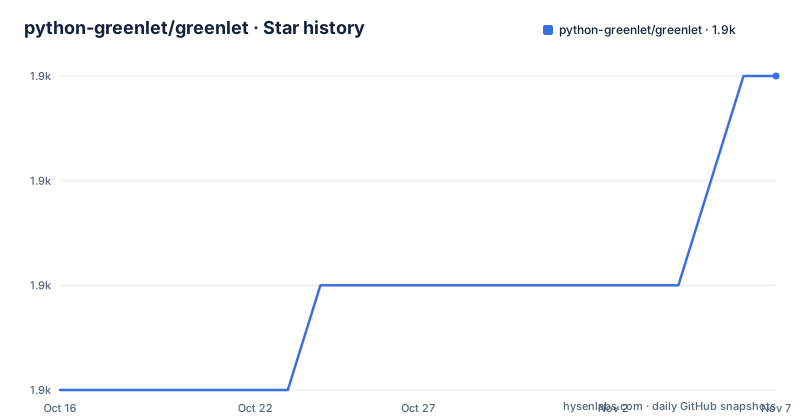
- python-greenlet/greenlet1,855 ★ · +3
| Repository | 2026-10-16 | 2026-11-07 |
|---|---|---|
| python-greenlet/greenlet | 1.9k | 1.9k |
3 Stars in the last 22 days, measured from the daily GitHub snapshot. Compare with other projects
Editorial analysis
Greenlet's place among Python execution models
Greenlet addresses a specific problem in Python control flow: developers who need lightweight coroutine-like execution while retaining precise control over when each execution path runs. The README calls greenlets "lightweight coroutines for in-process concurrent programming." It also describes them as primitive micro-threads with "no implicit scheduling." That absence of scheduling is the defining characteristic, rather than a missing convenience feature.
The package is intended for Python developers building advanced control-flow structures, custom schedulers, or lower layers beneath established concurrency libraries. The README names Concurrence, Eventlet, and Gevent as projects that use Greenlet as a more flexible alternative to Python's built-in coroutine support. This makes greenlet relevant both to direct experimentation with cooperative execution and to library maintainers who need a primitive that their own runtime can control.
Greenlet is not an OS-level parallel execution system. The README places greenlets inside one process and says that tasklets and greenlets run pseudo-concurrently, typically in one or a few OS-level threads. It does not promise that work is distributed across processor cores. Applications that require parallel CPU execution, independent thread stacks outside the interpreter, or operating-system scheduling isolation should select a native-thread or multiprocessing approach instead.
The intended users also need to think about ownership of scheduling behavior. If a team merely wants coroutine-style asynchronous code, a higher-level library may reduce integration work. If the team needs to decide exactly when code runs, greenlet's lower-level interface can be appropriate. The package is therefore most useful when explicit switching control is a requirement, not merely a preference.
How Greenlet's cooperative execution works
Greenlet is implemented as a C extension module for a regular, unmodified Python interpreter. According to `pyproject.toml`, the project supports C and C++ implementation alongside Python, uses `setuptools.build_meta` as its build backend, and declares Python 3.10 and later as its minimum version. The repository's `setup.py` contains platform-specific native extension build handling, which confirms that this is not a pure-Python package.
At the conceptual level, a greenlet represents a separate path of Python execution that can continue after another path has taken control. The README does not expose the complete switching API or internal stack mechanism, so it would be inaccurate to invent those details. What the project does state is that greenlets have no implicit scheduler. Execution transitions must therefore be initiated by the code or framework using them.
This makes greenlet a foundation rather than a complete asynchronous framework. It supplies the primitive from which a library can construct scheduled micro-threads. The surrounding framework must still determine when a greenlet starts, when it yields control, how errors leave it, and how application resources are synchronized. The README's references to Eventlet and Gevent are useful examples of higher layers built around Greenlet, but the repository description does not claim that their behavior is part of greenlet itself.
The README also uses generators to illustrate a capability that differs from Python's native generators. Its linked `test_generator.py` example demonstrates a greenlet-based generator without requiring the `yield` keyword. According to the README, such generators can call nested functions, and those nested functions can yield values too. This is the clearest project-specific illustration of why a primitive with explicit control over nested execution can be useful beyond ordinary sequential functions.
Installing Greenlet and finding a first executable example
The README identifies `pip` as the easiest installation route. `pyproject.toml` requires Python 3.10 or later, so the interpreter version should be checked before installation. The documented command is:
pip install greenletThe README says source archives and binary distributions are available through the Python Package Index at `https://pypi.org/project/greenlet`. It also directs developers to the repository at `https://github.com/python-greenlet/greenlet` and to the documentation at `https://greenlet.readthedocs.io`.
The README does not contain a complete first-use program that constructs and switches between greenlets. Its closest concrete example is the link to `src/greenlet/tests/test_generator.py`, where the README demonstrates the project's greenlet-based generator use case. A reader who wants executable starting code should consult that linked test and the readthedocs documentation rather than assume an import name, constructor signature, switching method, or scheduler callback that the README does not state.
There is also an important distinction between installation and successful native loading. `setup.py` builds an extension, while `pyproject.toml` declares an OS-independent project but does not guarantee that a usable binary is present for every Python and operating-system combination. After `pip install greenlet`, a developer should confirm that the installed extension loads in the intended interpreter and review the package manager's error output if compilation is required. The README does not document a project-specific verification command.
Greenlet, asyncio, generators, and native threads compared
Python's built-in generators are the closest everyday comparison. The README explicitly distinguishes Greenlet's generator example from Python's generators: Greenlet-based generators can call nested functions, and those nested calls can yield values without using Python's `yield` keyword. Native generators are therefore simpler when ordinary suspension through `yield` is sufficient. Greenlet becomes relevant when the program needs more general control over nested execution paths.
`asyncio` is a different alternative because it includes a runtime model for scheduling asynchronous tasks. Greenlet deliberately stops below that level. Direct Greenlet adoption gives the caller more control but also leaves scheduling and coordination to the integrating code. Adopting asyncio gives an application a conventional event-loop abstraction, though no detailed APIs, performance, cancellation semantics, or exception behavior are compared here. The architectural distinction is enough for initial screening: use Greenlet when explicit cooperative switching is central, not because it is presented as a general replacement for asyncio.
Native threads are different again. They create operating-system-managed execution contexts and can provide parallelism, while greenlets remain lightweight contexts inside a Python process. Greenlet should not be chosen for CPU-bound parallelism merely because its package metadata includes the word `concurrency`. The README's language of pseudo-concurrency makes that boundary clear.
Eventlet and Gevent are real higher-level alternatives in the sense that they are identified as Greenlet users. Their approach adds concurrency abstractions above a lower-level greenlet primitive. A team should choose between direct Greenlet integration and one of those frameworks according to how much scheduler and synchronization machinery the team wants to own. The README does not document which approach is preferable for a specific application.
Greenlet limitations, native build exposure, and coordination duties
The largest limitation is that greenlet does not decide when code runs. Without an external scheduler, a direct adopter can create unbalanced control flow: one execution path may never resume, or code may assume that a yield point will be reached even though the surrounding call path does not provide one. This is a design boundary rather than a documented bug, and it makes tests of switching, error propagation, and cleanup necessary within the integrating library.
Greenlet also does not replace synchronization. A scheduler and its managed contexts may need a defined policy for shared state, but the README does not claim that greenlet supplies locks, queues, channels, or automatic concurrency safety. The project should therefore not be interpreted as making ordinary shared Python objects safe between execution paths. Developers must evaluate synchronization as part of their own scheduler or select a library that documents that responsibility.
Native extension exposure is a separate adoption concern. The project uses a C extension and platform-aware build code, so packaging may involve compilation, binary distribution selection, or interpreter-specific compatibility. `pyproject.toml` lists Python 3.10 through 3.15 and classifies the operating system as OS Independent, but it does not promise that every wheel exists for every pairing. The documentation should be checked against the exact deployment platform before adding greenlet to a reproducible build.
Greenlet is the wrong tool when the application wants an event loop from the concurrency layer, separate OS threads, or parallel use of multiple CPU cores. It is also a poor fit for a small program that can use a normal function or generator without dynamic execution switching. In those cases, the lower-level native dependency and explicit coordination model provide little value.
Greenlet's license, compatibility, and upgrade burden
The repository has two license files, `LICENSE` and `LICENSE.PSF`, and `pyproject.toml` declares the expression `MIT AND PSF-2.0`. This is more precise than relying on the repository summary's custom-license category. An organization distributing Greenlet in a package, appliance, or embedded environment should review both files and retain the required notices. This article does not interpret legal obligations; it identifies the license texts that must be checked.
Compatibility is explicit at the metadata level. `requires-python = ">=3.10"` sets the minimum version, while classifiers list Python 3.10, 3.11, 3.12, 3.13, 3.14, and 3.15. Because Greenlet is a C extension, changing the Python version can affect installation and binary compatibility even when Python code remains unchanged. Teams that maintain wheels or rebuild extensions should treat the interpreter version as a deliberate packaging variable rather than a routine dependency upgrade.
The repository is not archived, and its last push was on 2026-10-01. GitHub releases are not listed for the repository, so there is no release-based upgrade sequence to cite. Before changing versions, review `CHANGES.rst` and the documentation changelog linked from `pyproject.toml`. For projects that depend on Eventlet, Gevent, or another Greenlet-based library, review that library's compatibility documentation as well, because a change in a lower-level greenlet can affect scheduler integration outside the greenlet package itself.
Editorial conclusion
Adopt greenlet when you need explicit control over cooperative execution or are building a concurrency layer such as Eventlet or Gevent. Do not choose it for automatic task scheduling, isolated native threads, or CPU parallelism. Verify the native extension build, scheduler integration, supported Python version, and the MIT and PSF-2.0 license files first. The project requires Python 3.10 or later, and its last push was on 2026-10-01.
Frequently asked questions
What is Greenlet used for in Python?
Greenlet provides lightweight, in-process coroutines with no implicit scheduling. The README describes custom micro-threads and advanced control flow, including generators that can yield through nested function calls.
How do I install Greenlet?
The README documents `pip install greenlet`. The project metadata requires Python 3.10 or later and points to the Python Package Index for source archives and binary distributions.
Does Greenlet provide automatic scheduling?
No. The README describes greenlets as having no implicit scheduling, so the surrounding code or framework controls when each execution path runs.
Can Greenlet run work in parallel on multiple CPU cores?
The README does not claim that Greenlet provides OS-level parallelism. It describes in-process pseudo-concurrency and identifies cooperative concurrency, so native threads or processes are the relevant choices when CPU parallelism is required.
Official sources
Add this badge to your README
If you maintain this project, the badge below links readers to this analysis and shows its maintenance status from the daily GitHub snapshot. Paste the markdown into your README; add ?metric=license or ?metric=stars to the image URL for a different field.

[](https://hysenlabs.com/projects/python-greenlet-greenlet)Star history chart for your README
[](https://hysenlabs.com/projects/python-greenlet-greenlet)Was this useful?