pywinauto drives the Windows GUI through win32 or uia, and you write the script by hand
Windows GUI Automation with Python (based on text properties)
At a glance
- What is it?
- A BSD-3-Clause Python library that automates native Windows dialogs and controls, installed with pip or conda, shipped with twenty example scripts and a test suite you start with one command.
- Who is it for?
- pywinauto earns a place on a Windows test box where a script has to reach a real dialog rather than a web element, and the uia backend plus the Spy and Inspect tooling cover most of what a team needs.
- Can I use it commercially?
- Yes. BSD-3-Clause is a permissive licence: you can use, modify and sell software built on it, as long as you keep its copyright and licence notices.
- Is it still maintained?
- Yes. The repository last received commits 6 days ago.
- What is it written in?
- Mainly Python, according to GitHub's language statistics.
Answers come from the project's GitHub data, last synced on November 14, 2026, and from our analysis. They are not legal advice.
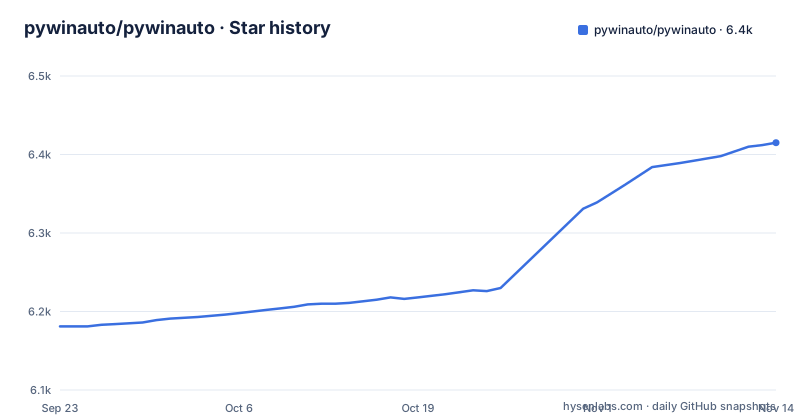
Star history
- pywinauto/pywinauto6,415 ★ · +234
| Repository | 2026-09-23 | 2026-11-14 |
|---|---|---|
| pywinauto/pywinauto | 6.2k | 6.4k |
234 Stars in the last 52 days, measured from the daily GitHub snapshot. Compare with other projects
Editorial analysis
win32 is the backend you get unless you ask for uia
pywinauto is a set of Python modules for automating the Microsoft Windows GUI, and it chooses an automation layer for you: the Win32 API backend is used by default, while MS UI Automation is reached by passing backend="uia". That default is the first decision to make in any script, because the two backends see different things in the same window. The Win32 path addresses windows, dialogs and controls through native handles, and the uia path walks the accessibility tree. Both are aimed at Windows. The exception is the pair of user input emulation modules, mouse and keyboard, which work on both Windows and Linux. On the Notepad example the resolution is done for you: app.UntitledNotepad is looked up on demand, then menu_select, click and type_keys are the verbs you call.
The record-replay generator is still on the wish list
One feature people expect from this kind of library is not in the package. A reliable text based record-replay generator is named as a high priority feature under development, which means you write the script yourself and you keep it under version control like any other code. The substitute is manual inspection: the Getting Started Guide points at the Spy and Inspect tools for finding the control you want to drive. That gap shapes the rest of the repository, where examples/ holds hand written scripts instead of captured sessions. Three of them, notepad_fast.py, notepad_slow.py and notepad_item.py, target the same text editor.
pip and conda-forge are the two documented install paths
Setup is two commands, one per ecosystem, and neither is pinned to a version range.
pip install -U pywinauto
conda install -c conda-forge pywinauto
The first is the plain PyPI route with an upgrade flag, and the second pulls from the conda-forge channel, which is the option to pick when the rest of your environment is already managed that way. The README does not state which Python versions are supported, so that check is yours to make. Release tags give a rough picture of the timeline: 1.0.0b1 went out on 2026-10-15 under the title Linux, macOS, WPF and Qt/QML Backends and Recfactoring, 0.6.9 on 2025-01-06 under the title The Last Python 2.7 Compatible Release, and 0.6.8 in October 2019. The last push to master is dated 2026-10-28.
Manual installs mean pyWin32, comtypes and python-xlib
If you install from source rather than through pip or conda, the dependencies are listed by platform. On Windows you need pyWin32 and comtypes, and those two are what the win32 backend and the uia COM layer sit on. On Linux you need python-xlib, which serves the mouse and keyboard emulation modules. One optional package is called out with its own command: Pillow, installed with pip install -U Pillow, is what makes the capture_as_image() method available when you want a snapshot of a control. The unit tests need two packages, Pillow and coverage. A dev-requirements.txt sits at the repository root for the tooling set, and a setup.cfg plus setup.py carry the packaging metadata.
The uia backend needs an elevated script for some windows
The MS UI Automation example for explorer.exe carries a warning that is easy to skim past: to connect to another process spawned by explorer.exe, the script has to be running as Administrator. The same example shows the other half of the model, a Desktop object that does not rely on any process id at all, which is how a dialog living in a separate process can still be reached. Between the two you get both addressing styles, a connection by path and title, and a desktop wide search for the windows it put on screen.
What the examples/ directory says people automate
The example set is the closest thing to a task list the project publishes, and it is worth reading as a catalogue of what people have pointed this library at. install_7zip.py and uninstall_7zip.py cover both directions of an installer, get_winrar_info.py reads an existing installation, list_windows_updates.py walks the update list, and print_administrators.py looks at accounts rather than windows. Then there are the everyday targets: mspaint.py, win10_calculator.py, windowmediaplayer.py, and two browser scripts, save_from_firefox.py and save_from_internet_explorer.py. test_drag_n_drop.py, test_sakura.py and test_sakura2.py sit beside a single walter_cat.jpg. hook_and_listen.py points at the other direction, reacting to window events instead of driving them.
One command runs the whole unit test suite
The suite is a script rather than a pytest convention, and it lives inside the package directory.
python ./pywinauto/unittests/testall.pyPillow and coverage are required to run it. Continuous integration is configured through .travis.yml and appveyor.yml, with codecov.yml covering coverage reporting, and .readthedocs.yaml ties the documentation build to Read the Docs. Two batch files, MakeBackup.bat and makedocs.bat, cover the Windows side chores that a Linux contributor cannot run. The Contribution Guide in the wiki is where the expectations about unit tests and coding conventions are written down, and pull requests are the stated route for contributing.
The license changed from LGPL to BSD at 0.6.0
Licensing shifted once and the credits record it. Starting from 0.6.0 pywinauto is distributed under the BSD 3-clause license, and pywinauto 0.5.4 and before was distributed under the LGPL v2.1 or later. The copyright lines follow the same seams: Mark Mc Mahon wrote pywinauto for native Windows GUI and holds 0.4.0 and before, Michael Herrmann is listed for 0.4.2, Intel Corporation for 0.5.x maintenance in 2015, and The Open Source Community for 0.6.0 and later development from 2015 to 2018. The project also describes itself as a hobby project that develops new features during out-of-office hours, which is the honest framing for how fast fixes arrive.
Editorial conclusion
pywinauto earns a place on a Windows test box where a script has to reach a real dialog rather than a web element, and the uia backend plus the Spy and Inspect tooling cover most of what a team needs. It is a poor fit if you want a recorder, if you need the library to work outside Windows beyond mouse and keyboard emulation on a stable release (the 1.0.0b1 beta is titled Linux, macOS, WPF and Qt/QML Backends), or if you want a release cadence you can plan around, since 0.6.8, 0.6.9 and 1.0.0b1 are dated 2019, 2025 and 2026. Before committing, check which backend the target application exposes, run the unit tests on your own machine, and read the Administrator note in the README's MS UI Automation example.
Frequently asked questions
How do I install pywinauto on my Windows machine?
Use pip install -U pywinauto, or conda install -c conda-forge pywinauto for the conda-forge channel. A manual install needs pyWin32 and comtypes on Windows, plus python-xlib on Linux for the mouse and keyboard modules.
What does pywinauto do inside Python?
It is a set of Python modules that automate the Microsoft Windows GUI, sending mouse and keyboard actions to windows, dialogs and controls, and it can also read text data back out. Scripts look like app.UntitledNotepad.Edit.type_keys("pywinauto Works!", with_spaces = True).
Is pywinauto open source?
Yes. Starting from 0.6.0 pywinauto is distributed under the BSD 3-clause license, and version 0.5.4 and before was distributed under the LGPL v2.1 or later. The repository also carries a Contribution Guide and accepts pull requests.
How do I use the pywinauto recorder?
A reliable text based record-replay generator is described as a high priority feature under development rather than a shipped tool. Until it lands, the Getting Started Guide points at the Spy and Inspect tools for finding the control you want to automate, and you write the script yourself.
Where can I find the pywinauto documentation?
The short intro and the Getting Started Guide, which covers the core concept and the Spy and Inspect tools, are published on Read the Docs at pywinauto.readthedocs.io. Questions also go to the StackOverflow tag and to the mailing list on SourceForge.
Official sources
Add this badge to your README
If you maintain this project, the badge below links readers to this analysis and shows its maintenance status from the daily GitHub snapshot. Paste the markdown into your README; add ?metric=license or ?metric=stars to the image URL for a different field.

[](https://hysenlabs.com/projects/pywinauto-pywinauto)Star history chart for your README
[](https://hysenlabs.com/projects/pywinauto-pywinauto)Was this useful?