gluetun-wiki: the documentation that has to match your container tag
Home to the Markdown Wiki page for Gluetun
At a glance
- What is it?
- gluetun-wiki holds the Markdown documentation for Gluetun, the VPN client container, and its most interesting property is its versioning scheme: every Gluetun release tag has a matching wiki tag, so the instructions you read are the instructions for the image you are actually running.
- Who is it for?
- Adopt gluetun-wiki as the reference you pin when you deploy Gluetun, because a VPN client whose options changed between tags is exactly the kind of thing where the documentation version has to match the image version. Do not expect it to be a tutorial, since the pages are terse reference material organised by setup task, and do not assume the main branch describes the tag you run.
- Can I use it commercially?
- Yes. MIT is a permissive licence: you can use, modify and sell software built on it, as long as you keep its copyright and licence notices.
- Is it still maintained?
- Yes. The repository last received commits 56 days ago.
- What is it written in?
- GitHub does not report a main language for this repository.
Answers come from the project's GitHub data, last synced on November 6, 2026, and from our analysis. They are not legal advice.
Star history
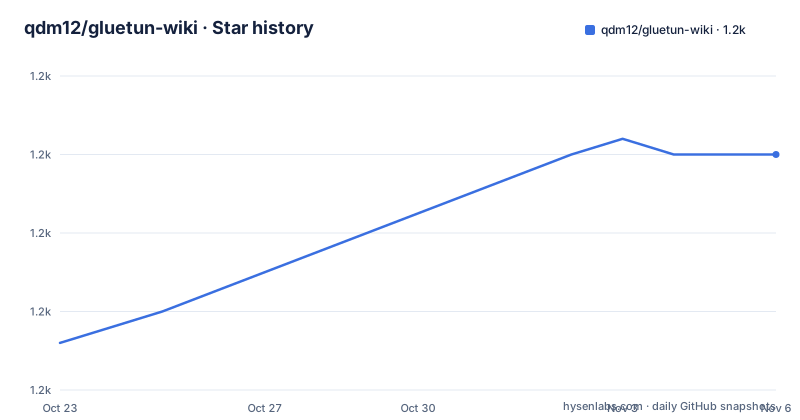
- qdm12/gluetun-wiki1,200 ★ · +12
| Repository | 2026-10-23 | 2026-11-06 |
|---|---|---|
| qdm12/gluetun-wiki | 1.2k | 1.2k |
12 Stars in the last 14 days, measured from the daily GitHub snapshot. Compare with other projects
Editorial analysis
A wiki, not a project
This repository is the home to the Markdown Wiki page for Gluetun, and that is the entire scope. The primary language is recorded as unknown, which is a fair description of a repository whose content is Markdown and images, and the top-level entries match: setup/, errors/, faq/, contributing/, media/ and a README that is the table of contents.
That matters for how you should read it. There is no code here to install and no library to import. The repository is the documentation for a container that lives somewhere else, and the value of the project is entirely in whether the documentation is accurate and current.
The README is short. It has a visitor counter badge, a welcome, a pointer to create an issue if you find a bug in the wiki, and a note that if you have a GitHub account you might want to start Copilot for free to ask your question, with two small animations illustrating it. Then the table of contents and the versioning table.
The licence is MIT, the default branch is main, and the repository is not archived, with the last push on 2026-09-12. The releases listed for the repository are v3.41.0 from 2026-08-07, and v3.40.1 and v3.40.2 both from 2025-11-18.
So this is a documentation project with a release process attached, and the release process is where its one interesting design decision lives.
Four sections, and one of them is an error list
The table of contents is the map of the wiki, and it is organised around what a reader is trying to do rather than around the software's modules.
Setup is marked as the place to start, and it has four subsections. Providers is the section about the VPN providers the container can be configured to use. Options is the reference for the settings. Advanced setup covers the configurations that are not the default path. And Popular apps is about the applications people run alongside it.
Then there is Common errors, which is a whole section of the wiki rather than a page inside the setup guide, and it is the one that tells you what the maintainer thinks the most common failure modes are. For a container whose job is to establish a network tunnel, the failure modes are almost entirely about the environment, the credentials and the routing, so a curated error list is the single most useful page in the set.
The FAQ is the third top-level section, and Contributing is the fourth, with its own readme that the table of contents links into.
It is a deliberately lean structure, and it reflects what a wiki for a single container needs. There is no architecture chapter and no tutorial series, because the software is one binary with one job, and the things a user needs to know are which provider to pick, what to set, and what went wrong.
The versioning table is the whole design
The versioning section maps the Gluetun release tags to the wiki branches, and it is the part of this repository that makes it more than a pile of Markdown.
| Gluetun release tag | Corresponding wiki |
| --- | --- |
| `:latest` | [`main` branch](https://github.com/qdm12/gluetun-wiki) |
| `:v3.41` | [`v3.41.0` tag](https://github.com/qdm12/gluetun-wiki/tree/v3.41.0) |
| `:v3.40.2` | [`v3.40.2` tag](https://github.com/qdm12/gluetun-wiki/tree/v3.40.2) |
| `:v3.40.1` | [`v3.40.1` tag](https://github.com/qdm12/gluetun-wiki/tree/v3.40.1) |
| `:v3.40.0` | [`v3.40.0` tag](https://github.com/qdm12/gluetun-wiki/tree/v3.40.0) |
| `:v3.39.0` | [`v3.39.0` tag](https://github.com/qdm12/gluetun-wiki/tree/v3.39.0) |
| `:v3.38.0` | [`v3.38.0` tag](https://github.com/qdm12/gluetun-wiki/tree/v3.38.0) |
| `:v3.35.0` | [`v3.35.0` tag](https://github.com/qdm12/gluetun-wiki/tree/v3.35.0) |
The rule underneath is that the wiki aims to mirror the release tags of Gluetun, and the mapping is one to one. The latest container tag tracks the main branch, and each numbered container tag has a wiki tag of the same version.
The one exception is stated with a precision that tells you the author has thought about it: the wiki bugfix version number, meaning the last number, is for Wiki fixes only. So the wiki version and the software version share the major and minor numbers, and the patch number can move without the software changing.
Why this matters is the reason to prefer this project over a single living documentation page. A VPN client with a provider selection, a set of environment variables and a routing behaviour is exactly the kind of software where an option was added, renamed or changed its default between two tags, and a user reading the latest documentation while running a pinned image will chase a problem that does not exist. Pinning the wiki to the image removes that entire class of confusion, and the table makes the pinning a one-line lookup.
The tooling that keeps the docs honest
A documentation repository still has to be linted, and the root files show what the maintainer checks.
There is a .markdownlint.json, which is the configuration for the Markdown linter, so the pages are held to a consistent style rather than each being formatted by whoever wrote it. There is a .linkspector.yml, which is the configuration for a link checker, and that is the more interesting of the two. A wiki full of links to provider pages, to container registry tags and to the other documentation projects rots silently, because a link that stops resolving produces a 404 rather than an error, and a link checker turns that into a build failure.
There is a .vscode/ directory for the editing experience, a .github/ directory for the workflows and templates, a .gitignore, and a media/ directory holding the images, including the two Copilot animations in the README.
The absence of a build system is worth noting. There is no Node project and no static site generator here in the repository listing, so the wiki is plain Markdown files with relative links, which means it can be read on GitHub directly, cloned locally, or rendered by whatever the project that consumes it uses. For a documentation set that has to work offline on a server you are configuring, that is a sensible property, and it is consistent with the wiki being the reference for a container people run on a small VPS with no web stack around it.
Where to report a problem, and what the pace tells you
The reporting path is short: if you find a bug in the wiki, create an issue in this repository. The README links the new issue form directly, and the name of the repository, gluetun-wiki rather than gluetun, is the whole routing mechanism, since the wiki lives separately from the software it documents.
That separation has a cost and a benefit. The benefit is that the documentation can be corrected without a software release, and that the wiki can be tagged independently, which is what the versioning table relies on. The cost is that a documentation fix and a software change can drift apart, and the patch-number exception in the versioning scheme exists partly to manage exactly that.
The release history gives you a sense of the rhythm. The repository's own releases are v3.41.0 from 2026-08-07, and v3.40.1 and v3.40.2 both from 2025-11-18, with the last push on 2026-09-12. The two November releases on the same day are the documentation fix pattern the versioning note describes, a wiki patch that does not need the software to move.
The gap between 2025-11-18 and 2026-08-07 is longer, and it is a fair inference that the wiki follows the software's own release rhythm rather than a schedule of its own, since the whole point of the tag mapping is that the two are aligned. For a reader, that means the main branch is the documentation for the latest image, and the tags are where you look when you are running something older.
Editorial conclusion
Adopt gluetun-wiki as the reference you pin when you deploy Gluetun, because a VPN client whose options changed between tags is exactly the kind of thing where the documentation version has to match the image version. Do not expect it to be a tutorial, since the pages are terse reference material organised by setup task, and do not assume the main branch describes the tag you run. Before you start, check the versioning table and read the wiki tag that corresponds to your container tag, and if you are setting up a new deployment, read the common errors page before you start debugging, because the failure modes of a VPN client are often the same shape.
Frequently asked questions
What is the gluetun-wiki repository?
It is the home to the Markdown wiki page for Gluetun, the VPN client container. The content is a setup guide with sections for providers, options, advanced setup and popular apps, plus a common errors section, an FAQ and a contributing guide. It is MIT licensed documentation, not code.
How does the gluetun-wiki versioning scheme work?
The wiki aims to mirror the release tags of Gluetun. The latest container tag maps to the main branch, and each numbered container tag such as v3.41 has a matching wiki tag. The exception is the last version number, which the README says is for Wiki fixes only.
Where should I report a bug in the Gluetun documentation?
In the gluetun-wiki repository itself, using the new issue form the README links to. The wiki is a separate repository from the software, so a documentation correction does not need a software release, and the wiki can be tagged independently of the container.
What is in the Gluetun wiki's setup section?
Four parts: providers, about the VPN providers the container can be configured to use, options, the reference for the settings, advanced setup for the configurations that are not the default path, and popular apps for the applications people run alongside it. The table of contents marks the setup section as the place to start.
How is the Gluetun wiki checked for quality?
The repository carries a .markdownlint.json for the Markdown linter and a .linkspector.yml for a link checker, so a link that stops resolving becomes a failure rather than a silent 404. There is a .vscode/ directory for editing and a .github/ directory for the workflows, and the pages are plain Markdown with relative links rather than a generated site.
Official sources
Add this badge to your README
If you maintain this project, the badge below links readers to this analysis and shows its maintenance status from the daily GitHub snapshot. Paste the markdown into your README; add ?metric=license or ?metric=stars to the image URL for a different field.

[](https://hysenlabs.com/projects/qdm12-gluetun-wiki)Star history chart for your README
[](https://hysenlabs.com/projects/qdm12-gluetun-wiki)Was this useful?