Jetson Nano Ubuntu 20 image: the repository is a readme and one wheel
Jetson Nano with Ubuntu 20.04 image
At a glance
- What is it?
- This repository publishes an Ubuntu 20.04 SD card image for the Jetson Nano, preloaded with OpenCV, PyTorch and TensorRT, but it holds only a readme, a licence and a single aarch64 wheel. The image itself lives on a third-party file server, and the instructions contradict themselves about how large the SD card has to be.
- Who is it for?
- This image suits someone who wants a Jetson Nano running a known machine learning stack today rather than assembling one, and who is willing to accept a 2023-vintage base. It does not suit anyone who needs a reproducible artefact they can rebuild or audit, because there is nothing in the repository to rebuild from.
- Can I use it commercially?
- Yes. BSD-3-Clause is a permissive licence: you can use, modify and sell software built on it, as long as you keep its copyright and licence notices.
- Is it still maintained?
- Yes. The repository last received commits 113 days ago.
- What is it written in?
- GitHub does not report a main language for this repository.
Answers come from the project's GitHub data, last synced on November 15, 2026, and from our analysis. They are not legal advice.
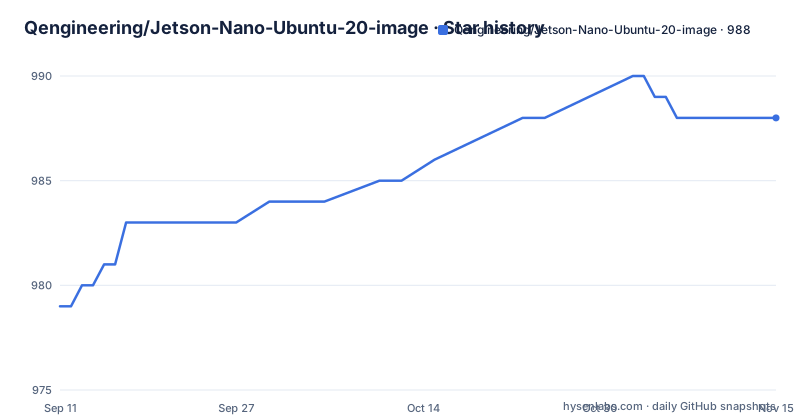
Star history
- Qengineering/Jetson-Nano-Ubuntu-20-image988 ★ · +9
| Repository | 2026-09-11 | 2026-11-15 |
|---|---|---|
| Qengineering/Jetson-Nano-Ubuntu-20-image | 979 | 988 |
9 Stars in the last 65 days, measured from the daily GitHub snapshot. Compare with other projects
Editorial analysis
Three files in the repository, and the image is on someone else's server
The repository contains a licence, the readme, and one binary file, a wheel named for TensorRT 8.0.1.6 built for CPython 3.8 on aarch64. That is the entire tree. There is no image file, no build script, no recipe and no Dockerfile, and the primary language is recorded as unknown because there is no source. There are also no GitHub releases, so the artefact a user needs is not version-controlled anywhere on GitHub. It is downloaded from a file server belonging to the project author, with copies on Google Drive for both images and, for the bare image, a link on a third sync service. Every artefact the readme tells you to install comes from somewhere this repository does not control.
A 32 GB card is recommended and then ruled out nine lines later
The installation list opens by saying to get a 32 GB card, marking it minimal, to hold the image. A few paragraphs later, under a tip, the document says the card is overflowing with software, more than 21 GB of it, and that with a 32 GB card you do not have enough space to work decently. It then tells you to flash onto a card of 64 GB or more and enlarge the partition with GParted, or to use a method described in another issue. So the first instruction is not merely superseded, it is contradicted with a figure. The size of the download is also given two ways: 8.7 GB in the installation section and 9.3 GB in the section describing the split archive. Neither figure is the number that matters, which is the 21 GB the installed system occupies.
The split archive says fourteen files and lists thirteen
Because the image is large, the readme offers it in chunks, described as more manageable than one huge download. The sentence introducing them says to download the following 14 files, 700 MB each. The list that follows runs from part 001 to part 013, which is thirteen links. Thirteen chunks at 700 MB is about 9.1 GB, consistent with the stated 9.3 GB, so the count in the sentence is the wrong number rather than a missing link. Once every part is in one folder, the extraction command is:
7z x JetsonNanoUb20_3b.img.xz.001Seven-Zip starts with the first part and walks the rest in order. The two md5 checksums in the document belong to the two whole images, not to the chunks, so a partial download of the split route has nothing to verify itself against.
The update log is the first thing in the readme, and it stops in 2023
The document opens with a changelog rather than a description, and its most recent entry is dated 9-17-2023, covering a refresh of Ubuntu 20.04, added WiFi support and a smaller archive. The entries before it step back through July 2023, March 2023, July 2022 and January 2022. The repository itself was last pushed on 2026-07-25. So the artefact a reader is offered was last described in September 2023 while the repository has seen a push some ten months after that, and nothing in the visible text says which of the two dates describes the file currently on the download server. For an image whose value is being a known-good stack, that gap is the first thing to check.
The TensorRT ceiling is set by the board, and the reason is written down
The July 2023 entry sets the machine learning stack: OpenCV 4.8.0, PyTorch 1.13.0, TorchVision 0.14.0, and TensorRT 8.0.1.6 as a new addition. A later note explains the TensorRT constraint properly. An installation wheel was added for TensorRT 8.0.1.6 with a CUDA 10.2 build, and the version is kept synchronous with the C++ library already present in the image. Newer TensorRT releases require CUDA 11 or later, which is not supported on this board. That is a hardware ceiling rather than a preference, it is credited to a named contributor, and it has a second consequence worth noting: the Python wheel and the baked-in C++ library are a matched pair, so replacing one without the other leaves a mismatch that the naming alone would not reveal.
The default password is printed in the readme
Two lines of the installation list are about the finished system rather than the flashing of it: insert the card and enjoy, and then the password, set in bold italics, is jetson. The same list also carries the md5 checksum for the image you should have just written. So the document publishes the credential for the root-equivalent account of an operating system image that is distributed as a file download, intended to be handed to other people, and written to removable media. Nothing in the visible text tells you to change it. It is a small thing and an ordinary one for this class of image, but it is the kind of default that gets flashed to a card, imaged, and copied between devices unchanged.
The lavapipe remedy deletes a system graphics directory
The warnings section carries two entries. The first says not to install Chromium because it will interfere with the Snap installation, and to use the preinstalled Firefox instead, which is an unusually specific dependency conflict to document. The second is heavier. You may see a warning during boot that the software rasteriser is broken, and the fix given is to remove the Vulkan driver configuration directory under the system path. The command shown stops after the privilege escalation prefix, so the exact invocation is not visible in what the readme prints. Deleting a system directory to silence a boot-time message is a blunt remedy, and a reader who cannot see the rest of the command is being asked to reconstruct it.
Two images, three hosts, and the bare one is the faster one
There are two images and they are not variations on a theme. The main one carries TensorFlow and PyTorch and runs at the regular 1479 MHz. The bare one, without TensorFlow or PyTorch but with the older JetPack, is overclocked to 1900 MHz and is smaller at 5.6 GB. So the image with the machine learning stack is the stock-clocked one, and the minimal image is the fast one, which inverts what the names suggest. They are also hosted differently: the main image comes from the project file server with a Google Drive copy, and the bare image comes from a different sync provider with its own Drive copy. Anyone planning ROS work is redirected to a separate repository and credited to a named doctoral student.
Editorial conclusion
This image suits someone who wants a Jetson Nano running a known machine learning stack today rather than assembling one, and who is willing to accept a 2023-vintage base. It does not suit anyone who needs a reproducible artefact they can rebuild or audit, because there is nothing in the repository to rebuild from. Check three things first. Check you have a 64 GB or larger card, since the document itself rules out the 32 GB it first recommends. Check the TensorRT version against the hardware, because the ceiling is set by the board and not by preference. And check the checksum, since MD5 is given for the two whole images and nothing at all is given for the thirteen split chunks.
Frequently asked questions
How large should the SD card be for this Jetson Nano image?
The installation list first says 32 GB, minimal. A later tip says the card overflows with more than 21 GB of software and that 32 GB is not enough to work decently, and recommends a card of 64 GB or more with the partition enlarged using GParted.
What is in the Jetson Nano Ubuntu 20 image repository itself?
A licence, the readme, and one wheel, tensorrt-8.0.1.6-cp38-none-linux_aarch64.whl. There are no GitHub releases, and the SD card image is downloaded from an external file server rather than from the repository.
Why is TensorRT limited to 8.0.1.6?
The readme states that newer versions require CUDA 11 or later, which is not supported on a Jetson Nano. The wheel it ships is built for CUDA 10.2 and its version is kept synchronous with the C++ library already in the image.
How do I verify a downloaded Jetson Nano image?
Two md5 checksums are published, one for the main image and one for the bare image. No checksum is given for the thirteen parts of the split archive, so that download route has nothing to verify itself against.
What is the password for the flashed Jetson Nano image?
The readme states it in bold italics as jetson. Nothing in the visible text instructs you to change it after flashing.
Official sources
Add this badge to your README
If you maintain this project, the badge below links readers to this analysis and shows its maintenance status from the daily GitHub snapshot. Paste the markdown into your README; add ?metric=license or ?metric=stars to the image URL for a different field.

[](https://hysenlabs.com/projects/qengineering-jetson-nano-ubuntu-20-image)Star history chart for your README
[](https://hysenlabs.com/projects/qengineering-jetson-nano-ubuntu-20-image)Was this useful?