Pilot: a wrapper that names its agent's minimum version, and a container that defaults to auto-merge
AI that ships your tickets.
At a glance
- What is it?
- Pilot is a Go program that picks up labelled tickets, plans the change, writes the code by driving somebody else's coding agent command line tool, validates the build and opens a pull request for you to merge. That single architectural choice explains most of what the repository looks like: a hard minimum version on the agent CLI, a container runtime that is Ubuntu rather than a minimal base because the CLI needs a runtime, and a cost-control design that routes trivial work to a small model and hard-fails at a budget ceiling.
- Who is it for?
- Pilot fits you if you already have a coding agent you trust with a repository, you have a backlog full of small well-specified tickets, and you want the mechanical part automated while keeping the merge decision. The sequencing is the part that makes it usable rather than a demo: claim the ticket, branch, plan, implement, validate, self-review, open the pull request, wait for the merge, and only then take the next one.
- Can I use it commercially?
- Check first. The repository uses a licence we do not classify automatically, so read its LICENSE file before any commercial use.
- Is it still maintained?
- Yes. The repository last received commits 1 day ago.
- What is it written in?
- Mainly Go, according to GitHub's language statistics.
Answers come from the project's GitHub data, last synced on November 22, 2026, and from our analysis. They are not legal advice.
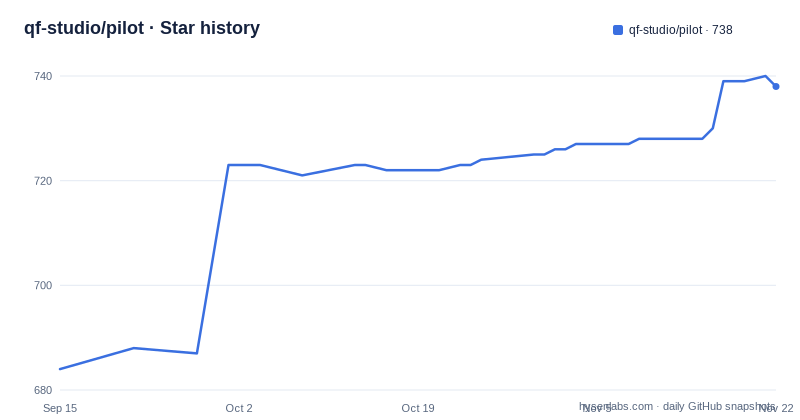
Star history
- qf-studio/pilot738 ★ · +54
| Repository | 2026-09-15 | 2026-11-22 |
|---|---|---|
| qf-studio/pilot | 684 | 738 |
54 Stars in the last 68 days, measured from the daily GitHub snapshot. Compare with other projects
Editorial analysis
The model lives in somebody else's command line tool, and the version floor is stated
The requirements list is short and it is the whole dependency story.
brew tap qf-studio/pilot
brew install pilot
a coding agent command line tool at a specific minimum version, a Go toolchain if you are building rather than installing, and an optional key for a speech-to-text service if you want to talk to it. There is no model in this repository. Every feature the readme advertises, planning, implementation, self-review, decomposition, research, is that external tool being driven. That makes the version number the most important line in the installation section. A command line agent that changes its output format, its exit codes, its configuration surface or its system prompt behaviour will break every feature at once rather than one, and a minimum version specified to three digits is a project telling you it has been broken by an earlier release and has found the boundary. It also reframes the whole feature list. When the readme says it plans an approach by analysing the codebase, that means it is asking another tool to read the codebase, and when it says it self-reviews before the push, that is a second invocation of the same tool with the diff as input. The intelligence features are prompts and routing on top of a subprocess.
The readme says Go 1.22, the module file says 1.25
A small inconsistency that matters more than it looks. The requirements say Go 1.22 or newer, and note that it is needed for building only. The module file declares a considerably newer language version as its floor. So a developer on the documented minimum can install the tool but cannot build it, and the two documents disagree about which is true. It survives because nobody hits it: the package-manager route and the prebuilt binaries mean most users never compile anything, and the desktop builds happen on machines that have a current toolchain. For an ordinary user this is a documentation bug. For anyone who wants to fork it, vendor it, or build it in a pinned container on an older base image, it is the effective floor that governs you, and it is the module file rather than the readme. The same pattern shows up in the container build, which uses a newer builder image than the readme's stated minimum, so the published image is built with the toolchain the project actually needs and the readme describes a floor that is only true for the binary you did not compile.
Three autopilot modes, and the container starts on the least careful one
Autonomy here is a single dial with three positions, and the naming is honest about the trade-off. A development mode skips continuous integration entirely and merges by itself, which is the mode for a repository where you want to see motion and do not yet trust the pipeline. A staging mode waits for the pipeline and then merges. A production mode waits for the pipeline and then waits for a human. That is a good design, because the risk that matters in an unattended agent is not bad code, it is bad code merged without a gate.
# Fast iteration - skip CI, auto-merge
pilot start --env=dev --github

# Balanced - wait for CI, then auto-merge
pilot start --env=stage --github

# Safe - wait for CI + human approval
pilot start --env=prod --github
What makes it worth writing about is the container's default. The compose file's command runs the start subcommand with GitHub polling and the development mode, so the out-of-the-box unattended configuration skips continuous integration and merges on its own. For a container whose entire purpose is running without a human watching, that is the wrong default, and it is a one-line change. The readme also ships a cost-control feature with hard enforcement and alerting on task failures, cost thresholds and stuck tasks, so the project clearly expects unattended operation; it just defaults the risk dial to the permissive end.
Sequential by default: one agent, one branch, wait for the merge
One line in the execution feature list is doing more work than it appears to. Sequential execution means the tool waits for the pull request to merge before it picks up the next issue, and the stated reason is to prevent conflicts. Pair it with the two neighbouring entries and you have the whole guardrail design. Quality gates run test, lint and build validation with automatic retry, so the claim of success is checked by your build rather than by the agent's confidence. Self-review runs a code review on the change before the push, so an obvious problem is caught while it is still cheap. Sequential execution then means the agent never has two of its own branches open against the same repository at once. The cost is throughput, and it is a deliberate cost: a fleet of agents working one repository in parallel is the obvious thing to want, and it is also the fastest way to produce a merge queue full of branches that were written against a codebase none of them could see. For a tool that runs unattended against real repositories, one at a time with a gate is the defensible default. The execution replay feature, which records, plays back, analyses and exports a run as HTML, JSON or markdown, exists because of that choice: it is how you audit the one run you let loose.
Two cost dials, not one: which model, and how hard it thinks
The intelligence features are really a cost-control design, and it is the most transferable idea in the project. Model routing auto-detects whether a task is trivial or not and sends trivial work to the small, fast model while standard and complex work goes to the frontier model. Effort routing is a second, separate dial: it maps task complexity onto the agent's thinking depth, so a hard task gets more reasoning tokens rather than a bigger model. Underneath both sit the cheap-model uses. Research subagents explore the codebase in parallel on the small model, because reading files is not the interesting part. Epic decomposition splits a complex task into sequential subtasks through the small model's API, because splitting a ticket is also not the interesting part. And a repository context file is auto-detected and skipped for trivial tasks, so you are not paying for context you do not need. A project that only had one dial, the model, would be affordable or accurate. Having two means you can be both, and the readme's claim that the tool ships tickets while you sleep only holds because the routing exists.
The runtime image is Ubuntu because the agent CLI needs a runtime
The container file opens with a comment that answers the question every reviewer asks about a minimal image: the runtime is Ubuntu rather than Alpine because the tool executes the coding agent command line tool, and that tool needs a scripting runtime, a version control client and a forge client at run time. The build stage is a minimal Alpine image that produces a static binary with the C compiler disabled, using a pure-Go database driver precisely so the result needs no shared libraries. Then the runtime stage installs version control, a transfer tool, certificates and a keyring, adds the forge client's package repository with its signing key, and installs it, in separate steps with a package index refresh between so the layer survives a copy. That is the honest cost of being a wrapper, and it is worth stating plainly: your container is now the union of your dependencies and your dependency's dependencies, and every runtime requirement of the agent you drive becomes a runtime requirement of your image. If you are choosing between this shape and embedding a model directly, that is the trade you are making, and the comment at the top of this file is the receipt.
A benchmark harness, a chaos test, and a tarball named for the upgrader
Two things in the build file are worth more attention than the feature list. The first is the verification surface. Alongside the ordinary test targets there are separate targets for checking secrets, checking mocks, checking destructive operations, checking the dependency graph, checking integration, a chaos test, a wiring test, a fast pre-push path, and an auto-fix target, plus an end-to-end directory, a stress directory and a benchmark directory with its own static binary target for an agentic benchmark. For a project whose job is writing code into other people's repositories unattended, that list is the actual product. A secrets check that fails the build is the difference between a tool people trust on a private repository and a tool people do not run at all, and a destructive-operation check is the difference between a demonstration and something you point at a monorepo. The second thing is a comment explaining why the archive inside the release tarball is named after the tool rather than after the platform it was built for: so the self-upgrade code finds it. Next to it, a flag that stops the macOS archiver adding resource-fork entries. Neither line is in any changelog, and both are the kind of detail that tells you what happens when somebody actually ships this to users.
Three patch releases in two days, and state in one SQLite file
Start with the operational picture. State lives in SQLite: token counts, cost and task counts survive restarts, and the compose file mounts a named volume for that directory with a comment stating it is required across restarts. The container publishes a health endpoint that a check probes every thirty seconds with a short grace period, passes the agent key and the forge token through the environment rather than baking them into the image, mounts the configuration file read-only, and restarts unless stopped. Hot upgrade is available from the command line or from a key inside the dashboard, and the feature list counts one hundred and thirty-three features across execution, intelligence, integrations and infrastructure, which is a number to treat as marketing rather than as information. Then the cadence: three patch-level releases in two days, two of them on the day this was written. For a tool that drives an external agent, a fast patch cadence is not vanity, it is how you ship the fix when that agent changes underneath you. The practical consequence for a user is that pinning is close to meaningless and reading the changelog before upgrading is not optional.
Editorial conclusion
Pilot fits you if you already have a coding agent you trust with a repository, you have a backlog full of small well-specified tickets, and you want the mechanical part automated while keeping the merge decision. The sequencing is the part that makes it usable rather than a demo: claim the ticket, branch, plan, implement, validate, self-review, open the pull request, wait for the merge, and only then take the next one. It does not fit if you want parallel agents on one repository, or if your tickets are the kind where the hard part is deciding what to do, because the planning step assumes the ticket already knows. Two things to change before you run it anywhere real. The container's default command runs the least careful autopilot mode, which skips continuous integration and merges on its own, so override it. And give it a hard budget ceiling before you point it at a queue, because an agent that spends per step will spend per step on the tasks you least wanted it to attempt.
Frequently asked questions
What does Pilot do with a ticket?
It claims the issue with an in-progress label, creates a branch named after the issue, plans an approach against the codebase, writes the code by driving a coding agent CLI, runs test, lint and build validation with automatic retry, reviews its own change, and opens a pull request for you to merge.
Which tools does Pilot integrate with?
It polls GitHub issues carrying a label, has polling and webhook adapters for GitLab and Azure DevOps, syncs with Linear, Jira and Asana, ships a Telegram bot with chat, question, research, planning and task modes, and can deliver scheduled briefs over Slack, email or Telegram.
What are the three autopilot modes?
A development mode that skips continuous integration and merges on its own, a staging mode that waits for continuous integration and then merges, and a production mode that waits for continuous integration and requires human approval. Note that the shipped container's default command runs the development mode.
What does Pilot need installed to work?
A coding agent command line tool at version 2.1.17 or newer, which is what actually plans and writes the code, plus a Go toolchain only if you are building from source. An OpenAI key is optional and used for voice transcription in the chat bot.
Does Pilot work with more than one coding agent?
Yes. The infrastructure list names both a Claude Code CLI and OpenCode as backends, and the bring-your-own-key option covers a hosted key service, a cloud provider's own model service or a Google-hosted endpoint.
Where does Pilot keep its state, and how does it control cost?
State lives in SQLite, with token, cost and task counts surviving restarts, and the container mounts a named volume for that directory. Cost is controlled by routing trivial tasks to a smaller model, mapping complexity onto the agent's thinking depth, enforcing budget limits with a hard ceiling, and alerting on cost thresholds.
Official sources
Add this badge to your README
If you maintain this project, the badge below links readers to this analysis and shows its maintenance status from the daily GitHub snapshot. Paste the markdown into your README; add ?metric=license or ?metric=stars to the image URL for a different field.

[](https://hysenlabs.com/projects/qf-studio-pilot)Star history chart for your README
[](https://hysenlabs.com/projects/qf-studio-pilot)Was this useful?