wechatDownload needs WeChat itself to hand over the key
A tool for batch-downloading WeChat official account articles, including comments and collections, saving as HTML/MHTML/MD/PDF/DOCX/CSV along with the images, videos and audio in the articles; supports MCP/Skill invocation.
At a glance
- What is it?
- wechatDownload is a desktop tool for batch saving WeChat Official Account articles, with no certificate to install and outputs in six formats plus images, video and audio. Its GitHub repository holds documentation, sample files and skills but not the program itself, and every download needs one step opened in WeChat's own built-in browser.
- Who is it for?
- This fits you if you routinely need an entire WeChat Official Account's article history as local files in a format your notes tooling already reads, and if you have a working WeChat account to satisfy the key step.
- Can I use it commercially?
- Not without permission. GitHub finds no licence file in the repository, and without a licence all rights are reserved by default: you may read the code but not reuse it. Check the README, or ask the authors, before using it.
- Is it still maintained?
- Yes. The repository last received commits 13 days ago.
- What is it written in?
- Mainly HTML, according to GitHub's language statistics.
Answers come from the project's GitHub data, last synced on November 14, 2026, and from our analysis. They are not legal advice.
Star history
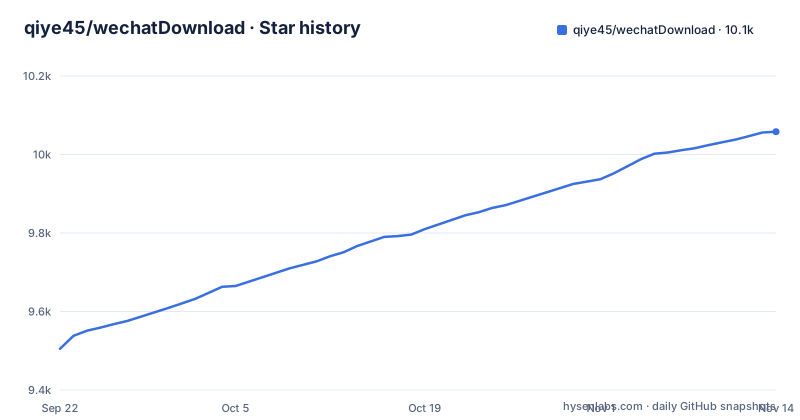
- qiye45/wechatDownload10,058 ★ · +553
| Repository | 2026-09-22 | 2026-11-14 |
|---|---|---|
| qiye45/wechatDownload | 9.5k | 10.1k |
553 Stars in the last 53 days, measured from the daily GitHub snapshot. Compare with other projects
Editorial analysis
Every download starts by sending a link into WeChat and waiting
The documented flow has three steps and none of them can be skipped. Open any article from the account you want, copy its link into the software, and click to get the account id. Then open the copied link inside WeChat itself, which the instructions spell out as sending the auto-copied link to WeChat's file transfer assistant and clicking open there, and wait a while while the software retrieves the key automatically. Only then can you download the account's articles. The stated requirement is that the link be opened with WeChat's built-in browser, not your desktop browser. The consequence for a reader is that the tool cannot bootstrap itself: an account whose article link does not yield a key stops you at step two, and the changelog shows that step failing often enough to be fixed in 3.1, 3.2, 3.5, 4.1 and 4.6.
The repository ships sample exports and a skills folder, not the program
The top level of the GitHub repository contains four entries: .github/, README.md, example/ and skills/. There is no source directory, no build configuration and no license file at that level, and the primary language recorded for the repository is HTML, which is consistent with a documentation and landing-page project rather than the tool's implementation. The homepage given for the project is changfengbox.top/wechat. So a reader who found the repository cannot read the code before running it, cannot build it from source, cannot fork it, and cannot answer the licensing question from the repository itself. Everything you are told about the program's behaviour comes from the README text and from the sample files, which is a thinner basis than it looks for a tool that reads your WeChat account.
Version 5.0 is a repair release, and repairs are most of the history
The 5.0 entry, tagged the same day as the last push, fixes four things: batch downloading of an account failed, image-paste style articles failed to download, images are now saved according to their actual format, and leftover text in Markdown output was cleaned up. The previous release 4.7, dated 2026-08-16, added batch downloading for image-paste accounts, saving of article highlight marks, images from sub-comments, display of comment replies and keyword filtering, plus a fuller spreadsheet export. Going back through earlier entries shows the same pattern: 4.3 fixed image-text format and download folder location problems, 4.1 fixed image-text and video failures, and 3.8 fixed a bug where only the first of several articles would download. The consequence is that format coverage grew ahead of its reliability, so an export you rely on was worth retrying on a newer build.
MCP arrived at 4.4 and by 4.6 it was listening on every interface
Release 4.4 introduced MCP and Skill invocation, with capabilities for downloading an article or a collection, fetching an account id, batch downloading articles and exporting article data. Two releases later, 4.6 changed the MCP listener to bind 0.0.0.0 and added WSL support, which is what lets the tool be called from inside a Linux subsystem on Windows. 4.5 in between updated the Mac version, allowed images to be saved from comments, relaxed the title length limit and reworked the MCP feature. Binding to all interfaces is the part worth thinking about before you turn it on: the MCP listener then accepts connections on every network interface of your machine, and nothing in the README describes an authentication mechanism.
Export filenames changed shape across versions, so old and new batches do not sort together
The example/ directory shows four different naming conventions sitting side by side. There are files prefixed with a date and an underscore such as a JPG, files with a hyphenated timestamp such as 2024-11-06-160246.csv, files prefixed with a compact eight-digit date such as 20240705 followed by the article title, and files wrapped in brackets with a date-time inside such as [2026-08-14-0843] plus a Chinese title in HTML, MD, MHTML and DOCX. The changelog explains the drift. 3.6 added a date at the start of the file with a separator, 2.6 made video, audio and cover files take the article's title, and 4.2 added date, time and region to articles and organised downloaded images by article with sequential numbering. The consequence is practical: a folder you accumulated across versions will not sort chronologically.
Six output formats, each with its own download bug on record
The stated output set is html, mhtml, md, pdf, docx and csv spreadsheet files, with images, video and audio from inside each article saved alongside, and comments and article collections downloadable too. Those formats arrived at different times. Word and PDF came in 2.0, spreadsheet export in 2.2 with real-time table export in 2.5, mhtml in 3.0, and Markdown image rendering in 2.2. The bug list is the more useful part: 2.6 fixed blank downloads and added image-text format downloads, 4.0 fixed video and image-text failures, 4.1 fixed image-text and video again along with accounts whose id could not be fetched, and 4.7 fixed downloads of articles that contain only plain text.
The disclaimer puts a 24 hour clock on everything the tool saves
The README states that all content the software provides may be used only for study and exchange, that it must not be used for other purposes, and that it should be deleted within 24 hours, with a request to respect author copyright by viewing at the original publishing site. That sits awkwardly with the tool's central capability, which is downloading an account's history in bulk. Some controls narrow it: 3.6 added an option to download only original articles, and 4.2 added date, time and region to each saved article. The export also carries engagement metadata, since 2.3 added reading count, like count, share count and comment count to the spreadsheet output. Read the terms before a batch run rather than after, since what the tool is built to do and what its author permits are not the same thing.
Editorial conclusion
This fits you if you routinely need an entire WeChat Official Account's article history as local files in a format your notes tooling already reads, and if you have a working WeChat account to satisfy the key step. It does not fit you if you need to audit, build or fork the tool, because the repository publishes only documentation, sample exports and a skills folder, states HTML as its primary language, and carries no license file, so you have nothing to read before running the program, whose homepage is changfengbox.top/wechat. Before a large batch, check the filename conventions of your version against the sample files in example/, because the naming rules changed more than once. And read the disclaimer: the author asks that downloaded content be deleted within 24 hours and viewed at the original site instead, which does not sit comfortably with archiving a whole account.
Frequently asked questions
Does wechatDownload require installing a certificate?
No. The README says the tool needs no certificate installation, and it supports both Windows and macOS.
How do I get the account id and the key in wechatDownload?
Open any article from the account, copy its link into the software and click to get the account id. Then send the auto-copied link to WeChat's file transfer assistant, open it there and wait while the software obtains the key automatically. The link must be opened in WeChat's built-in browser.
Which formats can wechatDownload save an article to?
html, mhtml, md, pdf, docx and csv spreadsheet files, plus the images, video and audio contained in the article. It also downloads comments and article collections.
Can wechatDownload be built or audited from its GitHub repository?
Not from what the repository publishes. Its top level holds only .github/, README.md, example/ and skills/, and its recorded primary language is HTML, while the project homepage is changfengbox.top/wechat.
Is wechatDownload still receiving updates?
Release 5.0 was published on 2026-11-01, after 4.7 on 2026-08-16 and 4.6 on 2026-06-21, and the last push to the default branch is dated 2026-11-01.
Official sources
Add this badge to your README
If you maintain this project, the badge below links readers to this analysis and shows its maintenance status from the daily GitHub snapshot. Paste the markdown into your README; add ?metric=license or ?metric=stars to the image URL for a different field.

[](https://hysenlabs.com/projects/qiye45-wechatdownload)Star history chart for your README
[](https://hysenlabs.com/projects/qiye45-wechatdownload)Was this useful?