modern-screenshot: DOM node to image through canvas and SVG
📸 Quickly generate image from DOM node using HTML5 canvas and SVG.
At a glance
- What is it?
- modern-screenshot clones a DOM node in the browser and renders the clone through canvas and SVG, so a page can export itself as a PNG, JPEG, WebP, blob or pixel buffer with no server involved. It is built for in-browser export, it is forked from bubkoo/html-to-image, and its README leaves the option list to a source file.
- Who is it for?
- modern-screenshot fits teams that must export a page fragment without sending it anywhere, and it does not fit markup built on CSS counters or on assets served without CORS headers. Read src/options.ts before committing, because the README names only debug and progress.
- Can I use it commercially?
- Yes. MIT is a permissive licence: you can use, modify and sell software built on it, as long as you keep its copyright and licence notices.
- Is it still maintained?
- Activity is slowing. The repository last received commits 6 months ago.
- What is it written in?
- Mainly TypeScript, according to GitHub's language statistics.
Answers come from the project's GitHub data, last synced on October 21, 2026, and from our analysis. They are not legal advice.
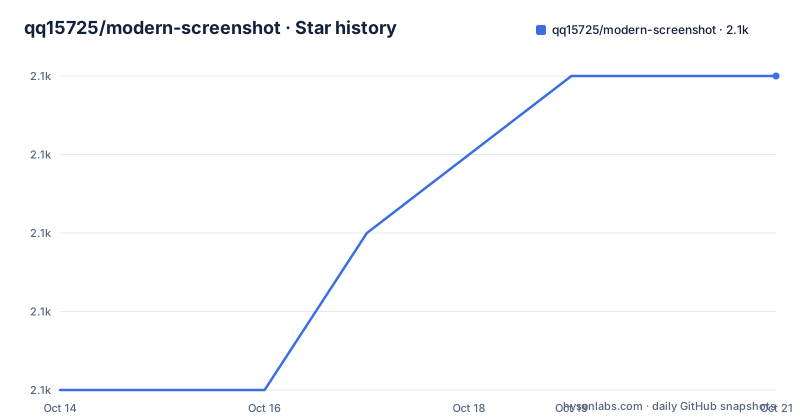
Star history
- qq15725/modern-screenshot2,088 ★ · +4
| Repository | 2026-10-14 | 2026-10-21 |
|---|---|---|
| qq15725/modern-screenshot | 2.1k | 2.1k |
4 Stars in the last 7 days, measured from the daily GitHub snapshot. Compare with other projects
Editorial analysis
Why clone the DOM instead of asking for a screen capture
A screenshot tool asks the operating system for the pixels of a window. modern-screenshot takes the opposite route: you hand it an element that already exists in the page, it clones that element, and it renders the clone itself using HTML5 canvas and SVG. Nothing depends on a window handle, a screen resolution or a browser-specific capture API, which is why the whole thing runs in a page tab with no native bridge. The result is a data URL for PNG, JPEG, WebP or SVG, or a blob, a pixel buffer or an element you can insert back into the document. The audience is developers building in-browser export: chart panels, report cards, chat bubbles, receipt views, any view a user wants to download as an image without a round trip to a server. The package is published to npm as modern-screenshot, is written in TypeScript, and the README records it as a fork of bubkoo/html-to-image.
Ten conversion functions sorted by what the caller receives
`method(node: Node, options?: Options)` is the shape every export follows, and the README groups ten of them by return type. Five produce a data URL: domToPng, domToSvg, domToJpeg, domToWebp and domToDataUrl. Two produce raw data instead, domToBlob and domToPixel. Three hand back an element you can place in a document, domToForeignObjectSvg, domToImage and domToCanvas. Each function lives in its own file under src/converts, so the entry point you call decides which stage runs and what the caller ends up holding. No timing, no size limit and no failure mode is described for any of them. Option names live in src/options.ts, and the README simply points there rather than listing a table.
npm i modern-screenshot, then one call and a download link
Installation is a single npm command, and the first real use is the shortest possible path: pass a selector result to domToPng, then push the returned data URL into a temporary anchor and click it. The file lands with the name you set on the link.
npm i modern-screenshotimport { domToPng } from 'modern-screenshot'
domToPng(document.querySelector('#app')).then((dataUrl) => {
const link = document.createElement('a')
link.download = 'screenshot.png'
link.href = dataUrl
link.click()
})No configuration file and no build step is required for this path. A script tag from https://unpkg.com/modern-screenshot exposes the same functions under the global name modernScreenshot, which covers pages that have no bundler.
One worker context reused across a burst of captures
Throughput has one documented lever, and it is context reuse. createContext(node, options) builds an object that later calls take in place of a node, and that object carries the worker setup which destroyContext frees when the burst is done. Two options appear in the example: workerUrl, imported from the package subpath 'modern-screenshot/worker?url', and workerNumber, set to 1. The loop then fires ten captures one second apart, saves each as screenshot-1.png through screenshot-10.png, and tears the context down on the tenth. One detail in that loop deserves a second look: each domToPng call is started and then left running while the code waits a fixed 1000 ms before starting the next, so captures overlap by design rather than being serialised. The README does not say what happens if destroyContext is called while a capture is still pending.
The browser field and the CDN recipe name different bundles
The packaging is where the README and the manifest disagree. The badge row at the top points at that file on a master branch, while the default branch is main. package.json then names three entry files: main and module both resolve to ./dist/index.mjs, require resolves to ./dist/index.cjs, and browser resolves to ./dist/index.js, which is also the exact file the Browser Console recipe pulls from unpkg. The root exports entry lists only import and require, so a consumer resolving through that map never reaches ./dist/index.js unless it falls through to the star catch-all key. The console recipe compounds this by attaching a script element to head at runtime and waiting for its onload, which works in a page you control and does nothing for a bundled app. Two further details from the manifest: sideEffects is set to false, and the published files list contains only dist and worker.d.ts.
CSS counters sit in the open cloning gap
The TODO list has one unchecked entry, and it names a real hole: the README states that css counters cannot be cloned, with the failing declaration written out as `content: counter(step);`. Any numbering produced that way, an ordered list, a step indicator, a figure counter, loses its numbers in a capture or fails outright depending on where the counter is applied. CORS is the second constraint, and the console example carries a warning that partial embedding will fail due to CORS. The mechanism is familiar: canvas pixels become unreadable once cross-origin content is drawn into them, so a page pulling fonts or images from another origin can taint the surface without any obvious error. Neither the README nor the option file lists a proxy setting, a crossOrigin switch or a documented message for these cases.
What the fork from html-to-image actually adds
The README names its origin in one line: Fork from bubkoo/html-to-image. That upstream is the direct comparison point, and because most method names carry over unchanged, moving between them means editing one import string and re-checking output size. What this fork puts on its own page is the context and web worker path with createContext and destroyContext, the ./worker subpath in package.json, and a separate vite.worker.config.ts at the repository root alongside vite.config.ts. The package keywords also carry html2canvas, which takes a different approach and paints elements onto a canvas instead of serialising them into an SVG foreignObject, but the README documents no comparison against it, so read that keyword as a discovery tag and not as a claim of parity.
Options, scripts and what the README never states
Documentation is the weak point. Ten call signatures are listed, but the option table is only a pointer to src/options.ts, and the sole two option names visible in prose come from the console example, debug and progress, where progress is called with current and total and the example logs the fraction. Build tooling is concrete, at least: packageManager is pinned to [email protected], build runs build:lib and then build:worker, typecheck runs tsc --noEmit, and test runs vitest --no-isolate. The last push was on 2026-04-16. The README documents no rollback path for a bad build, no browser support matrix, no Node version requirement for the build, and no guidance on running any of this where document is undefined, such as during server-side rendering.
Editorial conclusion
modern-screenshot fits teams that must export a page fragment without sending it anywhere, and it does not fit markup built on CSS counters or on assets served without CORS headers. Read src/options.ts before committing, because the README names only debug and progress. Then check your own stylesheets for `content: counter(step);`, confirm every remote font and image sends permissive headers, and verify that your bundler resolves the `./worker` export, which the README shows only through vite, before you write the first domToPng call.
Frequently asked questions
How do I install modern-screenshot and turn a DOM node into a PNG?
Run `npm i modern-screenshot`, then import domToPng from 'modern-screenshot' and pass it the node you want, for example document.querySelector('#app'). It returns a data URL that you can assign to a link's href and click to download.
Does modern-screenshot support CSS counters?
No. The README's TODO list states that it is unable to clone css counters, with `content: counter(step);` given as the failing declaration. Numbering that depends on counters will not survive a capture.
How does modern-screenshot speed up many screenshots in a row?
It exposes createContext and destroyContext so one context, and the web worker it holds, can be reused across captures. The example sets workerUrl and workerNumber, runs ten captures a second apart, then calls destroyContext.
Can I use modern-screenshot from a CDN without a bundler?
Yes, a script tag from https://unpkg.com/modern-screenshot exposes the functions as a global called modernScreenshot. The README also warns that partial embedding will fail due to CORS.
Where are the options for modern-screenshot documented?
The README does not list them. It points at src/options.ts in the repository, and the only option names visible in the README are debug and progress, both shown inside the Browser Console example.
Official sources
Add this badge to your README
If you maintain this project, the badge below links readers to this analysis and shows its maintenance status from the daily GitHub snapshot. Paste the markdown into your README; add ?metric=license or ?metric=stars to the image URL for a different field.

[](https://hysenlabs.com/projects/qq15725-modern-screenshot)Star history chart for your README
[](https://hysenlabs.com/projects/qq15725-modern-screenshot)Was this useful?