devzat: a chat server where the module is one word and the releases are commit hashes
The devs are over here at devzat, chat over SSH!
At a glance
- What is it?
- devzat turns an SSH connection into a chat room instead of a shell, with rooms, markdown, direct messages, moderation commands and two games, and it exists because SSH clients run everywhere including phones. Its files are the interesting part: the module path is a bare word so nobody can install it, releases are named after commit hashes, admin rights hang off a hashed key, and one dependency exists purely to keep a free hosting tier awake.
- Who is it for?
- Use this if you want a low-friction place to talk to other developers and you are already comfortable with a terminal, because the whole interface is a chat client you already have. Three things to know.
- Can I use it commercially?
- Yes. MIT is a permissive licence: you can use, modify and sell software built on it, as long as you keep its copyright and licence notices.
- Is it still maintained?
- Yes. The repository last received commits 115 days ago.
- What is it written in?
- Mainly Go, according to GitHub's language statistics.
Answers come from the project's GitHub data, last synced on November 15, 2026, and from our analysis. They are not legal advice.
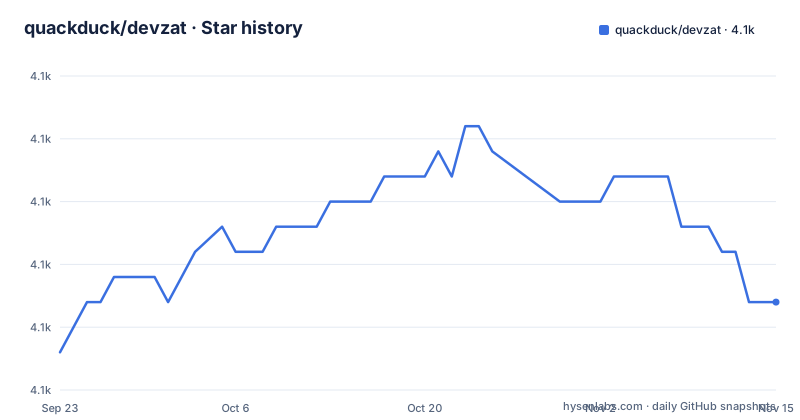
Star history
- quackduck/devzat4,071 ★ · +2
| Repository | 2026-09-23 | 2026-11-15 |
|---|---|---|
| quackduck/devzat | 4.1k | 4.1k |
2 Stars in the last 53 days, measured from the daily GitHub snapshot. Compare with other projects
Editorial analysis
The release tags are commit hashes with Build as a title
The release list has three entries and none of them is a version. They are named after short commit hashes and titled with the same hash preceded by the word Build, with the newest from July 2026 and the two before it from July and June of the same year. So there is no version number anywhere in the project's release history, and no way to ask what changed between two releases other than reading the diff between the two hashes. For a self-hosted server that is a defensible choice, since the artefact is a source checkout rather than a downloaded binary, and for the public instance it means uptime is tracked on a status page rather than tied to a release. It does mean the only stable handle for a build is the hash itself, so anything automating deployments has to parse tags rather than compare versions. The module manifest reinforces that: it declares no version requirement on itself at all.
The module path is devzat, so nobody can install it
The module declaration is a single word, with no domain in front of it. That is unusual and it is deliberate: this program is not something you fetch into your build, it is a server you clone and run. The self-hosting instructions say exactly that:
git clone https://github.com/quackduck/devzat && cd devzat
go build
./devzat
The default configuration is used and written automatically. It also means the plugin submodule is referenced as a path inside the same module rather than as an addressable package, and that the project could never be distributed the way its dependencies are. The consequence for a reader is that every instruction is a local one: there is no registry to pin, no version to upgrade across, and an upgrade means pulling the branch and rebuilding. For a chat server that is a reasonable trade, and for anything else it is a hard boundary.
Admins are a hashed key, not a username
The moderation model is the part of the design that reveals how the server thinks about identity. Users are identified from their public keys, so the same person is the same identity across addresses and reconnects. There is a command that prints a unique identifier for a user, derived from the hashed key, and another that prints the hashed identifiers of every admin. Ban, unban and kick all take either an address or that identifier, and the unban accepts an optional duration, which is how a timed ban is expressed. There is also a listing of banned identifiers. So the administrative surface never operates on names: names are display labels chosen by the user, and the thing with authority behind it is a hash. The trade-off is that a moderator who has banned an address cannot tell whether the person behind it has come back under a new one, which is exactly what an identifier-based ban list is for.
Port 443 needs no key at all
Users are identified by public key, which is the right default, and then the same document explains how to get in without one. The permission-denied section says that if you are refused, try port 443, which does not require a key, and that the underlying cause is usually not having a key pair at all, which you check by looking for a file of a given name in your SSH directory and fix by generating one. So the project ships two authentication paths: keys on the standard port, and nothing on the alternative one. That is a deliberate convenience trade, since it is how people join from a phone where generating and transferring a key is a chore, and the port number means it works where the default port is blocked. It is also an unauthenticated path into a chat server that has moderation commands, so the practical advice is to use it when you have to and set up a key when you have five minutes.
Two games, a panda, and one game supplied by a dependency
A chat server for developers has hangman and tic-tac-toe in it, and the way they arrived is worth noting. The tic-tac-toe board is a third-party library, pinned to a commit from 2021, so the game is a dependency rather than local code, and it has been frozen for four years. Hangman is in the repository's own games file alongside the rest of the commands. There is also a command that prints panda art, which the dependency list explains, because an image processing library is a direct requirement. The rest of the surface is more utilitarian: list users, change the colour of your own name, clear the screen, show a bell setting with three states, look up the manual for a specific command, see the emoji list, see the room you are in, and a shrug for messages that need no text. One command in the list appears with no description at all, which tells you the list is maintained by hand rather than generated from the parser.
A keep-alive library in the dependency list
One direct dependency exists for a single purpose that has nothing to do with chat, and it is worth naming because it explains a deployment choice. A small library whose job is to periodically send a request to an external URL sits in the require block alongside the SSH server, the markdown renderer and the syntax highlighter. That is the shape of a keep-alive client: it exists so that a server sitting on a free or trial hosting tier is not idle long enough to be reclaimed. There is also a separate uptime page linked from the README for the main instance, so the project monitors itself in both directions, pinging outward to stay resident and being watched from outside. Nothing in the README explains the dependency, so a reader auditing the build sees an unexplained network client and has to work out what it is for. The rest of the dependency list is coherent and modern: an SSH server library, a markdown renderer with its styling stack, a highlighter, a terminal helper written by the project's own author, and a chat-platform client.
Rooms, markdown with escaped newlines, and a prefix for messages
The in-chat help text is the most complete part of the README, and it is a list of what the thing is actually for. Directories are rooms: the change-directory command with no argument lists them and with a name prefixed by a hash joins or creates one. Markdown is supported, including tables, headers and italics, with the specific instruction that a literal escaped newline is what you send instead of pressing return, because return is how you submit. Code is sent as fenced blocks and highlighted on the far end, with a command to see an example. Direct messages have two forms, a prefix that takes a username and a message, or moving yourself into a private room named after that user. There is timezone support, and a bell setting that can ping on mentions, never, or on every message. The design is consistent: everything is a command with a short name, and the help text is reachable from inside the session rather than only from the repository.
A censor list, a committed server config and a manual with a space in its name
The repository root is flat and slightly untidy in the way a small server's is. There is a source file whose entire job is a word list to censor, which tells you the chat filters content and that the filter is code rather than configuration. There is a committed configuration file for the main public instance, which means the admin list and the public settings live in version control, and a separate data directory for whatever else the server keeps. The self-hosting documentation is a markdown file whose name contains a space and an apostrophe, which breaks any tooling that assumes filenames are shell-friendly, and it is linked twice in the README with the space percent-encoded. There is a script for compiling the protocol buffers, and a separate directory holding the generated API surface, so the RPC layer between the server and its plugins is generated rather than hand written. Alongside the English README sits a Chinese one, and there is a workspace configuration file for a hosted development environment.
Editorial conclusion
Use this if you want a low-friction place to talk to other developers and you are already comfortable with a terminal, because the whole interface is a chat client you already have. Three things to know. If you are behind a restrictive network, port 443 is the path in and it deliberately skips key authentication, so set up a key once you have had the chance. If you want to run it yourself, the build is three commands and the configuration is written for you, but there is no package to install and no version to upgrade across, so an upgrade is a pull and a rebuild. And the moderation model keys off a hash of your public key rather than your name, which is right for a community and means nobody's authority depends on a display name anyone can pick.
Frequently asked questions
How do I join devzat?
With SSH. Run `ssh devzat.hackclub.com`, and on your first login the SSH username becomes your display name, so `ssh [email protected]` joins as wenjie. A command changes the name later. Behind a firewall you can use port 443, which needs no key. Adding a host entry to your SSH config gives you a single-word command.
What can I do in a devzat chat?
Move between rooms with the change-directory command, including creating one; write markdown, with escaped newlines, tables, headers and italics; send fenced code blocks that are highlighted for everyone else; send direct messages with a username prefix or by moving into a private room; check the time in someone's zone; set a bell to ping on mentions, never or always; change the colour of your own name; and play hangman or tic-tac-toe, plus a piece of panda art.
How do I run my own devzat instance?
Clone the repository, build it with the Go toolchain, and run the binary. The default configuration is used and written automatically, and the server listens on port 2221 unless you set the port variable. A self-hosting manual is included in the repository covering the full setup, including the Slack and Discord message bridges and the announcement integration.
How does devzat decide who is an admin?
By a hashed key rather than a name. Users are identified from their public keys, one command prints a unique identifier derived from that hash, and another prints the hashed identifiers for every admin. Ban, unban and kick all take either an address or that identifier, and an unban can carry a duration for a timed ban.
What is devzat's plugin API?
A documented interface for integrating your own services, with the plugin documentation in the repository. It runs over a generated protocol buffer interface between the server and its plugins, and on the public instance you can ask for a token on the server to have a plugin added.
Official sources
Add this badge to your README
If you maintain this project, the badge below links readers to this analysis and shows its maintenance status from the daily GitHub snapshot. Paste the markdown into your README; add ?metric=license or ?metric=stars to the image URL for a different field.

[](https://hysenlabs.com/projects/quackduck-devzat)Star history chart for your README
[](https://hysenlabs.com/projects/quackduck-devzat)Was this useful?