QuestDB 10.0 moved the wire protocol to WebSocket and left Parquet to you
QuestDB is a high performance, open-source, time-series database
At a glance
- What is it?
- QuestDB is a time-series database written in zero-GC Java with C++ and Rust on the hot paths, storing data in memory-mapped partitioned columns backed by a write-ahead log. Version 10.0 introduced QWP, a binary columnar protocol over WebSocket for both writes and Arrow reads, and the open source build still expects you to run the Parquet conversion yourself.
- Who is it for?
- QuestDB fits a team with tick data, telemetry or an order book that needs SQL over years of history and wants the files readable outside the database. It does not fit a team that wants storage tiering to happen by itself, because in the open source build the Parquet conversion is an ALTER TABLE you schedule, and the automatic path to object storage is an Enterprise feature.
- Can I use it commercially?
- Yes. Apache-2.0 is a permissive licence: you can use, modify and sell software built on it, as long as you keep its copyright and licence notices.
- Is it still maintained?
- Yes. The repository received new commits within the last day.
- What is it written in?
- Mainly Java, according to GitHub's language statistics.
Answers come from the project's GitHub data, last synced on November 13, 2026, and from our analysis. They are not legal advice.
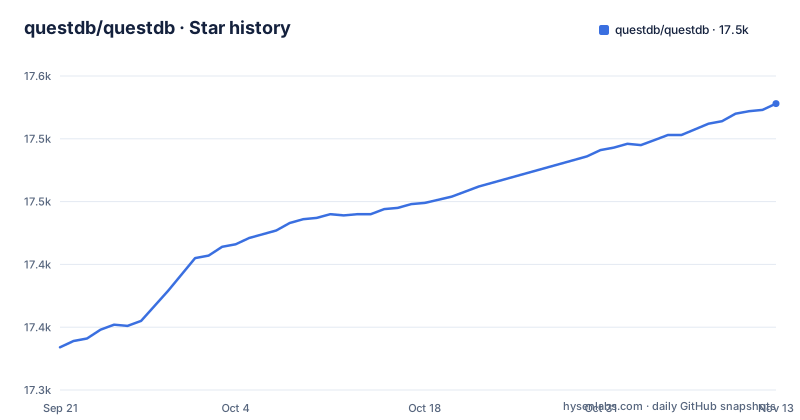
Star history
- questdb/questdb17,528 ★ · +194
| Repository | 2026-09-21 | 2026-11-13 |
|---|---|---|
| questdb/questdb | 17.3k | 17.5k |
194 Stars in the last 53 days, measured from the daily GitHub snapshot. Compare with other projects
Editorial analysis
Zero-GC Java, with C++ and Rust only on the hot paths
The engine description is unusually specific and worth taking apart. QuestDB is written in zero-GC Java, with C++ and Rust on the hot paths. Data lives in memory-mapped, time-partitioned columns, queries run across all cores using SIMD and JIT-compiled filters, and there are no third-party dependencies on the data path. That last clause is scoped, and the scope is the interesting part: a dependency audit of the ingest and query path will come back empty, which is a real and unusual property, while the JVM around it still has its own. The zero-GC claim is likewise about the engine's own loops. It describes what the database does with your rows, not what your client code does, so an application that allocates heavily on the same thread still shows up in the garbage collector logs. Time partitioning is the other structural fact: it is what lets old data be dropped or converted a partition at a time instead of rewriting a table.
QWP is a WebSocket that both ingests and returns Arrow columns
The QuestDB Wire Protocol arrived in version 10.0 and it changes the shape of the client side. It is a binary columnar protocol over WebSocket, and the same connection carries rows in and streams query results back out as columns. The Python client returns those columns as Apache Arrow by default; Rust and C or C++ clients can enable it with a flag. The figures the project publishes for it are its own, measured on version 10.0: peak ingestion of 19M rows per second per instance, which the post says holds from one thousand to one million series, and 220M rows per second streamed to Arrow with eight readers, with 500M rows in 2.3 seconds and the first batch arriving after 32 ms while client memory stays flat. Read those as vendor measurements on eight readers, not as a property of your deployment, and note that the older line protocol is still there to be compared against.
On the open source build, Parquet conversion is a statement you run
Storage is tiered in three layers: a parallel write-ahead log, native columnar partitions, and Apache Parquet. What differs between the editions is who decides when a partition is cold. In the open source build you convert partitions to Parquet yourself with ALTER TABLE, or you create a table in Parquet directly from the start. QuestDB Enterprise converts cold partitions automatically and tiers them to object storage. So the open source path is not automatic retention, it is a piece of scheduling you have to write, and the moment you skip it the native columnar files keep accumulating at full resolution. The payoff when you do it is that the data stops being QuestDB's private format: Parquet, Apache Iceberg and Apache Arrow are named specifically as the reason the data stays open to any tool, which is the argument for the whole design.
SAMPLE BY and ASOF JOIN are what you cannot port to another database
The SQL is standard, extended where time series needs it, and the extensions are the migration cost in both directions. The named additions are SAMPLE BY, LATEST ON, ASOF JOIN, WINDOW JOIN, HORIZON JOIN, materialized views, live views and n-dimensional arrays. A finance query looks like ordinary SQL until it reaches the time-series clause:
-- 15-minute OHLCV bars for EURUSD, today
SELECT timestamp, symbol,
  first(price) AS open,
  max(price) AS high,
  min(price) AS low,
  last(price) AS close,
  sum(quantity) AS total_volume
FROM fx_trades
WHERE symbol = 'EURUSD'
  AND timestamp IN '$today'
SAMPLE BY 15m;
SAMPLE BY collapses many rows into one per time slice, which is why first, max, min and last appear as aggregates on a price column. None of that runs on a general-purpose database without an extension, so a team choosing QuestDB is choosing to own queries that only QuestDB executes, and the same applies to the join family, where ASOF JOIN matches each trade to the most recent quote by timestamp. The second example in the same file pairs fx_trades with a core_price table on symbol, which is the shape market data code needs constantly, and LATEST ON, WINDOW JOIN and HORIZON JOIN round out the time-series extensions. The cost runs the other way as well: an analyst who knows SAMPLE BY cannot check the same aggregation on a Postgres replica, so reviewing a time query needs a QuestDB instance.
Materialized views roll up, live views stream from memory, and one is beta
The two view types are easy to confuse and they are not interchangeable. A materialized view aggregates by time slice, many rows in and one row out, and it is the mechanism behind pre-aggregated series. A live view runs window functions such as technical indicators, also one row in and one row out, but on an in-memory tier, so it is a continuous computation rather than a rollup written to disk. The version 10.0 note lists live views and native arrays as new and in beta, which is the part to plan around: a live view's working set is memory, so an indicator over a wide symbol set has a resident cost, and a beta API can change shape between minor releases. Materialized views have no such caveat in the same sentence, which is the hint about which one to build on first.
Docker works everywhere, and Homebrew only on Apple Silicon
The documented quick start is a container publishing two ports:
docker run -p 9000:9000 -p 8812:8812 questdb/questdbThe alternative is a native install on macOS, and it comes with a hardware restriction that is stated rather than discovered: QuestDB bundles native libraries for Apple Silicon only, so on an Intel Mac you are told to use the Docker image instead. The Homebrew path is brew install questdb, then brew services start questdb, with questdb start and questdb stop for foreground control. There is also a public demo instance running the latest release on sample datasets, among them live crypto trades from the OKX exchange at more than 30 million rows a month and ten years of New York taxi trips at 1.6 billion rows, plus real-time demo dashboards built on a Grafana-native plugin, which is a faster way to judge the query surface than reading the feature list.
The repository is a Java project with agent configuration checked in
The primary language recorded for the project is Java, and the tree is a Maven project with a pom.xml, a core/ directory, benchmarks/, a compat/ directory, a java-questdb-client directory, i18n/ for the translated README, and THIRD_PARTY_LICENSES.txt beside LICENSE.txt, which is the Apache 2.0 grant. Licensing is therefore two files to read rather than one. The release cadence is fast and the version numbers are honest about it: 10.0.0 on 2026-08-06, 10.0.1 on 2026-08-24 and 10.1.0 on 2026-10-22, with the last push recorded on 2026-11-02. Two details are worth noticing for anyone contributing. There are agent configuration directories in the repository for several tools, plus a CLAUDE.md at the root, so AI-assisted contributions are an expected path rather than an accident. And there is a script named find_unterminated_logs.py sitting at the top level.
Editorial conclusion
QuestDB fits a team with tick data, telemetry or an order book that needs SQL over years of history and wants the files readable outside the database. It does not fit a team that wants storage tiering to happen by itself, because in the open source build the Parquet conversion is an ALTER TABLE you schedule, and the automatic path to object storage is an Enterprise feature. Before you adopt it, read the version history: 10.0 arrived on 2026-08-06 with live views and native arrays still in beta, so pin a version and read the release notes before treating those as stable. Then decide the ingest path, because QWP is new in that same release and the published throughput figures are the project's own measurements of it.
Frequently asked questions
What is QuestDB used for?
QuestDB is an open source time-series database for data that arrives as events and is queried as time series. The documented deployments are capital markets with tick data, order books and post-trade analytics, aerospace and robotics telemetry, and energy and infrastructure telemetry kept at full resolution, plus AI coding agents through agent skills and an MCP server.
How much does QuestDB cost?
The database is open source under the Apache License 2.0. The paid part is Enterprise, and the specific capability the top-level file names is automatic conversion of cold partitions to Parquet and tiering them to object storage, which in the open source build you do yourself with ALTER TABLE.
how to install questdb
The documented route is Docker: docker run -p 9000:9000 -p 8812:8812 questdb/questdb. On macOS with Apple Silicon you can brew install questdb and then brew services start questdb, with questdb start and questdb stop for foreground control. Intel Macs are told to use the Docker image because native libraries bundle for Apple Silicon only.
what language is questdb written in
Java, described as zero-GC, with C++ and Rust on the hot paths. Storage is memory-mapped time-partitioned columns with SIMD and JIT-compiled filters, and there are no third-party dependencies on the data path.
what is wal in questdb
The write-ahead log is the first of three storage tiers. Storage is described as a parallel write-ahead log, native columnar partitions, and Apache Parquet, with the open source build converting partitions to Parquet by hand with ALTER TABLE.
is questdb sql
It speaks SQL, extended where time series needs it. The named additions are SAMPLE BY, LATEST ON, ASOF JOIN, WINDOW JOIN, HORIZON JOIN, materialized views, live views and n-dimensional arrays, so ordinary queries port in and the time-series ones do not.
Official sources
Add this badge to your README
If you maintain this project, the badge below links readers to this analysis and shows its maintenance status from the daily GitHub snapshot. Paste the markdown into your README; add ?metric=license or ?metric=stars to the image URL for a different field.

[](https://hysenlabs.com/projects/questdb-questdb)Star history chart for your README
[](https://hysenlabs.com/projects/questdb-questdb)Was this useful?