Questie ships one codebase for six WoW Classic flavours, and the build is a set of Python scripts
Questie: The WoW Classic quest helper
At a glance
- What is it?
- The quest helper addon for World of Warcraft Classic, written in Lua against the client's 5.1 runtime, with its own entity database, a localisation system covering nine languages and a release pipeline that produces separate bundles per game version. The unusual part is how much of the tooling is Python rather than Lua.
- Who is it for?
- Adopt Questie if you play World of Warcraft Classic and want quest data, map markers and a tracker that the base game does not provide. Do not treat the repository as a reusable library, because it is an addon whose public API is narrow and exists mainly for other addons to read its data.
- Can I use it commercially?
- Check first. The repository uses a licence we do not classify automatically, so read its LICENSE file before any commercial use.
- Is it still maintained?
- Yes. The repository received new commits within the last day.
- What is it written in?
- Mainly Lua, according to GitHub's language statistics.
Answers come from the project's GitHub data, last synced on November 7, 2026, and from our analysis. They are not legal advice.
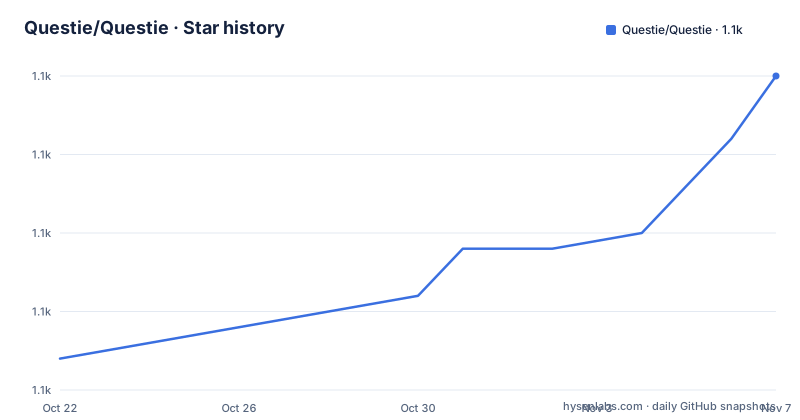
Star history
- Questie/Questie1,130 ★ · +18
| Repository | 2026-10-22 | 2026-11-07 |
|---|---|---|
| Questie/Questie | 1.1k | 1.1k |
18 Stars in the last 16 days, measured from the daily GitHub snapshot. Compare with other projects
Editorial analysis
One addon, six game versions, and a paired version number
Questie is a quest helper for World of Warcraft Classic, and the most structural thing about the repository is how it handles the fact that Classic is not one game.
The top level carries six toc files, one per flavour of the game: `Questie_Camelot.toc`, `Questie_Cata.toc`, `Questie_Mists.toc`, `Questie_TBC.toc`, `Questie_Vanilla.toc` and `Questie_Wrath.toc`. A toc file is the addon manifest, and having one per flavour means a single Lua codebase ships as a different addon depending on which version of the client it is installed into.
The release tags carry two numbers, which is worth understanding. The most recent tags are `bundle/v12.1.0+v1.0.6`, then `bundle/v12.0.4+v1.0.5` and `bundle/v12.0.3+v1.0.4`. The first number is the game version the bundle targets, since 12.1.0 is a WoW Classic client version, and the second is the addon version, which moves independently. The `bundle/` prefix tells you these tags are release bundles rather than source releases of a different kind.
The version bump is automated. There is a `versionbump.py` in the repository root alongside `build.py`, `changelog.py` and `release_notes.py`, and a `PLAN-release-bundles.md` describing the release bundle process. There are also `upload-cf.sh` and `upload-wago.sh` for the two distribution channels, CurseForge and Wago, and a `validate-bundle.sh` script.
The primary language is Lua, and the last push to the repository was on 2026-10-15 with the repository not archived, so the project is actively maintained against the current game.
The features are what a quest helper is actually for
The feature list reads like a product spec, and it is worth taking the map and tracker features together because they are the two halves of the tool.
For the map, Questie shows notes for quest start points, turn in points and objectives, and draws waypoint lines for NPCs showing their pathing. The tracker automatically tracks quests on accepting, and can show all quests from the log at once instead of the default 5. Left clicking a quest opens the quest log and that is configurable. Right clicking gives more options, such as focusing a quest so other quest icons become translucent, and pointing an arrow towards the objective, which requires the separate TomTom addon.
Then there is quest communication, where you can see party members' quest progress on the tooltip, and tooltips on map notes and quest NPCs and objects, where holding Shift while hovering over a map icon displays more information such as quest XP.
The Journey Log is the feature that goes furthest. Questie records the steps of your journey in the My Journey window, reached by left clicking the minimap button or typing `/questie journey`, and the same window holds the Quests by Zone tab, which lists all the quests of a zone divided between completed and available, and the Advanced Search tab, which searches the database.
The database is a real asset and the repository has a `Database/` directory, an `Icons/` directory and a `Libs/` directory for vendored libraries. There is also an `ExternalScripts(DONOTINCLUDEINRELEASE)/` directory, whose name is a statement about the release process rather than a comment on the code: those scripts are deliberately kept out of the shipped bundle.
The Lua toolchain is a four step setup, and busted is the test runner
The contribution section documents the local development setup in more detail than most addon projects do, and the reason is that testing a WoW addon outside the game requires a Lua environment that mimics the client.
The first requirement is Lua 5.1, because the WoW client uses Lua 5.1, and the macOS install is given as `brew install [email protected]`. Then luarocks, also `brew install luarocks` on macOS, and it has to be configured to use the correct Lua version, since by default luarocks uses the latest installed one.
luarocks config lua_version 5.1Then busted, the test framework, and two supporting packages, `bit32` and `luacheck`.
luarocks install busted
luarocks install bit32
luarocks install luacheck
The `bit32` package is a good sign about the fidelity of the test environment. It provides the 32 bit bitwise operations that exist in the game's Lua but not in stock Lua 5.1, so without it the tests would not exercise the same integer semantics the addon runs under.
The lint command is a single invocation.
luacheck -q Database Localization Modules Questie.luaThe unit tests run with busted from the root directory.
busted -p ".test.lua" .The naming convention for new tests is specific: name them `<module>.test.lua` and place them next to the module. That is a convention the top level reflects, since `Questie.test.lua` sits next to `Questie.lua` in the root.
There is a `.luacheckrc` at the root for the lint configuration and a `.luarc.json` for the Lua language server, plus a `.types/` directory for type definitions and a `setupTests.lua` in the root that the test harness presumably loads.
Python builds the release and validates the entity database
The most unusual thing about the repository is that a meaningful part of the tooling is Python rather than Lua, and that Python tooling has its own test files.
The root holds `build.py` with `build.test.py` beside it, `changelog.py` with `changelog.test.py`, `release_notes.py` with `release_notes.test.py`, and `upload-cf.py` and `upload-wago.py` each with a `.test.py` counterpart. The convention is that the Python tooling is unit tested in the same way as the Lua code.
That is a reasonable choice, because the release pipeline is where the bugs that reach users actually live. A build script that assembles the right files for the right game flavour, that produces the right version pair, and that uploads to two distribution channels is exactly the kind of code that deserves tests, and it is exactly the code that addon projects usually leave untested.
There is a `cli/` directory with a validation script inside it, `lua cli/validate-loader-usage.lua`, and the README explains what it does. Entity database validation is owned by QuestieDB, which is a separate project, and Questie retains loader-usage validation. The documentation for the split is at `docs/questiedb-integration.md`, which covers data ownership, initialisation and testing against the real provider.
That split is a significant architectural fact. The quest data, which is the bulk of what Questie is, comes from an external provider, and Questie is the client. The integration document is the place to look if you are reasoning about how fresh the data is, because a quest helper with stale data is worse than no quest helper, since the markers will point at the wrong things.
The `FOREVER_WORK_LEFT_TO_DO.md` file at the root is an unusual artefact, a running list of outstanding work that the project keeps in the repository rather than in an issue tracker, and it is worth a look to understand the shape of the remaining effort.
Localisation, contributions and the two distribution channels
Questie comes with translations for all the official WoW Classic languages, which are English, German, French, Spanish, Portuguese, Russian, Simplified Chinese, Traditional Chinese and Korean. On top of that there is support for Ukrainian through another addon, questie-translation-ukrainian, and the wiki has a guide for adding support for more languages.
The contribution mechanism for translations is specific and low friction. You go into the `Localization/Translations` folder and search for a missing translation by looking for a line like `["<yourLanguage>"] = false` and replacing the false with the new string, for example `["<yourLanguage>"] = "YourTranslation"`. The false marker makes untranslated strings greppable, which is a neat trick.
The `Localization/` directory at the root is the localisation code, and the `Localization` name appears in the luacheck command, so the localisation strings are linted along with everything else.
For distribution, the README suggests the CurseForge Client to manage WoW addons in general, and Questie is on CurseForge, with the alternative being the latest GitHub release and the Installation Guide in the wiki. The upload scripts confirm both channels are automated.
For bug reports, the README asks for a specific thing that is easy to miss. If you get an error message from the WoW client, include the complete text or a screenshot of it, and to see Lua error messages at all you need to enter `/console scriptErrors 1` once in the in-game chat, which you can later disable again with `/console scriptErrors 0`. That is a genuinely useful piece of operational knowledge, because by default the client swallows the error text and a bug report without it is close to useless.
There is also a public API for other addons, described in the `Public/README.md`, and the repository has an `AGENTS.md` and a `Bindings.xml` for the addon bindings.
Editorial conclusion
Adopt Questie if you play World of Warcraft Classic and want quest data, map markers and a tracker that the base game does not provide. Do not treat the repository as a reusable library, because it is an addon whose public API is narrow and exists mainly for other addons to read its data. Verify first that the release tag matches the game version you play, since the repository carries one toc file per flavour and the bundles are versioned in pairs, and that the entity database for your version is current, because the data and the code are versioned separately.
Frequently asked questions
What is Questie and what does it add to WoW Classic?
Questie is a quest helper addon for World of Warcraft Classic. It shows quest start points, turn in points and objectives on the map, tracks quests automatically, shows party members' quest progress, records a Journey Log, lists quests by zone and provides a database search.
Which WoW Classic versions does Questie support?
The repository carries one toc manifest per flavour, among them Questie_Camelot, Questie_Cata, Questie_Mists, Questie_TBC, Questie_Vanilla and Questie_Wrath. Release tags pair the game version with the addon version, for example bundle/v12.1.0+v1.0.6.
How do I set up a local development environment for Questie?
Install Lua 5.1 because the WoW client uses it, then luarocks configured with luarocks config lua_version 5.1, then busted, bit32 and luacheck through luarocks install. Lint with luacheck -q Database Localization Modules Questie.lua and test with busted -p ".test.lua" . from the project root.
How do I contribute a translation to Questie?
Go into the Localization/Translations folder, find the line for your language marked as false, and replace the false with your translation string. The project also documents adding support for further languages in the wiki, and Ukrainian is supported through a separate addon.
How do I report a Lua error from the WoW client to the Questie developers?
Enter /console scriptErrors 1 once in the in-game chat so the client shows Lua error messages, then include the complete text or a screenshot in the issue. You can turn the messages off again with /console scriptErrors 0.
Official sources
Add this badge to your README
If you maintain this project, the badge below links readers to this analysis and shows its maintenance status from the daily GitHub snapshot. Paste the markdown into your README; add ?metric=license or ?metric=stars to the image URL for a different field.

[](https://hysenlabs.com/projects/questie-questie)Star history chart for your README
[](https://hysenlabs.com/projects/questie-questie)Was this useful?