QuickFIX: the C++ FIX engine and the two build systems that do not match
QuickFIX C++ Fix Engine Library
At a glance
- What is it?
- QuickFIX is a C++ implementation of the FIX protocol covering 4.0 through 5.0 SP2 plus FIXT 1.1, with pluggable message stores and SWIG bindings for Python and Ruby. Its CMake and Autotools trees expose different feature sets, which is the first thing an adopter has to reconcile.
- Who is it for?
- Adopt QuickFIX when your team has to speak FIX to a venue or broker and would rather take session mechanics, resends and TLS from a maintained C++ core than hand-roll a parser. Do not adopt it if Ruby bindings matter to you and you build with CMake, since no flag exists there.
- Can I use it commercially?
- Check first. The repository uses a licence we do not classify automatically, so read its LICENSE file before any commercial use.
- Is it still maintained?
- Yes. The repository last received commits 171 days ago.
- What is it written in?
- Mainly C++, according to GitHub's language statistics.
Answers come from the project's GitHub data, last synced on November 7, 2026, and from our analysis. They are not legal advice.
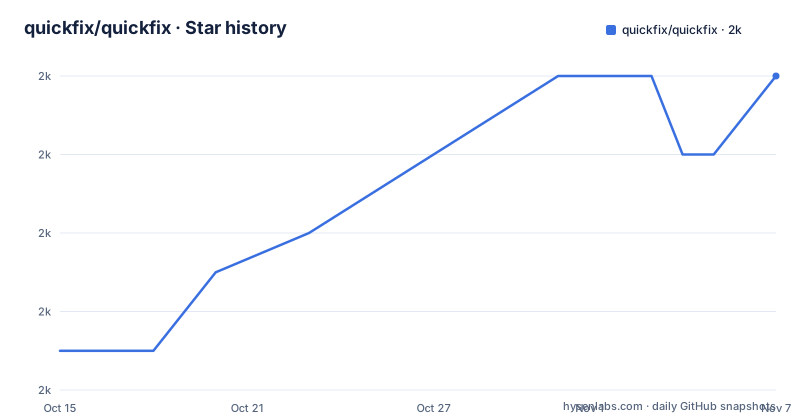
Star history
- quickfix/quickfix2,010 ★ · +7
| Repository | 2026-10-15 | 2026-11-07 |
|---|---|---|
| quickfix/quickfix | 2k | 2k |
7 Stars in the last 23 days, measured from the daily GitHub snapshot. Compare with other projects
Editorial analysis
Session Mechanics Every FIX Counterparty Has To Rebuild
QuickFIX exists because every party that speaks FIX ends up rewriting the same session mechanics: sequence numbers, message framing, heartbeats and resends after a socket drops. Buying that once as a library is the whole pitch. The engine covers FIX 4.0, 4.1, 4.2, 4.3, 4.4, 5.0, 5.0 SP1 and 5.0 SP2, plus FIXT 1.1, and it is aimed at the engineers who write order routers, execution venues, drop-copy consumers and simulators. Persistence is pluggable rather than hardwired, with MySQL, PostgreSQL and ODBC named as the database stores and logging left to the same plug-in idea. No throughput, latency or memory figures appear anywhere in the README, so any sizing decision has to come from your own load test. What you do get is a component boundary: replace the store, keep the session logic.
SWIG Bindings and Native OpenSSL Inside One Engine
Three language bindings come out of one codebase through SWIG: C++, Python and Ruby. The C++ core handles framing and session state, while TLS is folded in natively through OpenSSL instead of being left to a proxy in front of the process. That choice matters for a venue operator, since a FIX session in clear text exposes order flow to anything on the network path. Supported targets are named concretely: Windows Server 2019, Windows Server 2022, Ubuntu and other Linux distributions, and current macOS versions. Those three operating systems are built on at the same time, yet every optional database and every binding is a separate switch, so two teams can produce different binaries from the same tag. Confirm which switches your build enabled before assuming a feature exists at runtime.
Autotools Exposes Features That CMake Does Not
Put the two option lists side by side and they do not line up. CMake offers -DHAVE_SSL=ON, -DHAVE_MYSQL=ON, -DHAVE_POSTGRESQL=ON, -DHAVE_ODBC=ON, -DHAVE_PYTHON3=ON, -DQUICKFIX_SHARED_LIBS=ON, -DQUICKFIX_EXAMPLES=ON and -DQUICKFIX_TESTS=ON. The Autotools list offers --with-openssl=/path/to/openssl, --with-mysql, --with-postgresql, --with-python3, --with-ruby and --prefix=/install/path. Ruby is therefore an Autotools-only build, even though the feature list advertises C++, Python and Ruby bindings in one breath, and ODBC has no Autotools flag at all. The two binding routes look like this:
# Build with Python 3 support
cmake -DHAVE_PYTHON3=ON .
make# Build with Ruby support using autotools
./configure --with-ruby
makePython also arrives through a second door, `pip install quickfix`, and no statement anywhere says which version that wheel tracks. A team standardising on pip and a team compiling from source can drift apart without noticing.
Building And Installing On Linux, macOS And Windows
The README puts CMake first and marks it recommended, while bootstrap, configure.ac, Makefile.am and an m4 directory keep the Autotools route alive in the same tree. That second sequence is short enough to run in full:
./bootstrap
./configure
make
make check
sudo make install
On Windows the build goes out of source instead, creating a build directory before invoking the Visual Studio 17 2022 generator with the x64 architecture and an install prefix of `C:\quickfix`. The in-source layout on Linux and macOS is worth noting, because the CMake command the README gives writes its products next to CMakeLists.txt rather than into a separate directory. Three defines carry most of the configuration: `CMAKE_BUILD_TYPE` picks the build variant, `CMAKE_INSTALL_PREFIX` decides where headers and libraries land, and HAVE_SSL turns on TLS. Databases and bindings hang off the same mechanism, so each extra capability costs one more flag on a command line that is already long.
Executors, Ordermatch And Tradeclient As Working Reference
Three example programs ship in the examples directory and they sit at different levels of the stack. executor is a simple order execution simulator, ordermatch is a matching engine example, and tradeclient is an interactive trading client. For a new user that trio is the fastest route to a first real session, because each one already wires an engine to a socket and prints the tags moving in both directions. Both -DQUICKFIX_EXAMPLES=ON and -DQUICKFIX_TESTS=ON default to on, so the samples and the suite build with the library itself. Running the suite from an existing build directory needs no extra configure step:
# With CMake
cmake --build . --target test

# With Autotools
make check
API documentation is generated with Doxygen from the doc directory, and doc/html/configuration.html is the page the README points at for settings.
Turning On TLS Requires Naming OpenSSL Yourself
TLS is off by default because OpenSSL appears in the prerequisites as an optional item. On Unix, enabling it adds a single HAVE_SSL=ON define to the CMake invocation already given for Linux and macOS, which carries the build type and the /usr/local prefix as well. On Windows the command needs more, because the generator has to be told where OpenSSL lives: -DOPENSSL_ROOT_DIR is passed alongside -DHAVE_SSL=ON, with the install prefix still set to `C:\quickfix`. README.SSL and doc/html/building.html cover the rest of the setup. One gap is easy to miss: the `pip install quickfix` route carries no TLS instructions anywhere in this repository, so a team taking Python bindings from a package index gets no certificate guidance from the project itself. vcpkg is offered as a third install path:
git clone https://github.com/Microsoft/vcpkg.git
cd vcpkg
./bootstrap-vcpkg.sh  # or bootstrap-vcpkg.bat on Windows
./vcpkg integrate install
./vcpkg install quickfix
Nothing in that sequence says how SSL or the database stores are enabled for the package, which is a fair question to answer before switching install routes.
AIX And SunOS Notes Beside A Three Platform Support List
The support section narrows the claim to Windows Server 2019 and 2022, Linux distributions and macOS. The top-level tree nevertheless still carries README.AIX and README.SunOS next to .travis.yml, while the build badge points at a GitHub Actions workflow under .github. Two build systems are also maintained in parallel, CMakeLists.txt on one side and configure.ac, Makefile.am and bootstrap on the other, and the tree carries both .clang-format and a scripts directory for whichever one you pick. The Unix notes describe ports for platforms that no longer appear on the supported list, so read them as inherited documentation rather than as a support statement. The practical test when choosing a build system is narrow: does the flag you need exist in that system, given that the Autotools list is the shorter of the two.
Upgrade Cost Sits Between The Parallel Build Trees
The last push landed on 2026-05-20, eleven days after the v1.16.0 tag dated 2026-05-09. The previous tag was v1.15.1 from 2018-04-16, so roughly eight years separate two adjacent version numbers and any guidance written for the interval describes code that no longer matches the tree. The licensing is a custom QuickFIX Software License that GitHub cannot classify as one of the standard ones, and the LICENSE file has to be read against your own distribution rules before shipping a compiled binary. Beyond that, upgrading means rebuilding whichever of the eight CMake switches you enabled, because adding a database store or a binding changes link dependencies rather than just dropping in a header.
Editorial conclusion
Adopt QuickFIX when your team has to speak FIX to a venue or broker and would rather take session mechanics, resends and TLS from a maintained C++ core than hand-roll a parser. Do not adopt it if Ruby bindings matter to you and you build with CMake, since no flag exists there. Read both option lists before choosing: the Autotools list carries ruby and no ODBC, and the CMake list is the reverse. Then check that your platform sits on the tested set and that every store you need has a flag in the build system you actually use.
Frequently asked questions
Which FIX versions does QuickFIX support?
FIX 4.0, 4.1, 4.2, 4.3, 4.4, 5.0, 5.0 SP1 and 5.0 SP2, plus FIXT 1.1. The engine is a full messaging implementation, not a parser for a single dialect.
How do I build QuickFIX with SSL support?
Pass -DHAVE_SSL=ON to CMake, with OpenSSL treated as an optional prerequisite. On Windows you also pass -DOPENSSL_ROOT_DIR pointing at the OpenSSL installation, and README.SSL is the file the README points to for the rest of the setup.
Can I use QuickFIX from Python without compiling it?
The README lists pip install quickfix alongside building with -DHAVE_PYTHON3=ON. It does not state which version the packaged wheel corresponds to, nor how TLS is configured on that path.
Which build system should I use for QuickFIX on Linux?
CMake is marked recommended and covers SSL, MySQL, PostgreSQL, ODBC and Python 3. The Autotools list covers openssl, mysql, postgresql, python3 and ruby, so Ruby is reachable only through that one.
Which example application should I start from with QuickFIX?
The examples directory holds executor, a simple order execution simulator, ordermatch, a matching engine example, and tradeclient, an interactive trading client. They are built by default through -DQUICKFIX_EXAMPLES=ON.
Official sources
Add this badge to your README
If you maintain this project, the badge below links readers to this analysis and shows its maintenance status from the daily GitHub snapshot. Paste the markdown into your README; add ?metric=license or ?metric=stars to the image URL for a different field.

[](https://hysenlabs.com/projects/quickfix-quickfix)Star history chart for your README
[](https://hysenlabs.com/projects/quickfix-quickfix)Was this useful?