Quicksilver: main is the released build, and the first instruction is to back up
Quicksilver Project Source
At a glance
- What is it?
- A macOS launcher written in Objective-C whose default branch holds the source of the currently released version rather than a development head, whose readme opens by telling you to back up your user data before building, which explains why two copies of the app on one machine break the system's service registration, and whose every outbound link is plain http, two of them in a URL shape the group hosting service abandoned years ago.
- Who is it for?
- Quicksilver is a mature single-machine application with a source repository that treats the user's data as the first concern rather than an afterthought. Take it if you want a launcher that learns your habits on macOS, and read the readme's first section before you build, because a build shares its settings, caches and preferences with the installed copy and the page treats that as a data-loss risk.
- Can I use it commercially?
- Yes. Apache-2.0 is a permissive licence: you can use, modify and sell software built on it, as long as you keep its copyright and licence notices.
- Is it still maintained?
- Yes. The repository last received commits 23 days ago.
- What is it written in?
- Mainly Objective-C, according to GitHub's language statistics.
Answers come from the project's GitHub data, last synced on November 22, 2026, and from our analysis. They are not legal advice.
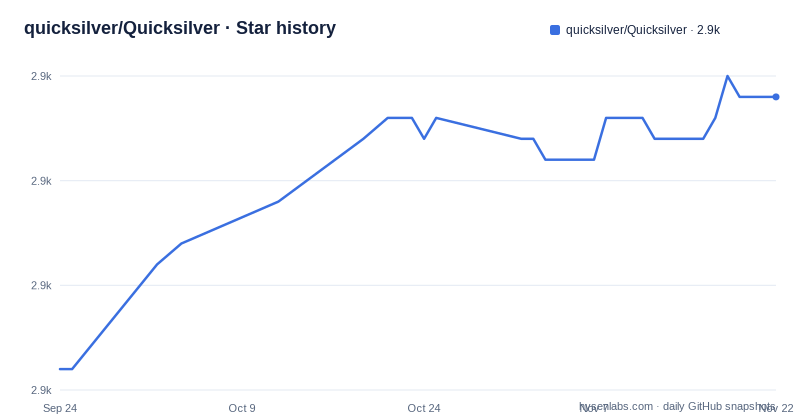
Star history
- quicksilver/Quicksilver2,944 ★ · +13
| Repository | 2026-09-24 | 2026-11-22 |
|---|---|---|
| quicksilver/Quicksilver | 2.9k | 2.9k |
13 Stars in the last 59 days, measured from the daily GitHub snapshot. Compare with other projects
Editorial analysis
The default branch is the released version
The repository explains its own scope in three sentences, and the second one is the important one. This repository contains the source code for the Quicksilver main app, and it is also where issues are browsed and opened. The main branch contains the source for the currently released Quicksilver. So the branch you land on by default is the shipped line rather than the head of development, which is the opposite of the usual convention and will mislead anyone who expects to find the newest work there. It also means the repository is not the whole product: it is the main app, with other pieces living elsewhere. For orientation there is a separate map document at the root that the readme recommends to anyone approaching the project for the first time, which is a deliberate alternative to a long readme and a reasonable one for a codebase of this age.
rm -r ~/Library/Caches/*QuicksilverThe first instruction is to back up, in capitals
Before anything else, the readme tells you to always back up your user data, with the emphasis in capitals, and then names three paths: the application support directory under your home folder, the caches directory beside it, and a single preferences file. That preferences file is where the historical name of the project survives: it is not called anything to do with Quicksilver's current identity, but carries a different prefix entirely. The justification follows: if anything happens you can restore the exact state the application was in. That sentence contains a grammatical slip, with a possessive pronoun standing where a subject should be, which suggests the paragraph has not been edited in some time. The reason the warning exists at all is that a build and the installed application read and write the same three locations, so running one from source is not a sandboxed experiment.
~/Library/Preferences/com.blacktree.Quicksilver.plistTwo copies of the app break the system's services
There is a section on having multiple copies of the application on the machine, and it gives the mechanism rather than shrugging. The service system does not register properly when the pasteboard server sees more than one application package, because each copy carries its own information file declaring the same services, and the system cannot decide which one to honour. AppleScript is confused by the same situation. The remedy is specific: compress any old copies you want to keep, so only one remains as a real file on the filesystem, and then empty the trash. That last step is the part people miss. A copy you have deleted but not emptied still exists as a file, and the pasteboard server is still counting it. This is the single most useful piece of troubleshooting on the page, and it is the kind of problem that would otherwise present as services that silently never appear.
Every outbound link is plain http, two of them badly formed
The readme points at the project site, an about page, a download page, a wiki page on building the application, a Wikipedia article, a support group and a developer group. Every one of those addresses is plain http rather than https, including the download page and the build instructions. Two of them are group-hosting links, and the developer group one uses the older address form for that service, with a language parameter, a membership parameter and a fragment identifying the forum, rather than the shorter form the service now uses. For a repository whose last commit is dated September 2026 that is a fair amount of link rot in a document that new contributors are expected to follow. The download instruction is one sentence telling you to visit the site and pick the right version for your operating system, with no package manager, no notarisation note and no source-build path.
One badge, a placeholder description, and a map file
The header carries a single badge, pointing at the continuous integration workflow. There is no coverage figure, no download counter, no documentation badge and no support link, which is sparse for a project with this many years of releases behind it. The repository's one-line description is equally spare: it names the project and the words project source, and nothing else, which is the shape of a field somebody filled in once to satisfy a form. The contrast with the readme is interesting, because the readme itself is unusually good on the things that go wrong at runtime and silent on the things a visitor wants at a glance. The orientation document at the root is where the architecture is described, and the build instructions live on the project's own wiki rather than in the repository, so a contributor reading only what is committed here learns what to be careful about but not how to compile anything.
The app is Quicksilver and its preferences are called blacktree
Three names are in play for one product and they do not agree. The organisation and repository say Quicksilver. The website is a different name entirely, a two-letter domain with an application suffix, and every public link points there rather than at the forge. And the preferences file that the readme tells you to back up is named after a third name, an older codename that also survives in the address of the support group. The application bundle itself is named after the current name, which is why the duplicate-copies section can talk about several application packages without confusion. So a developer reading this repository has to hold three names in their head, and a support request that quotes the preferences filename will immediately tell you which vintage of the project someone is running. The version history supports that reading: releases run through the two point five and two point six lines in 2026 with several patch builds in a matter of weeks.
A committed git config, editor properties and a translation directory
The root of the repository contains a handful of files that explain how the project is worked on rather than what it does. There is a git configuration file committed alongside the usual ignore and attributes files, and a submodules file, so parts of the tree come from elsewhere. There is an editor properties file, which on macOS carries per-directory settings for the classic editor that a project of this vintage was written in, including how wide a tab is and which characters start a comment. There is a directory belonging to a translation platform, which means localisation is handled through a hosted service and its configuration lives in the repository rather than in someone's account. And there are two contribution documents, a general one and a separate one specifically about version control conventions, which for a project with submodules and a translation pipeline is reasonable and for a single-app repository is a sign of how the project has grown.
Editorial conclusion
Quicksilver is a mature single-machine application with a source repository that treats the user's data as the first concern rather than an afterthought. Take it if you want a launcher that learns your habits on macOS, and read the readme's first section before you build, because a build shares its settings, caches and preferences with the installed copy and the page treats that as a data-loss risk. Keep exactly one copy of the application on the machine or the system's service registration breaks in a way that is hard to diagnose from the symptom. And if you are contributing, remember that the default branch is the released line, not where the next version is being written.
Frequently asked questions
What is Quicksilver on macOS?
A fast and free macOS productivity application that gives you control of your Mac quickly and elegantly. It learns your habits, with the aim of making everyday chores simple and efficient. This repository holds the source for the main app along with its issue tracker.
How do I build Quicksilver from source?
The readme contains no build commands. It says you should be able to build the application by following the instructions in the project's wiki, on a page about building Quicksilver. For orientation, the readme points newcomers to a separate map document at the repository root.
What should I back up before running Quicksilver from source?
Three locations: the Quicksilver directory under application support, the Quicksilver directory under caches, and the preferences file com.blacktree.Quicksilver.plist. The readme says to always back up before building and testing, and to clear the caches with rm -r on the caches path when switching between versions.
Why does Quicksilver misbehave with more than one copy installed?
The system's pasteboard server sees several application packages, each with its own information file declaring the same services, so services fail to register and AppleScript gets confused. The fix given is to compress any old copies so only one remains as a file, then empty the trash so the deleted copies stop being counted.
Where do I report bugs for Quicksilver?
In the issue tracker in this repository, which the readme describes as the place to browse existing issues and open new ones. A user support group and a separate developer group are also linked, and the main branch is stated to hold the source for the currently released version.
Official sources
Add this badge to your README
If you maintain this project, the badge below links readers to this analysis and shows its maintenance status from the daily GitHub snapshot. Paste the markdown into your README; add ?metric=license or ?metric=stars to the image URL for a different field.

[](https://hysenlabs.com/projects/quicksilver-quicksilver)Star history chart for your README
[](https://hysenlabs.com/projects/quicksilver-quicksilver)Was this useful?