pyenv-win: rehash after pip, and mind the PATH order against Windows' own launcher
pyenv for Windows. pyenv is a simple python version management tool. It lets you easily switch between multiple versions of Python. It's simple, unobtrusive, and follows the UNIX tradition of single-purpose tools that do one thing well.
At a glance
- What is it?
- pyenv-win is a Windows port of pyenv that switches Python interpreters in place, forked from a Ruby version manager and rebuilt for Python. Its documentation is unusually honest about the two things that break on Windows: the PATH entries have to be added with high priority, and Microsoft's built-in execution aliases can win over the shims. The newest GitHub release dates from July 2022, while the master branch has kept moving.
- Who is it for?
- Adopt it when you need several Python versions on Windows and you want to switch by directory rather than by activating an environment. Do not expect it to manage virtual environments, since the documentation is explicit that a local version is not the same thing.
- Can I use it commercially?
- Yes. MIT is a permissive licence: you can use, modify and sell software built on it, as long as you keep its copyright and licence notices.
- Is it still maintained?
- Yes. The repository last received commits 2 days ago.
- What is it written in?
- Mainly VBScript, according to GitHub's language statistics.
Answers come from the project's GitHub data, last synced on November 15, 2026, and from our analysis. They are not legal advice.
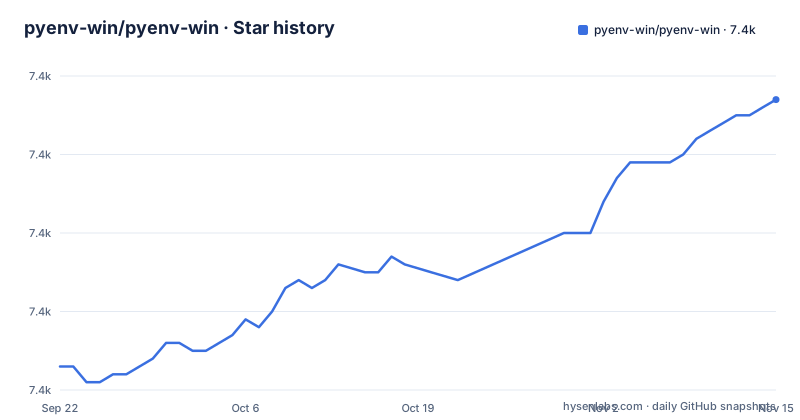
Star history
- pyenv-win/pyenv-win7,437 ★ · +34
| Repository | 2026-09-22 | 2026-11-15 |
|---|---|---|
| pyenv-win/pyenv-win | 7.4k | 7.4k |
34 Stars in the last 54 days, measured from the daily GitHub snapshot. Compare with other projects
Editorial analysis
Windows' own Python launcher can win, and the PATH order decides
The validation section is the most useful part of this README, because it describes failure modes rather than features. If you get a command not found error, the answer is not a broken install. Two directories have to be on the PATH, and the instructions insist they be set with high priority via the GUI:
C:\Users\<replace with your actual username>\.pyenv\pyenv-win\bin
C:\Users\<replace with your actual username>\.pyenv\pyenv-win\shims
The path to the settings is spelled out through This PC, then Properties, then Advanced system settings, then Advanced, then System Environment Variables, then PATH. And there is a second conflict that only exists on modern Windows: on Windows 10 version 1905 or newer you may need to disable the built-in Python launcher through the Manage App Execution Aliases screen, turning off the Python aliases under App Installer. The consequence is that a correct install can still appear broken, and the fix is PATH order plus an operating system setting.
pyenv rehash is the step that makes installed packages visible again
One command in the list exists because the architecture depends on it. After installing or uninstalling libraries with pip, or after modifying files inside a version's folder, you must run `pyenv rehash` so pyenv updates with new shims for the interpreter and for library executables. The command list describes rehash as rehashing the shims and tells you to run it after switching Python versions. There is one constraint attached: it must be run outside the pyenv folder. The consequence is the kind of bug that costs an afternoon. A package is genuinely installed into the interpreter you think is selected, pip reports success, the package's executable is still not found, and the reason is that the shim table is stale rather than the install being broken.
Local, global and shell are three levels, and none of them is a virtual environment
The command list is deliberately small: it lists available commands, sets or shows a local version, prints the latest installed or known version with a prefix, sets or shows the global version, sets or shows a shell specific version, installs and uninstalls one or more versions, updates the cached version database, rehashes the shims, and shows the current version. The usage notes explain what the three levels mean. The global version is the default when no local version is set, and the local version applies whenever python is called from inside that folder, which the documentation points out is different from a virtual environment because nothing has to be activated. A version must be installed before it can be selected with any of them. And `pyenv version` prints the selected version together with the file that set it, which is the fastest way to find out why you are not getting the interpreter you expected.
Six install routes, and the default one runs a script from master
Installation is offered six ways and the quick start picks the loudest of them. One PowerShell command downloads the installer from the repository's master branch and executes it immediately:
Invoke-WebRequest -UseBasicParsing -Uri "https://raw.githubusercontent.com/pyenv-win/pyenv-win/master/pyenv-win/install-pyenv-win.ps1" -OutFile "./install-pyenv-win.ps1"; &"./install-pyenv-win.ps1"The alternatives are a Git clone, which the documentation calls the default way with manual settings added, a zip archive for manual installation, pip for people who already have Python, a package manager route, and a note on how to use 32-train with a link to the announcements page. Two consequences. The quick start fetches from a moving branch rather than from a release tag, so it is worth pinning if you are installing on a machine you care about. And the Git route is the one that survives, because the update instructions for it are a git pull in your install directory, while the pip route needs the install path added to the easy_install file in site-packages before pip will recognise the tool as installed.
The version list is cached, and the update command is documented for old lines
`pyenv install -l` lists the Python versions pyenv-win knows about, and the documentation suggests filtering it on Windows with a pipe into a search tool when you are looking for a specific series. That list is a cache rather than a live query, and there is a command to refresh it. The usage section adds a detail that tells you the project's history: the update command is documented for the 2.64.x and 2.32.x versions, which are the lines that existed when that sentence was written. There is also a mirror list at the repository root, which is how these projects survive a download source disappearing. The consequence is small and predictable. A Python release that came out after your install will not appear until you update the cache, and if you are on a recent 3.x line you are outside the range the update instruction was written for, so check the announcements page linked from the installation docs before assuming you are current.
The packaging metadata stops at Python 3.10 while the tool installs what you ask for
The packaging file is where the age of the project shows. The version is not written inline; it is read from a version file at the repository root, and the long description is the README itself in Markdown. The classifier list is the interesting part: it runs from Python 2.6 and 2.7 through 3.1, 3.2, 3.3, 3.4, 3.5, 3.6, 3.7, 3.8, 3.9 and then stops at 3.10, alongside a Windows-only operating system tag, a production and stable development status and a build tools topic. The tool itself will happily install whatever version appears in its cache, which is the whole point of the version database. So the consequence is a documentation mismatch rather than a functional one: the packaging metadata describes a range that ended years ago, and the list of interpreters this thing can actually install is set by the cache and the download sources, not by the classifiers.
Three releases in July 2022, and the branch has moved since
The release history is the last thing to read and it sets expectations. Version 3.1.1, published 2022-07-20, is titled for adding a packaging tool to the Python package. Version 3.1, the day before, is titled for supporting many global and local versions. Before those, version 2.64.11 from 2021-09-13 is titled for updates, preventing infinite recursion and bug fixes. The repository is not archived and the last push on master is dated 2026-10-30, so there are four years of commits behind those tags. The Git route with a pull in your install directory is what tracks the branch. The project describes itself as fairly mature thanks to many contributors, MIT licensed, and it asks for feedback and offers a Slack channel, which is where a Windows specific problem belongs.
Editorial conclusion
Adopt it when you need several Python versions on Windows and you want to switch by directory rather than by activating an environment. Do not expect it to manage virtual environments, since the documentation is explicit that a local version is not the same thing. Before installing, decide between the PowerShell, Git, zip, pip and package manager routes, and note that the newest release tag is from July 2022 while the master branch has moved since.
Frequently asked questions
how to install pyenv-win
The quickest route is one PowerShell command that downloads the installer script from the repository's master branch and runs it, after which you reopen PowerShell and check with pyenv --version. The installation documentation also covers a Git clone, a zip archive, pip for people who already have Python, a package manager, and a note on how to use 32-train.
how to use pyenv win
List supported versions with pyenv install -l, install one with pyenv install <version>, then select it with pyenv global for the default or pyenv local for a single folder, and pyenv shell for one shell. Run pyenv rehash after installing or uninstalling packages, use pyenv version to see which interpreter is selected and which file set it, and pyenv versions to list what is installed.
what is pyenv win
It is a Windows port of pyenv, a version manager that lets you switch between several installed Python versions in place. It was forked from a Ruby version manager for Windows and modified for Python, and it keeps the single-purpose tool philosophy: the command set is commands, local, latest, global, shell, install, uninstall, update, rehash and vname. It is MIT licensed.
How to remove pyenv win?
For a single interpreter, pyenv uninstall <version> removes it. The README documents updating with separate instructions depending on whether you installed through pip, Git or another route.
Official sources
Add this badge to your README
If you maintain this project, the badge below links readers to this analysis and shows its maintenance status from the daily GitHub snapshot. Paste the markdown into your README; add ?metric=license or ?metric=stars to the image URL for a different field.

[](https://hysenlabs.com/projects/pyenv-win-pyenv-win)Star history chart for your README
[](https://hysenlabs.com/projects/pyenv-win-pyenv-win)Was this useful?