QuTiP: the Python quantum toolbox and the packaging details behind it
QuTiP: Quantum Toolbox in Python
At a glance
- What is it?
- QuTiP simulates the dynamics of closed and open quantum systems in Python, on top of NumPy, SciPy and Cython. Its build and runtime metadata disagree with each other in places, and those disagreements decide what your environment will actually install.
- Who is it for?
- QuTiP fits researchers and graduate students who need time-dependent Hamiltonians and collapse operators wired into SciPy and Matplotlib workflows, and it fits teaching labs that want this without paying for access. Leave it alone if your state vectors grow large enough that dense matrices stall, or if you need semidefinite optimisation and do not want cvxpy and cvxopt in the same environment.
- Can I use it commercially?
- Yes. BSD-3-Clause is a permissive licence: you can use, modify and sell software built on it, as long as you keep its copyright and licence notices.
- Is it still maintained?
- Yes. The repository received new commits within the last day.
- What is it written in?
- Mainly Python, according to GitHub's language statistics.
Answers come from the project's GitHub data, last synced on October 23, 2026, and from our analysis. They are not legal advice.
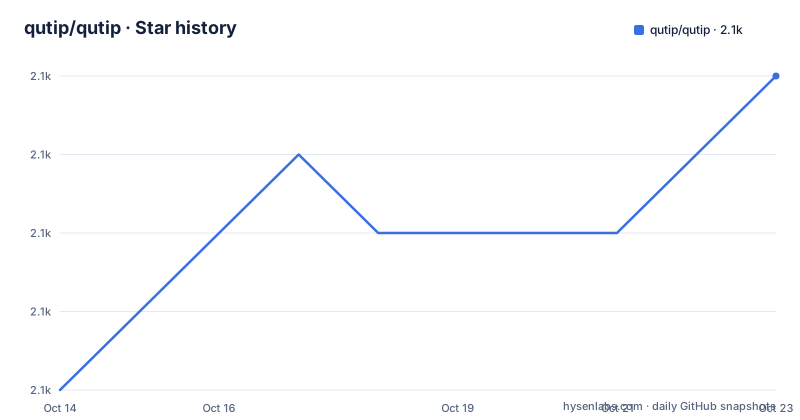
Star history
- qutip/qutip2,089 ★ · +4
| Repository | 2026-10-14 | 2026-10-23 |
|---|---|---|
| qutip/qutip | 2.1k | 2.1k |
4 Stars in the last 9 days, measured from the daily GitHub snapshot. Compare with other projects
Editorial analysis
Simulating closed and open quantum dynamics in Python
QuTiP exists to turn a quantum master equation into numbers you can plot. Its stated scope is the dynamics of closed and open quantum systems, which means a Hamiltonian plus, for open systems, collapse operators, with arbitrary time-dependence on either. That is a narrower promise than a general quantum computing stack, and the right one for people who want to reproduce a figure from a paper or follow a derivation step by step instead of assembling a circuit library.
Numerics come from Numpy and Scipy, graphical output comes from Matplotlib, and Cython sits underneath the Python layer for the compiled parts. The README states the package is freely available for use and modification on all Unix-based platforms and on Windows, which makes it an ordinary candidate for a graduate lab whose Python is already there.
The meson-python build backend compiles the Cython layer
The build no longer runs through setuptools. `pyproject.toml` names mesonpy as the build backend and demands four things before a wheel or an sdist can be produced:
[build-system]
build-backend = 'mesonpy'
requires = [
    "meson-python>=0.17",
    "cython>=3.0.0",
    "numpy>=2.0",
    "scipy>=1.13",
]
The build graph therefore lives in `meson.build` and `meson.options` at the repository root, and the top-level entries contain no legacy build script. Two consequences follow. A source install compiles Cython extensions, so a C toolchain is part of getting the package, not just Python. And a build that fails on a dependency resolution step is telling you about your build environment, not about your model.
Two different NumPy floors, one for build and one for runtime
Installing from pip gives the minimal package, and the README offers `qutip[full]` as the target that pulls every optional dependency. The short path is a single line:
pip install qutipHere is the first contradiction a careful reader catches. The build system asks for `numpy>=2.0` while the runtime dependencies in the very same file settle for `numpy>=1.23.2`:
dependencies = [
  "numpy>=1.23.2",
  "scipy>=1.13,!=1.16.0,!=1.17.0",
  "packaging",
]
A published wheel was compiled somewhere against NumPy 2.x, yet nothing in the runtime list stops you importing it into an environment holding 1.23.2. The README does not explain the gap between the two floors, so if you pin versions for a reproducible paper, decide the NumPy version yourself rather than trusting the metadata to decide it.
SciPy holes and three competing Cython floors
SciPy is declared as `scipy>=1.13,!=1.16.0,!=1.17.0`, so a resolver refuses those two particular builds even though each one satisfies the lower bound on its own. Someone hit a problem in them and encoded the exclusion in metadata, which is the honest way to do it and also the kind of detail that silently breaks an old lockfile.
Cython carries three different numbers for one build tool:
cython>=0.29.20
numpy>=1.23.2
scipy>=1.13
packaging
That listing comes from `requirements.txt`, whose Cython floor is 0.29.20. The build system asks for `cython>=3.0.0` and the runtime_compilation extra accepts `cython>=0.29.34`. A contributor building from source will resolve three incompatible expectations before writing a line of physics, and the project does not publish a note reconciling them.
Optional extras split graphics, SDPs and runtime compilation
Plotting is not part of a minimal install. The optional-dependency groups in `pyproject.toml` are graphics, runtime_compilation, semidefinite, ipython and extras, and they resolve like this:
[project.optional-dependencies]
graphics = ["matplotlib>=3.9"]
runtime_compilation = ["cython>=0.29.34", "filelock", "setuptools"]
semidefinite = ["cvxpy>=1.3", "cvxopt"]
The practical alternative to `qutip[full]` is the minimal install plus the specific group you need, which keeps cvxpy and cvxopt out of environments that never touch semidefinite programming. One naming detail is easy to miss: loky, the parallel helper, sits in a group named extras rather than in a group named parallel, so scripting against group names means guessing what `extras` contains. Every group named here is optional, and none of them is referenced by the README outside the `qutip[full]` target.
Three documentation locations and a separate tutorial repository
Documentation is split three ways. Read the Docs carries both the latest stable tag and the master branch, the `doc/` folder inside this repository holds the latest development documentation, and the project website publishes official versions in HTML and PDF. Demonstration notebooks live in a separate qutip-tutorials repository, so the tutorial code you copy is versioned apart from the library and can drift from the API sitting in your site-packages.
Continuous integration is visible from the same repository: a GitHub Actions badge points at a tests.yml workflow on master, Coveralls reports coverage, and Code Climate reports maintainability. A commit comment in the dependency block instructs maintainers to update installation.rst when dependencies move, which is the tell that the installation page and the packaging file are kept in sync by hand. Contribution questions run through a Google discussion group, not the issue tracker.
A Pre-Alpha classifier on a library with tagged builds
The packaging metadata carries the trove classifier Development Status :: 2 - Pre-Alpha, in the same file that declares requires-python >=3.11, an Intended Audience of Science/Research, and platform classifiers for MacOS, POSIX, Unix and Microsoft Windows. A pre-alpha label on a package that publishes tagged versions is a metadata oversight, and automated tooling that reads trove classifiers takes it at face value.
Two facts set the real scale. The last push to master landed on 2026-10-06 and the repository is not archived, and v5.3.1 shipped on 2026-08-04 after v5.3.0 on 2026-05-22. The classifier is the one part of this metadata you should ignore, while the version floors discussed earlier are the parts you should treat as binding.
Where QuTiP stops and your own model takes over
The limits follow directly from the scope. QuTiP integrates time evolution for closed and open systems; it offers no circuit-level or device-level stack, and nothing else in the repository layout plays that role. States are represented as vectors and operators, so Hilbert space size is your constraint rather than the library's, and the README names no competing toolbox to compare against, so any cross-library comparison has to come from your own side-by-side runs.
Two gaps show up as documented silence. No rollback procedure for a failed install appears anywhere in the README, and the parallel maintenance of installation.rst and the dependency list means a stale instruction can outlive the version it described. A minimal pip install brings you neither matplotlib nor cvxpy, so the first figure in your paper depends on which extra group you picked before you started.
Editorial conclusion
QuTiP fits researchers and graduate students who need time-dependent Hamiltonians and collapse operators wired into SciPy and Matplotlib workflows, and it fits teaching labs that want this without paying for access. Leave it alone if your state vectors grow large enough that dense matrices stall, or if you need semidefinite optimisation and do not want cvxpy and cvxopt in the same environment. Verify first that your NumPy and SciPy fall inside the declared floors, then read the meson-python notes, because a source install compiles Cython code rather than running pure Python.
Frequently asked questions
How do I install QuTiP with all of its optional dependencies?
A plain pip install gives the minimal package, and the target qutip[full] adds every optional dependency. Named groups such as graphics, semidefinite and runtime_compilation can be installed individually instead, which keeps unused packages such as cvxpy out of the environment.
Which Python and numerical library versions does QuTiP need?
The package requires Python 3.11 or newer, NumPy 1.23.2 or newer at runtime, and SciPy 1.13 or newer with 1.16.0 and 1.17.0 excluded. The build system is stricter and asks for NumPy 2.0 and Cython 3.0.0 when compiling from source.
What do I need for plotting and for semidefinite programming?
The graphics group supplies matplotlib 3.9 or newer, and the semidefinite group supplies cvxpy 1.3 or newer together with cvxopt. Neither is part of a minimal install, so a figure or a convex optimisation call will fail until the matching group is present.
Does QuTiP run on Windows and macOS as well as Linux?
The README states it can be used on all Unix-based platforms and on Windows, and the platform classifiers list MacOS, POSIX, Unix and Microsoft Windows. The Meson build means a source install needs a working compile toolchain on each of those systems.
What licence is QuTiP released under?
The packaging metadata declares BSD-3-Clause, and the README describes QuTiP as freely available for use and modification. No licensing fee is charged, which is the point the project makes about classroom and research use.
Official sources
Add this badge to your README
If you maintain this project, the badge below links readers to this analysis and shows its maintenance status from the daily GitHub snapshot. Paste the markdown into your README; add ?metric=license or ?metric=stars to the image URL for a different field.

[](https://hysenlabs.com/projects/qutip-qutip)Star history chart for your README
[](https://hysenlabs.com/projects/qutip-qutip)Was this useful?