Version 4 ships a prebuilt bundle, so the upgrade is re-running the installer
RailsAdmin is a Rails engine that provides an easy-to-use interface for managing your data
At a glance
- What is it?
- RailsAdmin is a Rails engine that generates an admin interface over your models, with ActiveRecord and Mongoid supported, Devise for authentication, CanCanCan or Pundit for authorization and PaperTrail for history, It is at a 4.0.0 beta, its JavaScript and styles are built with esbuild and sass from a src directory, and the README's install instruction still pins the 3.0 line.
- Who is it for?
- Take RailsAdmin when you want an admin interface over ActiveRecord or Mongoid models inside an application that already exists, and when you would rather choose your own authentication and authorization gems. Leave it if you are starting something fresh, because the gem sits at 4.0.0 beta rather than a released 4.0.
- Can I use it commercially?
- Yes. MIT is a permissive licence: you can use, modify and sell software built on it, as long as you keep its copyright and licence notices.
- Is it still maintained?
- Yes. The repository last received commits 15 days ago.
- What is it written in?
- Mainly Ruby, according to GitHub's language statistics.
Answers come from the project's GitHub data, last synced on November 13, 2026, and from our analysis. They are not legal advice.
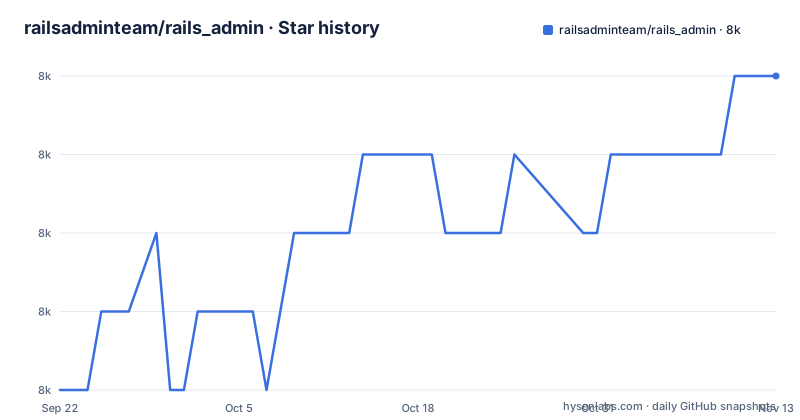
Star history
- railsadminteam/rails_admin7,959 ★ · +4
| Repository | 2026-09-22 | 2026-11-13 |
|---|---|---|
| railsadminteam/rails_admin | 8k | 8k |
4 Stars in the last 52 days, measured from the daily GitHub snapshot. Compare with other projects
Editorial analysis
The install line pins 3.0 while the manifest says 4.0.0-beta
The installation section is five numbered steps and the first one is where the version confusion starts.
gem 'rails_admin', '~> 3.0'That is a pessimistic constraint on the 3 series. The package manifest in this repository declares:
"version": "4.0.0-beta2",and there is a whole README section titled Upgrading to 4.0 with its own document behind it. So the repository is on a 4.0 pre-release while the install line a newcomer copies is for 3.x.
A team that copies the gem line gets 3.x while the repository is on a 4.0 pre-release.
The remaining steps are the familiar ones: bundle install, then the generator, then a namespace for the routes when asked, then rails s and the interface at /admin if you took the default namespace. That last detail is worth remembering, because the namespace you choose at step four is baked into every URL the engine generates.
Version 4 ships a prebuilt bundle, so the upgrade is re-running a generator
The Upgrading to 4.0 section is two sentences and the second one changes the shape of the gem.
It points at docs/upgrading-to-4.md, then gives the short version: re-run rails g rails_admin:install, because the gem ships a prebuilt bundle now.
That phrase is the whole 4.0 story. Version 4 hands you a compiled bundle instead, so the upgrade is a generator run rather than a migration.
The manifest confirms the shape of that bundle. The files array contains one entry:
	"main": "src/rails_admin/base.js",
	"sass": "src/rails_admin/styles/base.scss",
so src/ is both the entry point and the entire published npm payload, and the npm package type is module with a sass entry alongside the JavaScript one.
The build that produces it is one script:
"build": "node bin/build.js",with esbuild as the bundler and sass as the style compiler, both in devDependencies. So the asset toolchain for the gem lives in package.json and package-lock.json at the repository root, not in the gem's own gemspec.
The per-model configuration is a block inside the model class
Global configuration lives in an initializer, and the README names it exactly: config/initializers/rails_admin.rb, with the detail in docs/base-configuration.md.
Per model configuration does not live in a config file at all. It is a block inside the model, and the README's example is short enough to read as documentation:
class Ball < ActiveRecord::Base
  validates :name, presence: true
  belongs_to :player

  rails_admin do
    configure :player do
      label 'Owner of this ball: '
    end
  end
end
The rails_admin block calls configure on an association, and configure yields to a block that sets options such as label. So the admin interface's presentation of the player association is declared next to the association itself, in the same class.
That placement has a consequence. The admin's shape is coupled to your model class, so a change to the UI can mean editing application code, and a model that is shared with a service or a job has to carry the block along. The alternative documents exist for the rest: models.md, groups.md and fields.md for the model, group and field level options.
The example also shows the automatic form validation entry, since validates :name, presence: true on the model is what produces the required-field behaviour rather than anything configured in the engine.
Devise, CanCanCan and PaperTrail are hooks, not dependencies
The feature list names three gems, and it names them in a way that makes the integration model clear.
Authentication via Devise or other. Authorization via CanCanCan or Pundit. User action history via PaperTrail. In each case the phrasing is a supported integration point rather than a bundled component, and the configuration section links a document for each: docs/devise.md, docs/cancancan.md and docs/papertrail.md.
So an application can arrive with its own session strategy and its own permission object model, and RailsAdmin adapts. That is the right default for a gem that runs inside somebody else's application.
What the engine does provide is the surrounding machinery: CRUD on any data, custom actions, automatic form validation driven by the model's own validations, search and filtering, and export of data to CSV, JSON and XML.
The ORM list is two entries, ActiveRecord and Mongoid, which is a narrower commitment than the rest of the feature list and the one most likely to matter to somebody evaluating the gem. Both models and the fields on them are configured through the same block-based DSL shown above.
Appraisal and a Procfile.teatro are how the matrix gets run
The test and tooling files in the repository root are the ones to look at if you want to know how the gem is kept compatible.
An Appraisals file sits next to the Gemfile, and there is a gemfiles/ directory, which together are the appraisal gem's mechanism for testing one library against several dependency sets rather than one resolved bundle. That is how a gem that supports Ruby 2.7 through 3.4 keeps working across versions of Rails and of its own dependencies.
A Procfile.teatro and a .teatro.yml sit alongside them.
Then the two linters, which are not the same tool. .rubocop.yml and .rubocop_todo.yml are the Ruby side, and the todo file is the standard way to defer existing offences rather than fixing them in one commit. On the JavaScript side there is a .prettierignore and the package.json scripts format and format:check, both running prettier over the repository. So a change can fail the Ruby style check and the JavaScript one independently.
There is also a .yardopts for API documentation, a .rspec for RSpec, a Rakefile, and a rubocop/ directory that suggests custom cops rather than only configuration.
Ruby 2.7 through 3.4 plus JRuby, and no 3.5 in the list
The supported versions section is six Ruby lines and one alternative runtime.
The library aims to support, and is tested against, Ruby 2.7, 3.0, 3.1, 3.2, 3.3 and 3.4, plus JRuby.
The claim is tied to evidence rather than intent: the sentence links to the GitHub Actions workflow named test.yml, so the list is the matrix the badge in the README header reflects.
What the list does not contain is any release after 3.4. A user on a newer Ruby reading this page learns nothing about whether the gem runs on it, and the honest reading is that 3.4 is the newest version the project has claimed to test.
The lower bound is the other half. Ruby 2.7 is the floor, which is a long-expired release, so a team on a current Ruby is inside the range while a team pinned to an old one is not. JRuby being listed means the gem is not assumed to run only on CRuby.
There are no GitHub releases attached to this repository, so there is no tag history to consult alongside the version claim, and package.json's 4.0.0-beta2 is the only version number a reader can find.
Editorial conclusion
Take RailsAdmin when you want an admin interface over ActiveRecord or Mongoid models inside an application that already exists, and when you would rather choose your own authentication and authorization gems. Leave it if you are starting something fresh, because the gem sits at 4.0.0 beta rather than a released 4.0. Verify three things. Read the 4.0 upgrade note before you run the installer, because the short version given is to re-run the generator and the long version is in docs/upgrading-to-4.md. Work out which line you are actually on, because the README's install instruction pins '~> 3.0' while the manifest declares 4.0.0-beta2. And check the Ruby version, since the supported list runs from Ruby 2.7 to 3.4 plus JRuby and names nothing newer.
Frequently asked questions
What is RailsAdmin?
A Rails engine that provides an easy-to-use interface for managing your data. It does CRUD on your models, adds custom actions, automatic form validation, search and filtering, and export of data to CSV, JSON and XML. Two ORMs are supported: ActiveRecord and Mongoid.
How do I install RailsAdmin?
Add gem 'rails_admin', '~> 3.0' to your Gemfile, run bundle install, then run rails g rails_admin:install and give a namespace for the routes when asked. Start the server with rails s and the interface is at /admin if you chose the default namespace.
Does RailsAdmin bring its own authentication and authorization?
No. Authentication is integrated via Devise or another solution you supply, authorization via CanCanCan or Pundit, and user action history via PaperTrail. The README links a configuration document for each of them, all set from the global initializer at config/initializers/rails_admin.rb.
How do I customise a model in RailsAdmin?
Inside the model class, with a rails_admin block. The README's example declares validates :name and belongs_to :player, then uses configure :player do ... end with a label to change how the association appears. Separate documents cover the model, group and field level options.
Which Ruby versions does RailsAdmin support?
The library aims to support and is tested against Ruby 2.7, 3.0, 3.1, 3.2, 3.3 and 3.4, plus JRuby. The claim is tied to the GitHub Actions workflow linked from the README, and the list does not include a version newer than 3.4.
Is there a live demo of RailsAdmin?
Yes, hosted at rails-admin.fly.dev/admin/. Its source code is published in the repository under spec/dummy_app, which is also the dummy application the test suite runs against, so the demo and the fixture are the same application.
Official sources
Add this badge to your README
If you maintain this project, the badge below links readers to this analysis and shows its maintenance status from the daily GitHub snapshot. Paste the markdown into your README; add ?metric=license or ?metric=stars to the image URL for a different field.

[](https://hysenlabs.com/projects/railsadminteam-rails-admin)Star history chart for your README
[](https://hysenlabs.com/projects/railsadminteam-rails-admin)Was this useful?