Prism File Explorer for Android: Features, Installation, and Maintenance Limits
A modern, feature-rich, and lightweight file manager for Android, built entirely with Kotlin and Jetpack Compose.
At a glance
- What is it?
- Prism File Explorer is an Android file manager built with Kotlin and Jetpack Compose, combining file operations, media viewers, ZIP tools, and batch workflows. The README says the project is no longer maintained, so users must assess support and upgrade implications before adopting it.
- Who is it for?
- Prism File Explorer fits users who want one Android app for browsing, basic file management, media viewing, and ZIP handling, especially if they can obtain a release build and accept limited upstream support. It is a poor choice for users who require signed ongoing updates, current Android compatibility fixes, or supported maintenance.
- Can I use it commercially?
- Yes, with conditions. GPL-3.0 is a copyleft licence: if you distribute software that includes it, you must release that software's source code under the same licence. Running it internally without distributing it does not trigger that obligation.
- Is it still maintained?
- Yes. The repository last received commits 8 days ago.
- What is it written in?
- Mainly Kotlin, according to GitHub's language statistics.
Answers come from the project's GitHub data, last synced on November 6, 2026, and from our analysis. They are not legal advice.
Star history
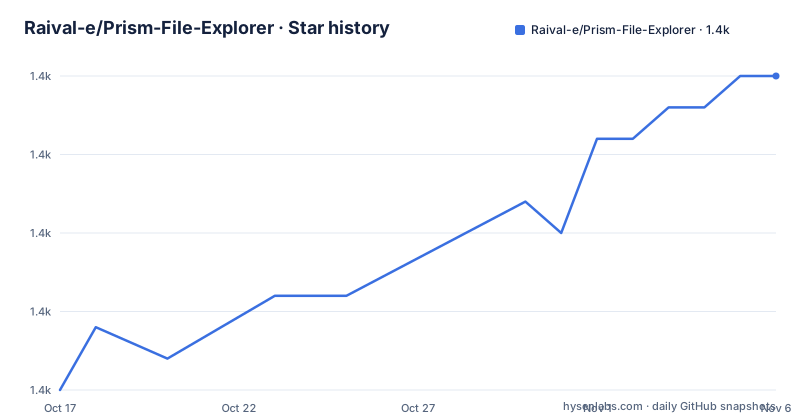
- Raival-e/Prism-File-Explorer1,390 ★ · +10
| Repository | 2026-10-17 | 2026-11-06 |
|---|---|---|
| Raival-e/Prism-File-Explorer | 1.4k | 1.4k |
10 Stars in the last 20 days, measured from the daily GitHub snapshot. Compare with other projects
Editorial analysis
What Prism File Explorer Combines on Android
Prism File Explorer addresses the need to browse and manipulate files on Android without switching among separate utilities for common tasks. It targets Android users who need more than a basic picker, including people who organize files in batches, inspect directories, browse ZIP archives, and open common media formats. The application requires Android 6.0, corresponding to API 23, or later, and the README says that storage access is required for file management.
The project combines ordinary directory management with several embedded tools. Its documented file operations include creating, copying, moving, renaming, and deleting files and folders. It also supports multi-selection, clipboard actions, batch operations, and file properties. A multi-tab interface allows users to work with more than one directory at a time, while breadcrumb navigation, search, sorting, and grid or list views address directory navigation.
The media side is broader than a typical file browser. The README lists an image viewer, video player, audio player, PDF viewer, and text editor with syntax highlighting. It names JPEG, PNG, GIF, WebP, MP4, AVI, MKV, MOV, MP3, WAV, FLAC, and OGG among the supported formats, although the wording does not establish whether every codec within each container is handled. ZIP creation, extraction, and archive preview add another category of work without requiring an external archive tool.
This concentration is convenient, but it also broadens the app's responsibility. A user evaluating it for a large media library must distinguish the documented format list from codec, device, and file-size support, which the README does not specify. The README also provides no compatibility matrix beyond the minimum Android version. That silence matters because storage access and media decoding behavior can vary across Android releases, but the project documentation does not explain how Prism handles those differences.
The Kotlin and Jetpack Compose Structure Visible in the Repository
The repository describes Prism File Explorer as an Android application built entirely with Kotlin and Jetpack Compose. Its top-level layout includes an `app/` module, Gradle Kotlin build files, `gradlew`, and `gradlew.bat`, which is consistent with a standard Android project that can be opened in Android Studio. The README also names Material Design 3, automatic light and dark theme switching, animations, and responsive Compose UI elements. These are implementation and interface choices, not proof of measured startup time or performance.
Based on the documented feature set, most activity can be understood as Android storage access feeding a Compose-based interface. The file manager reads and changes files and directories, presents directory contents in grid or list layouts, sorts entries, searches for files, and exposes selection state. Multi-tab and clipboard behavior add interaction state above the underlying storage operations. The README says that file operations run in the background and that memory management is designed for large directories, but it does not publish implementation details about workers, coroutines, database models, pagination, or cancellation.
The built-in viewers appear to extend the same application flow beyond directory browsing. Selecting a compatible file can expose the appropriate documented viewer or text editor. ZIP preview is listed separately from extraction, suggesting that archive entries can be inspected without first unpacking the archive. The repository excerpt does not reveal whether these tools share a media engine, use Android platform components, or rely on separate parsing code.
That opacity affects engineering evaluation. Kotlin and Compose can simplify a modern Android interface, but the feature description alone does not establish test coverage, accessibility quality, export-state safety, permission handling, or compatibility with scoped storage. Those are implementation-review concerns, and the README does not answer them.
Installing Prism File Explorer and Performing a First Browse
Prism File Explorer does not document a command-line installation procedure in the README. It directs users to APK download options rather than giving verified Gradle build instructions, signing requirements, or a dependency setup procedure. The documented installation path is therefore release acquisition rather than source compilation.
The README lists GitHub Releases, IzzyOnDroid, Obtainium, and OpenApk as download sources. The application identifier shown in those links is `com.raival.compose.file.explorer`. A user can obtain the application from the GitHub Releases page and install the release APK through Android's normal package installation flow, provided that the device meets the documented Android 6.0 minimum and permits installation from the selected source.
For the first real use, open Prism File Explorer after installation and grant the storage access required by Android for the locations that need management. The app should present its file-management interface, where the documented navigation tools include breadcrumbs, directory tabs, search, sorting, and grid or list views. Confirm that the expected storage location appears before creating, moving, or deleting anything.
A cautious first operation is to select a small, noncritical folder and inspect its properties or enable list view with name sorting. This checks access to the intended directory without committing to a large batch operation. The README does not document exact permission-dialog wording, initial-screen controls, default storage roots, or the interaction sequence for creating a folder, so the tutorial cannot specify those steps without guessing. Source builders should also avoid assuming that a local debug build is production-ready, because the README gives no signing or release-build instructions.
Batch Operations, Viewers, and ZIP Handling Boundaries
Prism File Explorer's strongest functional fit is an Android user who frequently performs several file-management actions in sequence. Multi-select operations, cut, copy, and paste, combined with multiple directory tabs, can reduce repeated navigation. Search and sorting help users locate entries in large folders, while properties provide a place to inspect metadata. The interface supports both grid and list views, which can help users switch between visual browsing and detail-oriented scanning.
The embedded viewers reduce app switching for supported files. Images, video, audio, PDF documents, and text are covered in the feature list. The text editor includes syntax highlighting for code files. ZIP users can create archives from files or folders, extract existing archives, and preview their contents before extraction. These functions make Prism broader than a download browser or document picker.
Several boundaries remain undocumented. The README does not say whether delete operations request confirmation, whether failed transfers can resume, whether clipboard state survives process death, or how conflicting files are handled during copy and move. It also does not explain whether archive previews support nested archives, password-protected ZIPs, or large central directories. For media, the format list does not guarantee that every codec inside a listed container will play. These omissions do not make the features unusable, but they prevent a reader from treating the feature headings as a complete compatibility contract.
A wrong-fit case is a user who needs guaranteed long-term support, audited recovery behavior, or enterprise administration. Prism is also not the right tool if the goal is to build a custom file manager from a currently supported foundation, because its own README states that bug fixes and pull request merges are no longer being provided.
Why a Maintained Android File Manager May Fit Better
The closest functional alternative is a conventional Android file manager with separate, currently maintained viewing or archive components. The practical difference is not the presence of familiar buttons. It is the maintenance model. A file manager centered on a currently supported Android codebase is more likely to receive compatibility work and clear fixes, while Prism leaves its user community dependent on the existing releases or an external maintainer.
Another alternative is using Android's system document picker plus dedicated tools for PDFs, images, audio, code, and ZIP archives. This approach requires more app switching and does not provide Prism's multi-directory tabs or batch file workflow in one interface. It can still suit users who already have trusted tools for each format and who value independent component updates over a unified interface.
Prism is more compelling when reducing app switching matters and the documented feature set covers the user's actual files. Its GPL-3.0 license also permits a fork to be studied and modified under that license's conditions, but downstream distribution requires compliance with the license. The README specifically invites maintainers to fork the project, and the author says a fork link can be added. That is an invitation to continue maintenance, not evidence that a supported fork currently exists.
Before choosing Prism over a maintained alternative, check whether a required workflow is documented rather than merely shown in screenshots. Confirm support for the storage locations used, the exact media formats, expected archive operations, and the Android version in use. The repository's unmaintained status makes those checks more important, not less.
Maintenance, GPL-3.0, and the Cost of Continuing Prism
The README opens with an explicit maintenance notice: the repository is no longer actively maintained, and the author cannot provide support, fix bugs, or merge pull requests. It invites another maintainer to take over through a fork. Repository metadata shows that the last push was on 2026-05-28, while the latest listed release is v1.3.2 from 2025-09-12. Those facts do not amount to a support commitment, especially because the maintenance notice directly contradicts any assumption that repository activity equals ongoing support.
The release sequence also changes the upgrade path. The documented versions are v1.3.0, v1.3.1, and v1.3.2, with no release after v1.3.2 listed. The README does not provide migration instructions, a supported upgrade path, or a compatibility policy. An organization considering a fork would need to account for code review, Android tooling changes, dependency maintenance, signing, release distribution, and regression testing. The repository contains `gradlew`, `gradlew.bat`, Gradle files, a `baselineProfile/` directory, and `fastlane/`.
Prism File Explorer is licensed under GPL-3.0. Anyone distributing a modified build or incorporating its licensed code must follow the applicable license terms, including its source and notice requirements. This is a compliance consideration rather than a claim about suitability. Because the project is unmaintained, adoption cost includes more than the APK download: someone may have to inspect the build files, reproduce the release process, verify permissions and file operations, and publish fixes under the license.
Editorial conclusion
Prism File Explorer fits users who want one Android app for browsing, basic file management, media viewing, and ZIP handling, especially if they can obtain a release build and accept limited upstream support. It is a poor choice for users who require signed ongoing updates, current Android compatibility fixes, or supported maintenance. Verify the selected APK, storage behavior, required permissions, media format handling, and your ability to maintain a GPL-3.0 fork before adopting it.
Frequently asked questions
What Android versions does Prism File Explorer support?
The README lists Android 6.0, API 23, or later as the system requirement. It does not provide a tested device or Android release matrix.
Can Prism File Explorer create and extract ZIP archives?
Yes. The documented archive features include creating ZIP archives, extracting them, and previewing their contents without extraction.
Is Prism File Explorer still actively maintained?
No. The README explicitly says the repository is no longer actively maintained and that the author cannot provide support, fix bugs, or merge pull requests. The repository's last push was on 2026-05-28.
Official sources
Add this badge to your README
If you maintain this project, the badge below links readers to this analysis and shows its maintenance status from the daily GitHub snapshot. Paste the markdown into your README; add ?metric=license or ?metric=stars to the image URL for a different field.

[](https://hysenlabs.com/projects/raival-e-prism-file-explorer)Star history chart for your README
[](https://hysenlabs.com/projects/raival-e-prism-file-explorer)Was this useful?