Rancher Fleet for GitOps Across Kubernetes Fleets
Deploy workloads from Git to large fleets of Kubernetes clusters
At a glance
- What is it?
- Fleet is a Go-based GitOps and HelmOps controller for deploying Kubernetes YAML, Helm charts, or Kustomize content across one or many clusters. Its main trade-off is a Helm-based deployment model that adds controller resources and Git repository configuration in exchange for consistent handling and visibility.
- Who is it for?
- Adopt Fleet when a team wants one Git-driven deployment path for many Kubernetes clusters, especially when it already uses Helm or needs raw manifests, Helm charts, and Kustomize handled together. Do not adopt it without checking cluster controller overhead, Git credentials and repository layout, and whether the Helm normalization model matches your operational process.
- Can I use it commercially?
- Yes. Apache-2.0 is a permissive licence: you can use, modify and sell software built on it, as long as you keep its copyright and licence notices.
- Is it still maintained?
- Yes. The repository last received commits 1 day ago.
- What is it written in?
- Mainly Go, according to GitHub's language statistics.
Answers come from the project's GitHub data, last synced on November 7, 2026, and from our analysis. They are not legal advice.
Star history
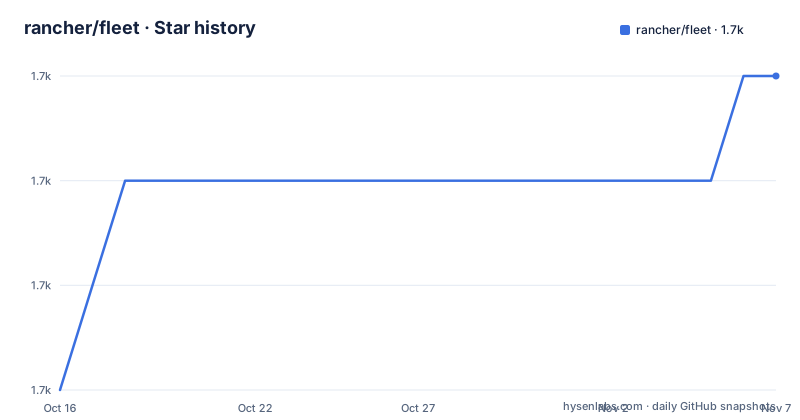
- rancher/fleet1,740 ★ · +3
| Repository | 2026-10-16 | 2026-11-07 |
|---|---|---|
| rancher/fleet | 1.7k | 1.7k |
3 Stars in the last 22 days, measured from the daily GitHub snapshot. Compare with other projects
Editorial analysis
What Fleet Solves Across Kubernetes Clusters
Fleet addresses the problem of distributing deployment definitions from a Git repository to a large number of Kubernetes clusters. The repository describes Fleet as a tool for organizations with many clusters, many deployments, or many teams, while also noting that it can be used with a single cluster. That makes the project relevant to both platform teams centralizing application delivery and smaller teams that want Git as the source for workloads without building a separate deployment controller.
The supported input types are broader than a basic YAML directory. Fleet can manage raw Kubernetes YAML, Helm charts, and Kustomize. A repository can contain a combination of these formats. The intended audience is therefore not limited to application developers who already use Helm. It also fits teams that keep manifests, chart values, and Kustomize overlays in Git but need the same distribution model across environments.
Fleet is not described as a general cluster provisioning system. The README gives no procedure for creating clusters, joining them to a management plane, or storing cluster credentials. Its documented responsibility begins after a cluster is represented in the Fleet setup and a `GitRepo` resource is applied. That boundary matters when selecting the project: Fleet focuses on workload deployment rather than the full cluster lifecycle.
Fleet Converts Repository Content into Helm Deployments
The central mechanism is a normalization step. According to the README, resources from Git are dynamically turned into Helm charts, and Helm is used as the deployment engine for everything sent to a cluster. This means YAML, Helm, and Kustomize sources do not remain separate deployment paths. They converge on a common Helm-based execution model.
The repository model is also path based. The quick-start example creates a `GitRepo` custom resource with a `spec.repo` URL and a `spec.paths` list. In that example, the `simple` path is selected from `https://github.com/rancher/fleet-examples`. The README states that Kubernetes manifest files intended for deployment should be placed under `/manifests` in the repository. Fleet therefore combines repository selection with a GitOps configuration object that identifies both the source and the content subset.
The `fleet-local` namespace has a special role in the example. The README says it is automatically wired to deploy to the local cluster. That makes it possible to validate a Git-backed deployment without first selecting a remote cluster in the example. The architecture also implies that Fleet controllers observe `GitRepo` resources and reconcile their selected content into cluster workloads. The README does not document the controller reconciliation sequence, cache behavior, or polling interval, so those implementation details should be checked in the project documentation before making timing assumptions.
Installing Fleet with Helm Charts
The README requires Helm and documents Helm 3 as the installation tool. It does not provide a source build or package-manager installation procedure for Fleet itself. Install Helm first, then install the Fleet CRDs separately from the main Fleet chart. The split allows CRDs to be managed with greater flexibility, according to the README.
On macOS with Homebrew, the documented Helm installation is:
brew install helmThe documented Fleet installation uses two Helm release names and the `cattle-fleet-system` namespace:
helm -n cattle-fleet-system install --create-namespace --wait \
    fleet-crd https://github.com/rancher/fleet/releases/download/v0.16.2/fleet-crd-0.16.2.tgz
helm -n cattle-fleet-system install --create-namespace --wait \
    fleet https://github.com/rancher/fleet/releases/download/v0.16.2/fleet-0.16.2.tgz
The README labels these commands as the quick start and links to `https://fleet.rancher.io/` for more installation information. The repository also contains `charts/`, `cmd/`, `internal/`, `pkg/`, and `e2e/` directories, which confirms that the project includes chart definitions and Go controller code. The documented first real use is applying a `GitRepo` resource rather than manually deploying an application. That keeps the initial test inside the same Git-driven path that Fleet is intended to automate.
First GitRepo Deployment in the Local Cluster
The quickest documented example applies a `GitRepo` resource to `fleet-local`. The resource points Fleet at the public `rancher/fleet-examples` repository and restricts the selected content to the `simple` path. The README instructs users to save the object as `example.yaml` and apply it with `kubectl`.
cat > example.yaml << "EOF"
apiVersion: fleet.cattle.io/v1alpha1
kind: GitRepo
metadata:
  name: sample
  # This namespace is special and auto-wired to deploy to the local cluster
  namespace: fleet-local
spec:
  # Everything from this repo will be run in this cluster. You trust me right?
  repo: "https://github.com/rancher/fleet-examples"
  paths:
  - simple
EOF
After applying the resource, inspect Fleet status in its namespace:
kubectl apply -f example.yamlkubectl -n fleet-local get fleetThe README says this should result in a Fleet resource being created. It then gives the expected workload check:
kubectl get deploy frontendThe sample output shows a `frontend` Deployment with three ready and three available replicas. This is an example from the README, not a guaranteed result for every repository. A real first use should confirm that the repository path exists, the selected content is valid for the target cluster, and the `GitRepo` status reports the expected reconciliation. The README does not document authentication setup for private repositories or a rollback procedure.
Helm Normalization as Fleet's Main Trade-off
Using Helm as the common deployment engine gives Fleet a consistent execution path for raw manifests, Helm charts, and Kustomize. It also provides a recognizable release-oriented model for operators who already inspect Helm deployments. The README connects that design with control, consistency, and auditability, although it does not provide measurements for those qualities.
The trade-off is that Fleet is not simply copying arbitrary files into a cluster. It turns repository content into Helm charts dynamically. Teams that rely on very specific raw-manifest behavior should verify how Fleet handles files outside the selected paths, chart metadata, generated names, values, and ordering. The README does not describe conflict handling, pruning policy, drift detection, secret management, or rollback semantics. Those omissions are significant for a GitOps controller because deployment success is not the same as successful recovery when a revision fails.
A conventional alternative is to run a GitOps controller separately for each cluster and keep cluster-specific configuration in its native format. That approach can avoid introducing Fleet's Git repository abstraction when a small environment has only a few clusters and one source format. Fleet becomes more relevant when centralized repository selection, multi-cluster distribution, and mixed deployment formats justify the extra controller model. The project is therefore less compelling for a single application owner who only needs a direct `kubectl apply` workflow.
Maintenance, Licensing, and Upgrade Surface
The repository is not archived, and its last push was on 2026-10-16. Recent releases listed for the project include `v0.17.0-alpha.7`, `v0.16.3-beta.2`, and `v0.15.8-beta.1`, all dated 2026-10-14. The README's quick-start commands, however, point to `v0.16.2` chart archives. That difference means an operator should not assume the newest release is the version used by the installation example.
The project is licensed under Apache-2.0. The repository includes `LICENSE`, `CONTRIBUTING.md`, `DEVELOPING.md`, and CI-related directories. Those files indicate that the project has separate contributor and developer documentation, but the README does not describe an upgrade migration policy or compatibility matrix. Since Fleet installs CRDs and controller resources, upgrades should account for Kubernetes API compatibility and the version relationship between the `fleet-crd` and `fleet` charts.
The Go module declares Go 1.27.0 with toolchain go1.27.2 and uses Kubernetes dependencies at v0.37.1. These are source-build and dependency facts, not a documented support policy. Verify the version pair used in the release artifacts and the target Kubernetes release before applying an upgrade. The Apache-2.0 license governs the repository's stated licensing, but it does not answer operational questions about internal policies or third-party dependencies.
Editorial conclusion
Adopt Fleet when a team wants one Git-driven deployment path for many Kubernetes clusters, especially when it already uses Helm or needs raw manifests, Helm charts, and Kustomize handled together. Do not adopt it without checking cluster controller overhead, Git credentials and repository layout, and whether the Helm normalization model matches your operational process. For the first deployment, verify the `GitRepo`, the selected `paths`, and the resulting workload status in `fleet-local` before expanding the scope.
Frequently asked questions
How do I install Rancher Fleet?
The README documents installing Helm 3, then installing the `fleet-crd` and `fleet` Helm charts into the `cattle-fleet-system` namespace. Its quick-start commands use the `v0.16.2` release archives.
What deployment formats does Fleet support?
Fleet supports raw Kubernetes YAML, Helm charts, and Kustomize. According to the README, content from these sources is dynamically converted into Helm charts and deployed with Helm.
How do I deploy from Git with Fleet?
Create a `GitRepo` custom resource with `spec.repo` and `spec.paths`, then apply it with `kubectl apply`. The README's example targets `fleet-local`, which it says is automatically wired to deploy to the local cluster.
Official sources
Add this badge to your README
If you maintain this project, the badge below links readers to this analysis and shows its maintenance status from the daily GitHub snapshot. Paste the markdown into your README; add ?metric=license or ?metric=stars to the image URL for a different field.

[](https://hysenlabs.com/projects/rancher-fleet)Star history chart for your README
[](https://hysenlabs.com/projects/rancher-fleet)Was this useful?