K3k, running K3s clusters inside an existing Kubernetes cluster
Kubernetes in Kubernetes
At a glance
- What is it?
- K3k is a Rancher project that creates isolated K3s clusters inside a Kubernetes cluster you already run, in a shared mode that shares resources or a virtual mode that gives each cluster its own control plane and nodes. The virtual mode's agent pods run privileged on the host, which is the caveat to understand first.
- Who is it for?
- K3k suits platform teams that need many short-lived Kubernetes environments for development, testing and CI, and who can accept either shared resource contention or privileged agent pods on their nodes. It does not suit tenants that require a hard security boundary, because the virtual mode's agent pods run privileged on the host and a privileged pod inside a virtual cluster is privileged on the real node.
- Can I use it commercially?
- Yes. Apache-2.0 is a permissive licence: you can use, modify and sell software built on it, as long as you keep its copyright and licence notices.
- Is it still maintained?
- Yes. The repository last received commits 2 days ago.
- What is it written in?
- Mainly Go, according to GitHub's language statistics.
Answers come from the project's GitHub data, last synced on November 7, 2026, and from our analysis. They are not legal advice.
Star history
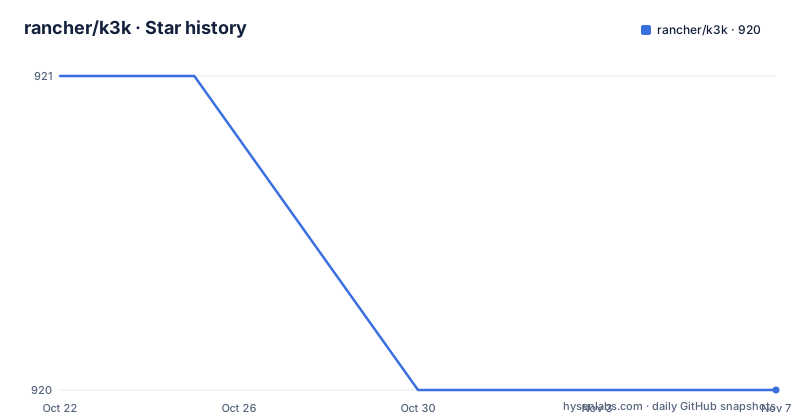
- rancher/k3k920 ★ · -1
| Repository | 2026-10-22 | 2026-11-07 |
|---|---|---|
| rancher/k3k | 921 | 920 |
-1 Stars in the last 16 days, measured from the daily GitHub snapshot. Compare with other projects
Editorial analysis
Two modes decide how much isolation you actually get
K3k, which stands for Kubernetes in Kubernetes, is a tool for creating and managing isolated K3s clusters within an existing Kubernetes environment. The stated benefits are efficient multi-tenancy, streamlined experimentation and resource isolation, with the cost argument being that several lightweight Kubernetes clusters can share one physical host.
The design decision that matters is that K3k offers two modes, and they are not variations on the same theme. Shared mode optimises resource utilisation by running multiple K3s clusters on the same physical host and sharing the underlying resources. Virtual mode provides dedicated K3s server and agent pods for each embedded cluster, so every cluster gets its own control plane, its own CNI and its own nodes.
The difference shows up in the isolation story. Shared mode gives you separate namespaces, separate RBAC and separate resource quotas, which is enough to stop one team from consuming another's capacity but not enough to stop a privileged workload from reaching the host. Virtual mode gives each cluster a control plane of its own, so a cluster that needs its own network or its own API server can have them, at the cost of running more pods.
The rest of the feature list follows from that split. Resource isolation through limits and quotas per embedded cluster. Simplified multi-tenancy with a dedicated cluster per user or project. Lightweight and fast operation, since K3s clusters can be spun up and torn down quickly, which the README frames as a CI/CD benefit. And integration with Rancher for managing the embedded clusters.
The agent pods run privileged on the host node
The README is direct about the sharpest limitation of virtual mode, and it deserves to be read before anything else on this page.
The agent pods currently run privileged on the host node, so a pod that is privileged inside a virtual cluster is also privileged on the real host node. In other words, the isolation between embedded clusters is not a security boundary against a determined workload, it is a boundary against accidental interference. A tenant who can schedule a privileged pod in their virtual cluster has the same power over the host that the host administrator has.
The documented mitigation is a sandboxed runtime. Kata Containers can be configured with spec.runtimeClassName to provide stronger isolation, and the README links both the how-to for using Kata Containers and the isolation and security section of the architecture document in docs/architecture.md.
That mitigation moves the cost rather than removing it. Kata Containers adds a virtual machine boundary under each workload, so the node cost per cluster goes up and the operational surface gets larger. The decision is a threat-model decision rather than a configuration decision.
It also explains why shared mode exists rather than being the older, simpler option. Shared mode has no per-cluster agent pods at all, so there is nothing privileged to escalate from, and the isolation you get is the isolation of namespaces and quotas on one cluster.
Installing the controller is two Helm commands
The prerequisites are modest. Helm must be installed to use the charts, you need an existing Kubernetes cluster, with RKE2 recommended, and a configured storage provider with a default storage class. If you have no storage provider, the cluster can be configured to use ephemeral or static storage, and the advanced usage document explains those options.
The controller install is the standard Helm flow. First add the chart repository and refresh it:
helm repo add k3k https://rancher.github.io/k3k
helm repo update
Then install the chart into its own namespace:
helm install --namespace k3k-system --create-namespace k3k k3k/k3kThe README recommends using the latest released version when possible. The chart and the controller are versioned in step, and the release list shows a chart release alongside each controller release, with v1.2.1-rc1 and chart-1.2.1-rc1 both dated 2026-10-08.
The controller is the component that watches the cluster for K3k custom resources and reconciles them, and the repository carries the chart under charts/. The policy surface lives in the cluster API types under pkg/apis and in the VirtualClusterPolicy example, which is how you express the constraints a tenant is allowed inside an embedded cluster.
k3kcli writes a kubeconfig context for each cluster
The command line client, k3kcli, is the fast path for creating clusters, and the README describes it as a quick and easy way to create K3k clusters and automatically expose them via a kubeconfig. It is distributed as a binary from the GitHub releases page, and the Linux amd64 download looks like this:
wget -qO k3kcli https://github.com/rancher/k3k/releases/download/v1.2.0/k3kcli-linux-amd64 && \
  chmod +x k3kcli && \
  sudo mv k3kcli /usr/local/bin
You can confirm it with k3kcli --version, which prints a version line. Creating a cluster is one command:
k3kcli cluster create myclusterWhen the K3s server is ready, the tool extracts the cluster's kubeconfig, adds it to your current kubeconfig as a context named for the namespace and the name, and prints instructions on how to use it. The example output shows the context appearing as a k3k-mycluster/mycluster entry in the kubeconfig file.
The CLI is built on cobra, viper and pflag, and the repository has a cli/ directory for it. The Makefile builds three binaries, the k3k controller, the k3k-kubelet and the k3kcli, and packages container images for the first two.
Your kubectl context decides where the clusters land
K3k operates within the context of your currently configured kubectl context, and the README spells out what that means in practice. K3k respects the standard Kubernetes mechanisms for context configuration, including the --kubeconfig flag, the $KUBECONFIG environment variable and the default $HOME/.kube/config file. Any K3k clusters you create will reside within the Kubernetes cluster that your kubectl is currently pointing to.
That is the whole model. There is no separate target, no server flag for the host cluster in the ordinary case. The CLI writes a context into your existing kubeconfig, and kubectl then talks to the embedded cluster exactly as it would talk to a physical one.
There is one case that needs an extra flag. If the host Kubernetes cluster is managed by Rancher, which you can tell because your kubeconfig's server address includes a Rancher URL, you should pass --kubeconfig-server when creating the cluster:
k3kcli cluster create --kubeconfig-server <host_node_IP_or_load_balancer_IP> myclusterThat ensures the generated kubeconfig connects to the correct endpoint, which matters because the address the host cluster advertises is not necessarily the address a client outside it can reach.
The repository ships examples for the configurations you will actually want to compare, including shared-single-server.yaml, shared-multiple-servers.yaml, virtual-server.yaml and hcp-server.yaml for the high availability control plane case, plus virtualclusterpolicy.yaml for the policy side. Comparing the shared and virtual examples side by side is the fastest way to understand what each mode costs.
Where K3k is the wrong shape for the problem
K3k solves a specific problem, and there are three situations where it is the wrong tool.
The first is hard tenant isolation. If you are running code from tenants you do not trust, virtual mode does not give you a boundary because of the privileged agent pods, and shared mode never claimed to. A namespace-per-tenant arrangement on a single cluster, or separate clusters on separate hosts, is the honest answer for that requirement, and the Rancher integration makes managing the latter no harder than managing the former.
The second is long-lived production clusters. The pitch is about spinning clusters up in seconds and tearing them down just as quickly for development and testing. A cluster that must survive a quarter, hold state and be upgraded on a schedule wants the control plane to be a thing you patch, and K3s running inside another K3s cluster adds a layer of upgrades to every patch.
The third is storage. The prerequisite of a configured storage provider with a default storage class is doing real work in that sentence. An embedded cluster that inherits the host's storage class shares the fate of the host's volumes, and the ephemeral and static storage options exist for the case where you have no provider at all, which is a development convenience rather than a production storage plan.
There is also a licensing and maturity dimension worth noting. The repository is Apache-2.0, the last push was on 2026-10-19, and the release tags in the list are release candidates, which is normal for a fast-moving project and another reason to test hard before putting anything important on it.
Editorial conclusion
K3k suits platform teams that need many short-lived Kubernetes environments for development, testing and CI, and who can accept either shared resource contention or privileged agent pods on their nodes. It does not suit tenants that require a hard security boundary, because the virtual mode's agent pods run privileged on the host and a privileged pod inside a virtual cluster is privileged on the real node. Before you deploy it, read the isolation section of docs/architecture.md, decide whether Kata Containers with spec.runtimeClassName is needed for your threat model, and confirm your host cluster has a default storage class or plan for the ephemeral and static storage options.
Frequently asked questions
What is K3k and what does it create?
K3k is a Rancher project that creates and manages isolated K3s clusters inside an existing Kubernetes environment. It offers a shared mode that shares underlying resources between clusters and a virtual mode that gives each embedded cluster its own K3s server and agent pods, control plane, CNI and nodes.
How do I install the K3k controller?
Add the Helm repository with helm repo add k3k https://rancher.github.io/k3k followed by helm repo update, then install with helm install --namespace k3k-system --create-namespace k3k k3k/k3k. Helm, an existing cluster with a default storage class and a configured storage provider are the prerequisites.
Is the isolation in K3k virtual mode a security boundary?
Not on its own. The README notes that the agent pods currently run privileged on the host node, so a pod that is privileged inside a virtual cluster is also privileged on the real host node. A sandboxed runtime such as Kata Containers can be configured with spec.runtimeClassName for stronger isolation, with details in the isolation section of docs/architecture.md.
How do I create a cluster with the k3kcli?
Download the k3kcli binary from the GitHub releases page, then run k3kcli cluster create mycluster. The tool waits for the K3s server, extracts the kubeconfig and adds it to your current kubeconfig as a namespace/name context. If the host cluster is Rancher managed, pass --kubeconfig-server with the host node or load balancer IP.
Official sources
Add this badge to your README
If you maintain this project, the badge below links readers to this analysis and shows its maintenance status from the daily GitHub snapshot. Paste the markdown into your README; add ?metric=license or ?metric=stars to the image URL for a different field.

[](https://hysenlabs.com/projects/rancher-k3k)Star history chart for your README
[](https://hysenlabs.com/projects/rancher-k3k)Was this useful?