edge-tts Deep Analysis: Six Examples, Four Dependencies, and One Remote Service
Use Microsoft Edge's online text-to-speech service from Python WITHOUT needing Microsoft Edge or Windows or an API key
At a glance
- What is it?
- edge-tts wraps Microsoft's online speech service in a Python module and two command line tools, which makes it free to install and quick to start, but it also puts your audio pipeline behind a service the project does not control. This walkthrough covers what the package actually gives you, starting with the SSML support that had to be removed.
- Who is it for?
- Pick edge-tts when you want speech without an API key, without Edge installed and without Windows, and when you are content to have the audio produced by a remote service at synthesis time rather than on your own machine.
- Can I use it commercially?
- Check first. The repository uses a licence we do not classify automatically, so read its LICENSE file before any commercial use.
- Is it still maintained?
- Yes. The repository last received commits 31 days ago.
- What is it written in?
- Mainly Python, according to GitHub's language statistics.
Answers come from the project's GitHub data, last synced on November 14, 2026, and from our analysis. They are not legal advice.
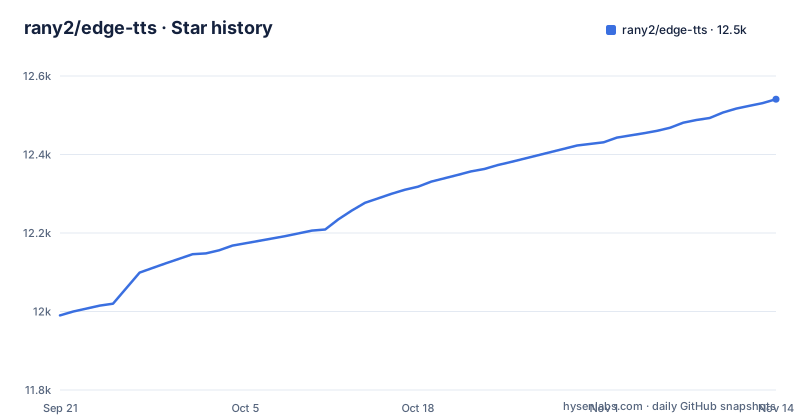
Star history
- rany2/edge-tts12,541 ★ · +551
| Repository | 2026-09-21 | 2026-11-14 |
|---|---|---|
| rany2/edge-tts | 12k | 12.5k |
551 Stars in the last 54 days, measured from the daily GitHub snapshot. Compare with other projects
Editorial analysis
Custom SSML support was removed by the service, not by the library
Support for custom SSML is gone, and the stated reason is a server side restriction rather than a decision in the Python code: Microsoft prevents the use of any SSML that could not be generated by Microsoft Edge itself. The consequence is a hard shape on the markup, because the service only permits a single `<voice>` tag with a single `<prosody>` tag inside it. That removes every case where SSML earns its keep, inserting pauses, voicing separate chunks of a long document differently, or switching voice mid sentence, because none of those fit inside one voice and one prosody tag. The compensation offered is that whatever can be expressed within the prosody tag is already available from the library or the command line itself. For a reader this is the first thing to settle before designing anything: rate, volume and pitch are the whole customisation surface, and a pipeline built around a markup document has to be rebuilt around three scalar options.
Negative rate, volume and pitch values need the equals sign
Three options adjust delivery, and their sign convention has a trap that costs an afternoon the first time you meet it. A negative value must be attached with an equals sign:
$ edge-tts --rate=-50% --text "Hello, world!" --write-media hello_with_rate_lowered.mp3 --write-subtitles hello_with_rate_lowered.srt
$ edge-tts --volume=-50% --text "Hello, world!" --write-media hello_with_volume_lowered.mp3 --write-subtitles hello_with_volume_lowered.srt
$ edge-tts --pitch=-50Hz --text "Hello, world!" --write-media hello_with_pitch_lowered.mp3 --write-subtitles hello_with_pitch_lowered.srt
Writing `--rate -50%` instead means the value is read as a command line option rather than as an argument to the flag. Note also that rate and volume take percentages while pitch is expressed in hertz, so the same fifty percent does not mean the same physical change across the three. For anyone pasting these into a shell script, a Dockerfile or a CI step, the space after the flag is not a style question but a parse error, and encoding the equals form for positive values too keeps the calls consistent through shell quoting layers.
edge-playback needs mpv and drops three options
`edge-playback` plays the result straight away with subtitles rather than writing files:
$ edge-playback --text "Hello, world!"It carries its own dependency and its own exclusions. Playback requires the mpv command line player, except on Windows, so a Linux or macOS machine or container needs mpv present before this command does anything. Every `edge-tts` option works with `edge-playback` except `--write-media`, `--write-subtitles` and `--list-voices`. Those three exclusions matter more than their size suggests. Because the playback path cannot write media, cannot write subtitles and cannot enumerate voices, any script that wants a file on disk, or wants to discover which voices exist, has to fall back to `edge-tts` and name a voice it already knows. Interactive preview and batch export are therefore two separate commands here, and there is no single invocation that both lets you hear the result and keeps the file.
Four runtime dependencies carry hard upper bounds
The setup.py file is short enough to read in full; its comment says metadata goes in setup.cfg and that these requirements are there for GitHub's dependency graph:
setup(
    name="edge-tts",
    install_requires=[
        "aiohttp>=3.8.0,<4.0.0",
        "certifi>=2023.11.17",
        "tabulate>=0.4.4,<1.0.0",
        "typing-extensions>=4.1.0,<5.0.0",
    ],
)
Four requirements, three of them with an upper bound as well as a lower one. Those ceilings are the kind that stop a build instead of warning you: the aiohttp cap means a project already committed to the next major version of its HTTP client cannot install edge-tts without resolving the conflict, and the tabulate and typing-extensions caps do the same for anything pinned forward of them. certifi carries no ceiling at all.
pip or pipx decides who receives those dependencies
Two install paths, and the difference is ownership of the dependency set rather than size. The plain route puts the module and all four requirements into the environment you already have:
$ pip install edge-ttsThat is the one to use when your own Python code is going to import it, and it means your environment absorbs the aiohttp, certifi, tabulate and typing-extensions bounds described above, with the resolution conflicts that implies. When you only want the commands, the page points at pipx instead:
$ pipx install edge-ttspipx keeps those four dependencies in an isolated environment your project does not share, which protects an existing setup from the ceilings but leaves the module itself not importable from your code without a second install into whatever environment runs it. So the choice is not a preference about disk space or tidiness. It decides whether the voice table, the streaming generators and the subtitle objects are reachable from your process or only from your shell.
No API key, and no documented behaviour when the call fails
The module reaches Microsoft's online text-to-speech service, which is precisely why it works from Python on Linux or macOS with neither Edge nor Windows present and no API key to configure. The same property is the constraint. Nothing is synthesised locally, so every request needs the network at the moment the audio is produced, and a batch job running unattended is exposed to whatever the remote endpoint does at that moment. The page documents no retry policy, no timeout value, no guidance about rate limits, no offline mode and no error handling for a failed request, so a caller assembling a pipeline supplies all of that itself. It also does not say whether identical text yields identical audio on every call, which means a system that stores rendered files as reference material, or diffs a new render against a previous one, has no documented basis for expecting a byte identical result.
Six example scripts are the closest thing to an API reference
The examples directory carries the shape of the library in its file names. Six scripts sit there: async_audio_gen_with_dynamic_voice_selection.py, async_audio_gen_with_predefined_voice.py, async_audio_streaming_with_predefined_voice_and_subtitles.py, sync_audio_gen_with_predefined_voice.py, sync_audio_streaming_with_predefined_voice_subtitles.py, and sync_audio_streaming_with_predefined_voice_subtitles_print2stdout.py. Read together they describe two surfaces, synchronous and asynchronous, and three output shapes: a finished audio file, a stream of chunks, and a stream that also yields subtitles, with the last variant writing those subtitles to standard output as they arrive. Voice selection appears as its own dimension, one script choosing a voice dynamically rather than naming it up front. The project also points at src/edge_tts/util.py as a further source of examples. What is missing is prose. There is no signature table and no parameter list anywhere on the page, so the callable shapes and the attributes of the returned objects have to be read out of the scripts, and the six examples are where a careful reader should start.
Editorial conclusion
Pick edge-tts when you want speech without an API key, without Edge installed and without Windows, and when you are content to have the audio produced by a remote service at synthesis time rather than on your own machine. Plan around three specifics before you start: no SSML, so rate, volume and pitch are the entire customisation surface; mpv, if you want the playback command outside Windows; and four dependencies, three of them with upper bounds that can block a forward-pinned environment. The last push to master is dated 2026-10-14 and the newest release is 7.3.1 from 2026-10-13, after 7.3.0 the same day and 7.2.8 on 2026-03-22, so check that the endpoint the package expects still answers and that your dependency ceilings still resolve before wiring it into anything long-lived.
Frequently asked questions
what is edge tts
A Python module that uses Microsoft's online text-to-speech service from inside Python code, or through the edge-tts and edge-playback commands. It needs neither Microsoft Edge nor Windows nor an API key.
how to install edge tts
Run pip install edge-tts. If you only want the edge-tts and edge-playback commands and not the importable module, pipx install edge-tts is the option the page points to, since it isolates the four dependencies.
how to use edge tts in python
Import the module in your own code, or drive it from the shell with edge-tts --text "Hello, world!" --write-media hello.mp3 --write-subtitles hello.srt. The examples directory holds six scripts covering synchronous and asynchronous generation plus streaming with subtitles, one of which prints subtitles to standard output as they arrive.
how to use edge tts offline
There is no offline mode described. The module calls an online service, so the network has to be available at the moment the audio is produced, and the page documents no local fallback.
is edge tts free
No API key is involved, which is stated as part of what the module does. The page says nothing about terms, quotas or usage conditions attached to the service itself, so those would need checking elsewhere before relying on the service in a product.
is edge tts open source
The repository publishes its source with a LICENSE file and gpl-3.0.txt at the root, alongside setup.py, setup.cfg and a build_and_publish.sh release script. GitHub reports the license as NOASSERTION rather than naming one.
Official sources
Where developers are discussing it
Posts on Hacker News, dev.to and Lobsters that link to this repository, found by our scan of those communities. 2 in the last 30 days; newest first.
- How I Create AI Demo Videos for My Hackathon Projectsdev.to · Nov 14, 2026 · 6 points · 0 comments
- edge-tts: Edge's online text-to-speech service from PythonHacker News · Nov 2, 2026 · 1 points · 0 comments
Add this badge to your README
If you maintain this project, the badge below links readers to this analysis and shows its maintenance status from the daily GitHub snapshot. Paste the markdown into your README; add ?metric=license or ?metric=stars to the image URL for a different field.

[](https://hysenlabs.com/projects/rany2-edge-tts)Star history chart for your README
[](https://hysenlabs.com/projects/rany2-edge-tts)Was this useful?