gdown gets past the virus-scan page that stops curl
Google Drive public file downloader when curl/wget fails.
At a glance
- What is it?
- A Python downloader for public Google Drive files and folders, plus a plain URL fetcher with resume, speed and cookie flags. What its option set actually does, and what a browser session costs you.
- Who is it for?
- gdown is the right tool when you need one public file or folder out of Drive and curl or wget keeps landing on the virus-scan page, and the flags that matter are --continue, --folder, --json and --cookies-from-browser. It is the wrong tool for a workflow that needs the raw HTML page instead of the file, and the documented flags contain no upload option.
- Can I use it commercially?
- Yes. MIT is a permissive licence: you can use, modify and sell software built on it, as long as you keep its copyright and licence notices.
- Is it still maintained?
- Yes. The repository last received commits 15 days ago.
- What is it written in?
- Mainly Python, according to GitHub's language statistics.
Answers come from the project's GitHub data, last synced on November 13, 2026, and from our analysis. They are not legal advice.
Star history
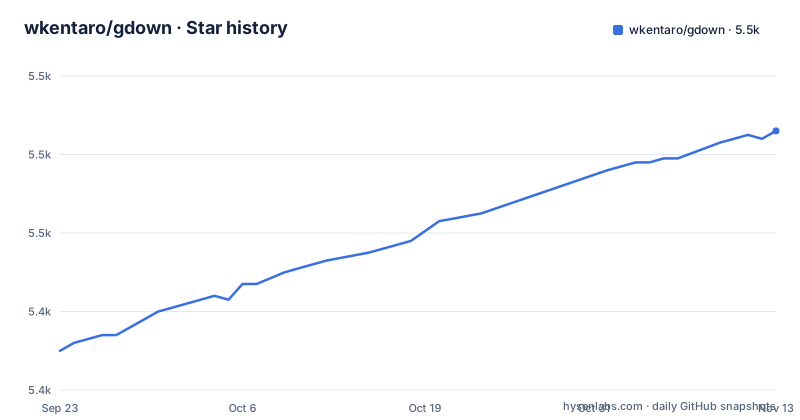
- wkentaro/gdown5,486 ★ · +56
| Repository | 2026-09-23 | 2026-11-13 |
|---|---|---|
| wkentaro/gdown | 5.4k | 5.5k |
56 Stars in the last 51 days, measured from the daily GitHub snapshot. Compare with other projects
Editorial analysis
The virus-scan confirmation page is the whole reason gdown exists
Google Drive gets in the way of large public downloads on purpose. For big files it serves a virus-scan confirmation page instead of the bytes, and the URL formats differ between a uc link, a file view link and a folder link. curl and wget stop at the page. gdown's job is to get past it: it skips the confirmation page so a large transfer actually finishes, it pulls whole folders recursively, it exports Google Docs, Sheets and Slides as PDF, DOCX, CSV and similar, and it resumes a partial file with --continue. It also takes plain HTTP and HTTPS URLs, so one binary covers both jobs. One boundary is explicit: for a Drive URL, gdown extracts the file ID and downloads the actual file, so it will not hand you the raw HTML page. That is what curl or wget are for.
One pip line, a Python 3.10 floor and a uv alternative
Installation is one line, with a hard floor on the interpreter.
pip install gdownThe project requires Python 3.10 or later, and the packaging metadata sets the same floor with requires-python at >=3.10 while listing classifiers for 3.10 through 3.14. The console script is gdown.__main__:main, which is what puts gdown on your PATH. The uv route installs it as a standalone tool instead of into a project environment.
uv tool install gdownRuntime dependencies are short and specific: beautifulsoup4 for parsing Drive pages, filelock, requests[socks], urllib3, tqdm for the progress bar, and typing_extensions only when running below Python 3.12. Exactly one optional extra exists, secretstorage, and it exists for a Linux keyring problem described further down.
Bare file ID, share link and --folder are three different doors
The command line takes a full uc URL, a bare file ID such as 1l_5RK28JRL19wpT22B-DY9We3TVXnnQQ, or a share link with the /file/d/ path pasted as is. Folder URLs are detected on their own, so passing a /drive/folders/ link downloads the tree recursively into the directory you name with -O. A bare folder ID is the exception: it still requires --folder, because file and folder IDs share the same format and nothing in the string distinguishes them.
gdown 1l_5RK28JRL19wpT22B-DY9We3TVXnnQQ
gdown https://drive.google.com/drive/folders/15uNXeRBIhVvZJIhL4yTw4IsStMhUaaxl -O /tmp/folder
The Python module mirrors those same three forms. gdown.download accepts url=, id= and output=, and gdown.cached_download adds a path, a hash for verification such as hash="md5:fa837a88f0c40c513d975104edf3da17", and a postprocess callback.
gdown.download(id="0B9P1L--7Wd2vNm9zMTJWOGxobkU", output="output.npz")--json is beta output, and jq is how you read it
To see what a link resolves to before any bytes move, --json prints an array of {url, path} entries, where path is the filename Drive reports. That output is marked as beta and the format may change in a future release, with --quiet silencing the warning in scripts. The documented pipeline pipes it through jq to filter a folder and hand each match to gdown.
gdown https://drive.google.com/drive/folders/15uNXeRBIhVvZJIhL4yTw4IsStMhUaaxl --json \
  | jq -r '.[] | select(.path | test("shad")) | .url' \
  | xargs -n1 gdown
The same trick fixes an extension problem. gdown --json gives you the real filename, so the shell can keep Drive's extension while you supply your own stem.
url="https://drive.google.com/uc?id=0B9P1L--7Wd2vU3VUVlFnbTgtS2c"
filename=$(gdown "$url" --json | jq -r '.[0].path')
gdown "$url" -O "my_name.${filename##*.}"
jq is an external program here. Nothing in the package installs it.
Docs, Sheets and Slides come out as docx, xlsx or pptx
A Google document is not a file you can download, so gdown asks Drive to export it. The default formats are fixed per product: Docs to docx, Sheets to xlsx, Slides to pptx. The format argument overrides that, and the documented example switches a presentation to PDF.
gdown "https://docs.google.com/presentation/d/15umvZKlsJ3094HNg5S4vJsIhxcFlyTeK/edit?usp=sharing"
gdown "https://docs.google.com/presentation/d/15umvZKlsJ3094HNg5S4vJsIhxcFlyTeK/edit" --format pdf
What you receive is whatever Drive produces at export time, and gdown is only the client asking for it. Sharing is the precondition for any of this: a Permission Denied error means the file is not set to Anyone with the link, which is a sharing setting to fix rather than a gdown failure.
--cookies-from-browser writes your whole google.com session to disk
Reusing a browser session is the documented escape hatch from throttling, and it is the part of gdown with a lasting footprint. When a download fails even though sharing is Anyone with the link, the stated cause is that Google throttles a file too many people are hitting while letting a signed-in account through, so the fix is to hand gdown the cookies of a browser where you are logged in.
gdown --cookies-from-browser firefox https://drive.google.com/uc?id=FILE_IDNine browsers are named as supported: brave, chrome, chromium, edge, firefox, opera, safari, vivaldi and whale. The first run saves the session to ~/.cache/gdown/cookies.txt, so later runs need no flag at all, which is convenient for a cron job and easy to forget about afterwards. That file then holds your whole google.com session, Gmail and Account included, so the README says to treat it like a password, and to revoke it by deleting the file and signing out of Google in that browser. Two flags change the footprint: --cookies points the cache at another file, and --no-cookies turns cookie handling off.
Cookie reading fails four different ways, and yt-dlp supplies the code
The platform notes are where this feature earns its keep, because the failure mode differs per operating system. On Linux, a Chromium-family browser that keeps secrets in GNOME Keyring needs the secretstorage package inside gdown's own Python environment, either as the extra or through uvx.
pip install 'gdown[secretstorage]'
uvx --from 'gdown[secretstorage]' gdown --cookies-from-browser chrome URL
Firefox needs no extra dependency there. macOS asks for your login password once to unlock the Chromium-family keychain entry, while Firefox needs nothing. On Windows, Chrome 127 and later encrypt cookies so other programs cannot read them, and the advice there is to use Firefox instead. Safari requires Full Disk Access for your terminal. If none of that works, the fallback is a Netscape cookies.txt exported by a browser extension, with Get cookies.txt LOCALLY named as one. The cookie parsing code itself is vendored: the justfile has a vendor target running scripts/vendor_ytdlp_cookies.py, described as regenerating the vendored yt-dlp cookie module.
Resume, speed, proxy, timeout and -O - round out the flags
The rest of the option set is about the transfer rather than about Drive. --continue resumes a partially downloaded file. --speed takes a size such as 10MB to cap throughput. --proxy routes through http://proxy:8080. --timeout 30 gives up when the server sends nothing for that many seconds. --no-check-certificate skips TLS verification, which reads as a debugging switch rather than something to leave on. Output goes wherever -O points, and -O - writes to stdout so a stream can be piped into another tool.
gdown https://drive.google.com/uc?id=1l_5RK28JRL19wpT22B-DY9We3TVXnnQQ --continue
gdown https://drive.google.com/uc?id=1l_5RK28JRL19wpT22B-DY9We3TVXnnQQ --speed 10MB
gdown https://github.com/wkentaro/gdown/archive/refs/tags/v4.0.0.tar.gz -O - --quiet | tar zxvf -
For a non-Drive URL the same binary fetches it as a plain downloader, and gdown https://httpbin.org/ip -O ip.json is the documented example. Development runs through just and uv: setup calls uv sync, test runs pytest over tests/ with a process count from NUM_PROCESSES, and lint chains ruff format --check, ruff check, gruff, ty, taplo, mdformat, yamlfix and typos. Release notes are towncrier fragments in changelog.d assembled into CHANGELOG.md.
Editorial conclusion
gdown is the right tool when you need one public file or folder out of Drive and curl or wget keeps landing on the virus-scan page, and the flags that matter are --continue, --folder, --json and --cookies-from-browser. It is the wrong tool for a workflow that needs the raw HTML page instead of the file, and the documented flags contain no upload option. Before scripting against --json, read the beta warning, because that output format may change in a release. Before using --cookies-from-browser, decide whether you are willing to write a whole google.com session to disk. Version 6.5.1 was released on 2026-10-29.
Frequently asked questions
How do I download entire Google Drive files and folders?
A folder URL is detected automatically, so passing a /drive/folders/ link with -O for the destination downloads the tree recursively. A bare folder ID still needs --folder, because file and folder IDs share the same format. Add --json first to see the url and path of every entry before downloading anything.
How can I download files from Google Drive using Python?
Import gdown and call gdown.download with url=, with id=, or with output= to name the file. gdown.cached_download adds a path, a hash for verification and a postprocess callback. The package requires Python 3.10 or later and installs with pip install gdown.
How do I download large files from Google Drive?
Large files are where curl and wget break, because Google serves a virus-scan confirmation page instead of the bytes. gdown skips that page so the transfer finishes, and --continue picks up a partially downloaded file. --timeout 30 makes it give up when the server sends nothing for 30 seconds.
Can you download from a Google Drive link?
Yes, when the file is shared as Anyone with the link. Pass the share link as is, or pass the bare file ID. If the download fails even with link sharing on, Google throttling is the stated cause, and --cookies-from-browser reuses the session of a browser where you are signed in.
How do I install gdown?
Run pip install gdown on Python 3.10 or later, or uv tool install gdown to get it as a standalone tool. Reading cookies from a Chromium-family browser on Linux needs the secretstorage extra: pip install 'gdown[secretstorage]'.
Official sources
Add this badge to your README
If you maintain this project, the badge below links readers to this analysis and shows its maintenance status from the daily GitHub snapshot. Paste the markdown into your README; add ?metric=license or ?metric=stars to the image URL for a different field.

[](https://hysenlabs.com/projects/wkentaro-gdown)Star history chart for your README
[](https://hysenlabs.com/projects/wkentaro-gdown)Was this useful?