fast-excel: two column limiters that clear each other, and a header row that used to be the start row
🦉 Fast Excel import/export for Laravel
At a glance
- What is it?
- A Laravel import and export library built on Spout, with fluent setters for header rows, row limits, column limits and multi sheet workbooks. The interesting parts are the precedence rules between those setters and the parts of the API that are referenced without ever being shown.
- Who is it for?
- Use fast-excel when you are moving rows in or out of Laravel through a spreadsheet and want a chainable reader rather than a cell by cell API, especially for large files where the headerRow, startRow and limitRows combination is what makes chunked imports workable. Two things to check before you rely on the setters. limitColumns and onlyColumns are mutually exclusive, so setting one clears the other and only null clears a single setter.
- Can I use it commercially?
- Yes. MIT is a permissive licence: you can use, modify and sell software built on it, as long as you keep its copyright and licence notices.
- Is it still maintained?
- Yes. The repository last received commits 17 days ago.
- What is it written in?
- Mainly PHP, according to GitHub's language statistics.
Answers come from the project's GitHub data, last synced on November 15, 2026, and from our analysis. They are not legal advice.
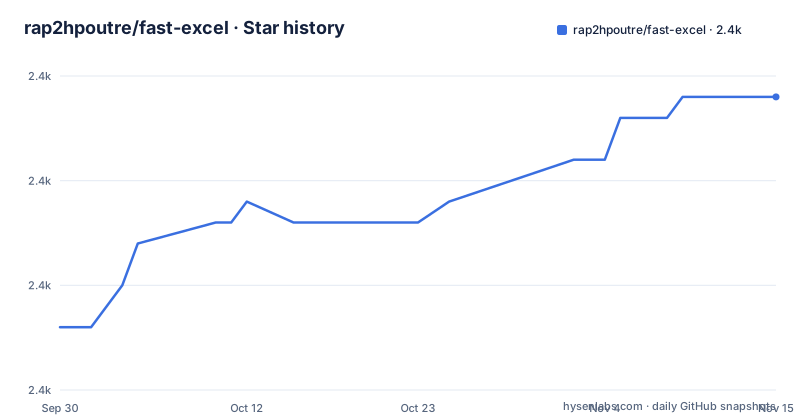
Star history
- rap2hpoutre/fast-excel2,394 ★ · +11
| Repository | 2026-09-30 | 2026-11-15 |
|---|---|---|
| rap2hpoutre/fast-excel | 2.4k | 2.4k |
11 Stars in the last 46 days, measured from the daily GitHub snapshot. Compare with other projects
Editorial analysis
hideColumnsPrefixedWith is opt-in and defaults to an underscore
The export callback can return more than you want written. The escape hatch is hideColumnsPrefixedWith, which keeps a prefixed column usable inside the callback while removing it from the file. A callback that returns a Name column and a _role column, with the comment that _role is used for logic below and never written to the file, produces a sheet with only the Name column. Two rules make that safe. The columns are hidden from the header row and from every data row, not just the body, so the header does not keep a column with no values under it. And the behaviour is opt-in: unless you call the method, every column is exported, so columns that already start with _ keep working exactly as before. The prefix defaults to a leading _, and another prefix such as tmp_ can be passed instead.
limitColumns and onlyColumns cannot both be active
Two setters shape which columns survive an import, and they are opposites. limitColumns truncates each row after a reference or a count, taking either a column reference such as 'H' or a number of columns such as 8. It exists for a specific failure mode: a spreadsheet where formatting was applied across whole rows reports thousands of trailing cells that look like real columns, and importing them yields empty column_9, column_10 style entries on every row. Those cells are dropped from the collection even though the parser still reads the sheet. onlyColumns does the opposite job, keeping the listed columns and dropping everything else including middle empties, mixing letters and 1 based indexes as in ['A', 'B', 'H'] or [1, 2, 8], with order preserved. The precedence is explicit: setting one clears the other, and passing null clears only that setter.
headerRow exists because startRow used to be the header row
Row selection is two setters with a history between them. startRow says where reading begins, but on its own it also treats that row as the header row, which is the behaviour it kept from before headerRow existed. headerRow opts into the current arrangement, where the header row is declared separately from where data starts:
$collection = (new FastExcel)->headerRow(1)->startRow(155)->import('file.xlsx');Headers come from row 1 and data from row 155 onwards. Without headerRow, startRow keeps its previous behaviour, so any loop written against the old semantics still compiles and still reads the wrong row as a header. The documented reason for the split is chunked imports of a large file, one slice per job run, each slice carrying the correct header names:
$chunk = (new FastExcel)
    ->headerRow(1)
    ->startRow(2 + ($page * 1000)) // data begins on row 2
    ->limitRows(1000)
    ->import('file.xlsx');
limitRows counts data rows with headers excluded, and like limitColumns it works with both import and importLazy.
The credit line says Spout and the column note says OpenSpout
Two names for the same underlying library appear in one document. The credit at the top attributes the import and export work to Spout, with a link to box/spout, while the limitColumns paragraph says that OpenSpout still parses the sheet even though the extra cells are dropped. So the surrounding API is written against one generation of that library and one paragraph names the other. A second gap sits next to it: importLazy is named twice, once as a companion of import for limitRows and once for limitColumns, and neither mention shows what it returns or how it differs. The visible text documents import as returning a Collection, the callback form that creates rows as you read, and the CSV configuration call configureCsv, which takes a delimiter, an enclosure character and an encoding, with ; and # and gbk as the worked example.
The Facade removes the constructor and hands you data() instead
There are three ways to reach the class and each one loses something. The direct form wraps the data in the constructor, as in new FastExcel($users), and is the only one that can hand over a SheetCollection. The global helper does the same thing in one call, with fastexcel() for an import that needs no data and fastexcel($collection) for an export. The Facade is the third: you register an alias in config/app.php under the aliases key, pointing at Rap2hpoutre\FastExcel\Facades\FastExcel::class, and then call it statically. The stated cost is that the constructor is not available through the Facade, so export data is set with a data method instead:
$list = collect([
    [ 'id' => 1, 'name' => 'Jane' ],
    [ 'id' => 2, 'name' => 'John' ],
]);

FastExcel::data($list)->export('file.xlsx');
Sheets are selected by number, by name, or by context
Multi sheet workbooks have their own set of entry points. On export, a SheetCollection takes several collections, and giving the array string keys names the sheets, so a keyed collection produces a workbook with Users and Second sheet rather than Sheet1 and Sheet2. On import, importSheets('file.xlsx') returns every sheet, and sheet() narrows the read to one: sheet(3) by position, or sheet('Users') by name when you would rather not depend on the order. withSheetsNames() changes importSheets so the returned sheets carry their names. withSheetContext() goes further and passes the current sheet name as the first argument to the importSheets callback, which is the arrangement for a workbook where the same field name means different things on different sheets. That callback takes the sheet name and the row, and the sheet name is what tells the branches apart.
Export returns a path, download returns a response
The two output methods differ in what the caller gets back. export('file.xlsx') writes the file and returns the absolute path to it, which is the form to use when something else has to pick the file up afterwards. download('file.xlsx') is the one to return from a controller method, so the framework handles the response. The format follows the extension, and xlsx, ods and csv are all named. The input side accepts the same three. Column naming for export is done in the callback rather than through a header definition: returning an array keyed with the header text you want, including computed values such as an uppercased last name, decides what appears in the header row. What the callback returns is both the header and the cell values, which is why the prefix trick for hidden columns has to work at that level.
Two hosted review configs sit next to phpcs.xml and phpunit.xml
The tree shows what the project runs on itself. .codacy.yaml and .scrutinizer.yml are two separate hosted code review configurations, phpcs.xml holds the coding standard, and phpunit.xml the test setup, with tests/ beside them. A bench/ directory sits at the root as well, which is what the note near the top of the README points at when it says to see the benchmarks below. There is a CHANGELOG.md, a CONTRIBUTING.md and a SECURITY.md, so the project publishes all three policies in the repository rather than only on a website. The release cadence matches that attention: v5.15.0 is dated 2026-08-16, v5.16.0 is dated 2026-09-01 and v5.17.0 is dated 2026-09-08, three minor releases in under a month, with the last recorded push dated 2026-09-14.
Editorial conclusion
Use fast-excel when you are moving rows in or out of Laravel through a spreadsheet and want a chainable reader rather than a cell by cell API, especially for large files where the headerRow, startRow and limitRows combination is what makes chunked imports workable. Two things to check before you rely on the setters. limitColumns and onlyColumns are mutually exclusive, so setting one clears the other and only null clears a single setter. And startRow changed meaning when headerRow arrived: on its own it still treats the start row as the header row, so an older chunking loop that assumed data started on the next row now needs headerRow(1) spelled out.
Frequently asked questions
How do I install fast-excel?
Run composer require rap2hpoutre/fast-excel. The library builds its import and export on Spout, and the documentation refers to the parser as OpenSpout in one paragraph.
What does the fast-excel export method return?
export() returns the absolute path to the written file, and it accepts xlsx, ods and csv. download() is the variant to return from a controller method.
How do I hide a column from a fast-excel export but still use its value?
Return it from the callback with a prefix and call hideColumnsPrefixedWith(). The prefix defaults to a leading _ character, and the column is removed from both the header row and every data row.
What is the difference between limitColumns and onlyColumns in fast-excel?
limitColumns truncates each row after a column reference or a number of columns, and onlyColumns keeps the listed columns in order while dropping the rest. They cannot both be active: setting one clears the other, and passing null clears only that setter.
How do I read headers from row 1 and data from row 155 in fast-excel?
Chain headerRow(1) with startRow(155). On its own, startRow keeps its previous behaviour of treating the start row as the header row.
How do I export and import several sheets with fast-excel?
Export with a SheetCollection, optionally keyed by sheet name. For import there is importSheets, sheet() by number or by name, withSheetsNames(), and withSheetContext() to pass the current sheet name as the first argument to the callback.
Official sources
Add this badge to your README
If you maintain this project, the badge below links readers to this analysis and shows its maintenance status from the daily GitHub snapshot. Paste the markdown into your README; add ?metric=license or ?metric=stars to the image URL for a different field.

[](https://hysenlabs.com/projects/rap2hpoutre-fast-excel)Star history chart for your README
[](https://hysenlabs.com/projects/rap2hpoutre-fast-excel)Was this useful?