Raspberry Pi USB device boot and provisioning with RPIBOOT
Raspberry Pi USB device provisioning tool (RPIBOOT)
At a glance
- What is it?
- RPIBOOT turns a supported Raspberry Pi into a USB mass-storage device so a host can provision its storage. It also provides the path for updating bootloader SPI flash EEPROM on Compute Module 4 and newer hardware.
- Who is it for?
- Adopt RPIBOOT when the target Raspberry Pi must be provisioned or receive a bootloader EEPROM update without removing its storage. Do not expect it to write the operating system image by itself, because Raspberry Pi Imager performs that stage.
- Can I use it commercially?
- Yes. Apache-2.0 is a permissive licence: you can use, modify and sell software built on it, as long as you keep its copyright and licence notices.
- Is it still maintained?
- Yes. The repository received new commits within the last day.
- What is it written in?
- Mainly Shell, according to GitHub's language statistics.
Answers come from the project's GitHub data, last synced on October 23, 2026, and from our analysis. They are not legal advice.
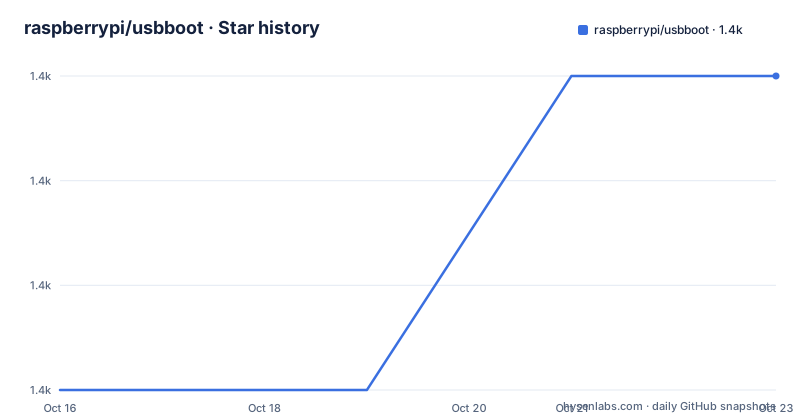
Star history
- raspberrypi/usbboot1,363 ★ · +3
| Repository | 2026-10-16 | 2026-10-23 |
|---|---|---|
| raspberrypi/usbboot | 1.4k | 1.4k |
3 Stars in the last 7 days, measured from the daily GitHub snapshot. Compare with other projects
Editorial analysis
RPIBOOT's USB provisioning boundary
RPIBOOT solves a specific gap between having a Raspberry Pi in the operator's hands and placing an operating system on its local storage. The host normally has no mounted filesystem to which it can copy an image. RPIBOOT uses USB to load temporary firmware into the target, after which the device can appear to the host as a standard USB drive. Raspberry Pi Imager can then write an operating system image to that exposed drive.
This division of responsibility matters. RPIBOOT creates the removable-storage path, while Raspberry Pi Imager handles image selection and writing. It is therefore not a general-purpose disk duplication utility, nor does the README describe it as the component that chooses or transfers the final operating system image. Its intended users are technicians, developers, and production staff who need repeatable access to supported Raspberry Pi storage.
The tool has a second purpose on Compute Module 4 and newer devices. In that setting, RPIBOOT is used to update bootloader SPI flash EEPROM. This makes it relevant to both initial image deployment and firmware maintenance, although the two workflows should not be treated as identical. The README does not document a rollback procedure for an EEPROM update, so that operation needs separate planning.
mass-storage-gadget and legacy msd data paths
Modern supported devices use the Linux-based `mass-storage-gadget` firmware. This firmware boots a Linux initramfs image, scans SD or EMMC storage, NVMe devices, and USB block devices, then uses `configfs` to expose a selected device through the USB mass-storage gadget. The host consequently sees a standard removable drive rather than a proprietary transport exposed by RPIBOOT.
Because this path runs Linux, it also provides a console login through both the hardware UART and the USB CDC-UART interface. That diagnostic channel can be important when a newly written image fails to start or when storage detection needs inspection. The README describes broader storage scanning for the gadget, but it does not expose a documented interactive menu for choosing among multiple eligible block devices. Operators should therefore verify what the connected target presents rather than assuming that every detected device will be safe to write.
Older devices use legacy `msd`, a VideoCore firmware build that emulates the SD or EMMC device as USB mass storage. This path runs on Raspberry Pi 4 and older hardware, according to the README. It loads quickly, but the documentation explicitly says its write performance is significantly lower than that of Linux-based `mass-storage-gadget`. It also supplies no console login or diagnostics. That makes `msd` primarily a compatibility route, not the preferred path when a listed device can run `mass-storage-gadget`.
Device compatibility and rpiboot mode constraints
The listed `mass-storage-gadget` devices include Raspberry Pi Zero2W, Raspberry Pi 3A+, Compute Module 3 variants, Compute Module 4 and 4S, Raspberry Pi 5, and Raspberry Pi 500-series models. The repository also includes Raspberry Pi 4B and Raspberry Pi 400, but the README says those models require rpiboot support to be enabled first. Raspberry Pi 500 has the same stated prerequisite.
Raspberry Pi 1A+, Compute Module 1, and Raspberry Pi Zero belong to the legacy `msd` category. This split is not a cosmetic compatibility label. It changes the firmware architecture, available diagnostics, and write performance. A deployment process that assumes a Linux console will fail as an assumption on the legacy path because that path does not provide one.
Pi 4B and Pi 400 require an additional hardware procedure. They lack the dedicated `nRPIBOOT` jumper found on other relevant models, so the README directs operators to configure a GPIO on the 40-pin header. Holding that GPIO low during boot forces the boot ROM into rpiboot mode. The `make-pi4-rpiboot-gpio-sd` utility creates an SD card that programs the selected setting at power-on. The README lists available GPIOs, but the exact pin choice and creation command are not shown.
Building RPIBOOT on Raspberry Pi OS
The documented Linux path starts by installing the compiler and `libusb` development dependencies. The repository depends on the `rpi-eeprom` submodule, so the clone command includes shallow submodule initialization. Run these commands on a Raspberry Pi or another supported Linux host:
sudo apt install git libusb-1.0-0-dev pkg-config build-essentialAfter dependencies are available, clone and build the host program. The README recommends a Raspberry Pi 4 or Raspberry Pi 5 host running 64-bit Raspberry Pi OS Trixie, although it says the software is also used on Linux x86 distributions.
git clone --recurse-submodules --shallow-submodules --depth=1 https://github.com/raspberrypi/usbboot
cd usbboot
make
The resulting `rpiboot` binary communicates with the target through `libusb`. Privileged access to `/dev/bus/usb` normally requires `sudo`, unless the current user already has write permission. Run the binary directly while selecting `mass-storage-gadget` from the source directory:
sudo ./rpiboot -d mass-storage-gadgetThe directory supplied through `-d` is important because a source-tree binary does not use the installed package layout automatically. The README states that omitting arguments attempts to boot `mass-storage-gadget64` from `INSTALL_PREFIX/share/mass-storage-gadget64`. The Raspberry Pi OS APT package sets that prefix to `/usr`.
Installing rpiboot and provisioning the first target
Installing the build puts `rpiboot` in `/usr/bin` and installs the required firmware assets under `/usr/share/rpiboot`. With the target connected through suitable USB data and power hardware, run the installed command:
sudo make install
sudo rpiboot
The README recommends a Raspberry Pi Powered USB Hub plus short, high-quality USB cables. Those details are operationally relevant because the process both transfers temporary boot software and draws power through USB. After RPIBOOT loads the gadget firmware, the host should expose the target's storage as a standard USB drive. Raspberry Pi Imager can then be used to write the selected operating system image.
For devices that support the Linux gadget, RPIBOOT also offers UART and USB CDC-UART console access. That is useful during initial provisioning, but the README does not document an automated verification sequence for checking the exposed block device before writing. The operator should inspect the storage presented by the host and confirm that it corresponds to the intended target. RPIBOOT itself does not perform the documented image-writing step.
On macOS, the documented build differs through Homebrew dependencies and an explicit install prefix. The first-use command there selects `mass-storage-gadget64`, not the shorter `mass-storage-gadget` path used in the Linux example.
Submodule upgrades, maintenance, and platform limits
The repository was not archived, and its last push was on 2026-10-16. The release history includes Windows Installer versions `windows-v1.1` and `windows-v1.0` from 2026, while the latest listed Compute Module release is `20221215-105525`. These dates describe the release and repository records, but they do not establish support duration for every host platform.
An update changes more than the C host program in some cases. The repository includes `rpi-eeprom` as a git submodule, and the README gives a separate submodule update step after pulling the main repository:
git pull --rebase origin master
git submodule update --init
The build also embeds a Git revision, package version, and build date through compiler definitions in the Makefile. This means version identification is tied to the source build, while installed asset paths are controlled by `INSTALL_PREFIX`. Packaging changes should therefore be checked alongside executable changes.
Support is best documented for Linux x86, Windows 11 through Cygwin, and macOS. Other platforms are described as best-effort or community maintained. Windows also has a driver installer under `usbboot\win32\rpiboot_setup`, and Windows source builds require symlinks under Cygwin. These host-specific requirements are a real adoption cost when an automated provisioning environment cannot install privileged USB access or preserve the required repository structure. The project is licensed under Apache-2.0. Any redistribution or integration decision should be checked directly against the repository's `LICENSE` file, since the README does not describe additional operational conditions.
RPIBOOT compared with direct removable-media writing
The clearest alternative is preparing a bootable SD card on the host and writing it through a normal card reader or connected USB storage adapter. That approach avoids the temporary target firmware, `libusb` host communication, and the need to force a target into rpiboot mode. It is simpler when the operator can physically access and remove the SD card.
RPIBOOT is different because the target receives its provisioning interface through USB. That is useful when storage removal is inconvenient, when the device is already installed, or when Compute Module bootloader EEPROM maintenance requires the rpiboot path. It also broadens the local environment beyond a single SD card on modern devices because `mass-storage-gadget` scans SD or EMMC, NVMe, and USB block devices.
The trade-off is host and target complexity. Direct media writing has fewer moving project-specific components, while RPIBOOT depends on firmware compatibility, USB access, supported boot mode, and appropriate assets. RPIBOOT is the better fit when direct access to local storage is unavailable or when bootloader EEPROM updating is part of the task. Direct removable-media preparation is the better fit for routine image duplication where removing the card is an accepted part of the process.
Editorial conclusion
Adopt RPIBOOT when the target Raspberry Pi must be provisioned or receive a bootloader EEPROM update without removing its storage. Do not expect it to write the operating system image by itself, because Raspberry Pi Imager performs that stage. Before adoption, verify the exact target model, required boot firmware, host permissions, and whether the Pi 4B, Pi 400, or Pi 500 needs its rpiboot mode enabled.
Frequently asked questions
What does RPIBOOT do on a Raspberry Pi?
RPIBOOT loads firmware that makes the target appear to the host as a USB mass-storage device. Raspberry Pi Imager can then write an operating system image to the exposed filesystem.
Does RPIBOOT install an operating system by itself?
No. The README assigns the image-writing stage to Raspberry Pi Imager. RPIBOOT supplies the USB storage interface and, on supported Compute Modules, the route for bootloader SPI flash EEPROM updates.
Can I run RPIBOOT on Raspberry Pi Zero?
Raspberry Pi Zero is listed under devices that require the legacy `msd` firmware interface. That path supports mass-storage exposure but does not provide a console login or diagnostics.
Does RPIBOOT require sudo on Linux?
The README says `sudo` is required unless the user already has write permissions for `/dev/bus/usb`. The program uses `libusb` to communicate with the target.
Why does my Raspberry Pi 4B need an extra RPIBOOT setup step?
The README says Pi 4B and Pi 400 do not have a dedicated `nRPIBOOT` jumper. A selected GPIO can instead be held low during boot, and `make-pi4-rpiboot-gpio-sd` prepares an SD card that applies the setting.
Official sources
Add this badge to your README
If you maintain this project, the badge below links readers to this analysis and shows its maintenance status from the daily GitHub snapshot. Paste the markdown into your README; add ?metric=license or ?metric=stars to the image URL for a different field.

[](https://hysenlabs.com/projects/raspberrypi-usbboot)Star history chart for your README
[](https://hysenlabs.com/projects/raspberrypi-usbboot)Was this useful?