rathole splits one tunnel into two files and calls the token mandatory
A lightweight and high-performance reverse proxy for NAT traversal, written in Rust. An alternative to frp and ngrok.
At a glance
- What is it?
- rathole is a Rust NAT traversal proxy positioned between frp and ngrok, and its configuration model is the real design decision: a service is declared twice, once on the server and once on the client, and a matching token is the only thing binding them. The benchmark section also warns against its own numbers more plainly than most projects do.
- Who is it for?
- rathole is a good fit when you want a reverse tunnel with service authentication, optional certificate-free Noise encryption, and a small binary suitable for constrained devices, and a bad fit when you want one config file to serve a whole estate, or when you are chasing throughput on a link where the network, not the CPU, is the bottleneck.
- Can I use it commercially?
- Yes. Apache-2.0 is a permissive licence: you can use, modify and sell software built on it, as long as you keep its copyright and licence notices.
- Is it still maintained?
- Yes. The repository last received commits 83 days ago.
- What is it written in?
- Mainly Rust, according to GitHub's language statistics.
Answers come from the project's GitHub data, last synced on November 14, 2026, and from our analysis. They are not legal advice.
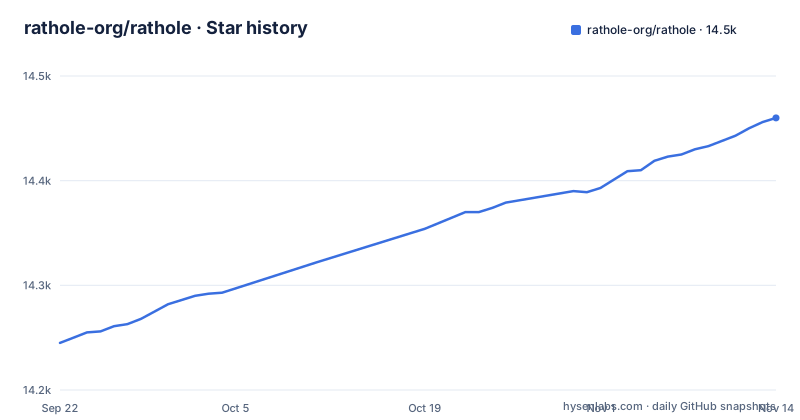
Star history
- rathole-org/rathole14,460 ★ · +215
| Repository | 2026-09-22 | 2026-11-14 |
|---|---|---|
| rathole-org/rathole | 14.2k | 14.5k |
215 Stars in the last 53 days, measured from the daily GitHub snapshot. Compare with other projects
Editorial analysis
A service exists twice, and the token is what joins the two halves
rathole sits in the same category as frp and ngrok: it exposes a service on a device behind NAT to the internet through a server that has a public IP. The configuration shape is the part that differs. Instead of one file describing everything, a service is declared on the server and again on the client, and only the token proves they are the same service.
On the public host, the control port and the exposed port both live in server.toml:
[server]
bind_addr = "0.0.0.0:2333" # `2333` specifies the port that rathole listens for clients

[server.services.my_nas_ssh]
token = "use_a_secret_that_only_you_know" # Token that is used to authenticate the client for the service. Change to an arbitrary value.
bind_addr = "0.0.0.0:5202" # `5202` specifies the port that exposes `my_nas_ssh` to the Internet
And on the device behind NAT, client.toml points at that control port and names the local address:
[client]
remote_addr = "myserver.com:2333" # The address of the server. The port must be the same with the port in `server.bind_addr`

[client.services.my_nas_ssh]
token = "use_a_secret_that_only_you_know" # Must be the same with the server to pass the validation
local_addr = "127.0.0.1:22" # The address of the service that needs to be forwarded
Tokens are mandatory and service-wise. The cost is that adding a tunnel is two edits in two files on two machines,.
One file can hold both blocks, but the mode flag has to say which half you meant
rathole infers its role from the file contents: if only a `[server]` block or only a `[client]` block is present, it runs in that mode without being told. That is what makes the quickstart files one-liners, where you start each process with the same invocation and the file decides.
When both blocks go into a single config.toml, inference stops working and you have to be explicit, running `rathole --server config.toml` on the public host and `rathole --client config.toml` on the inner machine. The mode flags exist for the shared-config case.
Separately, the project states that services can be added or removed dynamically by reloading the configuration file, while the HTTP API for configuration is marked WIP. So the programmatic path is unfinished, and a deployment that wants configuration to arrive from a control plane is relying on the part the project flags as work in progress. The examples directory covers minimal, unified, tls, noise_nk, udp, use_proxy, iperf3 and systemd setups, which is the fastest way to see the format variants before writing one from scratch.
Noise encryption avoids the certificate, and TLS is the other option
Security here is built around the token rather than around a certificate authority. Tokens are mandatory and scoped per service, the server and clients are responsible for their own configs, and encryption is configured through the optional Noise Protocol, with the stated benefit that you do not need to create a self-signed certificate. TLS is also supported, and the transport block in the configuration is where either choice is set.
That gives three shapes of deployment without a PKI. The default TCP transport authenticates the service but does not itself encrypt the tunnel; use Noise for encryption without certificates or configure TLS. Tokens may be set per service or inherited from a default token, so use distinct secrets when isolation is needed. The build manifest carries these as Cargo features, with `native-tls`, `rustls`, `noise`, `websocket-native-tls` and `websocket-rustls` as separate switches, so the choice is partly made at compile time.
What is not covered is the story of what a leaked token buys you. The README states that the server and clients are responsible for their own configs, and the token is what authenticates the client for the service. A reader should assume a token is a bearer credential for that one service, and that rotating it means editing both files and restarting the pair.
heartbeat_timeout has an ordering requirement, and setting it to 0 is a real choice
The client block carries three tuning keys that are easy to copy without reading. `default_token` supplies a fallback for services that do not declare their own. `retry_interval`, default 1 second, is the gap between attempts to reach the server. `heartbeat_timeout`, default 40 seconds, is the application-layer heartbeat test, and it has a stated constraint: the value must be greater than `server.heartbeat_interval`.
That ordering is the failure mode worth planning for. The README states the constraint but not what happens when it is violated. Setting it to 0 disables the application-layer heartbeat test entirely.
Logging follows Rust convention rather than a config key, so the level comes from the environment. `RUST_LOG=error ./rathole config.toml` runs with only error level logging, the available levels being `info`, `warn`, `error`, `debug` and `trace`, and the default when `RUST_LOG` is absent is `info`.
TCP_NODELAY is on by default since v0.4.7, trading bandwidth for latency
One tuning decision was made for you. From v0.4.7, rathole enables TCP_NODELAY by default, which the project says should benefit latency and interactive applications such as rdp and Minecraft servers, and also slightly decreases bandwidth.
Both halves of that sentence matter, because most tunnels carry bulk traffic and the trade runs the wrong way. A file transfer over the tunnel pays a small bandwidth penalty for a latency improvement nothing notices, while an SSH session or a game gets the benefit. Opting out is one key, `nodelay = false`.
This is the only default in the project worth examining before you run it in anger, and it is a reasonable default for the interactive cases the author names. If you find bandwidth lower than the link allows, this is a key to check.
The benchmark section argues against reading the benchmark
This is the most unusual passage in the README, and it belongs in any evaluation. rathole is described as having latency similar to frp while handling more connections with larger bandwidth and less memory, with details on a separate benchmark page. Immediately after that, the project undercuts it: it says not to take this as meaning rathole can magically make a forwarded service several times faster, because the benchmark runs on local loopback and therefore indicates performance when the task is CPU bound.
The reasoning continues: a real gain is available if the network is not the bottleneck, and that is not true for many users. In that case the stated main benefit is lower resource consumption, while bandwidth and latency may not improve significantly.
So the claim that survives is memory and connection count, not speed. That is a narrower claim than the feature list suggests, and it is the claim the author himself asks you to rely on. The memory side of it is backed separately by the build guide, which says the binary can be as small as about 500KiB to fit constraints of devices like embedded routers.
The embedded feature set drops TLS because cross-compiling it is hard
The Cargo manifest is where the real build matrix lives. Default features are `server`, `client`, `native-tls`, `noise`, `websocket-native-tls` and `hot-reload`, so a default build carries both roles, native TLS, Noise, websockets and config reload. Each can be turned off individually.
The interesting one is `embedded`, a separate feature set described as being for embedded devices, and it consists of `server`, `client`, `hot-reload` and `noise`, which means no TLS at all. The reason is stated plainly in a comment: cross-compiling with TLS is hard, so they did not. That is the whole constraint, and it is the tradeoff to know about if you are targeting a router, because on such a device Noise is the only encryption path available.
The `console` feature exists for tokio-console and is documented as disabled by default, not to be enabled except for debugging. Release builds set `panic = "abort"`, `lto = true`, `codegen-units = 1` and `strip = true`, while a separate `minimal` profile inherits release and sets `opt-level = "z"`. The Docker build accepts a FEATURES argument and passes it to cargo build.
Version 0.5.0 shipped in 2023 and later work ships as dev-latest
The release list is thin and the gap is wide. The most recent tagged release is v0.5.0 from 2023-10-01, preceded by v0.4.8 from 2023-05-26. Above those sits dev-latest, a development build identified as commit 3ee93f8 and published on 2026-08-22, and the default branch was last pushed on 2026-08-23.
That means the only named versions available are about three years old, while the most recent artifact is an untagged build. The version inside the binary will still read 0.5.0 for current work, since Cargo.toml declares that version.
For planning, treat v0.5.0 as the reference point for documented behavior and the dev build as what you would actually run for anything recent. The project is not archived, and it is under Apache-2.0.
Editorial conclusion
rathole is a good fit when you want a reverse tunnel with service authentication, optional certificate-free Noise encryption, and a small binary suitable for constrained devices, and a bad fit when you want one config file to serve a whole estate, or when you are chasing throughput on a link where the network, not the CPU, is the bottleneck. Before deploying, confirm three things: that the service name matches on both sides and the tokens are identical, that `heartbeat_timeout` is above `server.heartbeat_interval` as the README requires, and that your latency-sensitive service is not paying for TCP_NODELAY you did not ask for. Configure Noise or TLS on untrusted networks: the default TCP transport is not encrypted by rathole.
Frequently asked questions
What is rathole the software used for?
rathole is a reverse proxy for NAT traversal written in Rust. It exposes a service on a device behind NAT to the internet through a server with a public IP, working like frp and ngrok. The repository describes it as an alternative to both.
How do I install rathole?
A full build is downloaded from the release page, or you build from source for other platforms and to minimize the binary, and a Docker image is also published. On Linux, examples/systemd has the files for running it as a background service.
How does rathole compare to frp?
rathole is described as having latency similar to frp while handling more connections with larger bandwidth and less memory, and the project says that for many users whose network is the bottleneck the main benefit is lower resource consumption rather than noticeably better bandwidth or latency.
What encryption does rathole use without a certificate?
The optional Noise Protocol is the path that avoids certificate management, and the README states there is no need to create a self-signed certificate. Tokens of services are mandatory and service-wise. TLS is also supported and configured through the transport block.
Official sources
Add this badge to your README
If you maintain this project, the badge below links readers to this analysis and shows its maintenance status from the daily GitHub snapshot. Paste the markdown into your README; add ?metric=license or ?metric=stars to the image URL for a different field.

[](https://hysenlabs.com/projects/rathole-org-rathole)Star history chart for your README
[](https://hysenlabs.com/projects/rathole-org-rathole)Was this useful?