Raycast Script Commands add a directory to Raycast, not an extension
Script Commands let you tailor Raycast to your needs. Think of them as little productivity boosts throughout your day.
At a glance
- What is it?
- A Script Command is a shell script plus a small metadata block, and the repository shows how the Raycast app reads both, where the required fields stop, and what the .template. naming convention means. The install is a preferences dialog, not a package manager, and the repository's own tooling is a Swift package built from a Makefile.
- Who is it for?
- Use this repository if you want a shell script to run from the Raycast root search and you are willing to keep the script in a directory you copied, because upstream changes to the community tree will otherwise land in your command list without warning. Skip it if you want a stable release to pin, since the repository publishes no GitHub releases and versions live in the app version column of that table.
- Can I use it commercially?
- Yes. MIT is a permissive licence: you can use, modify and sell software built on it, as long as you keep its copyright and licence notices.
- Is it still maintained?
- Yes. The repository last received commits 54 days ago.
- What is it written in?
- Mainly Shell, according to GitHub's language statistics.
Answers come from the project's GitHub data, last synced on November 12, 2026, and from our analysis. They are not legal advice.
Star history
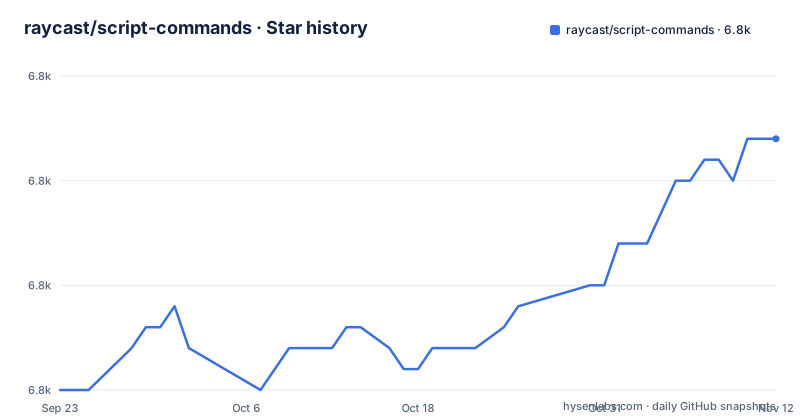
- raycast/script-commands6,812 ★ · +12
| Repository | 2026-09-23 | 2026-11-12 |
|---|---|---|
| raycast/script-commands | 6.8k | 6.8k |
12 Stars in the last 50 days, measured from the daily GitHub snapshot. Compare with other projects
Editorial analysis
Raycast loads a script directory, so one folder carries the package name
A Script Command is not installed one at a time. You point the app at a directory and every script inside it shows up in the root search, which means the directory is the unit of installation and the unit of identity. The install path is entirely inside the preferences window: open the Extensions tab, click the plus button, click Add Script Directory, then select the directories you want. What the directory buys you is the packageName. When a script leaves that field out, the subtitle in the root search is inferred from the directory name, so renaming the folder changes how every script inside it presents itself. Three top level entries carry the weight: commands/ holds community examples, templates/ holds starting points, and a folder the install instructions link as _enable-commands is offered as a folder you can reuse instead of creating a new directory.
schemaVersion, title and mode are the three fields Raycast will not start without
The metadata table separates required from optional with a column, and the required side is short. schemaVersion prepares for future API changes, and only version 1 exists today. title is the display name shown as the title in the root search. mode specifies how the script is executed and how the output is presented, which is the most consequential of the three and the least documented in this repository, since its option list lives in documentation/OUTPUTMODES.md rather than in the README. packageName, icon and iconDark are marked optional, and currentDirectoryPath is listed after them. The App Version column records when each field arrived, and it is not uniform. iconDark is marked 1.3.0+ while the earlier fields are marked 0.29+, which is a reminder that the metadata contract grew in steps.
icon takes an emoji, a local path or an https URL, and PNG or JPEG
The icon field is the most constrained optional field in the table. It can be an emoji, a file path that is either relative or full, or a remote URL, and the URL form is restricted to https only. Image formats are limited to PNG and JPEG, and the guidance is to keep icons small with a recommended size of 64px. iconDark repeats the same value for the dark theme, and if you leave it out the regular icon is used in both themes. What the table does not describe is any fallback for a remote icon that fails to load, nor a size limit for a local file. That matters because the field is optional in exactly the same way in both themes: setting one and forgetting the other is not caught by any required-field check.
currentDirectoryPath sets where the script runs, and mode decides what you see
currentDirectoryPath is documented in a single line: the path from which the script is executed, with the default being the path of the script itself. mode is the other half of the pair, and it is the field to decide before writing anything, because it governs execution and presentation together rather than only one of them. For richer extensions the README points at the Extensions API.
.template. in the filename marks a script that still needs values
The install instructions say to choose a script from the community repository and save it into a new directory, and they add a condition: scripts containing the word .template. in the filename require some values to be set, with the troubleshooting section of the same README named as the place that explains how. The naming convention is therefore the readiness flag. A file with .template. in its name is not finished, and a file without it is treated as finished, which means the convention is the only signal you get before the script runs. The same step offers an alternative to creating a new directory: reuse the repository's own folder, linked in the instructions as _enable-commands. Worth noticing before you do that, the top level of the repository lists that folder as _enabled-commands/, one letter apart from the link text the instructions use, and the link itself points at _enabled-commands.
Loading the community tree directly lets upstream changes rewrite your command list
The install steps carry an explicit warning against pointing Raycast at the community directories themselves, on the grounds of potential restructuring and new script commands suddenly appearing in Raycast. The mechanism is not mysterious: the app reads whatever is in the directory at load time, so a file that someone else moves, renames or adds becomes visible in your root search without any action from you. It also collides with the name inference described earlier, because the subtitle of a script without packageName comes from the directory name it sits in. The safer arrangement is the one the instructions lead with: copy what you want into a directory you own, then point Add Script Directory at that. Cost of that advice is that you now own updates.
ShellCheck is a submission condition, not a style suggestion
Bash authors get a linter by name: the ShellCheck extension from the VS Code marketplace, recommended to ensure smooth running of a script. The sentence that matters is the one after it, which says that all scripts uploaded to GitHub will need to have been run through ShellCheck. That turns the linter from advice into a review gate for anything you contribute here. The repository applies the same idea to its own code, and the Makefile shows the tooling: SwiftLint with a checked in config for linting and fixing, and SwiftFormat with its own config for formatting. Note the split in languages, because the primary language of this repository is Shell while the helper binary those targets operate on is built from a Swift package under Tools/Toolkit.
The Makefile builds a Swift binary called toolkit and exposes six useful targets
EXECUTABLE_NAME is set to toolkit and TOOLKIT_PATH points at Tools/Toolkit, so the repository treats its own scripts as something a small Swift program maintains. The release build runs clean first and then compiles the package, and a debug build sits beside it; both end by linking the built binary to the name toolkit at the repository root. Two targets touch documentation, one touches file permissions, and two wrap those with a commit step that goes through Tools/Toolkit/integration.sh, which is the only shell script the Makefile invokes directly.
build: clean
	swift build -c release --disable-sandbox --package-path $(TOOLKIT_PATH)
	ln -s $(EXECUTABLE_PATH_RELEASE) $(EXECUTABLE_NAME)
The docs and permissions pair reads like this:
gen-docs:
	./$(EXECUTABLE_NAME) generate-documentation
set-executable:
	./$(EXECUTABLE_NAME) set-executable
What this repository cannot offer you is a version to pin. It publishes no GitHub releases, so the only version markers anywhere in the documentation are the app versions in the metadata table. The open target also calls the Xcode application bundle by path, so even the maintainer tooling assumes a Mac with Xcode present.
Editorial conclusion
Use this repository if you want a shell script to run from the Raycast root search and you are willing to keep the script in a directory you copied, because upstream changes to the community tree will otherwise land in your command list without warning. Skip it if you want a stable release to pin, since the repository publishes no GitHub releases and versions live in the app version column of that table. Before adopting anything, run ShellCheck over a Bash script, decide the mode first, and confirm your directory name, because packageName is inferred from it.
Frequently asked questions
What are Raycast Script Commands?
They are small scripts you run from the Raycast root search, each paired with a metadata block that gives it a title, a mode and optionally a package name and icon. This repository holds example scripts, a templates directory and links to community commands, and you add them by pointing the app at a directory.
How do I install a Raycast Script Command?
Save the script into a directory you own, then open the Extensions tab in the Raycast preferences, click the plus button, click Add Script Directory and select your directory. Loading the community directories directly is discouraged, because restructuring or additions upstream would make new commands appear in your app without warning.
What does .template. mean in a Raycast script filename?
It marks a script that still needs values set before it can run, and the README sends you to its own troubleshooting section for what those values are. Such a script also has to be copied out of the community repository into your own directory rather than loaded from there.
Which metadata fields does a Raycast Script Command require?
schemaVersion, title and mode are required, while packageName, icon and iconDark are optional. Leaving packageName out means the subtitle is inferred from the script directory name, and iconDark arrived in app version 1.3.0 while the other fields shown are marked 0.29+.
Do Raycast Script Commands replace building a Raycast Extension?
No. A script command runs a script and presents its output, with the mode options detailed in documentation/OUTPUTMODES.md. For richer extensions the README points to the Extensions API instead.
Official sources
Add this badge to your README
If you maintain this project, the badge below links readers to this analysis and shows its maintenance status from the daily GitHub snapshot. Paste the markdown into your README; add ?metric=license or ?metric=stars to the image URL for a different field.

[](https://hysenlabs.com/projects/raycast-script-commands)Star history chart for your README
[](https://hysenlabs.com/projects/raycast-script-commands)Was this useful?