Raylib-cs Review: C# Game Development with Native raylib
C# bindings for raylib, a simple and easy-to-use library to learn videogames programming
At a glance
- What is it?
- Raylib-cs exposes the raylib 6.0 native library through C# bindings for desktop and browser WebAssembly. It is easy to start through NuGet, but its passive maintenance status and framework restrictions require attention before adoption.
- Who is it for?
- Raylib-cs is a practical choice for C# developers building small games, prototypes, or instructional samples with raylib, especially when a supported platform matches the included native package. It is a poor fit for projects that need.NET 6, expect frequent binding updates, or require guarantees beyond the repository's stated passive maintenance policy.
- Can I use it commercially?
- Yes. Zlib is a permissive licence: you can use, modify and sell software built on it, as long as you keep its copyright and licence notices.
- Is it still maintained?
- Yes. The repository last received commits 26 days ago.
- What is it written in?
- Mainly C#, according to GitHub's language statistics.
Answers come from the project's GitHub data, last synced on November 7, 2026, and from our analysis. They are not legal advice.
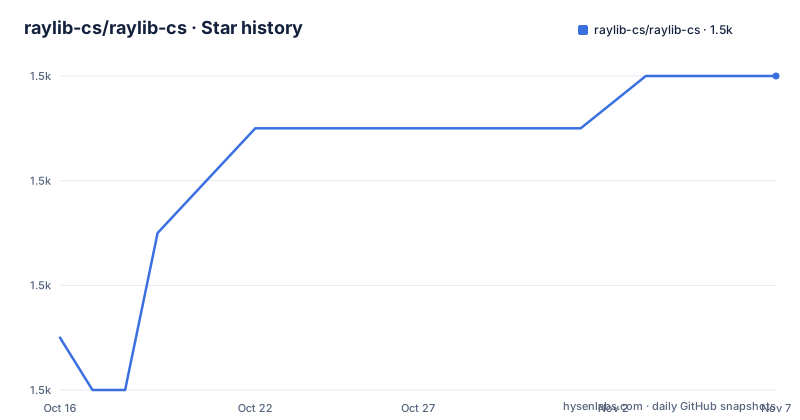
Star history
- raylib-cs/raylib-cs1,462 ★ · +5
| Repository | 2026-10-16 | 2026-11-07 |
|---|---|---|
| raylib-cs/raylib-cs | 1.5k | 1.5k |
5 Stars in the last 22 days, measured from the daily GitHub snapshot. Compare with other projects
Editorial analysis
What Raylib-cs Adds to C# Game Development
Raylib-cs is a binding layer between C# and the native raylib game programming library. Its stated purpose is narrower than that of a complete game engine: it makes raylib APIs available from C# so developers can use the library while working in a .NET project. The intended audience includes programmers learning game development, developers building small graphical applications, and C# users who prefer raylib's direct drawing model to a larger engine.
The repository description calls raylib a library for learning video game programming, and the README's first example reflects that approach. It initializes an 800 by 480 window, enters a loop until the user closes it, clears the drawing buffer, and draws text. There is no separate scene graph, entity system, asset pipeline, or editor requirement described in the project documentation. That makes the abstraction understandable, but it also means a game built with Raylib-cs must supply its own organization for scenes, state, entities, collisions, and assets beyond what raylib itself provides.
Raylib-cs is not the upstream raylib project. The README directs raylib-specific bugs and feature requests to the upstream repository, while Raylib-cs handles the C# binding and its managed package. This division matters when diagnosing an issue: a behavior in the native library may originate outside this repository, while packaging, interop, or binding behavior belongs to Raylib-cs.
Binding Architecture, Platforms, and Framework Support
The C# assembly does not replace the native library. It binds C# code to native raylib functions, which means the target executable needs an appropriate native binary at runtime. Raylib-cs builds against the official raylib 6.0 release. Version 8.1.0 lists browser WebAssembly through `raylib-6.0_webassembly`, Linux x64 through `raylib-6.0_linux_amd64`, macOS ARM64 and x64 through `raylib-6.0_macos`, and Windows x64 and x86 through the corresponding MSVC 16 packages.
That platform list is concrete but bounded. Version 8.1.0 targets `net8.0` and `net10.0`. The README marks `net6.0` as end of life and deprecated, directing projects that require it to Raylib-cs 7.x. This version relationship is an upgrade cost: moving from 7.x to 8.1.0 also means reviewing the target framework and deciding whether the new platform set and current API surface meet the project's deployment needs.
Windows deserves particular attention. The manual installation instructions state that the MSVC version of raylib is required on Windows. The package-based path avoids asking developers to locate native binaries themselves, but source-based users must either import `Raylib-cs/Raylib-cs.targets` or arrange the libraries in the executable directory or another location available through the platform's P/Invoke search path. Browser support is also specific to WebAssembly, not a claim that every browser-hosted .NET execution model is covered.
The binding layer also exposes deployment details that a purely managed library would not have. The example annotates `Main` with `[System.STAThread]` because it is required for NativeAOT deployment on Windows. That is a concrete boundary for teams considering native ahead-of-time publishing.
NuGet Setup and the First Window
The README identifies NuGet as the preferred installation method and assumes that .NET is already installed. From an empty `HelloRaylibCS` project directory, the documented setup creates a console project and adds the Raylib-cs package.
This creates the project in the current directory and places the package reference in its project file:
dotnet new consoleThe second command resolves and adds the `Raylib-cs` package through the standard NuGet workflow:
dotnet add package Raylib-csThe binding must then be used with `using Raylib_cs;`. The README's first application initializes an 800 by 480 window titled `Hello, World`, repeatedly calls `BeginDrawing()`, clears to white, draws `Hello, world!` at coordinates 12, 12 with font size 20, and finishes each frame with `EndDrawing()`. It exits the loop when `WindowShouldClose()` becomes true, then calls `CloseWindow()`.
That loop is the first real use because it demonstrates the frame lifecycle rather than only declaring a package dependency. A new project should also replace or extend the generated top-level statement with the `Program` structure shown in the README if it needs the documented class-based entry point. The project should be run from the environment matching its target platform so the corresponding native library can load. The README does not document a separate first-run graphics diagnostic or command for verifying which native binary was loaded, so runtime loading errors should not be attributed to the drawing loop without checking platform-specific native library availability.
Automatic Targets Versus Manual Native Packaging
Raylib-cs offers two materially different source-installation approaches. The automatic approach imports `Raylib-cs/Raylib-cs.targets` into the project so native libraries can be included through the repository's build targets. This is the closer equivalent to the NuGet path because the project does not need to define every native binary's placement by hand.
The manual approach starts from the official raylib 6.0 release. Developers download or build native libraries for the platforms they intend to target, then place them beside the executable or in a location available through the P/Invoke search path. On Windows, they must use the MSVC build. This approach gives direct control over native files, but it also transfers responsibility for target selection, directory layout, and runtime discovery to the project.
For source-based contributors, there is a third workflow that is less obvious from the package name. `Examples` and `Raylib-cs.Tests` normally reference the sibling `Raylib-cs` project, so edits to the binding are visible without first publishing a package. If a contributor instead needs the NuGet path, the package must first be packed into the local feed configured by `NuGet.config`.
That sequence is important because skipping the pack step can produce restore failure `NU1102` with `Raylib-cs not found`. The documented packing command is:
dotnet pack Raylib-cs -c Release -o Raylib-cs/nugetThe local package cache also affects binding work. NuGet caches extracted packages by version and can ignore a repack carrying the same version. The README therefore directs contributors to remove the old package from `./Raylib-cs/nuget` and clear the cached copy before restoring again. This is maintenance overhead specific to developing the bindings, not an issue ordinary NuGet consumers normally need to manage.
Repository Development and Maintenance Boundaries
The repository is not archived, and the last push was on 2026-10-12. However, recent repository activity does not change the project's explicit status: the README calls Raylib-cs passively maintained, says occasional updates may be released, and says pull requests may be accepted when they do not carry a large maintenance burden. It should therefore not be described as actively developed or regularly updated.
The local development commands are direct. Running the examples through the repository uses the sibling binding project by default:
dotnet run --project ExamplesRunning the test suite uses the repository's normal test command:
dotnet testTo exercise the NuGet package instead, the documentation requires a local package and the `RaylibCsForceLocalNuget` property:
dotnet run --project Examples -p:RaylibCsForceLocalNuget=trueThe equivalent test command uses the same property. This arrangement supports contributors who need to compare project references against packaged behavior. It also reveals a sharp boundary between consuming Raylib-cs and changing it: binding maintainers must account for native versioning, target frameworks, package feeds, and cache invalidation, while game developers can normally use the NuGet package without entering that workflow.
Release history includes `v8.1.0` on 2026-09-05, `v8.1.0-rc.1` on 2026-08-23, and `v8.0.0` on 2026-05-25. The README links Discord for raylib-related discussion, but it does not promise response times or a support SLA. Projects that depend on frequent fixes should not infer one from the repository's recent commits.
Zlib Licensing and Packaged Example Content
Raylib-cs uses the Zlib license, and the repository points readers to `LICENSE` for its exact terms. That is the license associated with the binding repository. The presence of an `Examples/licenses/` directory and bundled example resources means a project that copies examples or assets should inspect those files separately rather than assuming that every repository file is governed by one uniform notice.
The README also separates licensing or behavior questions about upstream raylib from questions about the binding. A team adopting a specific native raylib release should review the upstream 6.0 release materials in addition to Raylib-cs's `LICENSE`. The documentation does not claim that the binding's Zlib license replaces the terms for upstream native code, examples, fonts, audio, textures, or other assets.
This distinction is practical when an example moves into a commercial game. Binding code, native raylib, and copied media can represent different licensing decisions. The repository's licensing metadata is a starting point, not a substitute for checking the files actually distributed with a game.
Editorial conclusion
Raylib-cs is a practical choice for C# developers building small games, prototypes, or instructional samples with raylib, especially when a supported platform matches the included native package. It is a poor fit for projects that need.NET 6, expect frequent binding updates, or require guarantees beyond the repository's stated passive maintenance policy. Before adoption, verify the required target framework, deployment platform, native library placement, and licensing implications for any bundled examples or assets.
Frequently asked questions
What .NET versions does Raylib-cs 8.1.0 support?
Raylib-cs 8.1.0 targets `net8.0` and `net10.0`. The README marks `net6.0` as end of life and deprecated, with Version 7.x offered for projects that still require it.
Which platforms are supported by Raylib-cs 8.1.0?
The listed targets are browser WebAssembly, Linux x64, macOS ARM64, macOS x64, Windows x64, and Windows x86. These map to native raylib 6.0 libraries built for each platform.
How do I install Raylib-cs in a new C# project?
The README recommends creating a console project with `dotnet new console`, then adding the binding with `dotnet add package Raylib-cs`. Run both commands from the intended project directory.
Is Raylib-cs actively maintained?
The README describes Raylib-cs as passively maintained and says occasional updates may be released. It also states that pull requests may be accepted if they do not create a large maintenance burden. The last push was on 2026-10-12.
What is required to use Raylib-cs from source?
You can import `Raylib-cs/Raylib-cs.targets` for automatic native-library inclusion, or arrange raylib 6.0 native libraries manually. Windows source builds require the MSVC version, and libraries must be available through the executable directory or the P/Invoke search path.
Official sources
Add this badge to your README
If you maintain this project, the badge below links readers to this analysis and shows its maintenance status from the daily GitHub snapshot. Paste the markdown into your README; add ?metric=license or ?metric=stars to the image URL for a different field.

[](https://hysenlabs.com/projects/raylib-cs-raylib-cs)Star history chart for your README
[](https://hysenlabs.com/projects/raylib-cs-raylib-cs)Was this useful?