numa puts a DNS resolver in one binary, and its published container listens on every interface
Portable DNS resolver in Rust — .numa local domains, ad blocking, developer overrides
At a glance
- What is it?
- A read of razvandimescu/numa: what the single binary resolver actually does with ports 53, 853 and 5380, why the container image bakes an all-interfaces config into itself, and the build and dependency details behind the ad blocking and .numa local domains.
- Who is it for?
- numa is a good fit for one specific job: a resolver you carry on a laptop, that blocks ads on any network and hands your dev services real HTTPS names without touching /etc/hosts. It is a poor fit as shared infrastructure as shipped, because the container image writes a config that listens on every interface, uninstall leaves a copy of the binary behind, and turning the same binary into a public ODoH relay is a decision with consequences beyond your machine.
- Can I use it commercially?
- Yes. MIT is a permissive licence: you can use, modify and sell software built on it, as long as you keep its copyright and licence notices.
- Is it still maintained?
- Yes. The repository last received commits 1 day ago.
- What is it written in?
- Mainly Rust, according to GitHub's language statistics.
Answers come from the project's GitHub data, last synced on November 15, 2026, and from our analysis. They are not legal advice.
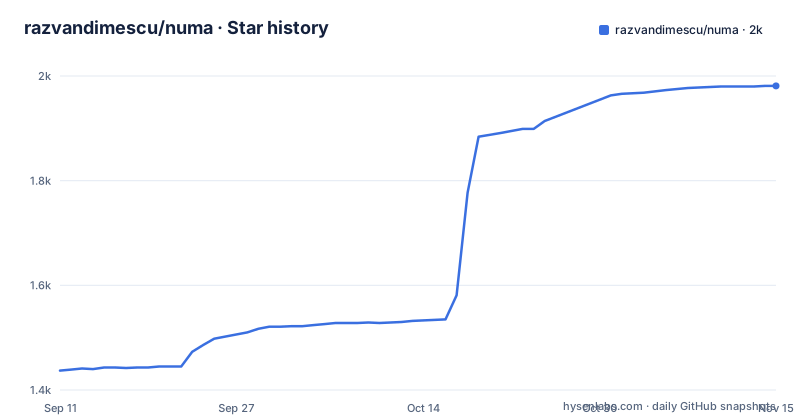
Star history
- razvandimescu/numa1,981 ★ · +544
| Repository | 2026-09-11 | 2026-11-15 |
|---|---|---|
| razvandimescu/numa | 1.4k | 2k |
544 Stars in the last 65 days, measured from the daily GitHub snapshot. Compare with other projects
Editorial analysis
The published image writes a config that binds the API and proxy to 0.0.0.0
The final Docker stage copies the binary and then creates a root level config file before the image is ever started. The file it writes is this:
[server]
api_bind_addr = "0.0.0.0"

[proxy]
enabled = true
bind_addr = "0.0.0.0"
So the dashboard and the proxy are configured for every interface, not just loopback, in the image the quick start tells you to run. The exposed port list in the same stage is wider still: 53/udp plus 80, 443, 853 and 5380 over TCP. The documented run command publishes only the dashboard, and only on loopback:
docker run -d --name numa -p 127.0.0.1:5553:53/udp -p 127.0.0.1:5553:53/tcp \
  -p 127.0.0.1:5380:5380 ghcr.io/razvandimescu/numa
dig @127.0.0.1 -p 5553 example.com
docker exec numa numa token            # dashboard password
The login rules explain why the token command is in that snippet. Requests arriving over loopback, which the docs count as `localhost`, `127.0.0.1` and `numa.numa`, need no login at all. Everything else is asked for the API token that numa generates on first start, and the docs name Docker port mapping and this machine's LAN address as cases that fall on the token side of that line. You then log in with any username at all, so the token is the only secret in the scheme, and you can replace it with your own through `[server] api_token` or `NUMA_API_TOKEN`. Binding that token protected surface to every interface by default is worth changing before the container is put on a network other than your own.
A stub crate warms the dependency cache, then the real sources are touched
The image does not compile the project from a clean checkout. The builder stage starts from `rust:1.98-alpine`, installs `musl-dev cmake make perl`, and copies only `Cargo.toml`, `Cargo.lock` and `build.rs`. It then manufactures an empty crate, builds it with the failure output discarded, throws the placeholder away, and copies the real `src/`, `benches/` and `site/` in. One line in the middle explains why the second build is not left to Cargo's own change detection:
RUN touch src/main.rs src/lib.rsWithout that touch, Cargo can compare timestamps, decide the manifests have not moved relative to the source files it just replaced, and skip recompiling. The stub build is a cache warmer for the dependency graph, and the touch is what forces the real code to be compiled in the same layer chain.
There is a second path through the same file, chosen by a build argument. `ARG NUMA_BINARY=builder` selects the compiled stage, while `FROM scratch AS prebuilt` copies `dist/${TARGETARCH}/numa` straight into the release path, and a comment at the top explains that release images set `NUMA_BINARY=prebuilt` so they can package the static release binaries from `dist/<arch>/`. Nothing in that path compiles or verifies anything. Whatever sits in `dist/` is what the image runs, and a stale artifact there would be packaged just as quietly as a fresh one.
Port 53 gets a different answer on each platform
Binding 53 is the one part of numa that cannot be done the same way everywhere, and the docs spell out three different answers.
On Linux the shipped unit is unprivileged: `DynamicUser=yes` with only `CAP_NET_BIND_SERVICE`, so the daemon gets a dynamic account and the single capability it needs rather than root. `numa install` reconfigures systemd-resolved through a drop-in file, and `numa uninstall` removes that drop-in. Anything else already holding port 53 has to be dealt with by hand, and the docs name dnsmasq, including the copy NetworkManager runs, as a process you stop yourself. On macOS the launchd daemon runs as root. On Windows the resolver binds `127.0.0.2:53` rather than loopback, because the built-in Dnscache service already owns `127.0.0.1:53`, and an NRPT rule routes queries to the second address; the same paragraph warns you to edit `bind_addr` and `api_bind_addr` against `127.0.0.2` on that platform. Windows also autostarts numa on login through the registry.
The install table carries one asymmetry that matters for planning: Windows needs a reboot after `numa install` and again after `numa uninstall`, while macOS and Linux do not. And if you would rather not fight any of it, `bind_addr` in `numa.toml` moves the listener off 53 entirely, which is also why the Docker path maps host port 5553 to container port 53.
install copies a binary it cannot run, and uninstall leaves the copy behind
The removal section is unusually honest about what survives. `uninstall` restores DNS settings but keeps the data directory, so a reinstall comes back with the same API token and the same local CA. Deleting everything afterwards means knowing each platform's leftovers: on macOS the binary plus `/usr/local/var/numa` and `/usr/local/var/log/numa.log`; on Linux the binary, `/var/lib/numa` and `/etc/numa`; on Windows the binary and `%PROGRAMDATA%\numa`. A user config at `~/.config/numa` and any `[server] data_dir` you set are separate again, and none of them are touched by the uninstall command.
The Linux case has a specific wart worth knowing before you install from cargo. The docs state that `numa install` copies a binary it cannot run from its original location, for example `~/.cargo/bin`, into `/usr/local/bin/numa`, and that uninstall leaves that copy in place. So the full sequence is cargo install, numa install, numa uninstall, and a stale privileged copy of the binary is still on the system pointing at a data directory you may already have deleted. Package manager installs behave differently: `brew uninstall`, `pacman -R` and `cargo uninstall` all remove the binary they placed, which is why the leftover list has to be read per install method rather than per platform.
auto mode probes root servers and otherwise hands your queries to Quad9
Three resolution modes are documented, and the third is the one with a catch worth reading twice.
`forward`, the default, is a transparent proxy in front of whatever your system already uses, so captive portals, VPNs and corporate resolvers keep working and you gain caching and blocking on top. `recursive` resolves from the root nameservers directly, with `[dnssec] enabled = true` adding RRSIG signature checks, DNSKEY verification, DS delegation and NSEC or NSEC3 denial proofs. `auto` probes the root servers at startup, switches to recursive when they answer, and otherwise falls back to forwarding over DNS-over-HTTPS to Quad9 at `https://9.9.9.9/dns-query`, which the docs are explicit about: that provider then sees your queries. The suggested way to avoid that fallback is to run `forward` with your own `[upstream]` instead.
Blocking is a daily refresh of the Hagezi Pro list, applied in every mode because filtering happens inside numa rather than at any upstream. The same binary can also be run as a public ODoH endpoint with `numa relay`, and the argument offered for doing so is that the curated DNSCrypt list has one surviving relay. Publishing a relay means your address answers queries for strangers, and it inherits the all-interfaces defaults described above unless you narrow them first.
https://frontend.numa works because numa generates the CA and the installer trusts it
Local services are registered by posting to the dashboard API, so adding a dev server is one request rather than an `/etc/hosts` edit and a certificate dance:
curl -X POST localhost:5380/services \
  -d '{"name":"frontend","target_port":5173}'
The entry then answers on `https://frontend.numa` with a valid certificate and WebSocket passthrough, which is what makes hot module replacement work through the name instead of the port. Path routing and sharing services across machines on the LAN are listed as further options, with `numa.toml` holding the configuration.
The certificate side runs through `rcgen`, which the manifest pulls in with the `pem` and `x509-parser` features, and the default is a self-signed mode in which numa generates a local CA on its own. That is where the trust surface sits: `numa install` adds the CA to the system trust store on macOS, on Linux across the Debian and Ubuntu, Fedora and RHEL and SUSE, and Arch families, and on Windows, and `numa uninstall` removes it again. Phones are handled separately through a `.mobileconfig` produced by `numa setup-phone`, which is how an iOS device configured for Private DNS can trust it. The paragraph on browsers stops mid-sentence at the one point that would matter most to a web developer: it has already said that Firefox keeps its own NSS store and ignores the system one, and that a CA has to be trusted there separately.
The wire parser is hand written, and the fuzz target is pinned to a dated nightly
The docs state plainly that the wire-protocol parser was written by hand as a learning project, and that later features including the recursive resolver, DNSSEC and the dashboard were built with AI assistance. The Makefile treats that hand-written parser as the thing worth attacking, because `FUZZ_TARGET ?= packet_parse` is the default target for a cargo-fuzz setup pinned to a dated toolchain:
FUZZ_TOOLCHAIN := nightly-2025-12-01
FUZZ_SECONDS ?= 60
# cargo-fuzz defaults to its own build triple, which is musl when it arrives via
# cargo-binstall. Pin it to the toolchain's host.
FUZZ_TRIPLE := $(shell rustc +$(FUZZ_TOOLCHAIN) -vV | sed -n 's/^host: //p')

fuzz:
	mkdir -p fuzz/corpus/$(FUZZ_TARGET)
	cargo +$(FUZZ_TOOLCHAIN) fuzz run --target $(FUZZ_TRIPLE) \
		$(if $(filter Darwin,$(shell uname -s)),-s none,) \
		$(FUZZ_TARGET) fuzz/corpus/$(FUZZ_TARGET) fuzz/seeds/$(FUZZ_TARGET) \
		-- -max_total_time=$(FUZZ_SECONDS) -max_len=4096 -timeout=25
Each line is a workaround for a specific tool behavior. The triple is read out of the toolchain because cargo-fuzz otherwise picks musl when it arrives through cargo-binstall. Sanitizers are switched off on Darwin with a comment saying that on macOS 26 ASan deadlocks before main, and that CI runs the real thing on Linux. The target gets a 4096 byte length cap and a 25 second timeout, with a 60 second default budget, and there are separate corpus and seeds directories in the tree.
The same file has a smaller inconsistency. The phony list names `blog` but not `blog-drafts`, even though the draft target exists right below it and does different work: it renders `drafts/*.md` through pandoc with the same template, then reruns the index generator with `BLOG_INCLUDE_DRAFTS=1` set. As a side effect, a file called `blog-drafts` in the working directory will be picked up by make instead of the recipe.
getrandom 0.4 has to move in step with what ODoH pulls in
Two dependency comments in the manifest explain constraints that are easy to break with a careless version bump.
The first is about the randomness crate. `odoh-rs` is pinned at 1.0.5, and it reaches HPKE, which is where the transitive bounds come from:
odoh-rs = "1.0.5"
# sys_rng re-exports the rand_core odoh-rs (via hpke) bounds on; keep the majors in step.
getrandom = { version = "0.4", features = ["sys_rng"] }
The `sys_rng` feature re-exports `rand_core`, and the types involved are bounded by whatever `odoh-rs` and its HPKE dependency already require, so the major versions of the two have to be moved together. The second comment covers TLS roots, and it changes behaviour rather than just versions:
# Bundled Mozilla roots (DER) for both the reqwest and DoT TLS paths — see forward.rs.
webpki-root-certs = "1"
rustls = { version = "0.23", default-features = false, features = ["ring", "std", "tls12", "logging"] }
Outbound TLS does not read the host trust store, in either the HTTP client path or the DNS-over-TLS listener path, because the root list is compiled into the binary. A resolver whose entire privacy story is about not leaking queries has exactly one root source, and updating it means updating the dependency rather than the operating system. One last mismatch between metadata and emphasis: the crate description ends with DNS-over-HTTPS, while the headline mechanism throughout the docs is ODoH under RFC 9230, with RFC 7858 presented as an inbound listener for strict clients.
Editorial conclusion
numa is a good fit for one specific job: a resolver you carry on a laptop, that blocks ads on any network and hands your dev services real HTTPS names without touching /etc/hosts. It is a poor fit as shared infrastructure as shipped, because the container image writes a config that listens on every interface, uninstall leaves a copy of the binary behind, and turning the same binary into a public ODoH relay is a decision with consequences beyond your machine. If you plan to run any of that, settle four things first: which interfaces the dashboard and proxy should bind to, what happens on a host where something else already owns port 53, how you will get the same built-in Mozilla root bundle revalidated as it ages, and where your sessions and service definitions end up, since the data directory survives an uninstall along with the API token and the local CA. Teams that only need a blocklist in their existing resolver will get the same result from a hosts file or a dnsmasq include.
Frequently asked questions
What does numa do in one sentence?
It is a DNS resolver in a single roughly 8 MB binary that blocks ads from the Hagezi Pro list, resolves .numa names for local dev services, overrides hostnames, caches, and can run in forward, recursive or auto resolution modes with optional DNSSEC validation.
How do I log in to the numa dashboard?
Requests over loopback, counted as localhost, 127.0.0.1 and numa.numa, need no login; anything else, including Docker port mapping and the machine's LAN address, asks for the API token that numa generates on first start. Print it with `sudo numa token` and log in with any username, or pin your own with `[server] api_token` or `NUMA_API_TOKEN`.
What happens if something already uses port 53 on my machine?
Set `bind_addr` in numa.toml, or use Docker, which is why the quick start maps host port 5553 to container port 53. On Linux, numa install reconfigures systemd-resolved through a drop-in that uninstall removes, but any other process holding 53, including dnsmasq and the copy NetworkManager runs, has to be stopped by hand.
Does numa install leave anything on my system?
Yes. Uninstall restores DNS but keeps the data directory, so the API token and local CA survive a reinstall. On Linux the binary is left at /usr/local/bin/numa, along with /var/lib/numa and /etc/numa; macOS keeps the binary, /usr/local/var/numa and /usr/local/var/log/numa.log; Windows keeps the binary and %PROGRAMDATA%\numa. A user config at ~/.config/numa is separate again.
Can numa resolve HTTPS names for my local dev servers?
Yes. Post a name and target port to the dashboard API and the service answers on https://<name>.numa with a valid certificate and WebSocket passthrough, using a local CA that numa generates and that `numa install` adds to the system trust store. Phones need the .mobileconfig from `numa setup-phone`, and Firefox keeps its own store and ignores the system one.
Is there a way to run numa without touching my system DNS?
Yes. Running `sudo numa` in the foreground only listens on port 53, and your system keeps its current resolver until you run `numa install`, so you can test with `dig @127.0.0.1 example.com`. Only the install step registers the service, points system DNS at numa and trusts its local CA.
Official sources
Add this badge to your README
If you maintain this project, the badge below links readers to this analysis and shows its maintenance status from the daily GitHub snapshot. Paste the markdown into your README; add ?metric=license or ?metric=stars to the image URL for a different field.

[](https://hysenlabs.com/projects/razvandimescu-numa)Star history chart for your README
[](https://hysenlabs.com/projects/razvandimescu-numa)Was this useful?