data.table's Makefile names version 1.18.99 in three places and asks R CMD check not to stop on test errors
R's data.table package extends data.frame:
At a glance
- What is it?
- data.table is an R package that extends data.frame with by-reference updates, joins and a fast file reader, and its build tooling is unusually explicit: a Makefile that hardcodes the dev version in three recipes, a check target that keeps going after test failures, and a revision target that appends to DESCRIPTION on every run.
- Who is it for?
- data.table is worth reaching for when the work is grouping, joining or reading delimited files inside R, and it is worth reading the build files before you depend on it, because the version string lives in three Makefile recipes rather than in one place and the check target is configured to continue past test errors.
- Can I use it commercially?
- Yes, with conditions. MPL-2.0 is a weak copyleft licence: you can use it inside commercial and closed-source software, but if you distribute changes to its own files, you must publish those changes under the same licence.
- Is it still maintained?
- Yes. The repository last received commits 1 day ago.
- What is it written in?
- Mainly R, according to GitHub's language statistics.
Answers come from the project's GitHub data, last synced on November 14, 2026, and from our analysis. They are not legal advice.
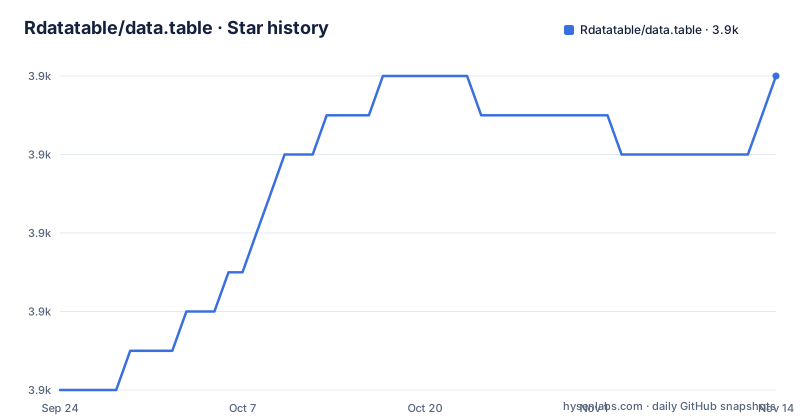
Star history
- Rdatatable/data.table3,928 ★ · +8
| Repository | 2026-09-24 | 2026-11-14 |
|---|---|---|
| Rdatatable/data.table | 3.9k | 3.9k |
8 Stars in the last 51 days, measured from the daily GitHub snapshot. Compare with other projects
Editorial analysis
The Makefile repeats the dev version 1.18.99 in three recipes
The root Makefile is short enough to read in one sitting and it does not parameterize anything. The string `data.table_1.18.99.tar.gz` is written out three times: once in `clean`, which removes that tarball along with `src/*.o` and `src/*.so`, once in `install`, which runs `$(R) CMD INSTALL` on it, and once in `check`. A `.99` suffix marks a development version rather than a release, so the version bump is a search and replace across those recipes instead of a single field read from `DESCRIPTION`.
The last target is the odd one. `revision` shells out to `git rev-parse HEAD` and appends the result to `DESCRIPTION` with `>>`, so running it twice leaves two `Revision:` lines behind unless the file is cleaned in between. The aggregate targets `all` and `some` are just ordered lists of the others, with `all` adding `check` at the end.
The check target keeps going after test failures and skips vignettes
Two flags in the `check` recipe decide how much a run can prove. `--no-stop-on-test-error` tells R CMD check to carry on when a test fails, and `--ignore-vignettes` leaves the vignettes out of the check entirely. The `build` recipe matches that from the other side with `--no-build-vignettes`, so vignettes are neither built nor checked by the local target that most contributors will run.
The test path itself is a single R expression, `$(R) -e 'require(data.table); test.data.table()'`, so the suite runs against the installed package rather than the source tree. The same recipe sets `_R_CHECK_CRAN_INCOMING_REMOTE_=false`, which stops the incoming checks from reaching out over the network during a local run. In other words the local gate is fast and quiet, and it is deliberately not the gate that would block a submission.
The oldest supported R is 3.5.0, and that is a stated policy
The feature list states that the package has no dependencies other than base R itself, and that the R dependency is as old as possible for as long as possible, currently R 3.5.0 from 2018, tested against continuously. That is a deliberate position rather than an accident of neglect: it is what lets a package used by hundreds of other packages keep installing on old builds, and it is why nothing in the dependency list needs a version pin.
The cost is visible in the tree. `configure` sits at the root next to `src/`, and `clean` deletes compiled objects and shared objects from `src/`, so an install from source compiles part of the package and needs a working toolchain on the machine doing the installing. Nothing in the repository wraps that step, which is why the installation routes below matter more here than they would for a pure R package.
The subset operator takes an expression, not a column list
The syntax section contrasts the `[` operator with the `data.frame` one on three points: no `DT$` prefix is needed, any R expression from any package is allowed in `j` rather than a list of columns, and an extra `by` argument computes that expression per group. The whole mapping is written as one line of comment over the example, from where select group, with the table indexed as `DT[i, j, by]`.
library(data.table)
DT = as.data.table(iris)

# FROM[WHERE, SELECT, GROUP BY]
# DT  [i,     j,      by]

DT[Petal.Width > 1.0, mean(Petal.Length), by = Species]
#      Species       V1
#1: versicolor 4.362791
#2:  virginica 5.552000
Columns of type `list` are supported in queries, and updates add, change or delete columns by reference within a group using no copies at all, which is the mechanism behind the memory efficiency claim.
Joins come in ordered, overlapping and non-equi flavours
The joins bullet is the longest in the feature list and it separates four cases. Ordered joins cover rolling forwards, rolling backwards, nearest neighbour and limited staleness. Overlapping range joins are described as similar to `IRanges::findOverlaps`, and the link goes to a talk on the topic rather than to reference documentation. Non-equi joins use the operators `>`, `>=`, `<` and `<=` instead of equality.
Two modifiers sit on top of any join: `by=.EACHI` aggregates on join, returning one row per matching row in the other table, and update on join writes matched values back into the receiving table. Combined with the by-reference updates, that is the path for maintaining a lookup table in place rather than rebuilding it after every pass.
Three install routes, and no GitHub release to compare them against
The installation section gives three commands, and the difference between them is what you are opting into:
install.packages("data.table")

# latest development version (only if newer available)
data.table::update_dev_pkg()

# latest development version (force install)
install.packages("data.table", repos="https://rdatatable.gitlab.io/data.table")
The middle route checks whether a development build is newer before installing it, while the third skips that check and takes whatever the project repository holds. The repository publishes no GitHub releases, so there is no tag list to compare a CRAN build against, and the NEWS files at the root, `NEWS.md`, `NEWS.1.md` and `NEWS.0.md`, are where the changes are recorded instead.
The two billion row figure is cited to an external benchmark page
The aggregation bullet claims 100GB in RAM on up to two billion rows, and the parenthetical link points at a benchmark page hosted on someone else's site rather than at anything in this repository. The number is therefore not reproducible from the tree, and no script in `tests/` or `.ci/` regenerates it.
The same pattern runs through the rest of the feature list. The low-level parallelism claim, that many common operations are internally parallelized across CPU threads, has no thread count and no configuration key attached to it. What the repository does hold is the mechanism list itself, and `fread` and `fwrite` as the reader and writer pair, each with reference documentation of its own.
Governance, an agents file and three NEWS files sit at the root
The root is unusually crowded with process files. `GOVERNANCE.md` holds the project's own governance agreement, and the README notes that the project is fiscally sponsored by NumFOCUS with a donation link for developer time and workshops. `AGENTS.md` and `CODEOWNERS` both sit alongside `.github/`, and `Seal_of_Approval.md` records the packages that extend or build on data.table.
Development infrastructure is split the same way. Checks run on two systems, with a GitHub Actions badge and a separate GitLab check results page, and `.gitlab-ci.yml` sits next to `.ci/`, `.dev/` and a devcontainer definition. Three NEWS files of different vintages keep old entries in place while the current one moves, which is the file set to read when you want to know whether a change you rely on was released, since the tag list does not exist.
The scale of that attention shows in the issue count rather than in the commit log. The project records close to a thousand open issues against just over 3900 stars and about 1050 forks, so the ratio of open questions to contributors is high, and the README's answer to that is community rather than triage: a StackOverflow tag, a community blog called The Raft, and the Seal of Approval list as the place to find who else builds on the package. The governance file and the fiscal sponsorship are the formal half of the same arrangement.
Editorial conclusion
data.table is worth reaching for when the work is grouping, joining or reading delimited files inside R, and it is worth reading the build files before you depend on it, because the version string lives in three Makefile recipes rather than in one place and the check target is configured to continue past test errors. Anyone installing it should pick a route deliberately: CRAN for stability, the development repository when you need what has not been released, and neither if you only want a data frame reshape. Check the NEWS files against the release you install, since there is no GitHub release to compare against, and note that the repository carries close to a thousand open issues, which tells you where to expect friction on anything unusual.
Frequently asked questions
How do I install data.table in R?
From CRAN with install.packages("data.table"). For the latest development version, data.table::update_dev_pkg() installs it only when a newer build exists, and installing against repos="https://rdatatable.gitlab.io/data.table" forces the development build from the project repository regardless.
What is data.table in R?
It is a high-performance version of base R's data.frame with the same subset operator plus additions: no DT$ prefix needed, any R expression from any package allowed in j, an extra by argument for grouped computation, by-reference column updates with no copies, and list columns. It has no dependencies other than base R itself.
How do I group and summarise rows with data.table?
Use the three-argument subset, where the table is indexed as DT[i, j, by]. The README's own example filters with DT[Petal.Width > 1.0, mean(Petal.Length), by = Species] on the iris data and returns one mean per species, versicolor at 4.362791 and virginica at 5.552000.
Does data.table do what Excel's what-if Data Table does?
Nothing in the repository covers Excel's what-if Data Table. data.table is an R package that extends data.frame with grouped computation, joins, reshaping through dcast and melt, and the fread and fwrite pair for delimited files, so the two names share a word and nothing else.
What R versions does data.table still support?
The project states that the R dependency is kept as old as possible for as long as possible, currently R 3.5.0 from 2018, and that it is tested against that version continuously. It has no dependencies other than base R, which is what allows an install to succeed on old builds.
Official sources
Add this badge to your README
If you maintain this project, the badge below links readers to this analysis and shows its maintenance status from the daily GitHub snapshot. Paste the markdown into your README; add ?metric=license or ?metric=stars to the image URL for a different field.

[](https://hysenlabs.com/projects/rdatatable-data-table)Star history chart for your README
[](https://hysenlabs.com/projects/rdatatable-data-table)Was this useful?