geckodriver: the WebDriver proxy that drives Firefox
WebDriver Classic proxy for automating Firefox through Marionette
At a glance
- What is it?
- geckodriver translates W3C WebDriver HTTP calls into Firefox's Marionette protocol, so Selenium and other clients can automate Gecko browsers. It is a small Rust binary with a narrow job, and knowing where its job ends matters more than knowing how to start it.
- Who is it for?
- Adopt geckodriver if you are automating Firefox and your client already speaks W3C WebDriver, since geckodriver is the proxy that lets W3C WebDriver clients interact with Gecko-based browsers. Do not adopt it if you need one driver for Chrome, Safari and Firefox at once, or if you want a modern WebDriver BiDi-only stack, because geckodriver is a Classic proxy and the README points to the WebDriver protocol page rather than a BiDi surface.
- Can I use it commercially?
- Yes, with conditions. MPL-2.0 is a weak copyleft licence: you can use it inside commercial and closed-source software, but if you distribute changes to its own files, you must publish those changes under the same licence.
- Is it still maintained?
- Yes. The repository last received commits 80 days ago.
- What is it written in?
- GitHub does not report a main language for this repository.
Answers come from the project's GitHub data, last synced on November 13, 2026, and from our analysis. They are not legal advice.
Star history
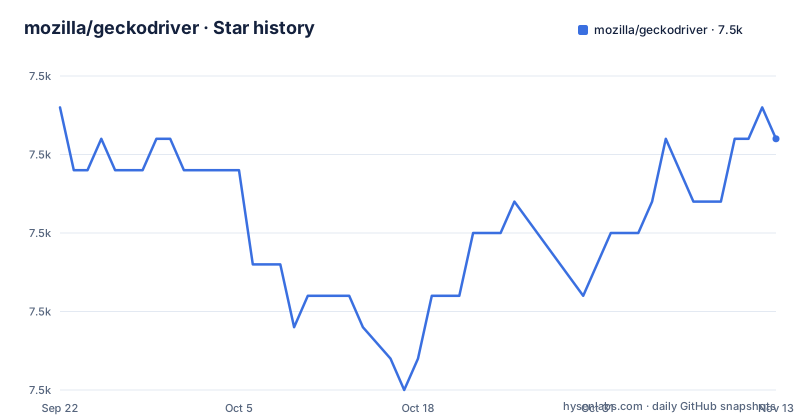
- mozilla/geckodriver7,478 ★ · -1
| Repository | 2026-09-22 | 2026-11-13 |
|---|---|---|
| mozilla/geckodriver | 7.5k | 7.5k |
-1 Stars in the last 52 days, measured from the daily GitHub snapshot. Compare with other projects
Editorial analysis
What geckodriver actually sits between
geckodriver drives Firefox through Marionette, Mozilla's own remote protocol, and the README describes geckodriver as a proxy that "translates calls into the Marionette remote protocol by acting as a proxy between the local- and remote ends." That sentence is the whole architecture. Your test client sends HTTP requests shaped by the W3C WebDriver spec to a local geckodriver process, and geckodriver forwards the equivalent Marionette commands to the browser.
The audience is narrow and worth stating plainly. This is for people who already have a WebDriver client (Selenium in Python, Java, C#, Ruby, Perl or JavaScript, all linked from the README) and need a Firefox endpoint for it. If you are writing a test suite against Chrome, geckodriver does nothing for you. If you are driving Firefox through a lower-level interface directly, you are bypassing the layer geckodriver exists to provide.
The protocol boundary is the design decision
Putting translation in a separate process rather than inside Firefox has consequences. The driver can be updated independently of the browser, which is why the release cadence does not have to match Firefox's. It also means the driver is a real network hop: your client talks HTTP to localhost, and geckodriver talks Marionette to the browser. When something fails, there are two places to look, and the README links a dedicated page on enabling trace logs for exactly that reason.
The second consequence is version coupling. geckodriver is a Rust program distributed as a standalone binary, and Firefox is a separate download with its own release train. The README does not promise any compatibility matrix between the two; it points to the change log for a detailed list of changes per release. In practice that means the pairing is something you verify, not something the project guarantees on the README page.
Installing geckodriver and running a first session
The README lists two installation routes: pre-built binaries from the Releases page for the most common platforms, or compiling it yourself. The self-compile options are `cargo install geckodriver` or checking out the `release` branch or a specific tag. For a machine where no binary exists, the README's custom build section says to check out the release tag for the version of interest and run `cargo build`.
The README gives this example for the crates.io route:
cargo install geckodriverThat installs the driver from crates.io. The README also gives the alternative for a custom build, checking out the release tag and running:
cargo buildAfter either, the binary needs to be on your PATH, or your client needs to be told where it is. The README points to the geckodriver usage page and the supported platforms page for the details it does not repeat.
Once the binary is reachable, a Selenium session is short. The README links the Selenium Python API documentation and the capabilities example on the Firefox capabilities page, which is where the Firefox-specific options are documented. If a session fails, the first thing to check is whether Selenium found the driver binary at all, because a missing driver produces an error before any browser starts. The README's trace log page is the documented next step when the browser starts but a command fails.
Where geckodriver is the wrong tool
The clearest limitation is in the name of the protocol it implements. geckodriver is a WebDriver Classic proxy. If your testing strategy has moved to WebDriver BiDi for event streams, network interception or console log capture, the README does not present a BiDi surface; it links the W3C WebDriver protocol and the MDN command, error and type references, all of which are the Classic model. Treat BiDi support as something to confirm against the release notes for the version you install, not something to assume.
The second limitation is scope. One driver, one browser family. Teams running a matrix across Chrome, Edge and Firefox end up managing multiple driver binaries with different download pages, different version schemes and different failure messages. geckodriver does not abstract that away, and no amount of configuration makes it do so.
The third is the distribution model. The README states that the GitHub repository is only used for issue tracking and making releases, and that the source lives in mozilla-central under testing/geckodriver. If you file a pull request against the GitHub repo expecting it to be merged there, you have misread the layout. Development happens in the Mercurial tree.
How it compares to a Selenium Manager style approach
The alternative most people actually weigh is not another Firefox driver but letting the client library resolve drivers for you. Selenium's own tooling downloads and caches the correct driver binary automatically, which removes the manual step of visiting the Releases page. That approach is not a different protocol implementation; it is a different answer to the question of who owns driver provisioning.
The trade-off is control against convenience. With automatic resolution you get less visibility into which driver version is on disk and when it changed. With a manual `cargo install geckodriver` or a pinned binary you know exactly what is running, which matters when you are debugging a failure that only appears on one CI machine. Neither approach changes what geckodriver does once it starts; both end up executing the same Rust binary.
For platforms without a pre-built binary, the README's ARM page documents self-serving a build, which is the path that automatic resolution cannot take for you.
Licence, maintenance and the cost of upgrading
geckodriver is released under the Mozilla Public License 2.0, the LICENSE file at the repository root. MPL-2.0 is a file-level copyleft licence: modifications to MPL-covered files must be made available under the same licence, while larger works that combine it with other code can be licensed differently. If you redistribute a modified geckodriver, read the licence text rather than relying on that summary, and get legal advice if the distinction matters to your product.
The maintenance picture is concrete. The last push to the repository was on 2026-08-25. The most recent release is v0.37.1 from 2026-07-20, following v0.37.0 on 2026-06-03 and v0.36.0 on 2025-02-25. That gap between v0.36.0 and v0.37.0 is over a year, so release timing is not something to plan around; the version you need may simply not exist yet.
Upgrade cost is mostly about the browser pairing. Because geckodriver is a proxy and Firefox ships separately, a driver upgrade and a browser upgrade are two events. The change log is the document to read before either, and the trace log page is where you go when the pairing breaks.
Editorial conclusion
Adopt geckodriver if you are automating Firefox and your client already speaks W3C WebDriver, since geckodriver is the proxy that lets W3C WebDriver clients interact with Gecko-based browsers. Do not adopt it if you need one driver for Chrome, Safari and Firefox at once, or if you want a modern WebDriver BiDi-only stack, because geckodriver is a Classic proxy and the README points to the WebDriver protocol page rather than a BiDi surface. Before committing, verify that a pre-built binary exists for your platform on the Releases page, that your Firefox version is covered by the release notes for the tag you pick, and that your client library can locate the driver without you hard-coding a path.
Frequently asked questions
What is geckodriver?
It is a proxy that lets W3C WebDriver compatible clients interact with Gecko-based browsers such as Firefox, translating WebDriver calls into the Marionette remote protocol. The README describes it as sitting between the local and remote ends of that conversation.
How do I install geckodriver?
The README gives two routes: download a pre-built binary for the most common platforms from the Releases page, or compile it yourself with cargo install geckodriver, or by checking out the release branch or a specific tag.
How do I use geckodriver with Selenium in Python?
The README links the Selenium Python API documentation and the Firefox capabilities page. In practice you install the driver so your client can find it, then create a Firefox session through Selenium, which sends WebDriver commands that geckodriver translates to Marionette.
How do I install geckodriver on Ubuntu?
The README does not give distribution-specific instructions. It points to pre-built binaries on the Releases page for the most common platforms, and to cargo install geckodriver or a release tag checkout for compiling it yourself.
What is a GeckoDriver?
GeckoDriver is geckodriver: a proxy for using W3C WebDriver compatible clients to interact with Gecko-based browsers, as the README's opening line states.
How do I install geckodriver for Selenium?
Install the driver binary from the Releases page or with cargo install geckodriver, put it where your Selenium client can find it, and then start a Firefox session. The README links the Selenium API documentation for each language rather than repeating client setup.
Official sources
Add this badge to your README
If you maintain this project, the badge below links readers to this analysis and shows its maintenance status from the daily GitHub snapshot. Paste the markdown into your README; add ?metric=license or ?metric=stars to the image URL for a different field.

[](https://hysenlabs.com/projects/mozilla-geckodriver)Star history chart for your README
[](https://hysenlabs.com/projects/mozilla-geckodriver)Was this useful?