React-Bootstrap's version table stops at Bootstrap 5 while 3.0.0 sits in beta
Bootstrap components built with React
At a glance
- What is it?
- React-Bootstrap repackages Bootstrap 5 markup as React components and is still shipping prereleases. We read the manifest, the build scripts and the compatibility table to show what the package can and cannot do for a team picking it today.
- Who is it for?
- Pick React-Bootstrap when the application already loads Bootstrap 5 CSS and you want the component layer rather than assembling Bootstrap class names by hand. It does not support Bootstrap 3 or 4 on a maintained line, and it offers nothing to compare against utility CSS frameworks.
- Can I use it commercially?
- Yes. MIT is a permissive licence: you can use, modify and sell software built on it, as long as you keep its copyright and licence notices.
- Is it still maintained?
- Yes. The repository last received commits 4 days ago.
- What is it written in?
- Mainly TypeScript, according to GitHub's language statistics.
Answers come from the project's GitHub data, last synced on November 15, 2026, and from our analysis. They are not legal advice.
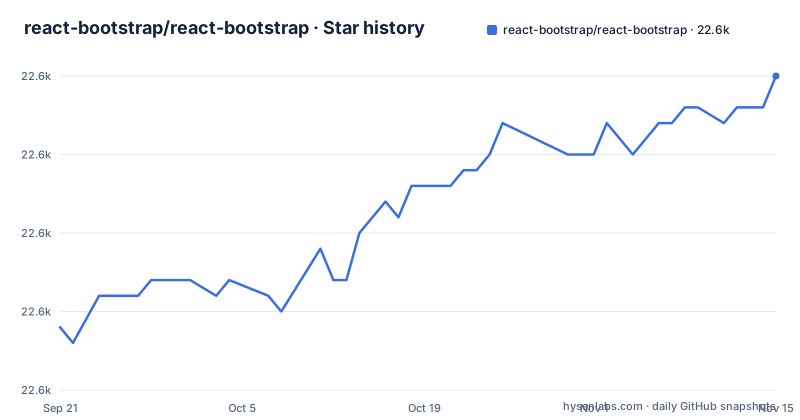
Star history
- react-bootstrap/react-bootstrap22,615 ★ · +16
| Repository | 2026-09-21 | 2026-11-15 |
|---|---|---|
| react-bootstrap/react-bootstrap | 22.6k | 22.6k |
16 Stars in the last 55 days, measured from the daily GitHub snapshot. Compare with other projects
Editorial analysis
The compatibility table stops at Bootstrap 5 and marks two lines not maintained
The whole package hinges on version pairing, and the repository is blunt about it: you need to ensure you are using the correct combination of versions. The table maps Bootstrap v5.x to React-Bootstrap 2.x, Bootstrap v4.x to 1.x with a not maintained label in the same cell, and Bootstrap v3.x to 0.33.x with that label too. So exactly one generation of Bootstrap has a maintained line here. A team still on Bootstrap 4 has no supported path inside this package, and the fallback is worse than an unmaintained tag: the older documentation is split across separate Netlify sites, react-bootstrap-v4.netlify.app and react-bootstrap-v3.netlify.app, rather than the main homepage at react-bootstrap.github.io. Each generation also gets its own migration guide, one for Bootstrap 4 to 5 at /docs/migrating and one on the v4 site for Bootstrap 3 to 4. The practical consequence is that a Bootstrap 3 or 4 upgrade is not a dependency bump. It means moving Bootstrap itself first, then porting component call sites to the 2.x API, and the README does not enumerate what changed in that port.
3.0.0 has sat at beta since September 2025 with no final release listed
The version field in package.json reads 3.0.0-beta.6, and the release list shows three prereleases: v3.0.0-beta.4 dated 2025-09-04, v3.0.0-beta.5 dated 2025-09-22 and v3.0.0-beta.6 dated 2026-10-22. No 3.0.0 final tag appears in that list, so the newest published line is a prerelease rather than a stable release. The default branch is not dormant, though: the last push landed on 2026-10-31, which is active work rather than an abandoned repository. The awkward part is that the documented line and the shipped line disagree with each other. The compatibility table maps Bootstrap 5.x to the 2.x series, the hosted documentation at the main homepage covers that series, and the manifest meanwhile names a 3.x beta. Nothing in the README lists breaking changes for 3.x, so there is no supported way to read the diff between 2.x and 3.0.0-beta.6 before you install it. Adopting the beta means auditing your own call sites by hand.
One package, two output trees, and an export map that resolves twice
package.json sets type to module and still keeps the legacy entry fields next to a modern exports map. main points at cjs/index.js, module points at lib/index.js, and types points at lib/index.d.ts. The exports map repeats that split as a condition object: the require branch resolves to ./cjs/index.d.ts and ./cjs/index.js, while the import branch resolves to ./lib/index.d.ts and ./lib/index.js. Each branch carries its own types entry, which is what lets TypeScript match declarations to whichever module system the bundler actually loaded. A wildcard entry of the form ./* mirrors the same pattern for subpaths, so individual files from either tree can be imported directly. sideEffects is set to false, an explicit claim that importing a component has no side effects. The files array restricts what ships: CHANGELOG.md, lib, cjs and dist. Nothing from src/ reaches the package, and no stylesheet appears in that list, because this package supplies components rather than Bootstrap's CSS. That is the hard limit for a reader: React-Bootstrap cannot make a page look like Bootstrap unless your application also loads Bootstrap's own stylesheet.
Babel compiles .ts and .tsx and skips every .d.ts
The build clears the output directory first, then compiles src twice through Babel under different environment names and ends with a build:dist step. Verbatim from package.json:
"build": "rimraf lib && npm run build:esm && npm run build:esm:types && npm run build:cjs && npm run build:cjs:types && npm run build:dist",
"build:esm": "babel src --out-dir lib --delete-dir-on-start --env-name esm --extensions .ts,.tsx --ignore '**/*.d.ts'"
The --extensions .ts,.tsx pair is how a TypeScript repository publishes JavaScript, and --ignore '**/*.d.ts' keeps hand written declaration files out of the JavaScript pass, which is why each output tree gets a separate type step named build:esm:types and build:cjs:types. The CommonJS script uses the same extension list under the cjs env name and then writes its own package.json into the cjs directory to mark it as commonjs, because the root package declares type module and would otherwise treat that folder as ESM.
The bootstrap install script pulls a second workspace for the docs site
The setup path uses npm. The script itself is a two-stage install, because the docs site lives in its own folder:
"bootstrap": "npm install && npm install --prefix www"The --prefix www part means a first-time checkout pulls the documentation site's dependencies as well as the library's, so the install is heavier than the package you are actually working on. After that the README offers four commands:
npm test
npm run tdd
npm start
npm run build
The first two cover a single run and watch mode, npm start runs a local copy of the docs site, and npm run build builds the library. For a reader deciding whether to contribute, the cost is concrete: there is a committed package-lock.json, a .nvmrc pinning a Node version, and a www/ directory that any change to documentation examples can touch. Contributor setup does not stop at the library.
The README describes contributor setup but gives no install command for consumers
The README has no consumer install line, no usage snippet, and no copy-paste example; the npm badge at the top is a badge only. What the file does supply is contributor setup and a pointer to a CodeSandbox examples repository, plus a launch link that opens the basic example as a workspace. The manifest tells you what an installed copy contains, since the files array is CHANGELOG.md, lib, cjs and dist, so you know you are getting compiled JavaScript and declarations and nothing from src/. The gap matters for evaluation: before you can judge this library you have to assemble the bootstrap import, the CSS delivery, and the component usage from sources outside this repository, and no supported snippet here will tell you whether the pieces line up.
test/ and tests/ sit side by side with no documented split
The top level contains both test/ and tests/, alongside vitest.config.mts, vitest.setup.ts, and vitest.shims.d.ts. Two parallel test directories in one repository is unusual enough that it changes what a new contributor can infer, and the README does not explain the difference. It names exactly two test commands, npm test for a single run and npm run tdd for watch mode, but maps neither to a directory, so there is no way to tell from the documentation where a new test belongs or which tree the suite already covers. The rest of the top level carries the usual automation: .babelrc.js, .editorconfig, .gitattributes, .github/, .husky/, renovate.json, tsconfig.json, eslint.config.mjs, codecov.yml, and two changelogs in CHANGELOG.md and CHANGELOG-pre1.md. Badges are published for GitHub Actions, Travis CI, npm, Codecov, Netlify deploys and Discord, so several pipelines exist, and the README describes the scope of none of them. A reader trying to judge maintenance will find activity signals without any stated test policy.
The component set stops where Bootstrap stops, and some pieces live elsewhere
The repository names its own gaps by pointing at two related modules. react-router-bootstrap is the integration with React Router, so anything that couples navigation state to Bootstrap components needs a second dependency. Awesome React Bootstrap Components is listed as providing additional components such as an off canvas navbar, a switch, and sliders, which means the core package does not cover those three. That is a real constraint for a reader who is planning component coverage: if your design needs an off canvas navbar or a switch, you are adding another package, and the README gives no version constraint tying that package to this one, so compatibility becomes your problem to verify. There is no icons package among the related modules. The published file list now includes a dist directory alongside the lib and cjs module trees, built by a build:dist script.
Editorial conclusion
Pick React-Bootstrap when the application already loads Bootstrap 5 CSS and you want the component layer rather than assembling Bootstrap class names by hand. It does not support Bootstrap 3 or 4 on a maintained line, and it offers nothing to compare against utility CSS frameworks. Before committing, confirm which line you are pinning, because the manifest names a 3.0.0 beta while the compatibility table and the hosted documentation still describe the 2.x series.
Frequently asked questions
What is Bootstrap in React?
React-Bootstrap is Bootstrap 5 markup and behavior packaged as React components, published as the npm package react-bootstrap with TypeScript as its primary language under an MIT license. It supplies the component layer only, so the application still has to load Bootstrap's own CSS.
Is Bootstrap outdated in 2026?
The compatibility table still maps Bootstrap v5.x to React-Bootstrap 2.x, and the lines for Bootstrap v4.x and v3.x are labeled not maintained. The default branch received a push on 2026-10-31, so the work is ongoing, and the repository states no end of life date for Bootstrap itself.
Which is better for React Bootstrap or Tailwind?
The compatibility table covers Bootstrap versions only, from v3.x through v5.x, and the related modules named are react-router-bootstrap and Awesome React Bootstrap Components. Neither the README nor package.json says anything about Tailwind, so this repository offers no basis for that comparison.
what is the latest version of react bootstrap
The version field in package.json reads 3.0.0-beta.6. The release list shows v3.0.0-beta.4, v3.0.0-beta.5 and v3.0.0-beta.6, with the last dated 2026-10-22, and no 3.0.0 final tag appears in it.
how to install react bootstrap npm
The README contains no consumer install command. It gives an npm based contributor setup that starts with npm run bootstrap, and the published contents are listed as CHANGELOG.md, lib, cjs and dist, so an installed copy is compiled output rather than source.
what is react bootstrap used for
It renders Bootstrap 5 markup as React components, so an application does not have to hand write the underlying Bootstrap class names. The repository links a CodeSandbox examples repository and a launch link that opens the basic example as a workspace.
Official sources
Add this badge to your README
If you maintain this project, the badge below links readers to this analysis and shows its maintenance status from the daily GitHub snapshot. Paste the markdown into your README; add ?metric=license or ?metric=stars to the image URL for a different field.

[](https://hysenlabs.com/projects/react-bootstrap-react-bootstrap)Star history chart for your README
[](https://hysenlabs.com/projects/react-bootstrap-react-bootstrap)Was this useful?