react-icons and the subfolder rule that picks your icon set
svg react icons of popular icon packs
At a glance
- What is it?
- react-icons folds two dozen upstream icon sets into one npm package, selected by import subfolder instead of config. What that layout buys, what it costs at install time, and why the license you inherit depends on which pack you import.
- Who is it for?
- Use react-icons when you want many upstream icon sets in one package and depend on tree shaking to keep the bundle small. Skip the all-files variant unless meteorjs or gatsbyjs forces it.
- Can I use it commercially?
- Check first. The repository uses a licence we do not classify automatically, so read its LICENSE file before any commercial use.
- Is it still maintained?
- Yes. The repository last received commits 23 days ago.
- What is it written in?
- Mainly TypeScript, according to GitHub's language statistics.
Answers come from the project's GitHub data, last synced on November 15, 2026, and from our analysis. They are not legal advice.
Star history
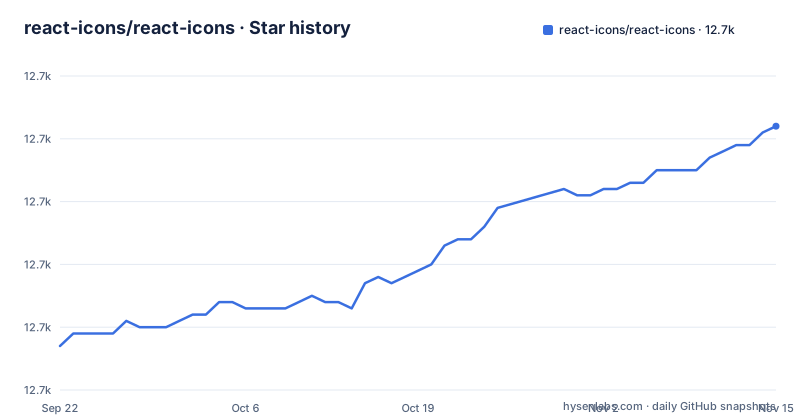
- react-icons/react-icons12,702 ★ · +35
| Repository | 2026-09-22 | 2026-11-15 |
|---|---|---|
| react-icons/react-icons | 12.7k | 12.7k |
35 Stars in the last 54 days, measured from the daily GitHub snapshot. Compare with other projects
Editorial analysis
Every icon pack is a subfolder, and the import path is the whole API
react-icons ships one npm package holding many upstream icon sets, and you address them by subfolder rather than through a single flat entry point. The example is `import { FaBeer } from "react-icons/fa";`, and the note under it says each Icon package has its own subfolder under `react-icons`. Material Design follows the same rule: `import { ICON_NAME } from 'react-icons/md';`.
So the pack is chosen at the import site, not in a config file, and a page mixing Font Awesome with Material Design pulls from two subfolders at once. The stated benefit of that layout is tree shaking: the project describes it as using ES6 imports that allows you to include only the icons that your project is using. Nothing registers a global icon set, no provider wraps your tree, and there is no init step to remember.
Two packages, and the second one is flagged as stale in place
There are two install paths, and the second carries its own warning. Standard modern projects use:
yarn add react-icons
# or
npm install react-icons --save
Projects that grow in size, such as meteorjs and gatsbyjs setups, are pointed elsewhere:
yarn add @react-icons/all-files
# or
npm install @react-icons/all-files --save
That block carries a Note saying this option has not had a new release for some time, pointing at issue 593, and the text says the method has the trade-off that it takes a long time to install the package. Read plainly, a large project is choosing between the current package and the one that matches how its framework resolves files. The all-files variant also changes import paths to one file per icon, `@react-icons/all-files/fa/FaBeer`, so code written that way does not move to the standard package without editing every import.
The license is decided per pack, not for the package
react-icons does not carry one license for everything it republishes. The pack table names a different license for each upstream set: Font Awesome 5 and 6 are CC BY 4.0, Material Design icons and Remix Icon are Apache License Version 2.0, Feather, Bootstrap Icons, Ant Design Icons, Devicons, Octicons and Flat Color Icons are MIT, Simple Icons is CC0 1.0 Universal, Weather Icons is SIL OFL 1.1, Game Icons is CC BY 3.0, and Typicons is CC BY-SA 3.0.
The consequence is that the package cannot answer a redistribution question for you. CC BY 4.0 and CC BY 3.0 require attribution, and Typicons carries a share-alike term. Anyone shipping icons inside a client bundle has to know which upstream set each glyph came from, and that table is where the README records the answer.
Version strings that stop at an upstream commit
Several entries are not plain release numbers. Font Awesome 5 is listed as 5.15.4-3-gafecf2a, Material Design icons as 4.0.0-98-g9beae745bb, Lucide as v5.1.0-6-g438f572e, and Game Icons as a bare commit hash, 12920d6565588f0512542a3cb0cdfd36a497f910.
A trailing commit suffix means the snapshot came from a working tree a number of commits past a tag rather than from the tag itself. For Game Icons there is no version to compare at all, so those glyphs cannot be lined up against any release on game-icons.net from this table. Others are pinned to clean versions such as 6.5.2, 12.14.0, 2.1.3 or 4.29.1, which means the question of which upstream point in time you got has a different answer for each pack, and in some cases no answer at all.
Three families ship twice, so a name alone is not a selection
The table lists several families twice, with a version suffix in the name: Font Awesome 5 at 1612 icons and Font Awesome 6 at 2045, Ionicons 4 at 696 and Ionicons 5 at 1332, Heroicons at 460 and Heroicons 2 at 888.
That is a real choice rather than a duplicated row, and the counts are far enough apart to matter, since Ionicons 5 holds nearly twice the set of Ionicons 4 and Heroicons 2 holds more than the first release. The consequence for the reader is that an icon name is under-specified until you name a generation, and choosing the wrong one produces an import that resolves to nothing. Since packs are addressed by subfolder and the README's examples do not show the mapping from subfolder to generation, confirm it in the documentation site before the import goes into a file.
A yarn workspaces root that publishes through a pinned lerna
The repository is not one package. package.json is a private root named react-icons-root, with packageManager set to [email protected] and a workspaces array pointing at packages/*. The tree also carries lerna.json, build-script.sh, yarn.lock and eslint.config.cjs, and devDependencies cover linting and formatting only through scripts named lint, format and format:ci.
Release plumbing runs through a lerna fetched on demand, with "version-up": "npx [email protected] version" and a version-snapshot target producing preid snapshot prepatch builds. Recent releases were v6.0.0-beta.0 on 2026-08-12, v5.7.0 on 2026-06-30 and v5.6.0 on 2026-03-02, and the last push to master landed on 2026-10-23. What reaches npm is produced by build-script.sh and lerna versioning, not published from the root, so package contents are decided by that script.
What react-icons leaves to you, and what that costs
Two gaps matter in practice. The first is props. The usage example is a bare `<FaBeer />` with no size, color or class attribute, and the page sends further usage to the documentation site instead of enumerating an API. react-icons republishes upstream SVG data as components, so presentation is your job, but the README's example does not show which attributes the component forwards. Anything past default rendering has to be confirmed there, which is a working difference between a package with a documented surface and one that hands you raw SVG.
The second gap is versioning: a subfolder's contents can shift under a react-icons upgrade without your code changing, so pin the exact version, read the license and version row for the pack you import, and check the docs site before assuming these components accept the same options as the rest of your tree.
Editorial conclusion
Use react-icons when you want many upstream icon sets in one package and depend on tree shaking to keep the bundle small. Skip the all-files variant unless meteorjs or gatsbyjs forces it. Before committing, read the license and version row for the pack you actually import, and confirm prop support in the docs site rather than assuming it.
Frequently asked questions
how to install react-icons
For a standard modern project run `yarn add react-icons` or `npm install react-icons --save`, then import from your pack's subfolder, for example `import { FaBeer } from "react-icons/fa";`. Projects built with meteorjs or gatsbyjs are pointed at `yarn add @react-icons/all-files` or `npm install @react-icons/all-files --save` instead, with imports such as `@react-icons/all-files/fa/FaBeer`.
how to use react icons fa
Font Awesome appears twice in the pack table, as 5.15.4-3-gafecf2a with 1612 icons and as 6.5.2 with 2045 icons, both CC BY 4.0. The usage example imports from `react-icons/fa`, but the example does not say which of the two entries that subfolder resolves to.
What are the best icons for React?
The pack table lists more than twenty sets with per-pack counts, from Devicons at 192 and Weather Icons at 219 up to Material Design icons at 4341, Game Icons at 4040 and Simple Icons at 3209. The table does not rank them; it records the license, version and count for each set.
how to use react icons in typescript
The repository's primary language is TypeScript and the root is a [email protected] workspace over packages/*, but the usage examples shown are jsx only, with no type imports or TypeScript setup steps. The documentation site is the reference given for anything beyond the shown example.
Official sources
Add this badge to your README
If you maintain this project, the badge below links readers to this analysis and shows its maintenance status from the daily GitHub snapshot. Paste the markdown into your README; add ?metric=license or ?metric=stars to the image URL for a different field.

[](https://hysenlabs.com/projects/react-icons-react-icons)Star history chart for your README
[](https://hysenlabs.com/projects/react-icons-react-icons)Was this useful?