Async Storage is an unencrypted Web Storage API over SQLite, IndexedDB, and a legacy desktop fallback
An asynchronous, persistent, key-value storage system for React Native.
At a glance
- What is it?
- Async Storage gives a React Native app a Web Storage API backed by SQLite on Android, iOS and macOS, by IndexedDB in the browser, and by one legacy database on Windows and visionOS. The API is small and the round trip is predictable, but nothing in the store is encrypted and the minimum React Native versions sit high enough to decide your upgrade for you.
- Who is it for?
- Async Storage fits apps that need a few non-secret values to survive a restart: settings, drafts, a last-visited screen, on React Native 0.76 or newer with CocoaPods already in place. Keep it away from session tokens, refresh credentials and anything else an attacker would want in plain text, because the store is unencrypted and no key API is documented, and use a synchronous in-memory store such as MMKV when a screen has to read several keys before its first paint.
- Can I use it commercially?
- Yes. MIT is a permissive licence: you can use, modify and sell software built on it, as long as you keep its copyright and licence notices.
- Is it still maintained?
- Yes. The repository received new commits within the last day.
- What is it written in?
- Mainly Kotlin, according to GitHub's language statistics.
Answers come from the project's GitHub data, last synced on November 15, 2026, and from our analysis. They are not legal advice.
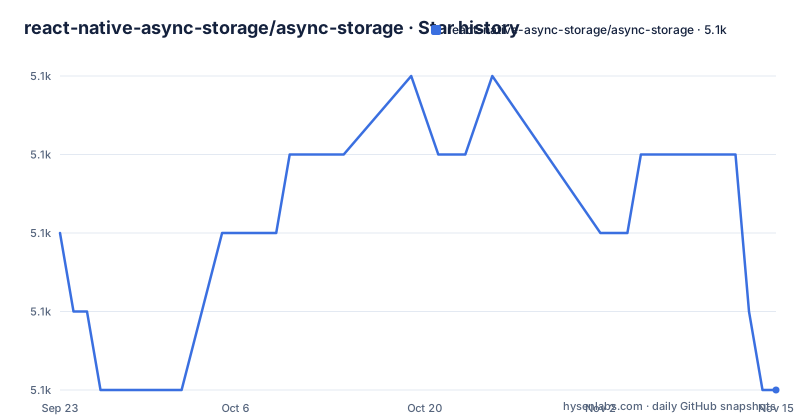
Star history
- react-native-async-storage/async-storage5,070 ★ · -2
| Repository | 2026-09-23 | 2026-11-15 |
|---|---|---|
| react-native-async-storage/async-storage | 5.1k | 5.1k |
-2 Stars in the last 53 days, measured from the daily GitHub snapshot. Compare with other projects
Editorial analysis
setItem and getItem return a promise on every platform
Async Storage exists for the values a React Native app cannot keep in a variable: a session flag, a draft, the last screen the user was on. It is an asynchronous, unencrypted, persistent key-value store, and its method names are the ones the Web Storage API already uses in a browser, so a call to `localStorage.setItem` arrives as `storage.setItem` with a promise in front of it. The promise is not decoration. Asynchronous means the call hands work off instead of stalling the JavaScript thread while the platform writes to its backing store, which is why the README's example wraps setItem, getItem and removeItem in `await`. What comes back is what went in: the example writes `abc123` with setItem, reads the key with getItem, and logs `abc123`. That round trip is the entire contract, and there is no query language attached to it. Nothing here filters a value, indexes a field or returns a subset of keys. Data with a shape that needs any of that comes out of the store whole, and the filtering happens in your JavaScript.
createAsyncStorage names a database before you touch a key
Storage arrives from a factory rather than a top-level singleton, and its first argument is the database name. `createAsyncStorage("appDB")` binds an instance to that database, and every setItem and getItem on it lands there. This is the whole usage example, four calls and a removal:
import { createAsyncStorage } from "@react-native-async-storage/async-storage";

// create a storage instance
const storage = createAsyncStorage("appDB");

async function demo() {
  await storage.setItem("userToken", "abc123");

  const token = await storage.getItem("userToken");
  console.log("Stored token:", token); // abc123

  await storage.removeItem("userToken");
}
Two extensions sit on top of the Web Storage API shape: batch operations, so several keys move in one call, and multi-database support, so more than one instance can exist side by side. Neither one appears in the example above, and no method signature for either is given anywhere in the README. If you are porting code that leans on batch reads, you have nothing here to check that call against, and the documentation site at https://react-native-async-storage.github.io is where the rest of the surface is expected to be.
npm install, yarn add, then pod install inside macos/ios
Adding the package is one line, and the package manager is the only choice the installation offers:
# Using npm
npm install @react-native-async-storage/async-storage

# Using yarn
yarn add @react-native-async-storage/async-storage
On Apple targets the native half still has to be linked, and the project names the directory and the command rather than a config file:
# inside macos/ios directory
pod install
Run that from the macos or ios directory of your app and the pod for Async Storage is installed next to your other pods. From there the import above resolves and `createAsyncStorage` is the only symbol the usage example pulls in. Compiling the native library is a separate job the repository keeps for contributors rather than for app teams: the root package.json has `./scripts/build-native-lib.sh android` and `./scripts/build-native-lib.sh apple` for it, while an app consumes the published package.
React Native 0.76 is the floor on mobile, 0.79 on visionOS and Windows
The floor matters more than the install. The compatibility table gives a minimum React Native version per platform, and two of the four rows sit at the top of it:
| React Native | Minimum Version | | ------------ | --------------- | | ios/android | 0.76 | | macOS | 0.78 | | visionOS | 0.79 | | windows | 0.79 |
An app still on React Native 0.75 cannot add this package without moving React Native first, and that upgrade is a much larger job than adding a dependency. The second table is the native floor:
| Component | Version | | ---------------- | ------- | | kotlin | 2.1.0 | | android min sdk | 24 | | ios min target | 13 | | macOS min target | 12 |
SDK 24 on Android and target 13 on iOS together set the oldest devices the store can run on at all, so an app still supporting anything below those has to drop the package rather than downgrade it. The contributor side of the repository follows the same shape: the root package.json requires Node `^22.18.0` and pins `[email protected]` as its packageManager.
Windows and visionOS get one legacy database, not SQLite
Six platforms sit behind the same four calls, and they are not running the same code underneath. Android, iOS and macOS are on SQLite, which matches the repository's primary language, Kotlin, alongside native code on the Apple side. The web build swaps the backend for IndexedDB, so a browser run exercises none of the SQLite path: what you verify in a browser tab tells you nothing about the behaviour you ship on a phone. Windows and visionOS are marked as a legacy fallback, single database only. One database means the multi-database extension has nothing to offer on those targets, so code that opens a second instance to keep cache data apart from settings behaves differently on Windows and visionOS than it does on the three SQLite platforms. Any test matrix worth writing down has to name which of these backends it touches, because an assertion that passes on iOS can fail on Windows for reasons that have nothing to do with your logic.
Unencrypted makes the userToken example a warning, not a demo
The store is unencrypted, and the usage example drops a value called `userToken` into it with setItem. Those two facts sit within one page of each other, which makes the package easy to adopt for the wrong job. Anything that can read the app's storage reads that value back in plain text: a file dump from a rooted or jailbroken device, a backup, a debug build with a file browser pointed at the app directory. No encryption option, key derivation or rotation call is documented anywhere, so a value that needs protecting has to go somewhere else, and on iOS and Android that somewhere is the platform keychain or keystore. Capacity is the quieter half of the same gap. No size limit, no quota behaviour and no error path for a failed write appear in the README, so a fire-and-forget setItem has exactly one signal to report trouble and that signal is the promise.
MMKV returns inline through JSI, Async Storage makes you await SQLite
The comparison that comes up most often is against react-native-mmkv, and the difference is shape rather than speed. MMKV holds its map in memory and hands values back through a synchronous JSI call, so a read returns without a promise and without an await sitting in the middle of your render path. Async Storage does the opposite on purpose: every read is a promise, and the value arrives after a hop into SQLite or IndexedDB. That trade suits reads triggered by something the user just did, and it works against a screen that needs five values before it can draw its first frame, because the waiting lands on your code and a synchronous call would have kept the reads inline with the render. The platform keychain or keystore answers a different question entirely: not where a setting lives, but where a secret lives. Async Storage cannot take that role, since nothing it stores is encrypted.
changesets, turbo and Kotlin 2.1.0 decide what an upgrade costs
The repository is a monorepo, and its layout tells you what an upgrade involves. Workspaces cover `packages/async-storage`, `packages/eslint-config`, `packages/expo-with-async-storage` and four entries under `examples/` (react-native, web, common-tests and expo), with `shared-storage/` sitting beside them at the top level and `turbo run build` fanning out across the graph. Releases move through changesets: `release:version` runs `changeset version` and `release:publish` runs `changeset publish`, each behind a CI git user script. For an app developer that narrows to something practical: tags are published per package, so you upgrade `@react-native-async-storage/async-storage` on its own, and 3.1.1 from 2026-05-29 arrived eight days after 3.1.0, which itself came two days after 3.0.3. The licence is MIT, which leaves room to vendor the code into an app that cannot carry the dependency. Docs are MkDocs, with `docs:dev` running `mkdocs serve`, and the last push to the default branch main was on 2026-10-26.
Editorial conclusion
Async Storage fits apps that need a few non-secret values to survive a restart: settings, drafts, a last-visited screen, on React Native 0.76 or newer with CocoaPods already in place. Keep it away from session tokens, refresh credentials and anything else an attacker would want in plain text, because the store is unencrypted and no key API is documented, and use a synchronous in-memory store such as MMKV when a screen has to read several keys before its first paint. Two things to verify before pinning a version: whether the React Native floor in the compatibility table matches the release your app sits on, and whether the Windows and visionOS legacy fallback, single database only, still covers every instance your code opens. The last push was on 2026-10-26 and the newest tag is @react-native-async-storage/[email protected], published 2026-05-29.
Frequently asked questions
What is Async Storage in React Native?
It is an asynchronous, unencrypted, persistent key-value store for a React Native app, with an API compatible with the Web Storage API plus extensions for batch operations and multi-database support. SQLite backs it on Android, iOS and macOS, IndexedDB backs the web build, and Windows and visionOS use a legacy fallback with a single database.
How do I install Async Storage in a React Native project?
Add the package with `npm install @react-native-async-storage/async-storage` or `yarn add @react-native-async-storage/async-storage`. On iOS and macOS you then run `pod install` inside the macos or ios directory of your app to link the native side.
How do I use Async Storage to read and write a key?
Create an instance with `createAsyncStorage("appDB")`, then await `storage.setItem("userToken", "abc123")`, await `storage.getItem("userToken")` and await `storage.removeItem("userToken")`. Every one of those calls returns a promise, which is why the usage example wraps them in await.
Is Async Storage persistent?
It is described as a persistent key-value storage solution, so values outlive the app process. Where they live differs by platform: SQLite on Android, iOS and macOS, IndexedDB on the web, a single legacy database on Windows and visionOS.
Is Async Storage safe to keep a token in?
No, not for anything sensitive: it is unencrypted, and the README's own usage example writes a value called userToken through setItem. No encryption or key management call is documented, so secrets belong in the platform keychain or keystore.
Is Async Storage deprecated?
Nothing in the README marks it deprecated, and the repository is not archived. The last push was on 2026-10-26, and the most recent tagged release is @react-native-async-storage/[email protected], published on 2026-05-29.
Official sources
Add this badge to your README
If you maintain this project, the badge below links readers to this analysis and shows its maintenance status from the daily GitHub snapshot. Paste the markdown into your README; add ?metric=license or ?metric=stars to the image URL for a different field.

[](https://hysenlabs.com/projects/react-native-async-storage-async-storage)Star history chart for your README
[](https://hysenlabs.com/projects/react-native-async-storage-async-storage)Was this useful?