electron-store keeps settings in one JSON file it rewrites every time
Simple data persistence for your Electron app or module - Save and load user preferences, app state, cache, etc
At a glance
- What is it?
- electron-store persists Electron app settings in a JSON file named config.json, validates it with JSON Schema through ajv, and reads and writes the whole document on every change. It is built for small preferences, and several of its options come with documented sharp edges.
- Who is it for?
- electron-store is a good fit for an Electron app that keeps preferences, window state and a handful of flags in one small JSON file, and for teams that already run ESM. It is a poor fit for anything you would call data: the entire file is read and written on every change.
- Can I use it commercially?
- Yes. MIT is a permissive licence: you can use, modify and sell software built on it, as long as you keep its copyright and licence notices.
- Is it still maintained?
- Yes. The repository last received commits 32 days ago.
- What is it written in?
- Mainly JavaScript, according to GitHub's language statistics.
Answers come from the project's GitHub data, last synced on November 13, 2026, and from our analysis. They are not legal advice.
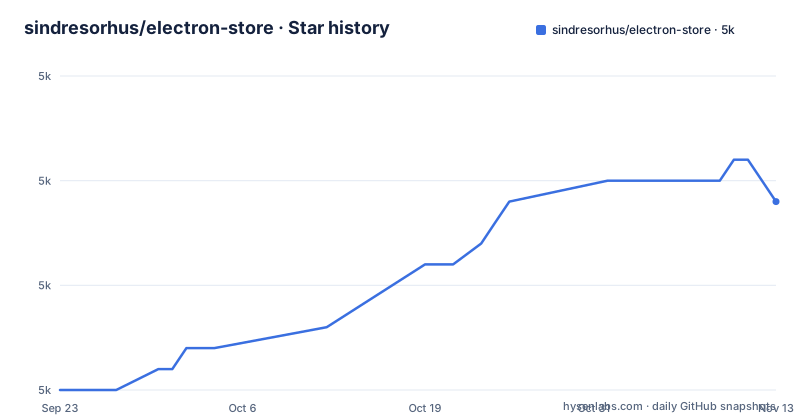
Star history
- sindresorhus/electron-store5,029 ★ · +9
| Repository | 2026-09-23 | 2026-11-13 |
|---|---|---|
| sindresorhus/electron-store | 5k | 5k |
9 Stars in the last 51 days, measured from the daily GitHub snapshot. Compare with other projects
Editorial analysis
One JSON file, read and written whole on every change
Everything this module persists lands in a single JSON file named config.json, inside the directory Electron reports for `app.getPath('userData')`. The mechanism behind that is the part that decides whether it fits your app: the entire JSON file is read and written on every change. A `store.set` call does not patch a key, it rewrites the document.
The project's own note says this plainly, that this is not a database, and it is best suited for small data like user settings, with SQLite or similar named for large data. Writes are atomic, so a crash during a write will not corrupt the existing config. That guarantee is about integrity rather than cost, and the cost stays: the more often you write, the more often the whole file is serialised and written to disk. Dot notation shows how a nested change behaves, since `store.set('foo.bar', true)` produces `{bar: true}` when you read `foo`, so a single deep key still costs a full document rewrite. Preferences, window bounds and feature flags fit. A request cache or an activity log does not.
The renderer errors come from Electron's own security defaults
The module can be used in the main process and in the renderer, but the renderer path collides with how Electron ships. Node.js is disabled in the renderer by default, `nodeIntegration: false`, and it has been disabled in the preload script since Electron 20, `sandbox: true`. This module reaches for Node built-ins such as fs and path, so importing it from a renderer or a preload script fails, and the failure arrives with messages like `Can't resolve 'fs'` or `module not found: fs`.
Turning those defaults off is explicitly not recommended. The path the project points at instead is to keep the store in the main process and expose it over IPC with `ipcMain.handle` on the main side and `ipcRenderer.invoke` on the renderer side. For an app that only needs the store in the renderer, two setups are given: call `Store.initRenderer()` in the main process, or create a `new Store()` instance in the main process. Either way the file access stays on the main side, and a preload script is still not a supported place to construct the store.
Native ESM, no CommonJS export, Electron 30 minimum
Installation is one command:
npm install electron-storeTwo conditions come with it. Electron 35 or later is required. And the package is native ESM, with no CommonJS export provided any more, so a project still on `require` has to convert to ESM before the import resolves at all. The project's stance on that is blunt enough to quote: please don't open issues for questions regarding CommonJS and ESM. Instead of a compatibility shim, you get a conversion guide and a pointer to Electron's own ESM tutorial.
The manifest agrees with the prose. `package.json` sets `type` to `module`, exports `./index.js` as the default with `./index.d.ts` as its types, declares `sideEffects: false`, and requires Node 22 or later through `engines`. The published files are just `index.js` and `index.d.ts`. So the cost of moving to this major version sits in your module setup, not in the API calls, and the `Store` import has to be an ESM default import in every process that touches it.
defaults overwrites the schema default, and nesting needs empty parents
Two options can supply a starting value, and one of them wins. `defaults` is an object of default values for the store items, and the values in it overwrite the `default` key in the `schema` option. The precedence is stated from both directions: the schema section repeats that a `default` value will be overwritten by the `defaults` option if set. Set both and `defaults` is what a new store starts with.
Nesting is where silent surprises live. A `default` on a nested property is only applied when the parent object exists, so a parent needs a `default` of an empty object for the defaults of its own properties to be applied:
const store = new Store({
	schema: {
		bar: {
			type: 'object',
			default: {},
			properties: {
				a: {
					type: 'number',
					default: 5
				}
			}
		}
	}
});

console.log(store.get('bar.a'));
//=> 5
Without `default: {}` on `bar` there is no `bar` object to apply `a` to, and `store.get('bar.a')` returns `undefined`. The rule repeats at each level, so a property nested two objects deep needs an empty object default on both objects in the chain. Nothing throws; you get an undefined in application code instead of a configuration error.
Ajv strict mode turns an unknown keyword into a startup error
Validation is done by ajv using JSON Schema draft-2020-12, with all validation keywords and formats supported. The schema you write is an object whose keys are your property names and whose values are the schemas for those properties, not a wrapper with a `properties` key:
const schema = {
	foo: {
		type: 'number',
		maximum: 100,
		minimum: 1,
		default: 50
	},
	bar: {
		type: 'string',
		format: 'url'
	}
};

const store = new Store({schema});

console.log(store.get('foo'));
//=> 50

store.set('foo', '1');
// [Error: Config schema violation: `foo` must be number]
A strict root schema cannot be combined with migrations
`schema` defines the `properties` of the config object, and `rootSchema` is where everything that applies to that object as a whole goes.
The migrations option arrives with a no-support warning
Two published files and a three-tool test script
The shipped surface is deliberately small. `package.json` lists `index.js` and `index.d.ts` in `files`, and the `exports` map points types at `./index.d.ts` and default at `./index.js`. Everything else in the repository is for development, including the `fixtures/` directory and `test.js` at the top level.
The test script is one line, `xo && node --test`, covering lint and runtime behaviour. The dev dependencies are electron, execa and xo. One configuration detail explains itself once you see the rest. The xo config turns off the rule `n/no-unsupported-features/node-builtins`, which is consistent with a package declaring Node 22 or later.
Editorial conclusion
electron-store is a good fit for an Electron app that keeps preferences, window state and a handful of flags in one small JSON file, and for teams that already run ESM. It is a poor fit for anything you would call data: the entire file is read and written on every change. Before adopting, check that your main process can move to ESM on Electron 35 or later and decide in advance whether nested schema defaults need empty object parents.
Frequently asked questions
what is electron store
electron-store is a module for simple data persistence in an Electron app or module, holding user settings, app state or cache. Data is saved in a JSON file named config.json inside app.getPath('userData'). It is not a database: the entire JSON file is read and written on every change, so it suits small data like user settings.
how to use electron store
Run `npm install electron-store`, then `import Store from 'electron-store';` and construct it with `new Store();`. Use `store.set` and `store.get` with dot-notation for nested properties, and `store.delete` to remove a key. The package requires Electron 35 or later and is native ESM with no CommonJS export.
electron-store vs sqlite
The project states that this is not a database, that the entire JSON file is read and written on every change, and that it is best suited for small data like user settings. For large data it points to SQLite or similar. Writes are atomic, so a crash during a write will not corrupt the existing config.
Official sources
Add this badge to your README
If you maintain this project, the badge below links readers to this analysis and shows its maintenance status from the daily GitHub snapshot. Paste the markdown into your README; add ?metric=license or ?metric=stars to the image URL for a different field.

[](https://hysenlabs.com/projects/sindresorhus-electron-store)Star history chart for your README
[](https://hysenlabs.com/projects/sindresorhus-electron-store)Was this useful?